
1. Sản phẩm hếtview
The Soundcore Liberty 5 Pro Max are advanced wireless earbuds designed for superior audio experiences, crystal-clear communication, and smart productivity features. They integrate cutting-edge AI technology for noise cancellation, voice recording, and personalized sound.
Các tính năng chính:
- Guinness World Records Certified Call Quality: The Liberty 5 Pro Max offers exceptional call performance, certified by Guinness World Records for its speech quality.
- AI Voice Recorder & Transcription: The smart charging case features an integrated microphone to record in-person meetings and interviews, providing AI-generated transcriptions and summaries. (Note: Does not record online meetings or calls.)
- Intuitive AMOLED Smart Case: A 1.78" AMOLED display on the charging case allows direct control over AI recording, ANC settings, and earbud configurations, with customizable wallpapers.
- Cuộc gọi trong trẻo: Equipped with 10 sensors and a Thus AI Chip, ensuring your voice is heard clearly in any environment, even in noisy conditions exceeding 100 dB.
- Instant Absolute Silence (ANC): Features 100% more effective Active Noise Cancellation than previous models, utilizing 8 sensors and a Thus AI Chip to process over 384K noise signals per second for immediate quiet.
- Personalized Audio with HearID 5.0: Tailor your sound experience with custom EQ and an AI audio optimizer, ensuring optimal sound quality.
- Lag-Free Voice Control: Access 20 integrated commands for music playback and volume adjustment with zero delay, thanks to offline processing.
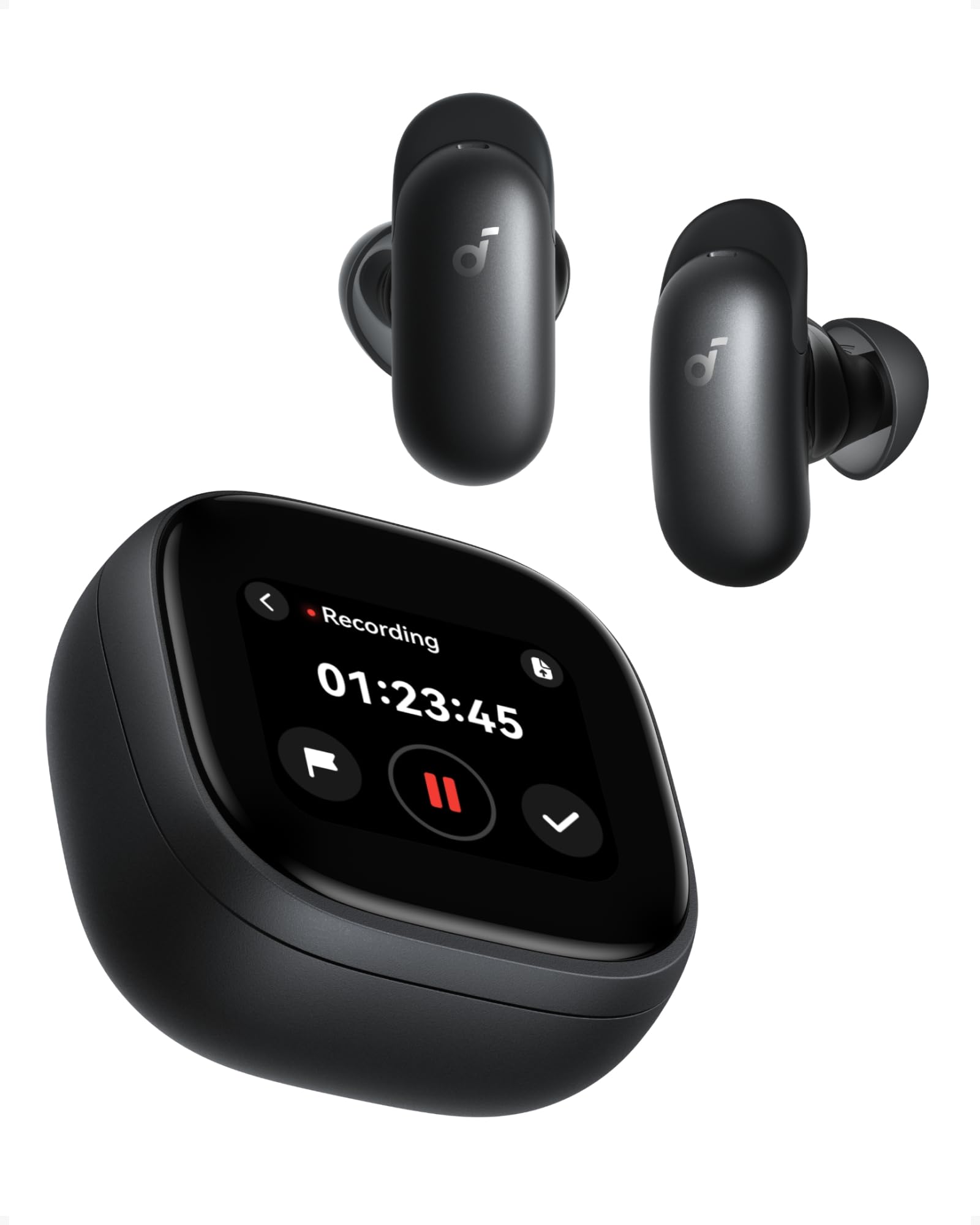
Image: Soundcore Liberty 5 Pro Max earbuds in their smart charging case.
2. Nội dung gói hàng
Đảm bảo tất cả các mục đều có trong hộp:
- Soundcore Liberty 5 Pro Max Earbuds
- Vỏ sạc thông minh
- Ear Tips: XXS, XS, S, M, L (Medium pre-installed)
- Ear Wings: 0, 1, 2 (Size 1 pre-installed)
- Cáp sạc USB-C

Image: All components included in the Soundcore Liberty 5 Pro Max package.
3. Thiết lập và sử dụng lần đầu
3.1 Sạc tai nghe và hộp đựng
- Đặt tai nghe vào hộp sạc.
- Connect the charging case to a power source using the provided USB-C cable. The LED indicators on the case will show charging status.
- Để sạc không dây, hãy đặt ốp lưng lên đế sạc không dây tương thích.
- A full charge for the earbuds takes approximately 50 minutes. The case provides multiple charges for extended use.
3.2 Lắp tai nghe
For optimal sound quality and noise cancellation, it is crucial to choose the correct ear tips and ear wings that provide a secure and comfortable seal.
- Experiment with different sizes of ear tips (XXS, XS, S, M, L) and ear wings (0, 1, 2).
- Insert the earbuds into your ears and rotate them until they fit snugly and comfortably.
- Use the Soundcore app's "Tip Fit Test" feature to verify the seal.

Image: Earbud correctly positioned in the ear for a secure fit.
3.3 Ghép nối với thiết bị của bạn
- Open the charging case. The earbuds will automatically enter Bluetooth pairing mode (LEDs will flash).
- On your device (smartphone, tablet, PC), go to Bluetooth settings and select "Soundcore Liberty 5 Pro Max" from the list of available devices.
- Once connected, the earbuds will automatically connect to the last paired device when removed from the case.
- The Liberty 5 Pro Max supports simultaneous connection to up to 3 devices. Manage connections via the Soundcore app or the smart case display.

Image: Illustration of connecting the earbuds to multiple devices simultaneously.
3.4 Cài đặt ứng dụng Soundcore
Download the Soundcore app from the App Store (iOS) or Google Play Store (Android) to unlock full features, customize settings, and manage your earbuds.
4. Hướng dẫn vận hành
4.1 Earbud Controls (Touch/Slide)
The earbuds feature touch and slide controls. Customize these controls via the Soundcore app.
- Phát/Tạm dừng: Chạm một lần vào bất kỳ bên tai nghe nào.
- Bài hát tiếp theo: Chạm hai lần vào tai nghe bên phải.
- Bản nhạc trước: Nhấn đúp vào tai nghe bên trái.
- Tăng âm lượng: Slide up on right earbud.
- Giảm âm lượng: Slide down on left earbud.
- Trả lời/Kết thúc cuộc gọi: Chạm một lần vào bất kỳ bên tai nghe nào.
- Từ chối cuộc gọi: Nhấn và giữ một trong hai miếng đệm tai nghe trong 2 giây.
- Chuyển đổi chế độ ANC: Press and hold left earbud for 2 seconds (cycles through ANC, Transparency, Normal).
4.2 Smart Charging Case Display
The 1.78" AMOLED display on the charging case provides direct access to various functions:
- Máy ghi âm giọng nói AI: Start, pause, and stop recordings. View thời gian ghi âm.
- Kiểm soát ANC: Adjust Active Noise Cancellation modes (ANC, Transparency, Normal).
- Earbud Settings: Manage equalizer presets, customize controls, and perform firmware updates.
- Tình trạng pin: View battery levels for both earbuds and the charging case.
- Hình nền tùy chỉnh: Personalize the display background.

Image: Hand interacting with the smart charging case display, showing various control options.
4.3 Chế độ khử tiếng ồn chủ động (ANC) và chế độ trong suốt
The Liberty 5 Pro Max offers advanced noise control:
- Chế độ ANC: Giảm tiếng ồn xung quanh để mang lại trải nghiệm nghe nhạc đắm chìm. Lý tưởng cho du lịch hoặc môi trường ồn ào.
- Chế độ trong suốt: Allows you to hear your surroundings while listening to audio. Useful for awareness in urban areas or conversations.
- Chế độ bình thường: Phát lại âm thanh tiêu chuẩn mà không có chế độ kiểm soát tiếng ồn chủ động.

Image: A man on a boat, illustrating the effectiveness of instant absolute silence with ANC.
4.4 AI Voice Recorder
Utilize the AI Voice Recorder for in-person meetings and interviews:
- Access the recorder via the smart case display or the Soundcore app.
- Start recording. The integrated microphone in the case will capture audio.
- After recording, the system will transcribe and generate AI summaries.
- Manage recordings, transcriptions, and summaries through the Soundcore app or the "Ask Anka" web cổng thông tin.

Image: Individuals in a meeting, demonstrating the use of the AI voice recorder.
4.5 Personalized Audio Settings
The Soundcore app allows you to customize your audio experience:
- HearID 5.0: Perform a hearing test to create a personalized EQ profile tailored to your unique hearing.
- EQ tùy chỉnh: Manually adjust equalizer settings to your preference.
- AI Audio Optimizer: Enhances sound quality based on AI analysis.

Image: A woman relaxing, enjoying personalized audio settings.
5. Bảo trì
- Vệ sinh: Regularly clean the earbuds, ear tips, and charging case with a soft, dry, lint-free cloth. Avoid using harsh chemicals.
- Khả năng chống nước: The earbuds have an IPX4 water resistance rating, meaning they are resistant to splashes and sweat. Do not submerge them in water. Ensure earbuds are dry before placing them back in the charging case.
- Kho: Cất tai nghe vào hộp sạc khi không sử dụng để bảo vệ và giữ cho tai luôn được sạc.
KHAI THÁC. Xử lý sự cố
| Vấn đề | Giải pháp |
|---|---|
| Tai nghe không ghép nối |
|
| Không có âm thanh hoặc âm lượng nhỏ |
|
| ANC không hiệu quả |
|
| Các vấn đề về sạc |
|
7. Thông số kỹ thuật
| Tính năng | Chi tiết |
|---|---|
| Thương hiệu | Âm thanh |
| Tên mẫu | Liberty 5 Pro Max |
| Số hiệu mẫu | Ngày 1204 |
| Màu sắc | Đen |
| Yếu tố hình thức | Trong tai |
| Kiểm soát tiếng ồn | Khử tiếng ồn chủ động (ANC) |
| Trở kháng | 17 Ohm |
| Đáp ứng tần số | 20 KHz |
| Độ nhạy | 123 dB |
| Công nghệ kết nối | Không dây |
| Công nghệ không dây | Bluetooth |
| Phiên bản Bluetooth | 6.1 |
| Loại điều khiển | Touch and Slide Control |
| Phương pháp kiểm soát | Ứng dụng, Giọng nói |
| Casing Vật liệu | Nhựa |
| Mức độ chống nước | IPX4 (Splash and Sweat Resistant) |
| Thời lượng pin trung bình (Tai nghe) | 12 giờ |
| Thời gian sạc pin | 50 phút |
| Tính năng đặc biệt | AI Note-Taker, AI Noise Cancellation, AMOLED Smart Case |
| Thiết bị tương thích | iPhone, Android, PC, Mac |
| Mã số định danh duy nhất (UPC) | 194644331047 |
8. Bảo hành và Hỗ trợ
The Soundcore Liberty 5 Pro Max comes with a Bảo hành 24 tháng kể từ ngày mua. Vui lòng giữ lại hóa đơn mua hàng để yêu cầu bảo hành.
For technical support, troubleshooting assistance, or warranty inquiries, please visit the official Soundcore support webtrang web hoặc liên hệ với dịch vụ khách hàng của họ. Bạn có thể tìm thêm thông tin trên Cửa hàng Soundcore trên Amazon or the Soundcore app.
9. Thông tin an toàn quan trọng
- Không để ở nơi có nhiệt độ quá cao.
- Tránh làm rơi hoặc để thiết bị chịu tác động mạnh.
- Để xa tầm tay trẻ em và vật nuôi.
- Không tháo rời hoặc cố gắng tự sửa chữa thiết bị.
- Chỉ sử dụng cáp sạc và bộ chuyển đổi chính hãng hoặc được chứng nhận.
- Avoid using earbuds at high volume for extended periods to prevent hearing damage.
10. Tài nguyên video
Không có video giới thiệu sản phẩm chính thức. URLs were provided in the product data. Please refer to the official Soundcore website or YouTube channel for video tutorials and demonstrations.