
SmallRig RF20C
SmallRig RF20C RGB Portable LED Photo Torch User Manual
Model: RF20C (5335)
Thương hiệu: SmallRig
1. Giới thiệu
The SmallRig RF20C RGB Portable LED Photo Torch is a versatile and powerful lighting tool designed for photographers, videographers, and content creators. It features 5-color LED beads, adjustable beam angle, and supports creative lighting effects with included gobos. This manual provides essential information for the safe and effective use of your device.
2. Thông tin an toàn
- Không để thiết bị tiếp xúc với nước hoặc độ ẩm quá cao.
- Tránh để ánh sáng LED chiếu trực tiếp vào mắt.
- Không được tháo rời hoặc sửa đổi thiết bị. Việc sửa chữa chỉ nên được thực hiện bởi nhân viên được ủy quyền.
- Để xa tầm tay trẻ em.
- Ensure proper ventilation during extended use, as the device may become warm.
- Chỉ sử dụng cáp sạc và bộ đổi nguồn được chỉ định.
3. Nội dung gói hàng
Xác minh rằng tất cả các mục đều có trong gói hàng của bạn:
- RF20C Portable Focusable LED Video Light x 1
- Gobos x 20
- Silicone Gobo Holder x 1
- Túi lưu trữ x 1
- Hướng dẫn sử dụng x 1 (Tài liệu này)
- Cáp sạc x 1
4. Thiết lập
4.1 Sạc ban đầu
Before first use, fully charge the RF20C. Connect the provided USB-C charging cable to the device's charging port and to a compatible USB power adapter (PD 36W recommended). The device can be used while charging.

Figure 4.1: Internal battery illustration and runtime information.

Figure 4.2: Portable design, mounting options, cooling fan, and charging capability.
4.2 Attaching Gobos
To use the creative pattern gobos, first remove the plano-convex lens from the front of the light. Then, attach the silicone gobo holder and insert the desired gobo. This ensures optimal projection effects.

Figure 4.3: Gobo projection examples and installation tip.
5. Hướng dẫn vận hành
5.1 Bật/Tắt nguồn và các điều khiển cơ bản
The RF20C features a single multi-function button for control. To prevent accidental activation during transport, the device requires a specific action to turn on.
- Bật nguồn: Rotate the control button to turn on the device.
- Tắt nguồn: Nhấn và giữ nút điều khiển trong 3 giây.
- Thay đổi màu sắc: Short press the control button to cycle through the available colors (Red, 5600K White, Purple, Orange, Cyan).
- Điều chỉnh độ sáng: Rotate the control button to increase or decrease the light brightness.
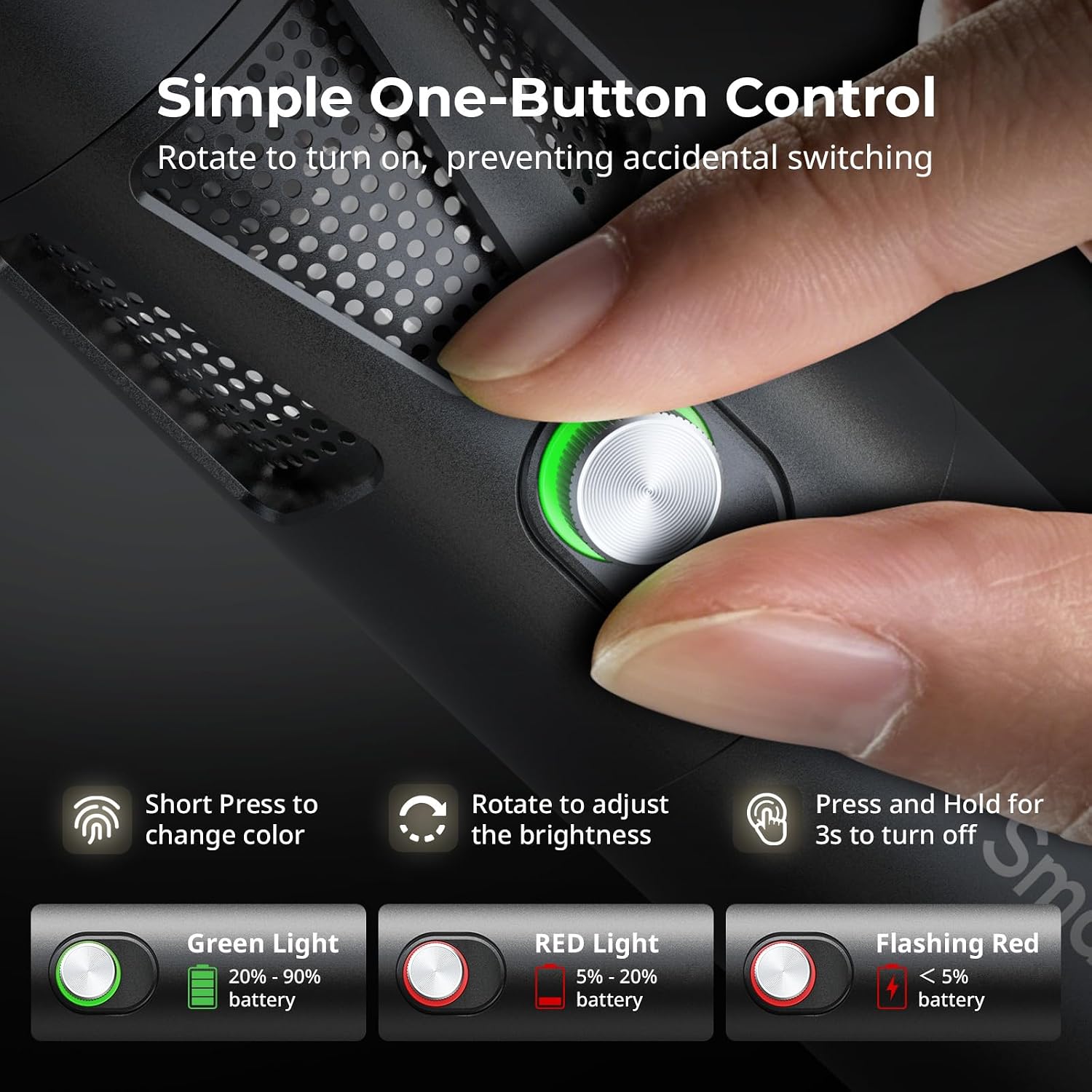
Figure 5.1: One-button control and battery indicator.

Figure 5.2: Available LED colors.
5.2 Điều chỉnh góc chùm tia
The front plano-convex lens allows for adjustment of the beam angle. Push or pull the lens to change the focus of the light from a narrow 24° beam to a wider 60° diffusion.
- Extend the lens: Narrows the beam (e.g., 24°).
- Retract the lens: Diffuses the beam (e.g., 60°).

Figure 5.3: Beam angle adjustment mechanism.
5.3 Chỉ báo pin
The control button's LED indicates the battery status:
- Đèn xanh: Pin còn lại 20% - 90%.
- Đèn đỏ: Pin còn lại 5% - 20%.
- Đèn đỏ nhấp nháy: Pin còn lại chưa đầy 5%.

Figure 5.4: Brightness comparison of RF20C.
6. Bảo trì
- Clean the device regularly with a soft, dry cloth. Do not use harsh chemicals or abrasive materials.
- Bảo quản thiết bị ở nơi khô ráo, thoáng mát, tránh ánh nắng trực tiếp và nhiệt độ cao.
- When not in use for extended periods, charge the battery to approximately 50% every three months to prolong battery life.
- Keep the lens and LED surface free from dust and fingerprints for optimal light output.
KHAI THÁC. Xử lý sự cố
| Vấn đề | Nguyên nhân có thể | Giải pháp |
|---|---|---|
| Thiết bị không bật. | Pin yếu; quy trình bật nguồn không chính xác. | Charge the device. Ensure you rotate the control button to power on. |
| Độ sáng yếu. | Low battery; brightness set too low; dirty lens. | Charge the device. Rotate the control button to increase brightness. Clean the lens. |
| Gobo projection is blurry. | Plano-convex lens not removed; gobo not seated correctly. | Remove the plano-convex lens before attaching the silicone gobo holder. Ensure gobo is properly inserted. |
| Device becomes warm during use. | Normal operation, especially at high power; fan obstruction. | This is normal. Ensure the fan vents are not obstructed for proper heat dissipation. If excessively hot, reduce brightness or allow to cool. |
| Tiếng ồn của quạt khá rõ rệt. | Normal operation for cooling. | The device uses a high-speed fan for efficient heat dissipation. This noise is part of normal operation. Consider distance from audio recording equipment. |
8. Thông số kỹ thuật
| Tính năng | Chi tiết |
|---|---|
| Người mẫu | RF20C (5335) |
| Quyền lực | 20W |
| Đầu vào | 20 V / 1.8 A (max. 36 W) |
| Màu sắc đèn LED | Red, 5600K White, Purple, Orange, Cyan |
| Chỉ số hoàn màu (CRI) | ≥ 97 |
| Chỉ số nhất quán chiếu sáng truyền hình (TLCI) | ≥ 99 (at 5600 K) |
| Độ sáng | 5400 Lux @ 1m / 5600K |
| Dung lượng pin | 10000mAh (2 x 5000mAh / 7.4V / 37Wh) |
| Runtime (Full Power) | Lên đến 1.5 giờ |
| Sạc | USB-C PD 36W Fast Charging, supports charging while operating |
| Điều chỉnh góc chùm | 24° đến 60° |
| Vật liệu | Hợp kim nhôm, ABS |
| Kích thước sản phẩm | φ49.0 x 200.0 mm / φ1.9 x 7.9 inches |
| Trọng lượng sản phẩm | 520.0 ± 20.0 g / 18.3 ± 0.7 oz |
| Công nghệ kết nối | USB |
| Nước xuất xứ | Trung Quốc |
9. Bảo hành và Hỗ trợ
SmallRig products are designed and manufactured to the highest quality standards. This product is covered by a limited warranty from the date of purchase. For detailed warranty terms, technical support, or service inquiries, please refer to the official SmallRig webtrang web hoặc liên hệ với nhà phân phối địa phương của bạn.
Vui lòng giữ lại bằng chứng mua hàng của bạn để yêu cầu bảo hành.
10. Các tình huống sử dụng
The SmallRig RF20C is suitable for various applications, including:
- Nhiếp ảnh
- Quay Video
- Phát trực tiếp
- Creative Accent Lighting
- Macro Work and Close-ups

Hình 10.1: Ví dụamples of RF20C usage scenarios.
Ask a question about this manual
Ask about setup, troubleshooting, compatibility, parts, safety, or missing instructions. Manuals+ will review the question and use this page’s manual context to help answer it.