
1. Giới thiệu
The Valeton GP-180 is a versatile digital multi-effects processor designed for guitarists. It offers advanced modeling capabilities and flexible software, making it suitable for various musical applications, whether as a standalone unit or integrated into an existing pedalboard. This manual provides essential information for setting up, operating, and maintaining your GP-180, ensuring you can fully utilize its potential as a reliable core for your signal chain.
2. Sản phẩm hếtview
The Valeton GP-180 features a robust design with intuitive controls, including footswitches, rotary knobs, and a clear display for easy navigation and parameter adjustment. The rear panel provides comprehensive connectivity options for various setups.
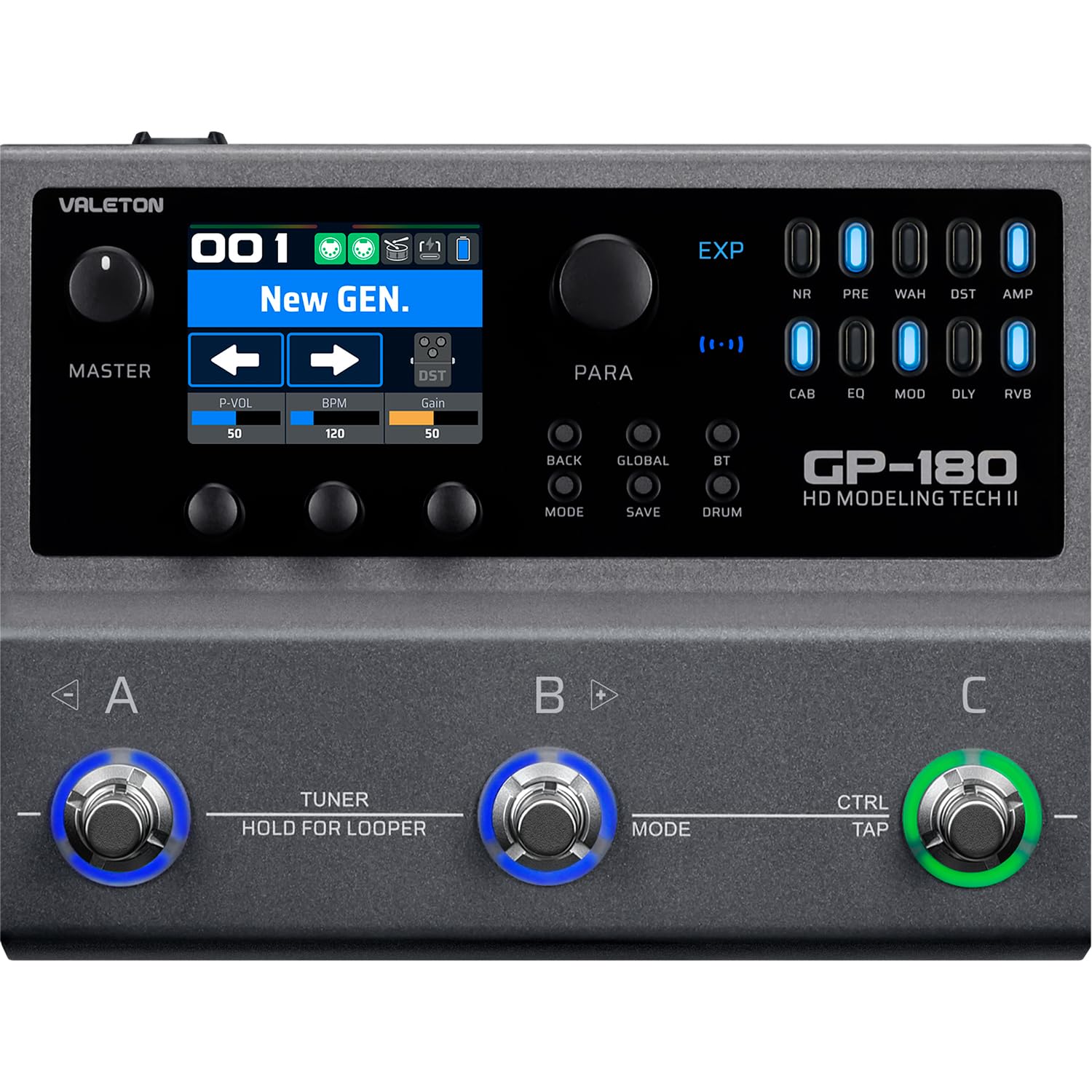
Hình 2.1: Trên cùng view of the Valeton GP-180, highlighting the main interface with its display, rotary knobs, and three footswitches for control.

Figure 2.2: Rear panel connectivity of the GP-180, detailing the various input, output, and control ports.

Figure 2.3: The GP-180 integrated into a home studio environment, connected to headphones and a guitar.

Figure 2.4: Close-up of a user interacting with the GP-180's control knobs.

Figure 2.5: A user operating the footswitches of the GP-180 during performance.
3. Thiết lập
3.1 kết nối nguồn
Connect the included 9V DC power adapter to the POWER input on the rear panel. Ensure the adapter provides at least 1500mA of current. Use only the specified power supply to prevent damage.
3.2 Instrument and Audio Connections
- Đầu vào guitar: Kết nối đàn guitar của bạn với giắc cắm 'IN' ở mặt sau.
- Đầu ra âm thanh: Connect the 'OUT' jacks (L/R Balanced) to your amplifier, audio interface, or mixer.
- Tai nghe: Để luyện tập trong im lặng, hãy kết nối tai nghe vào giắc cắm 'PHONES'.
- Micrô: Connect a microphone to the 'MIC' input for vocal processing or recording.
- External Expression Pedal/Footswitch: Use the 'EXP/FS' jacks to connect an external expression pedal or footswitch for additional control.
3.3 Kết nối USB
Connect the GP-180 to your computer using a USB cable via the 'PD USB' port. This allows for firmware updates, software editing, and direct audio recording.
4. Hướng dẫn vận hành
4.1 Điều hướng cơ bản
The GP-180 features a central display and several rotary knobs for navigating menus and adjusting parameters. The three footswitches (A, B, C) allow for preset changes, effect toggling, and other performance-oriented functions.
4.2 Chức năng của bàn đạp chân
- Công tắc chân A, B, C: These can be assigned to switch presets, toggle individual effects, or control other parameters depending on the selected mode.
- HOLD FOR LOOPER (Footswitch B): Press and hold footswitch B to activate the looper function. A short press typically engages the tuner.
- CTRL/TAP (Footswitch C): This footswitch can be used for tap tempo or as an assignable control switch.
4.3 nút điều khiển
- HƯỚNG: Switches between different operational modes (e.g., Patch Mode, Stompbox Mode).
- CỨU: Lưu cài đặt hiện tại của bạn dưới dạng thiết lập sẵn.
- TOÀN CẦU: Accesses global settings for the unit.
- BT (Bluetooth): Activates Bluetooth for audio streaming or app control.
- CÁI TRỐNG: Engages the built-in drum machine for practice.
4.4 Mô-đun hiệu ứng
The GP-180 includes a wide array of effect modules, indicated by LEDs on the right side of the display. These include:
- Không có: Giảm tiếng ồn
- TRƯỚC: Trướcamp
- WAH: Bàn đạp Wah
- DST: Sự biến dạng
- AMP: Amplifier Modeling
- CAB: Mô phỏng tủ
- EQ: Bộ cân bằng
- CHẾ ĐỘ: Hiệu ứng điều chế
- DLY: Hiệu ứng trì hoãn
- RVB: Hiệu ứng hồi âm
Use the corresponding buttons and rotary knobs to activate and adjust these effects within your signal chain.
5. Bảo trì
5.1 Vệ sinh
To clean the unit, use a soft, dry cloth. Do not use abrasive cleaners, waxes, or solvents. Avoid spraying liquid directly onto the unit.
5.2 Lưu trữ
When not in use for extended periods, store the GP-180 in a dry, cool place away from direct sunlight and extreme temperatures. Disconnect the power adapter.
5.3 Cập nhật phần mềm
Periodically check the official Valeton website for firmware updates. Keeping your GP-180's software up-to-date ensures optimal performance and access to new features.
KHAI THÁC. Xử lý sự cố
- Không có điện: Ensure the power adapter is correctly connected and provides the specified 9V DC, 1500mA. Check the power outlet.
- Không có âm thanh: Verify all audio cables are securely connected. Check the volume levels on the GP-180, your instrument, and your amplifier/mixer. Ensure the correct input/output settings are selected on the unit.
- Âm thanh bị méo: Check input gain levels to avoid clipping. Ensure all cables are in good condition.
- Sự cố kết nối USB: Try a different USB port or cable. Ensure the necessary drivers (if any) are installed on your computer. Restart both the GP-180 and your computer.
- Hành vi bất ngờ: Perform a factory reset (refer to the full manual for instructions on how to do this, as it may vary). If issues persist, contact Valeton support.
7. Thông số kỹ thuật
| Tính năng | Đặc điểm kỹ thuật |
|---|---|
| Thương hiệu | VALETON |
| Số hiệu mẫu | GP180 |
| Trọng lượng sản phẩm | 843 gram |
| Tậptage | 9 vôn |
| Hiện hành | 1500mA |
| Giao diện phần cứng | USB, Bluetooth |
| Kích thước sản phẩm | 18.1 x 13.9 x 5.2cm |
| Nước xuất xứ | Trung Quốc |
| Mã số UPC | 888506830174 |
| ASIN | B0GV23QTY7 |
8. Bảo hành và Hỗ trợ
8.1 Thông tin bảo hành
The Valeton GP-180 comes with a 1-year manufacturer's warranty. Please retain your proof of purchase for warranty claims. The warranty covers defects in materials and workmanship under normal use.
8.2 Hỗ trợ khách hàng
For technical assistance, troubleshooting beyond this manual, or warranty inquiries, please contact Valeton customer support through their official website or your local distributor. Provide your product model and serial number when contacting support.