
Giới thiệu
This manual provides essential information for the safe and efficient use of your Samsung 43-Inch Class U8000H Series Crystal UHD 4K Smart TV. Please read all instructions carefully before using the product and retain this manual for future reference.
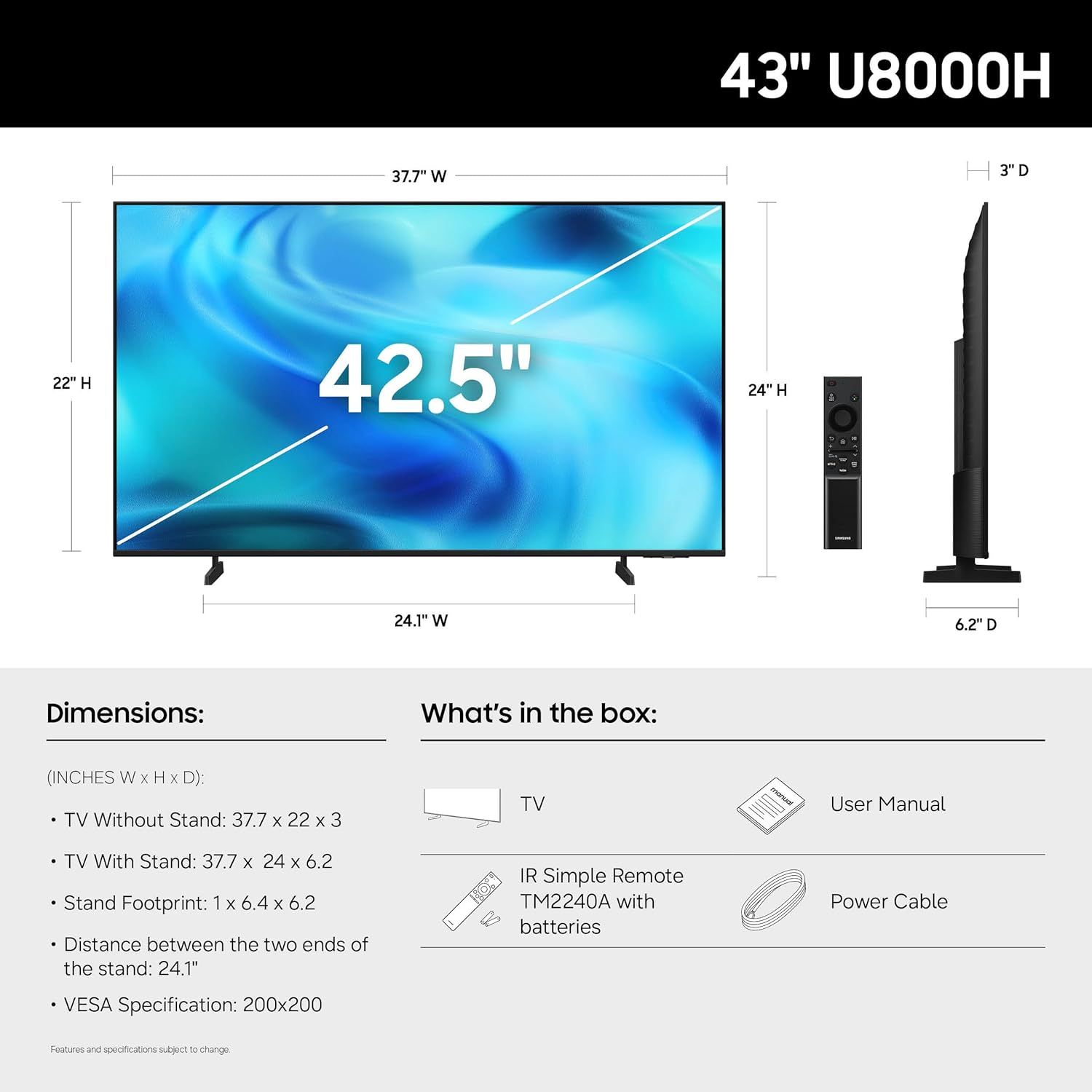
Có gì trong hộp
Xác minh rằng tất cả các thành phần đều có trong bao bì:
- Samsung 43-Inch U8000H Series Crystal UHD 4K Smart TV
- Cáp nguồn
- Điều khiển từ xa
- Đứng
- Hướng dẫn sử dụng (tài liệu này)
- Thẻ bảo hành

Image: Included components for the Samsung U8000H Series TV.
Cài đặt
1. Physical Setup (Stand or Wall Mount)
Before proceeding, ensure the TV is placed on a stable, level surface or securely mounted to a wall. Refer to the separate wall mount instructions if applicable.
- Gắn giá đỡ: Carefully place the TV screen-down on a soft, clean cloth. Align the stand with the designated slots on the bottom of the TV. Secure the stand using the provided screws.
- Lắp trên tường: If wall mounting, ensure you use a VESA-compatible mount (200 x 200 mm) and follow the mount manufacturer's instructions. Disconnect the stand if already attached.
Hình ảnh: Phía sau view of the TV, highlighting VESA mounting points and input panel.
2. Kết nối thiết bị
Connect your external devices (cable box, Blu-ray player, gaming console, etc.) to the TV's input ports.
- HDMI: Use HDMI cables for high-definition video and audio. The TV has 3 HDMI ports. HDMI 1 supports eARC for enhanced audio return.
- USB: Connect USB devices for media playback or power. The TV has 1 USB port.
- Ethernet (LAN): Để có kết nối internet có dây ổn định.
- Ăng-ten / Cáp: Connect an antenna or cable TV signal for over-the-air or cable channels.

Hình ảnh: Chi tiết view of the TV's connectivity panel.
3. Bật nguồn ban đầu và thiết lập mạng
- Kết nối dây nguồn vào TV rồi cắm vào ổ cắm trên tường.
- Nhấn nút nguồn trên điều khiển từ xa hoặc trên TV.
- Làm theo hướng dẫn trên màn hình để hoàn tất thiết lập ban đầu, bao gồm chọn ngôn ngữ, kết nối mạng (Wi-Fi hoặc Ethernet) và quét kênh.
- For smart features, you may be prompted to log in to or create a Samsung Account.
Điều hành TV
Điều khiển từ xa
The included remote control allows you to navigate the TV's interface, adjust settings, and access smart features. Familiarize yourself with the button layout for optimal use.

Image: The standard remote control for the Samsung U8000H Series TV.
Các tính năng và chức năng chính
-
Bộ xử lý Crystal 4K: This powerful processor enhances colors and sharpens details, providing a vibrant 4K viewing experience. It also performs 4K upscaling for lower-resolution content.

Image: Visual representation of the Crystal Processor 4K technology.
-
Tăng tốc chuyển động: Enjoy clear picture and smooth motion, especially in fast-paced scenes like sports and games. This technology estimates and adjusts frame transitions in real-time.

Image: Motion Xcelerator in action, demonstrating smooth visuals.
-
Tăng cường màu sắc: This feature enhances color intensity, making reds fiery and blues sparkling, transforming content into a visually rich experience.

Image: Demonstrating the enhanced colors with Color Booster.
-
Nâng cấp 4K: Upgrade your favorite shows and movies to crisp 4K clarity. This advanced technology enhances details and clarity even from lower-quality sources.

Image: Illustration of 4K Upscaling improving image detail.
-
Endless Free Content (Samsung TV Plus): Access over 2,700 free streaming options, including 750+ subscription-free channels. Content includes news, sports, movies, and more.

Image: Samsung TV Plus interface with free streaming options.
-
Trung tâm trò chơi Samsung: Play thousands of video games without a console. This central hub brings together games from consoles, cloud services, and gaming apps.

Image: Samsung Gaming Hub interface.
-
Vision AI Companion: Ask your TV questions and access powerful AI features. Get personalized answers with Bixby, and utilize AI agents like Microsoft Copilot for enhanced viewđang.

Image: Vision AI Companion features.
-
One UI Tizen: The TV's operating system provides an intuitive smart TV platform tailored to you, with personal data secured by Samsung Knox. It also receives 7 years of automatic OS updates.

Image: One UI Tizen smart TV interface.
-
Bảo mật Samsung Knox: Enjoy peace of mind with built-in triple-layer data protection. Your TV experiences are secured against harmful apps and phishing sites.

Image: Samsung Knox Security features.
BẢO TRÌ
- Làm sạch màn hình: Lau nhẹ màn hình bằng vải sợi nhỏ mềm, khô. Đối với các vết bẩn cứng đầu, hãy lau nhẹampLau khăn bằng nước hoặc chất tẩy rửa màn hình chuyên dụng. Tránh sử dụng hóa chất mạnh hoặc vật liệu mài mòn.
- Làm sạch khung: Sử dụng vải mềm, khô để lau sạch khung và chân đế TV.
- Thông gió: Đảm bảo thông gió tốt xung quanh TV để tránh quá nhiệt. Không được chặn các lỗ thông gió.
- Dây nguồn: Thường xuyên kiểm tra dây nguồn xem có bị hư hỏng không. Nếu bị hỏng, hãy thay thế ngay bằng phụ tùng chính hãng của Samsung.
Xử lý sự cố
| Vấn đề | Giải pháp khả thi |
|---|---|
| Không có điện |
|
| Không có hình ảnh / Hình ảnh bị méo |
|
| Không có âm thanh / Âm thanh nhỏ |
|
| Điều khiển từ xa không hoạt động |
|
| Smart Features Not Working / Network Issues |
|
Thông số kỹ thuật
| Tính năng | Chi tiết |
|---|---|
| Tên mẫu | U8000H |
| Số hiệu mẫu | UN43U8000HFXZA |
| Kích thước màn hình | 43 inch |
| Công nghệ hiển thị | DẪN ĐẾN |
| Nghị quyết | 4K UHD (3840x2160) |
| Tốc độ làm mới | 60Hz |
| Bộ xử lý | Bộ xử lý Crystal 4K |
| Định dạng HDR được hỗ trợ | HDR10+ |
| Kết nối | 3x HDMI, 1x USB, Ethernet (LAN), Wi-Fi, Bluetooth 5.3 |
| Hệ điều hành | Tizen |
| Phương pháp kiểm soát | Ứng dụng, Điều khiển từ xa, Giọng nói |
| Đầu ra âm thanh | Loa tích hợp |
| Tiêu chuẩn gắn kết VESA | 200 x 200mm |
| Kích thước sản phẩm (D x R x C) | 6.2"D x 37.7"W x 24"H (có chân đế) |
| Trọng lượng sản phẩm | 14.8 pound (có chân đế) |
| Màu sắc | Đen |

Image: Dimensional diagram of the Samsung 43-inch U8000H TV.
Bảo hành và Hỗ trợ
Your Samsung 43-Inch U8000H Series Crystal UHD 4K Smart TV comes with a Bảo hành của nhà sản xuất 1 năm. For warranty claims, technical support, or service inquiries, please contact Samsung Customer Service.
You can find additional support resources, FAQs, and contact information on the official Samsung support webđịa điểm.
Hỗ trợ trực tuyến: www.samsung.com/us/support/