
Giới thiệu
This manual provides detailed instructions for the installation, operation, and maintenance of your AWESAFE Android 15 Car Radio. This unit is specifically designed for Peugeot Expert 2, Citroën Jumpy, Fiat Scudo, and Toyota Proace models manufactured between 2007 and 2016. Please read this manual thoroughly before using the product to ensure proper function and safety.
Thông tin an toàn
- Luôn sử dụng thiết bị một cách có trách nhiệm và tuân thủ luật giao thông địa phương. Lái xe mất tập trung có thể dẫn đến tai nạn.
- Do not attempt to install or repair the unit yourself if you are not qualified. Improper installation can cause damage to the vehicle or the device.
- Đảm bảo tất cả các kết nối dây điện đều an toàn để tránh hiện tượng đoản mạch hoặc nguy cơ điện.
- Giữ màn hình sạch sẽ và không bị vật cản để duy trì tầm nhìn rõ ràng.
- Tránh để thiết bị ở nơi có nhiệt độ quá cao, ánh nắng trực tiếp trong thời gian dài hoặc độ ẩm quá cao.
Nội dung gói
Kiểm tra xem tất cả các mặt hàng được liệt kê dưới đây có trong gói hàng của bạn không. Nếu có bất kỳ mặt hàng nào bị thiếu hoặc hư hỏng, vui lòng liên hệ với bộ phận hỗ trợ khách hàng.

Hình ảnh: Trênview of the AWESAFE car radio and its included accessories, such as cables, antennas, and tools.
- AWESAFE Android Car Radio Unit (9-inch touchscreen)
- Outer Frame / Dashboard Kit
- Bộ đổi nguồn
- Bộ giải mã CANBUS
- Bộ cáp RCA
- Micrô ngoài
- Ăng-ten GPS
- Cáp USB (x2)
- Radio Head / Angled Radio Line
- Cáp đầu vào video camera lùi
- Screwdriver and Pry Tool

Image: A detailed layout of all components included in the AWESAFE car radio package, showing each item clearly labeled.
Thiết lập và cài đặt
The AWESAFE Android Car Radio is designed for seamless integration into your vehicle's dashboard. Professional installation is recommended.
1. Pre-Installation Comparison
Observe the difference in dashboard appearance before and after installation to understand the aesthetic integration.

Image: A side-by-side comparison showing the vehicle's dashboard with the original radio (before installation) and with the new AWESAFE Android car radio installed (after installation).
2. Kết nối dây
Connect the power adapter, RCA cables, USB cables, GPS antenna, and external microphone according to the wiring diagram provided with your unit. Ensure the CANBUS decoder is correctly connected for steering wheel control integration.
3. Gắn thiết bị
Carefully mount the car radio unit into the dashboard using the provided frame and tools. Ensure it is securely fastened and flush with the dashboard.
Hướng dẫn sử dụng
1. Bật/Tắt nguồn
Press and hold the power button (usually located on the front panel or within the system interface) to turn the unit on or off. A short press typically puts the unit into standby mode.
2. Hoạt động trên màn hình cảm ứng
The 9-inch capacitive touchscreen responds to touch gestures similar to a smartphone. Tap to select, swipe to scroll, and pinch to zoom (where applicable, e.g., navigation maps).
3. CarPlay & Android Auto
Connect your smartphone via USB or wirelessly via Bluetooth and Wi-Fi to use CarPlay or Android Auto. This allows access to navigation, calls, messages, and music directly from the car radio screen.

Image: A visual guide demonstrating both wireless (Bluetooth and Wi-Fi) and wired (USB port) connection methods for CarPlay and Android Auto.

Image: The car radio display showing the CarPlay and Android Auto interfaces, highlighting app icons and control layouts for smartphone integration.
4. Định vị GPS
The unit supports online GPS navigation applications like G-Maps and Waze. Connect to Wi-Fi to download maps and receive real-time traffic information.

Image: The car radio screen displaying a GPS navigation map with route information and traffic updates, alongside icons indicating Wi-Fi connectivity.
5. Chức năng Bluetooth
Pair your smartphone via Bluetooth for hands-free calling and wireless audio streaming. Access your phone's contacts and music library directly from the car radio.

Image: The car radio display showing a phone dialer interface and a music player, illustrating hands-free calling and Bluetooth audio streaming features.
6. FM Radio with RDS
Tune into your favorite FM radio stations. The RDS (Radio Data System) feature provides additional information such as station name and song titles where available.

Image: The car radio screen displaying the FM radio interface, showing frequency tuning and RDS information.
7. DSP Audio Processor
Utilize the integrated DSP (Digital Signal Processor) to customize your audio experience. Adjust bass, treble, and equalizer settings to optimize sound quality.

Image: The car radio screen showing the DSP audio settings interface with equalizer controls and sound field adjustments for an immersive listening experience.
8. Các nút điều khiển trên vô lăng (SWC)
The unit is compatible with your vehicle's original steering wheel controls, allowing you to manage audio, calls, and other functions without taking your hands off the wheel.
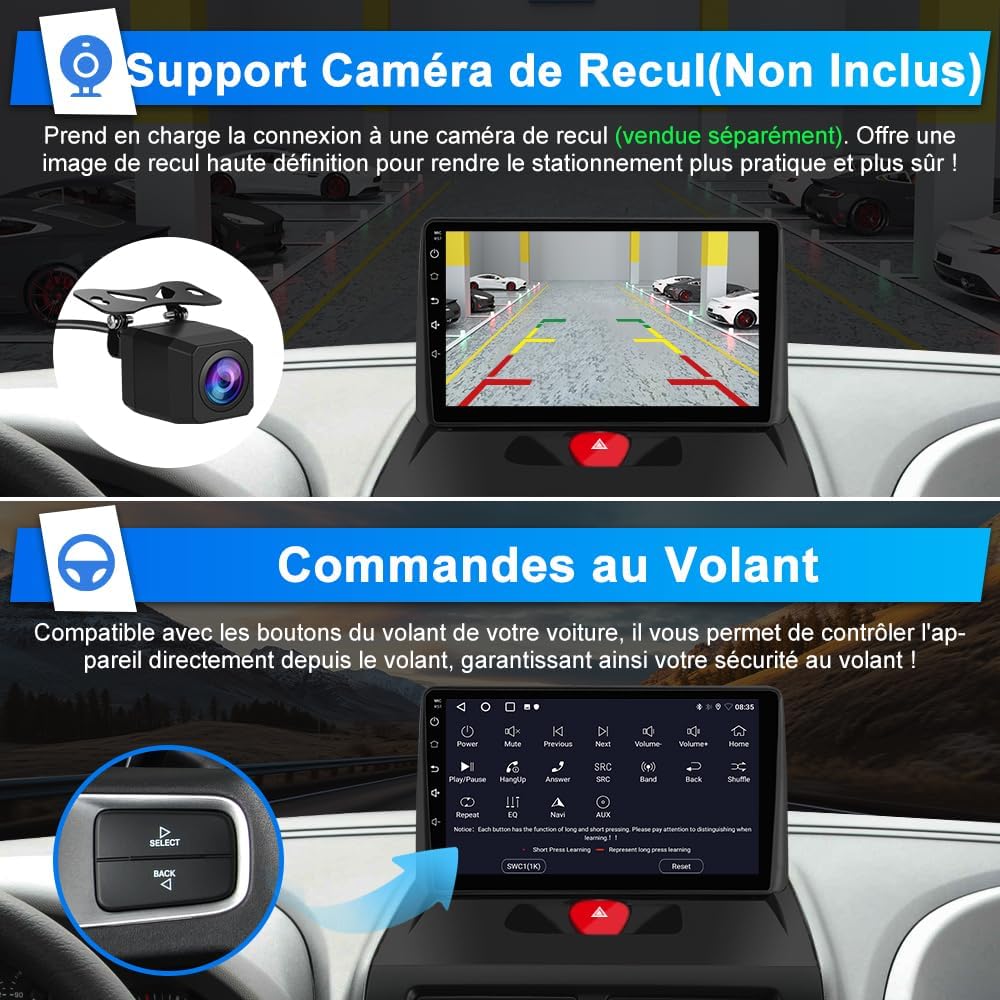
Image: The car radio display showing the steering wheel control mapping interface, with an inset image of a steering wheel control button cluster.

Image: A visual representation of how steering wheel controls interact with the car radio, showing various control buttons and their functions.
9. Rear Camera Support (Camera Not Included)
The unit supports connection to an aftermarket rear view camera (sold separately). This provides a high-definition reverse image for safer parking maneuvers.
Image: The car radio screen displaying a rear view camera feed with parking guidelines, alongside an image of a compact rear view máy ảnh.
BẢO TRÌ
- Vệ sinh màn hình: Sử dụng một miếng vải mềm, không xơ vải lau nhẹampened with water or a screen cleaner. Do not use abrasive cleaners or solvents.
- Cập nhật phần mềm: Kiểm tra định kỳ của nhà sản xuất website or the unit's system settings for available software updates to ensure optimal performance and access to new features.
- Quan tâm chung: Avoid placing heavy objects on the unit or exposing it to direct impacts. Keep ventilation openings clear to prevent overheating.
Xử lý sự cố
| Vấn đề | Nguyên nhân có thể | Giải pháp |
|---|---|---|
| Thiết bị không bật nguồn. | Không có nguồn điện; dây điện bị lỏng. | Check power connections and vehicle's fuse box. Ensure proper wiring. |
| Không có âm thanh. | Volume too low; incorrect audio source; speaker wiring issue. | Tăng âm lượng. Chọn nguồn âm thanh chính xác. Kiểm tra kết nối loa. |
| Tín hiệu GPS bị mất hoặc không chính xác. | Ăng-ten GPS bị cản trở hoặc lắp đặt không đúng cách. | Đảm bảo ăng-ten GPS rõ ràng view trên bầu trời và được kết nối an toàn. |
| Sự cố kết nối Bluetooth. | Thiết bị chưa được ghép nối; Bluetooth đã tắt trên điện thoại/thiết bị. | Ensure Bluetooth is enabled on both devices. Re-pair the devices. |
| Các nút điều khiển trên vô lăng không hoạt động. | CANBUS not connected; incorrect configuration. | Verify CANBUS connection. Check SWC settings in the unit's menu. |
Thông số kỹ thuật
| Tính năng | Chi tiết |
|---|---|
| Thương hiệu | TUYỆT VỜI |
| Số hiệu mẫu | IB-FR-XT892SCEXPERTT716 |
| Hệ điều hành | Android 15 |
| ĐẬP | 2GB |
| Kho | 64GB |
| Kích thước màn hình | 9 inch |
| Loại màn hình | Màn hình cảm ứng điện dung |
| Kết nối | Bluetooth, Wi-Fi, USB |
| Tính năng đặc biệt | CarPlay, Android Auto, GPS, FM Radio (RDS), DSP Audio, Steering Wheel Control (SWC) |
| Chế độ đầu ra âm thanh | Âm thanh nổi |
| Mã hóa video | AVI |
| Công suất đầu ra | 45 Watt |
| Trọng lượng sản phẩm | 1800 gam |
| Phương pháp kiểm soát | Chạm |
| Xe tương thích | Peugeot Expert 2, Citroën Jumpy, Fiat Scudo, Toyota Proace (2007-2016) |
| Mã số UPC | 759973265564 |
Bảo hành và Hỗ trợ
Thông tin bảo hành
This AWESAFE car radio comes with a 2-year warranty. Please retain your proof of purchase for warranty claims. The warranty covers manufacturing defects and malfunctions under normal use. It does not cover damage caused by improper installation, misuse, accidents, or unauthorized modifications.
Hỗ trợ khách hàng
For technical assistance, troubleshooting, or warranty inquiries, please contact AWESAFE customer support through the retailer where you purchased the product or visit the official AWESAFE webtrang web để biết thông tin liên hệ.