
1. Giới thiệu
Thank you for choosing the Cillso GTR3 Fitness Smart Watch. This manual provides essential information for the proper setup, operation, and maintenance of your device. Please read it thoroughly to ensure optimal performance and a complete understanding of all features.
2. Nội dung gói hàng
Xác minh rằng tất cả các mục đều có trong gói hàng của bạn:
- 1 x Cillso GTR3 Smart Watch
- 1 x Cáp sạc từ tính
- 1 x Detailed User Manual (this document)
3. Hướng dẫn cài đặt
3.1 Sạc đồng hồ thông minh
Before first use, fully charge your Cillso GTR3 Smart Watch. Connect the magnetic charging cable to the charging points on the back of the watch and plug the USB end into a standard USB power adapter (not included).

Image: The Cillso GTR3 Smart Watch connected to its magnetic charging cable, indicating a 350 mAh battery and 3ATM waterproof rating.
A full charge typically takes approximately 2 hours. The watch has a standby time of up to 45 days and can last up to 10 days with heavy usage.
3.2 Tải xuống và ghép nối ứng dụng
To unlock the full functionality of your smart watch, download the "Runmefit" application on your smartphone.
- Tải ứng dụng: Tìm kiếm "Runmefit" in your smartphone's app store (compatible with iOS 12.0+ and Android 7.0+).
- Bật Bluetooth: Bật Bluetooth trên điện thoại thông minh của bạn.
- Open Runmefit App: Launch the app and follow the on-screen instructions to search for your device. Select "GTR3" from the list of available devices.
- Xác nhận ghép nối: Confirm the pairing request on both your phone and the smart watch.

Image: Visual guide demonstrating the steps to download the "Runmefit" app, enable Bluetooth, and connect the GTR3 smart watch.
3.3 Kích hoạt chức năng gọi Bluetooth
For Bluetooth calling functionality, an additional connection is required:
- Ensure the watch is successfully bound to the "Runmefit" app.
- Vào phần cài đặt Bluetooth trên điện thoại thông minh của bạn.
- Find and select "GTR3" (or a similar identifier) in the list of available devices and click to bind. This creates a separate audio connection.
- Once connected, you can use the watch to answer and make calls.
4. Hướng dẫn vận hành
4.1 Điều hướng cơ bản
The Cillso GTR3 features a 1.46-inch AMOLED Ultra-HD full touchscreen display. Swipe across the screen to navigate through menus and functions. Use the physical buttons for quick access or to return to the home screen.

Image: The 1.46-inch AMOLED display of the GTR3 Smart Watch showcasing nhiều mặt đồng hồ có thể tùy chỉnh khác nhau.
4.2 Theo dõi sức khỏe
Chiếc đồng hồ liên tục theo dõi nhiều chỉ số sức khỏe khác nhau:
- Nhịp tim: Theo dõi nhịp tim của bạn 24/7. View real-time data and historical trends in the Runmefit app.
- Oxy trong máu (SpO2): Monitors blood oxygen levels to help ensure vital signs stay within a healthy range.
- Theo dõi giấc ngủ: Automatically tracks sleep patterns, including deep sleep, light sleep, and awake times, providing insights into sleep quality.
- Giám sát căng thẳng: Analyzes stress levels throughout the day.
- Nhắc nhở chu kỳ sinh lý: Provides reminders for women's health tracking when configured in the app.

Hình ảnh: Trênview of the GTR3's 24/7 health tracking capabilities, including heart rate, SpO2, body energy, and sleep monitoring.

Hình ảnh: Chi tiết view of the heart rate monitoring feature on the GTR3 Smart Watch and its companion app.

Image: The GTR3 Smart Watch showing continuous blood oxygen monitoring, with data also visible in the app.

Image: The GTR3 Smart Watch's sleep monitoring interface, showing duration of deep sleep, light sleep, and awake periods.
4.3 chế độ thể thao
The GTR3 supports over 110 sports modes, including walking, running, cycling, soccer, and hiking. Select your desired activity to track specific metrics such as steps, distance, calories burned, and exercise duration.

Image: The GTR3 Smart Watch highlighting its 110+ sports modes and detailed tracking of steps, calories, heart rate, blood oxygen, and stress.
4.4 Gọi điện và thông báo qua Bluetooth
Once the Bluetooth call function is enabled (see Section 3.3), you can answer, reject, or make calls directly from your watch. The watch also displays notifications from your smartphone, including messages and app alerts.
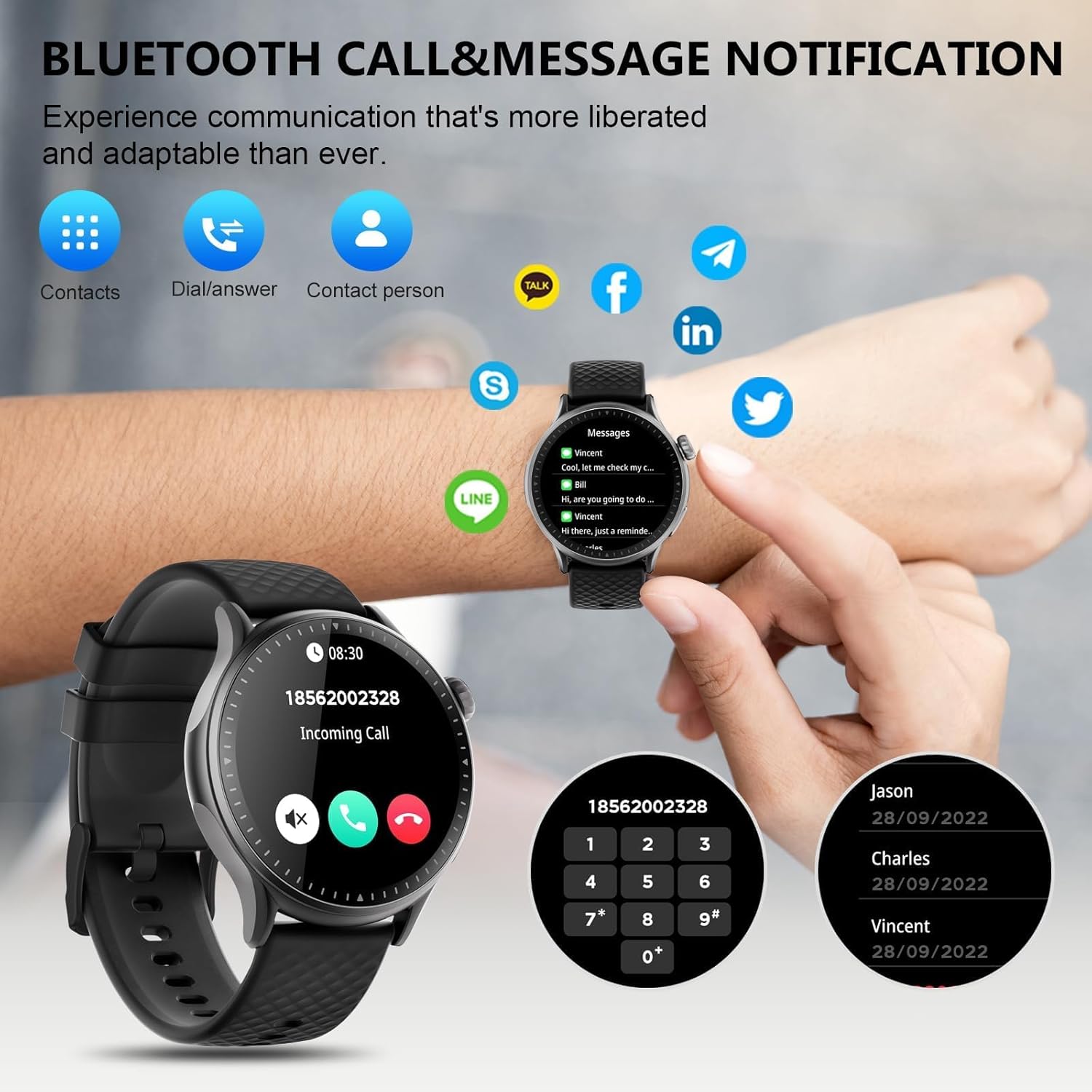
Image: The GTR3 Smart Watch displaying an incoming call and various message notification icons from social media and communication apps.
4.5 Trợ lý giọng nói AI
The built-in AI assistant allows for hands-free control. Use voice commands to check the weather, control music playback on your phone, set alarms, and more.

Image: The GTR3 Smart Watch's AI Voice Assistant interface, illustrating how to use voice commands for tasks like checking weather or setting alarms.
4.6 chức năng bổ sung
The Cillso GTR3 offers a range of other useful features:
- Dự báo thời tiết
- Tìm điện thoại
- Đồng hồ bấm giờ và hẹn giờ
- Máy tính
- Đồng hồ báo thức
- Điều khiển máy ảnh từ xa
- Music Control (for your phone's music player)
- Bài tập thở

Image: The GTR3 Smart Watch's app menu, showcasing icons for various functions including Find Phone, Weather, Calculator, Remote Camera Shutter, Breathing Exercises, Women's Health, and Alarm Clock.
4.7 Tùy chỉnh mặt đồng hồ
Personalize your watch with a variety of watch faces. The "Runmefit" app offers over 200 watch faces to choose from. You can also upload your favorite photos to create custom watch faces.
5. Bảo trì
5.1 Chống thấm
The Cillso GTR3 has a 3ATM waterproof rating, meaning it is resistant to splashes, rain, and sweat. It is suitable for daily use and can withstand brief immersion in water. However, it is không recommended for hot showers, saunas, diving, or high-speed water sports, as steam or high water pressure can compromise the seals.
5.2 Làm sạch và Chăm sóc
Để duy trì vẻ ngoài và chức năng của đồng hồ:
- Thường xuyên lau màn hình và dây đeo bằng khăn mềm.amp vải.
- Tránh sử dụng hóa chất mạnh, chất tẩy rửa có tính mài mòn hoặc dung môi.
- Đảm bảo các điểm tiếp xúc sạc sạch và khô trước khi sạc.
- Tránh để đồng hồ tiếp xúc với nhiệt độ quá cao hoặc ánh nắng trực tiếp trong thời gian dài.
5.3 Tuổi thọ pin
To maximize battery life, avoid fully discharging the watch frequently. Charge it when the battery level is low, and disconnect it once fully charged.
KHAI THÁC. Xử lý sự cố
If you encounter issues with your Cillso GTR3 Smart Watch, refer to the following common problems and solutions:
| Vấn đề | Giải pháp khả thi |
|---|---|
| Đồng hồ không kết nối được với điện thoại qua Bluetooth. | Ensure Bluetooth is enabled on your phone. Restart both the watch and phone. Make sure the "Runmefit" app is open and running in the background. Check if the watch is already paired with another device. |
| Chức năng gọi điện qua Bluetooth không hoạt động. | Verify that the watch is connected via Bluetooth in cả hai the "Runmefit" app and your phone's native Bluetooth settings (as a separate audio device). |
| Notifications or calls only vibrate, no sound. | Check the sound settings on your watch and in the "Runmefit" app. Ensure the watch's speaker volume is not muted or set too low. Note that the speaker volume may be limited in noisy environments. |
| Inaccurate step count or health data. | Ensure the watch is worn snugly on your wrist. Calibrate the watch in the "Runmefit" app if available. Keep the app connected to sync data regularly. |
| Weather information not updating. | Ensure your phone's location services are enabled and the "Runmefit" app has permission to access your location. The app must be connected and running in the background to sync weather data. |
| Watch disconnects frequently. | Maintain close proximity between your watch and smartphone. Avoid obstacles that may interfere with the Bluetooth signal. Ensure the "Runmefit" app is not being closed by your phone's power-saving features. |
| Cannot customize watch faces. | Ensure the watch is connected to the "Runmefit" app. Follow the app's instructions for selecting or uploading watch faces. Some watches may have limitations on the number of custom faces stored simultaneously. |
7. Thông số kỹ thuật
| Tính năng | Chi tiết |
|---|---|
| Tên mẫu | GTR3 |
| Thương hiệu | Cillso |
| Kiểu hiển thị | AMOLED |
| Kích thước màn hình | 1.46 inch |
| Nghị quyết | 1.46" AMOLED Ultra-HD |
| Hệ điều hành | iOS 12.0+ và Android 7.0+ |
| Dung lượng lưu trữ bộ nhớ | 128MB |
| Công nghệ kết nối | Bluetooth |
| Tiêu chuẩn giao tiếp không dây | Bluetooth |
| Dung lượng pin | 350 mAh (approximate, based on image) |
| Tuổi thọ trung bình của pin | Up to 10 days (heavy usage), 45 days (standby) |
| Mức độ chống nước | 3ATM (30 mét) |
| Số liệu đo được | Heart Rate, Sleep Duration, Blood Oxygen Monitor |
| Tính năng đặc biệt | 24/7 Activity Tracker, Heart Rate Monitor, Sleep Monitor, AI Voice Control, Message Notifications, Answer/Make Call, AMOLED Touchscreen, Cycle Tracking, Alarm Clock, Blood Oxygen Monitor, 110+ Sport Modes, Music Control, Distance Record/Pedometer/Calories, Distance Tracker |
| Loại vật liệu băng tần | Silicone, Rubber, or Fluoroelastomer |
| GPS | GPS qua điện thoại thông minh |
| Đối tượng mục tiêu | Người lớn Unisex |
8. Thông tin bảo hành
The Cillso GTR3 Smart Watch comes with a Bảo hành tiêu chuẩn 1 năm Kể từ ngày mua. Bảo hành này bao gồm các lỗi sản xuất và sự cố trong điều kiện sử dụng bình thường. Bảo hành không bao gồm các hư hỏng do sử dụng sai cách, tai nạn, sửa đổi trái phép hoặc không tuân theo hướng dẫn trong sách hướng dẫn này.
Vui lòng giữ lại bằng chứng mua hàng của bạn để yêu cầu bảo hành.
9. Hỗ trợ khách hàng
For further assistance, technical support, or warranty inquiries, please refer to the contact information provided with your purchase or visit the official Cillso website. Ensure you have your product model (GTR3) and proof of purchase ready when contacting support.