
1. Giới thiệu
This manual provides detailed instructions for the setup, operation, maintenance, and troubleshooting of your Aigo AG98 Wireless Mechanical Keyboard. Please read this manual thoroughly before using the product to ensure optimal performance and longevity.
2. Thông tin an toàn
- Không để bàn phím tiếp xúc với chất lỏng hoặc nơi có độ ẩm quá cao.
- Tránh nhiệt độ quá cao.
- Do not attempt to disassemble or repair the keyboard yourself. This may void the warranty and cause damage.
- Chỉ sử dụng cáp USB Type-C được cung cấp kèm theo để sạc.
- Để xa tầm tay trẻ em.
3. Nội dung gói hàng
Xác minh rằng tất cả các mục đều có trong gói hàng của bạn:
- Aigo AG98 Wireless Mechanical Keyboard
- Cáp USB loại C
- Hướng dẫn sử dụng
4. Sản phẩm hếtview
The Aigo AG98 is a versatile 98-key mechanical keyboard featuring triple-mode connectivity (Bluetooth, 2.4G Wireless, USB Type-C Wired), RGB backlighting, and hot-swappable switches. Its compact design and durable ABS construction make it suitable for both gaming and daily use across various devices.

Figure 1: Aigo AG98 keyboard demonstrating its triple-mode connectivity with various devices.
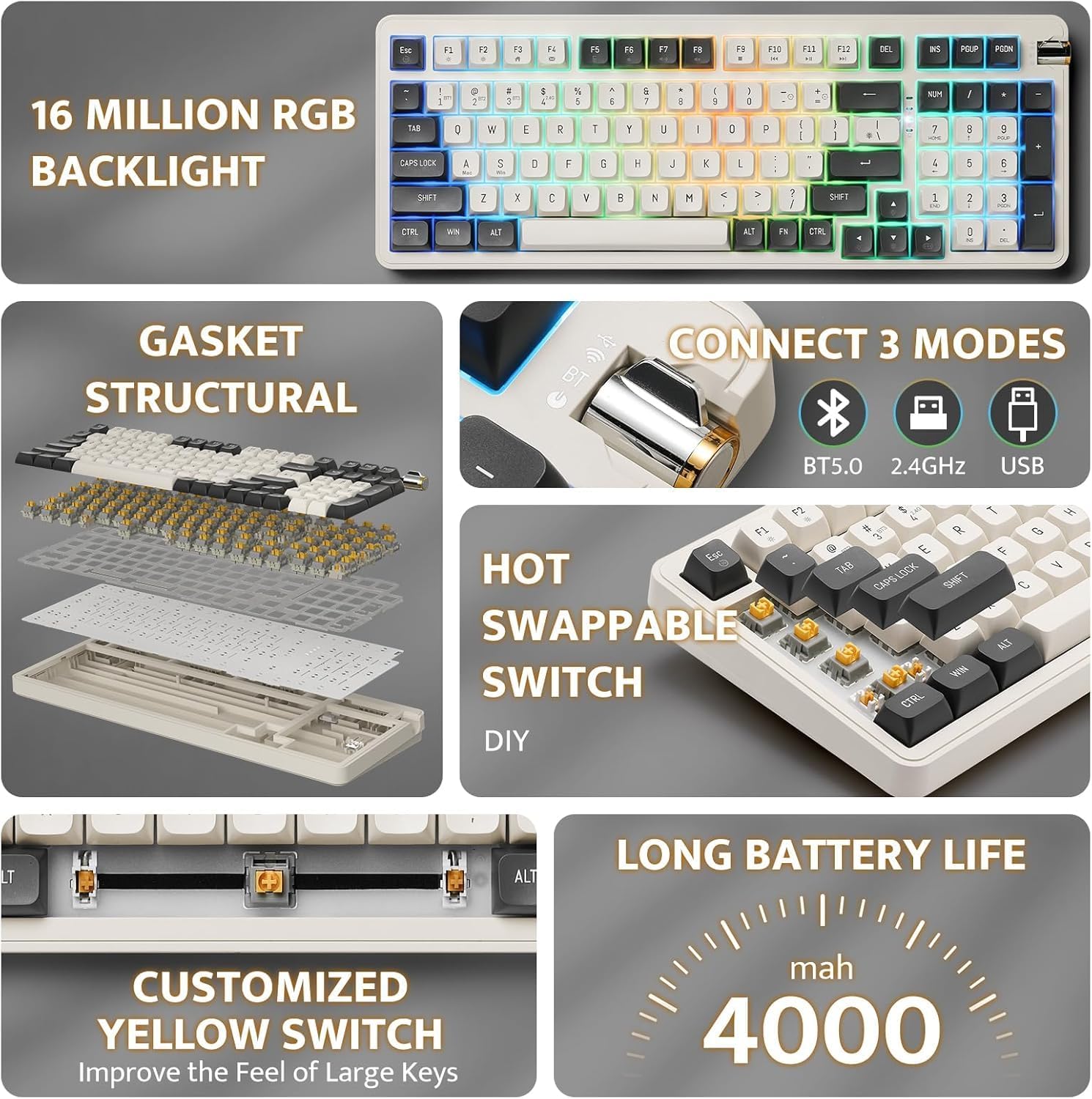
Figure 2: Key features of the Aigo AG98, including structural design, connectivity options, and battery capacity.
5. Thiết lập
5.1. Sạc bàn phím
Before initial use, fully charge the keyboard using the provided USB Type-C cable. Connect the cable to the keyboard's USB-C port and the other end to a powered USB port (e.g., computer, wall adapter).

Figure 3: USB-C port and mode switch location.
5.2. Chế độ kết nối
The Aigo AG98 supports three connection modes: Bluetooth, 2.4G Wireless, and USB Type-C Wired. Use the switch on the side of the keyboard to select your desired mode.
5.2.1. Kết nối có dây USB Type-C
- Hãy đảm bảo công tắc chế độ trên bàn phím được đặt ở vị trí kết nối có dây (USB).
- Kết nối cáp USB Type-C với bàn phím và máy tính của bạn.
- Hệ điều hành của bạn sẽ tự động nhận dạng bàn phím.
5.2.2. Kết nối không dây 2.4G
- Ensure the mode switch on the keyboard is set to the 2.4G wireless position.
- Plug the 2.4G USB receiver into an available USB port on your device.
- The keyboard should connect automatically. If not, press and hold the Fn + 4 key combination to initiate pairing.
5.2.3. Kết nối Bluetooth
- Ensure the mode switch on the keyboard is set to the Bluetooth (BT) position.
- Trên thiết bị của bạn (máy tính, máy tính bảng, điện thoại thông minh), hãy bật Bluetooth và tìm kiếm các thiết bị mới.
- On the keyboard, press and hold Fn + 1, Fn + 2, or Fn + 3 to enter pairing mode for BT1, BT2, or BT3 respectively. The indicator light will flash.
- Select "Aigo AG98" from the list of available devices on your screen.
- Sau khi ghép nối thành công, đèn báo sẽ ngừng nhấp nháy.
6. Hướng dẫn vận hành
6.1. Điều khiển đèn nền RGB
The Aigo AG98 features customizable RGB backlighting. Use the following key combinations to control the lighting effects:
- Fn + \|Thay đổi chế độ đèn nền.
- Fn + ↑: Tăng độ sáng của đèn nền.
- Fn + ↓: Giảm độ sáng của đèn nền.
- Fn + ←: Slow down backlight effect speed.
- Fn + →: Speed up backlight effect speed.

Figure 4: Aigo AG98 with RGB backlighting activated.
6.2. Công tắc có thể hoán đổi nóng
The Aigo AG98 keyboard features hot-swappable switches, allowing you to change mechanical switches without soldering. This enables customization of typing feel and sound.

Figure 5: Hot-swappable yellow switches with details on pre-lubrication and stable shaft design.
Để thay thế công tắc:
- Tắt bàn phím hoặc ngắt kết nối khỏi thiết bị.
- Use a switch puller tool (not included) to carefully grip the switch and pull it straight up.
- Align the pins of the new switch with the holes on the PCB and press it gently until it clicks into place. Ensure the pins are not bent.
7. Bảo trì
7.1. Vệ sinh
- Hãy ngắt kết nối bàn phím trước khi vệ sinh.
- Hãy dùng một miếng vải mềm, khô để lau sạch bề mặt bàn phím.
- For deeper cleaning, use a keycap puller (not included) to remove keycaps and clean dust or debris with compressed air or a small brush.
- Không sử dụng hóa chất khắc nghiệt hoặc vật liệu mài mòn.
7.2. Chăm sóc pin
- Tránh xả hết pin thường xuyên.
- Charge the keyboard regularly, even if not in use, to maintain battery health.
- Nếu không sử dụng bàn phím trong thời gian dài, hãy bảo quản ở nơi khô ráo, thoáng mát.
KHAI THÁC. Xử lý sự cố
| Vấn đề | Nguyên nhân có thể | Giải pháp |
|---|---|---|
| Bàn phím không phản hồi (Không dây) | Pin yếu, chế độ không chính xác, lỗi ghép nối, bộ thu không được kết nối. | Charge the keyboard. Ensure correct mode is selected. Re-pair the keyboard (Fn + 1/2/3 for BT, Fn + 4 for 2.4G). Check USB receiver connection. |
| Bàn phím không phản hồi (Có dây) | Cable issue, incorrect mode. | Ensure cable is securely connected. Try a different USB port or cable. Ensure wired mode is selected. |
| Đèn nền RGB không hoạt động | Đèn nền đã tắt, độ sáng được đặt ở mức tối thiểu. | Press Fn + \| to cycle modes. Increase brightness with Fn + ↑. |
| Phím cụ thể không hoạt động | Công tắc bị lỗi, có mảnh vụn dưới nắp phím. | Remove keycap and clean. If issue persists, replace the hot-swappable switch. |
| End key not working (Windows) | Mouse Keys enabled in OS accessibility settings. | Disable "Mouse Keys" in your operating system's accessibility settings. |
9. Thông số kỹ thuật
- Người mẫu: AG98
- Thương hiệu: Trời ơi
- Kết nối: Bluetooth 5.0, Wi-Fi 2.4G, USB Type-C có dây
- Số lượng chìa khóa: 98
- Cách trình bày: Bàn phím QWERTY (tiếng Anh)
- Loại công tắc: Mechanical (Linear Yellow Switches)
- Tính năng đặc biệt: Hot-swappable switches, RGB Backlighting, Ergonomic Design
- Vật liệu: Acrylonitrile Butadiene Styrene (ABS)
- Ắc quy: Pin Lithium có thể sạc lại 1200 mAh
- Hệ điều hành tương thích: Windows 10+, Android, iOS, Mac, Linux
- Thiết bị tương thích: Máy tính để bàn, máy tính xách tay, máy tính bảng, điện thoại thông minh
- Trọng lượng sản phẩm: 425 gram
10. Thông tin bảo hành
The Aigo AG98 keyboard comes with a 14-day warranty from the date of purchase. This warranty covers manufacturing defects. It does not cover damage caused by misuse, accidents, unauthorized modifications, or normal wear and tear. Please retain your proof of purchase for warranty claims.
11. Hỗ trợ
For further assistance or technical support, please refer to the contact information provided with your purchase or visit the official Aigo webđịa điểm.