
1. Giới thiệu
The EPOMAKER TH108 V2 PRO is a full-size mechanical keyboard designed for versatility and performance. It features multi-mode connectivity (Bluetooth, 2.4GHz wireless, and wired USB-C), a customizable screen and knob, hot-swappable switches, RGB lighting, and a gasket-mounted design for a comfortable typing experience. This manual provides instructions for setting up, operating, maintaining, and troubleshooting your keyboard.
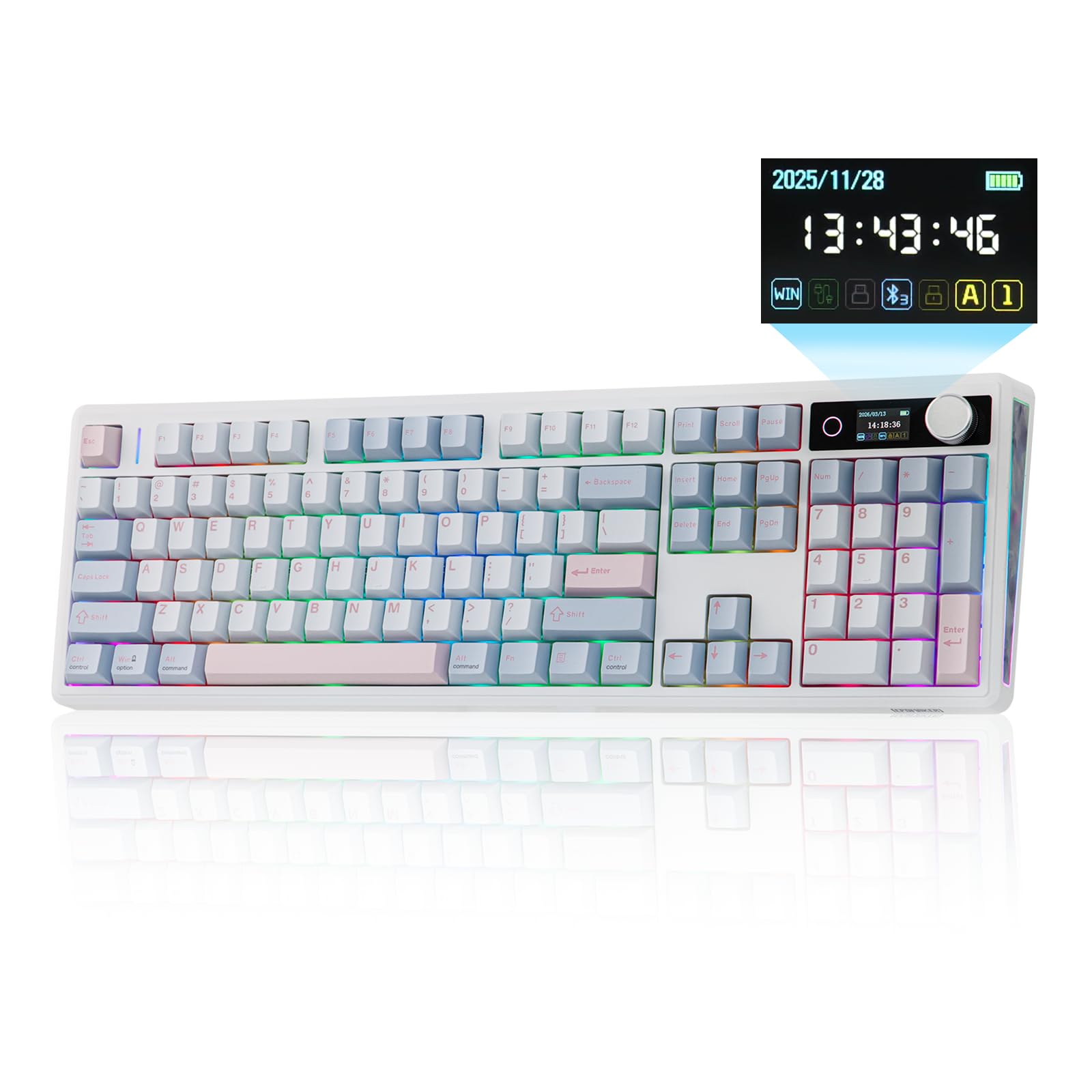
Figure 1.1: EPOMAKER TH108 V2 PRO Mechanical Keyboard
2. Có gì trong hộp
- EPOMAKER TH108 V2 PRO Full-Sized Gaming Keyboard
- Detachable USB A-to-C Cable
- Wireless 2.4Ghz Receiver (stored under the left kick-stand)
- Công tắc bổ sung
- Dụng cụ tháo switch và keycap 2 trong 1
- Summarized Multilingual Manual and Product Card

Figure 2.1: Location of the 2.4Ghz Wireless Receiver
3. Sản phẩm hếtview
The TH108 V2 PRO keyboard integrates several features for enhanced user experience:
- Kết nối đa chế độ: Supports Bluetooth, 2.4GHz wireless, and wired USB-C connections.
- Customizable Screen & Knob: A 1.06-inch functional glass screen displays real-time keyboard information, backlight settings, and supports custom GIFs or images. The rotary knob controls volume and screen pages, and is customizable.
- Công tắc có thể hoán đổi nóng: Allows for easy replacement of mechanical switches without soldering.
- Thiết kế lắp gioăng: Multiple layers of sound-dampening materials (PORON, latex, IXPE, silicone, foams) provide a soft, bouncy typing feel and a deep acoustic profile.
- Đèn RGB: Features per-key adjustable south-facing LEDs, an integrated light bar, and a custom decor panel for vibrant lighting effects.
- Tuổi thọ pin dài: Equipped with a 10000mAh battery, providing up to 200 hours of continuous use.
- Khả năng tương thích với Mac/Windows: Includes dedicated Mac modifier keycaps for seamless switching between operating systems.

Figure 3.1: Cushioned Gasket Structure

Figure 3.2: Pre-Lubed Linear Switches

Figure 3.3: Mac Modifier PBT Keycaps

Hình 3.4: Ánh sáng RGB sống động
Video sản phẩm
Video 3.1: Comparison between TH108 PRO and TH108 V2 PRO, highlighting key differences and improvements.
Video 3.2: Demonstrates the typing sound and feel of Creamy Jade and Sea Salt Silent V2 switches on the TH108 V2 PRO.
Video 3.3: Provides close-up views of various components and design elements of the TH108 V2 PRO keyboard.
4. Thiết lập
4.1 Tùy chọn kết nối
The TH108 V2 PRO supports three connection modes:
- Chế độ có dây: Connect the keyboard to your device using the provided USB A-to-C cable.
- Chế độ không dây 2.4GHz: Insert the 2.4GHz USB receiver (found under the left kick-stand) into your device's USB port. Switch the keyboard's mode selector to 2.4G.
- Chế độ Bluetooth: Switch the keyboard's mode selector to BT. Press FN + Q/W/E Chọn kênh Bluetooth. Đèn báo sẽ nhấp nháy, cho biết chế độ ghép nối. Tìm kiếm "TH108 V2 PRO" on your device and connect.
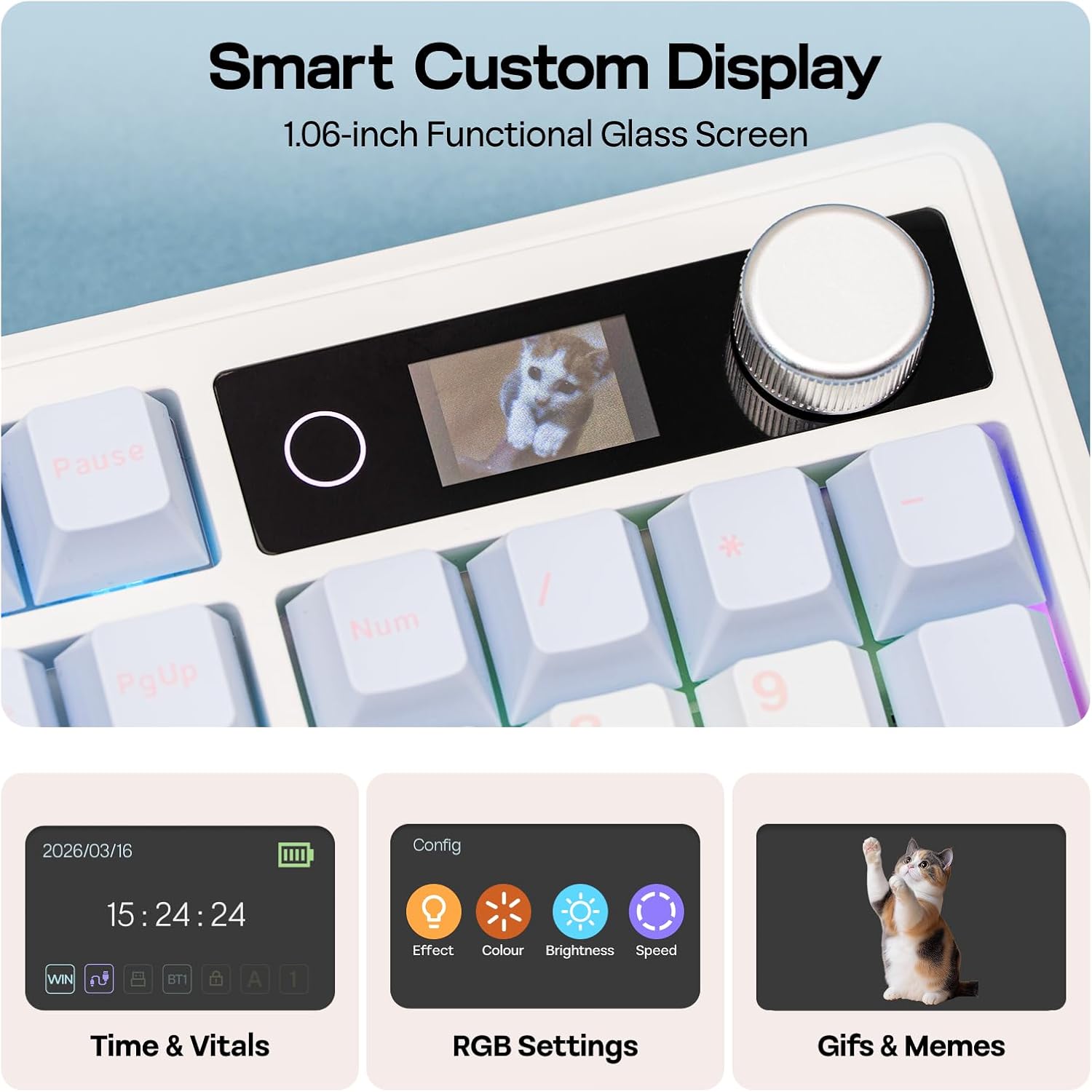
Figure 4.1: Connection Hub and Mode Switches
4.2 Chuyển đổi hệ điều hành
Use the dedicated switch on the keyboard to toggle between Windows (WIN) and Mac operating system layouts. This ensures correct key mapping for your system.
4.3 Phí ban đầu
Before first use, it is recommended to fully charge the keyboard using the provided USB-C cable. The screen will indicate charging status.
Video 4.2: An unboxing video of the TH108 V2 PRO, showing initial setup components.
5. Hướng dẫn vận hành
5.1 Screen and Knob Functions
The 1.06-inch screen displays various information and settings. The rotary knob allows for quick adjustments:
- Default Knob Function: Xoay để điều chỉnh âm lượng. Nhấn để tắt/bật tiếng.
- FN + Núm xoay: Toggles between screen pages (e.g., time, battery, connection status, RGB settings).
- Tùy chỉnh: The screen can display custom GIFs, drawings, or photos. This is managed via the web-compatible software.

Figure 5.1: Smart Custom Display and Knob
5.2 Điều khiển ánh sáng RGB
The keyboard features customizable RGB backlighting. You can adjust effects, colors, brightness, and speed using:
- Integrated Knob and Screen: Use FN + Knob to navigate to RGB settings on the screen, then use the knob to adjust.
- Phím tắt: Refer to the included quick guide for specific FN key combinations to change RGB modes.
- Web-Based Software: For advanced customization, including per-key lighting and custom effects.
5.3 Phần mềm lập trình được
The TH108 V2 PRO utilizes a web-compatible software for advanced customization. This software allows you to:
- Sửa lại các phím
- Record macros
- Customize RGB lighting
- Adjust keyboard settings
- Upload GIFs or images to the screen
Access the software via the official EPOMAKER website. It is compatible across various devices and operating systems.
Video 5.2: A guide on how to customize your TH108 V2 PRO using the available software and features.
6. Bảo trì
6.1 Vệ sinh
- Hãy ngắt kết nối bàn phím khỏi tất cả các nguồn điện trước khi vệ sinh.
- Sử dụng một miếng vải mềm, không xơ vải lau nhẹampDùng nước hoặc dung dịch tẩy rửa nhẹ để lau sạch các phím và khung máy.
- Đối với bụi bẩn và mảnh vụn giữa các phím bấm, hãy sử dụng khí nén hoặc một chiếc chổi nhỏ.
- Tránh sử dụng hóa chất mạnh, chất mài mòn hoặc độ ẩm quá mức.
6.2 Thay thế keycap và switch
The TH108 V2 PRO features hot-swappable switches, allowing for easy replacement without soldering.
- Use the provided 2-in-1 switch-and-keycap puller.
- Để tháo nắp phím, hãy nhẹ nhàng kéo nó lên bằng dụng cụ tháo nắp phím.
- To remove a switch, use the switch puller to grasp the top and bottom clips of the switch and pull straight upwards.
- When inserting a new switch, ensure the pins are straight and align with the PCB sockets. Press firmly until it clicks into place.
- When replacing keycaps, align them with the switch stem and press down gently.
KHAI THÁC. Xử lý sự cố
- Bàn phím không phản hồi:
- Đảm bảo bàn phím đã được sạc.
- Check the connection mode switch (wired, 2.4GHz, Bluetooth) matches your setup.
- Đối với tần số 2.4GHz, hãy đảm bảo bộ thu được cắm đúng cách.
- Đối với Bluetooth, hãy ghép nối lại thiết bị.
- Hãy thử kết nối qua cáp USB-C để loại trừ các sự cố không dây.
- Đèn RGB không hoạt động/không chính xác:
- Check RGB settings via the screen or software.
- Ensure brightness is not set to zero.
- Cập nhật phần mềm bàn phím nếu có.
- Các phím không đăng ký:
- If a specific key is not working, try removing and re-inserting its switch.
- Ensure the switch pins are not bent.
- Hãy thử với một công tắc khác nếu có.
- Sự cố phần mềm:
- Ensure you are using a compatible browser (e.g., Chrome) for the web-dựa trên phần mềm.
- Xóa bộ nhớ cache của trình duyệt hoặc thử sử dụng trình duyệt khác.
- Refer to the EPOMAKER support website for software-specific FAQs.
8. Thông số kỹ thuật
| Thương hiệu | máy làm EPOM |
| Tên mẫu | TH108 V2 PRO |
| Công nghệ kết nối | 2.4Ghz Wireless, Bluetooth, USB Cable |
| Mô tả bàn phím | Cơ khí |
| Số lượng chìa khóa | 104 |
| Bố trí bàn phím | BÀN PHÍM QWERTY |
| Loại công tắc | Linear, Linear Silent (depending on variant) |
| Tính năng đặc biệt | Backlit, Ergonomic, Hot-Swappable, Programmable Keys, Volume Roller, Screen |
| Đèn nền bàn phím | RGB |
| Nguồn điện | Pin (10000mAh) |
| Vật liệu | Plastic (Enclosure), Polycarbonate (Plate) |
| Thiết bị tương thích | Máy chơi game, Máy tính xách tay, PC, Điện thoại thông minh, Máy tính bảng |
| Hệ điều hành tương thích | Android, Windows, Mac OS 11 Big Sur and above |
| Tỷ lệ bỏ phiếu (Có dây) | 1000Hz |
| Latency (Wired) | 2ms |
9. Bảo hành và Hỗ trợ
The EPOMAKER TH108 V2 PRO Mechanical Keyboard comes with a Bảo hành 1 năm kể từ ngày mua.
For technical support, warranty claims, or additional information, please visit the official EPOMAKER website or contact their customer service directly. You can also find more resources and product information on the Cửa hàng EPOMAKER trên Amazon.