
1. Giới thiệu
This manual provides detailed instructions for the installation, operation, and maintenance of your Zebronics DMS200 Monitor Desk Stand. Please read this manual thoroughly before installation and use to ensure proper function and safety. The DMS200 is designed to support monitors from 17 to 32 inches, with a maximum load capacity of 7 kg, offering ergonomic adjustments for an optimized viewkinh nghiệm.

Image 1.1: Zebronics DMS200 Monitor Desk Stand overview.
2. Thông tin an toàn
Vui lòng tuân thủ các biện pháp phòng ngừa an toàn sau đây để tránh thương tích hoặc hư hỏng sản phẩm:
- Không được vượt quá trọng lượng tối đa cho phép là 7 kg (15.4 lbs).
- Ensure the desk surface is stable and strong enough to support the combined weight of the stand and monitor.
- Always follow the installation instructions carefully. Improper installation can lead to equipment damage or personal injury.
- Tránh xa trẻ em và vật nuôi trong quá trình lắp đặt. Các bộ phận nhỏ có thể gây nguy cơ nghẹt thở.
- Không nên siết ốc quá chặt vì có thể gây hư hỏng.
- Thường xuyên kiểm tra tất cả các kết nối để đảm bảo chúng luôn an toàn.
3. Nội dung gói hàng
Xác minh rằng tất cả các thành phần đều có sẵn trước khi bắt đầu cài đặt:
- Lắp ráp tay màn hình
- Bàn Clamp (C-clamp)
- Đế gắn lỗ
- Tấm VESA
- Bộ dụng cụ phần cứng (ốc vít, vòng đệm, chìa khóa lục giác)
- Hướng dẫn sử dụng
4. Thiết lập và Cài đặt
The Zebronics DMS200 offers two installation methods: C-clamp và giá đỡ Grommet. Chọn phương pháp phù hợp nhất với bàn làm việc của bạn.
4.1. Choosing a Mounting Method
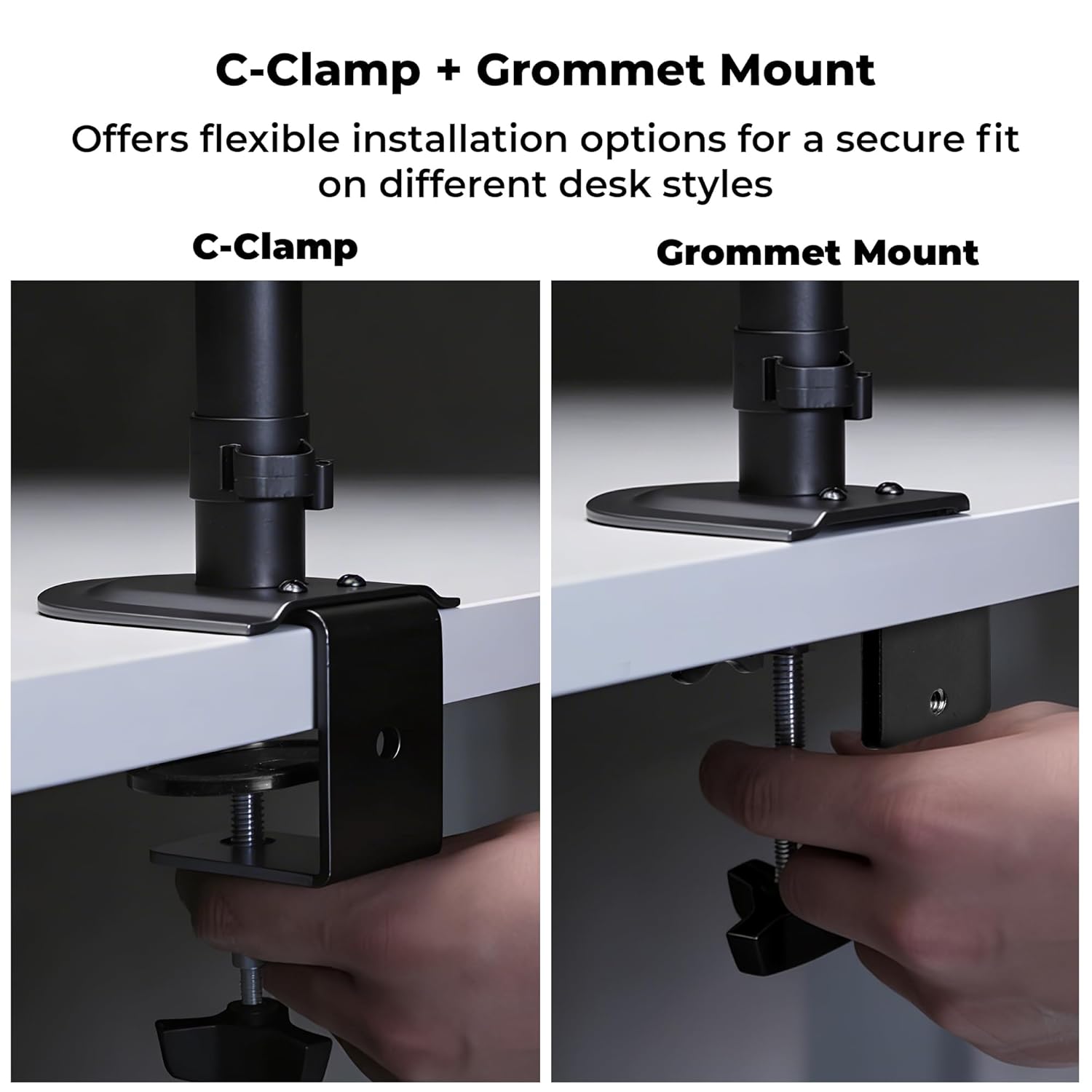
Hình 4.1: C-Clamp and Grommet Mount options.
- C-Clamp: Ideal for desks without pre-drilled holes. Clamps to the edge of the desk.
- Giá đỡ Grommet: Requires a pre-drilled hole (or drilling one) in the desk. Provides a more flush installation.
4.2. C-Clamp Cài đặt
- Gắn C-clamp to the bottom of the main pole.
- Position the stand on the edge of your desk.
- Thắt chặt C-clamp screw until the stand is securely fastened to the desk. Ensure it is stable and does not wobble.
4.3. Grommet Mount Installation
- Tháo rời C-clamp from the main pole if it was pre-attached.
- Luồn thanh chính qua lỗ khoen trên bàn làm việc của bạn.
- Secure the grommet base plate and tighten the nut from underneath the desk until the stand is firm.
4.4. Ensuring Stability
After mounting the stand, verify its stability on the desk. The anti-slip base and robust construction ensure reliable support for monitors up to 7 kg.

Image 4.4: Stand stability and maximum load capacity.
4.5. Kết nối màn hình
The DMS200 supports VESA patterns of 75x75mm and 100x100mm.

Image 4.5: VESA mount plate for monitor attachment.
- Attach the VESA plate to the back of your monitor using the appropriate screws from the hardware kit. Ensure the screws are not overtightened.
- Carefully slide the monitor (with the VESA plate attached) onto the monitor arm's mounting head.
- Secure the monitor to the arm by tightening the locking screw or mechanism on the mounting head.
4.6. Quản lý cáp
Utilize the integrated cable management clips to keep your workspace tidy.

Image 4.6: Integrated cable management.
- Route your monitor's power and display cables through the clips located along the arm and pole.
- Ensure cables have enough slack for full range of motion without being strained.
5. Hướng dẫn vận hành
The DMS200 monitor arm provides various adjustments for optimal ergonomic positioning.

Image 5.1: Monitor arm adjustment capabilities.
- Điều chỉnh chiều cao: Loosen the collar on the main pole, adjust the arm to the desired height, and then re-tighten the collar.
- Điều chỉnh độ nghiêng: The monitor can be tilted up to ±5°. Adjust the tilt angle by gently pushing or pulling the top or bottom of the monitor. If the monitor does not hold its position, tighten the tilt mechanism screw with an Allen key.
- Điều chỉnh xoay: The arm allows for ±90° swivel. Gently rotate the monitor left or right to achieve the desired viewgóc ing.
- Sự xoay vòng: The VESA plate allows for 360° rotation, enabling portrait or landscape orientation. Rotate the monitor gently to switch orientations.
- Duỗi tay: The mechanical arm can extend up to 42 cm. Adjust the arm's position by gently pulling or pushing it to bring the monitor closer or further away.
6. Bảo trì
To ensure the longevity and proper function of your monitor stand:
- Vệ sinh: Lau chân đế bằng vải mềm,amp vải. Tránh sử dụng chất tẩy rửa hoặc dung môi có tính mài mòn vì có thể làm hỏng lớp hoàn thiện.
- Kiểm tra định kỳ: Kiểm tra định kỳ tất cả các ốc vít và mối nối để đảm bảo chúng được siết chặt và chắc chắn. Siết chặt lại nếu cần thiết.
- Sức chịu tải: Do not place items on the monitor arm or exceed the maximum weight capacity.
KHAI THÁC. Xử lý sự cố
| Vấn đề | Nguyên nhân có thể | Giải pháp |
|---|---|---|
| Monitor sags or does not hold tilt position. | Tilt mechanism screw is loose. | Tighten the tilt adjustment screw on the VESA head using the provided Allen key. |
| Chân đế bị lung lay hoặc không ổn định. | Bàn clamp/grommet mount is not tight enough. | Siết chặt lại C-clamp or grommet mount screw/nut. Ensure the desk surface is stable. |
| Monitor cannot be rotated or swiveled smoothly. | Joints may be too tight or require lubrication. | Check for any obstructions. If joints are too stiff, apply a small amount of silicone-based lubricant (avoid oil-based). |
| Cables are strained during adjustment. | Insufficient slack in cable management. | Re-route cables, ensuring enough slack is provided for the full range of arm movement. |
8. Thông số kỹ thuật
| Tính năng | Chi tiết |
|---|---|
| Người mẫu | DMS200 |
| Kích thước màn hình được hỗ trợ | 17 - 32 inch |
| Tải trọng tối đa | 7 kg (15.4 pound) |
| Khả năng tương thích VESA | 75x75mm, 100x100mm |
| Kiểu lắp đặt | C-Clamp, Grommet Núi |
| Điều chỉnh | Height, Tilt (±5°), Swivel (±90°), Rotation (360°) |
| Mở rộng cánh tay | Lên đến 42 cm |
| Vật liệu | Metal (Rust-Proof) |
| Màu sắc | Đen |
| Trọng lượng sản phẩm | 1670 gam |
9. Bảo hành và Hỗ trợ
Bảo hành: The Zebronics DMS200 Monitor Desk Stand comes with a 1-year carry-in warranty to the service center from the date of purchase.
Ủng hộ: For technical assistance, troubleshooting, or warranty claims, please contact Zebronics customer support. Refer to the official Zebronics webtrang web hoặc tài liệu mua hàng của bạn để biết thông tin liên hệ.
Manufacturer: Zebronics India Private Limited, 13/7 Smith Road, Royapettah, Chennai, Tamil Nadu - 600 002, India.