
1. Sản phẩm hếtview
The ATK N9 Tri-Mode Gaming Headset is designed for gamers requiring flexible connectivity, clear audio, and reliable communication across multiple devices. It supports 3.5 mm wired, 2.4G wireless, and Bluetooth connections, allowing seamless switching between gaming consoles, PC, and mobile devices. Stereo-tuned dynamic drivers deliver balanced sound, enhancing in-game audio cues such as footsteps, gunfire, and environmental effects. The detachable noise-canceling microphone improves voice clarity for team communication, online gaming, and voice calls. Its over-ear design, with soft ear cushions and an adjustable headband, ensures a comfortable fit for extended gaming sessions. The headset is compatible with PS5, PS4, PC, Nintendo Switch, and mobile devices. For Xbox Series X|S, audio and microphone functions are supported via the 3.5 mm wired connection.

2. Nội dung gói hàng
Xác minh rằng tất cả các mục được liệt kê dưới đây đều có trong gói hàng của bạn:
- ATK N9 Pro/White Gaming Headset
- Micrô khử tiếng ồn có thể tháo rời
- Cáp sạc USB-C
- Cáp âm thanh 3.5mm
- 2.4G Wireless USB Adapter
- Hướng dẫn sử dụng (tài liệu này)

3. Thiết lập ban đầu
3.1. Sạc tai nghe
Before first use, fully charge the headset using the provided USB-C charging cable. Connect the USB-C end to the headset's charging port and the USB-A end to a compatible USB power source (e.g., PC, wall adapter). The LED indicator will show charging status.
3.2. Gắn Micro
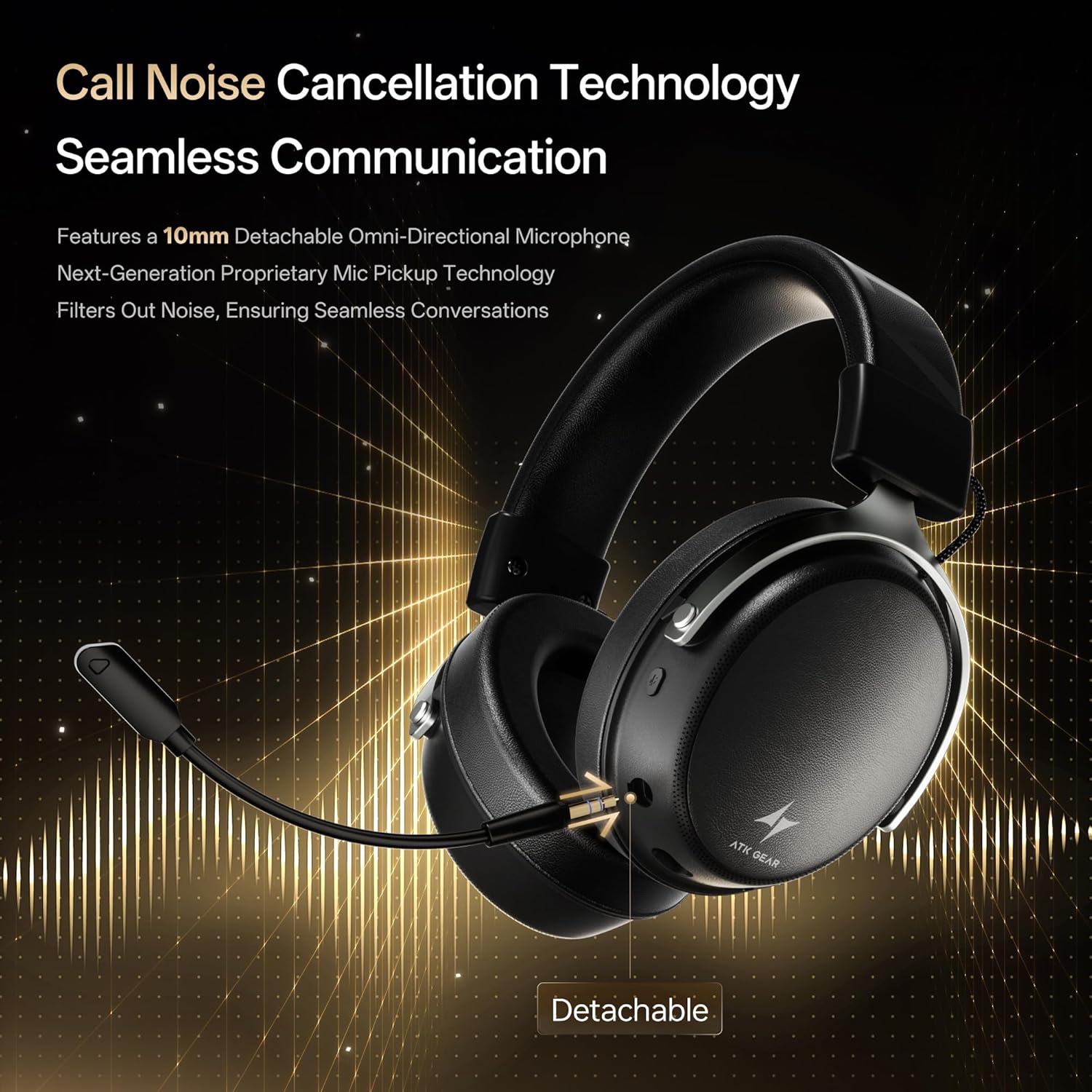
Insert the detachable boom microphone into the microphone port on the left earcup until it clicks into place. Ensure it is securely connected for optimal voice pickup.
3.3. Tùy chọn kết nối
The ATK N9 Pro/White headset offers three connectivity modes:
- Chế độ không dây 2.4G: For PC, PS4, PS5, and Nintendo Switch (docked mode).
- Plug the 2.4G wireless USB adapter into an available USB port on your device.
- Bật nguồn tai nghe.
- Switch the headset to 2.4G mode using the mode switch. The headset will automatically pair with the adapter.
- Adjust audio output settings on your device if necessary to select the headset.
- Chế độ Bluetooth: For mobile devices, PC, and Nintendo Switch (handheld mode).
- Power on the headset and switch to Bluetooth mode. The LED indicator will flash, indicating pairing mode.
- On your device, go to Bluetooth settings and select "ATK N9 Pro" from the list of available devices.
- Sau khi kết nối, đèn LED sẽ sáng liên tục.
- Chế độ có dây 3.5mm: For Xbox Series X|S, PS4, PS5, PC, Nintendo Switch, and mobile devices.
- Kết nối một đầu của cáp âm thanh 3.5mm với giắc cắm 3.5mm trên tai nghe.
- Connect the other end to the 3.5mm audio port on your device (e.g., controller, PC audio jack).
- Tai nghe sẽ hoạt động ở chế độ có dây, bỏ qua các chức năng không dây.

4. Hướng dẫn vận hành
4.1. Điều khiển tai nghe
The ATK N9 Pro/White headset features intuitive controls located on the earcups:
- Nút nguồn: Press and hold to power on/off. Short press for play/pause (in 2.4G/Bluetooth mode).
- Chuyển đổi chế độ: Toggle between 2.4G wireless, Bluetooth, and wired modes.
- Nút xoay tăng/giảm âm lượng: Xoay để điều chỉnh âm lượng.
- Nút tắt tiếng micrô: Nhấn để tắt tiếng / bật tiếng micrô.
- Spatial Audio Button: Press to activate/deactivate 3D Spatial Audio.
- Mic Monitoring Button: Press to enable/disable microphone monitoring (sidetone).
4.2. Cách sử dụng micro
The detachable noise-canceling microphone is designed for clear communication. Position the microphone approximately 1-2 inches from your mouth for optimal voice pickup. Use the microphone mute button on the headset to quickly mute your voice when needed.
4.3. Điều chỉnh độ vừa vặn
The headset features an adjustable headband and soft ear cushions for comfort. Extend or retract the headband to achieve a snug yet comfortable fit. The earcups are designed to fully enclose your ears for passive noise isolation and comfort during long gaming sessions.
5. Thông số kỹ thuật
| Tính năng | Đặc điểm kỹ thuật |
|---|---|
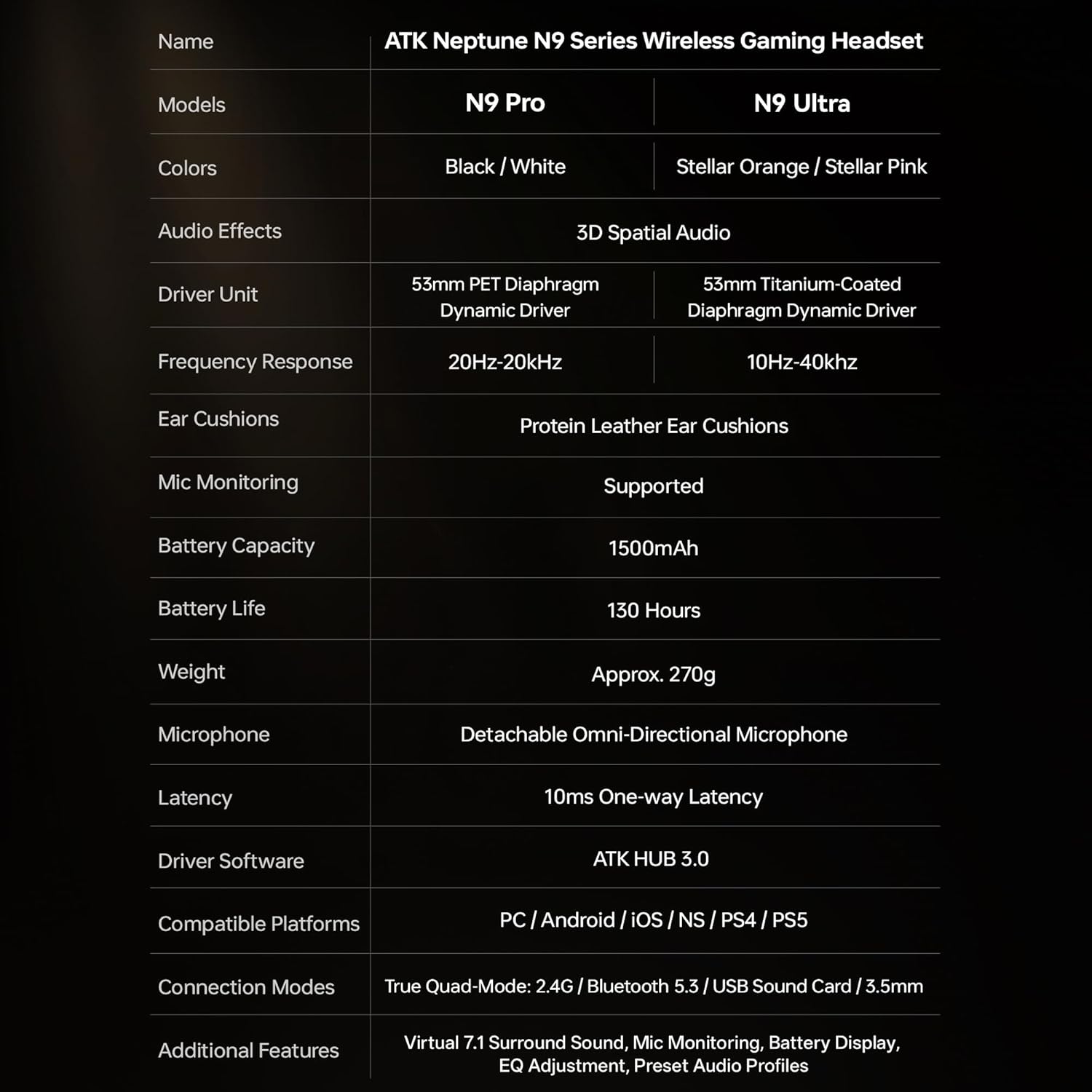
| Tên mẫu | ATK N9 Pro |
| Kết nối | 3.5mm Wired, 2.4G Wireless, Bluetooth 5.3 |
| Loại trình điều khiển | Trình điều khiển động |
| Kích thước trình điều khiển | 53mm |
| Dải tần số | 20 Hz - 20,000 Hz |
| Trở kháng | 64 Ohm |
| Micrô | Detachable Noise-Canceling Omni-Directional |
| Dung lượng pin | 1500mAh |
| Tuổi thọ pin | Lên đến 130 giờ |
| Độ trễ (2.4G) | 10 Milliseconds (one-way) |
| Cân nặng | 270 gam |
| Vị trí tai | Trên tai |
| Thiết bị tương thích | PS5, PS4, PC, Nintendo Switch, Mobile Devices, Xbox Series X|S (wired) |
| Các tính năng bổ sung | 3D Spatial Audio, Mic Monitoring, Volume Control |

6. Chăm sóc và bảo dưỡng
- Vệ sinh: Dùng vải mềm, khô để vệ sinh tai nghe. Tránh sử dụng hóa chất mạnh hoặc vật liệu mài mòn.
- Kho: Bảo quản tai nghe ở nơi khô ráo, thoáng mát, tránh ánh nắng trực tiếp và nhiệt độ cao.
- Chăm sóc pin: Để kéo dài tuổi thọ pin, tránh xả hết pin tai nghe thường xuyên. Hãy sạc pin thường xuyên, ngay cả khi không sử dụng trong thời gian dài.
- Khả năng chống nước: Tai nghe không có khả năng chống nước. Tránh tiếp xúc với chất lỏng.
KHAI THÁC. Xử lý sự cố
7.1. Không có âm thanh / Âm lượng thấp
- Ensure the headset is powered on and connected in the correct mode (2.4G, Bluetooth, or 3.5mm wired).
- Kiểm tra nút điều chỉnh âm lượng trên tai nghe và cài đặt âm lượng của thiết bị.
- For wireless modes, ensure the headset is paired correctly and selected as the audio output device in your system settings.
- If using 3.5mm wired, ensure the cable is fully inserted into both the headset and the device.
7.2. Micrô không hoạt động
- Đảm bảo micrô được gắn chặt vào tai nghe.
- Kiểm tra xem nút tắt tiếng micro trên tai nghe có đang được kích hoạt hay không.
- Verify that the headset microphone is selected as the input device in your device's sound settings.
- For Xbox Series X|S, ensure you are using the 3.5mm wired connection for microphone support.
7.3. Các vấn đề về kết nối
- Không dây 2.4G: Ensure the USB adapter is firmly plugged in. Try a different USB port.
- Bluetooth: Ensure the headset is in pairing mode. Forget the device on your phone/PC and re-pair. Keep the headset within the 5-meter Bluetooth range.
- Tổng quan: Power cycle both the headset and your connected device.
8. Bảo hành và Hỗ trợ
8.1. Thông tin bảo hành
The ATK N9 Pro/White Gaming Headset comes with a Bảo hành 6 tháng Kể từ ngày mua. Bảo hành này bao gồm các lỗi sản xuất và chất lượng gia công trong điều kiện sử dụng bình thường. Bảo hành không bao gồm các hư hỏng do sử dụng sai mục đích, tai nạn, sửa đổi trái phép hoặc hao mòn thông thường.
8.2. Hỗ trợ khách hàng
For further assistance, technical support, or warranty claims, please contact ATK customer service through the retailer where the product was purchased or visit the official ATK webtrang web để biết thông tin liên hệ hỗ trợ.