
1. Giới thiệu
Thank you for choosing the AULA G7 Pro Wireless Gaming Headset. This manual provides detailed instructions for setting up, operating, and maintaining your headset to ensure optimal performance and an immersive audio experience. Please read this manual thoroughly before using the product.
2. Sản phẩm hếtview
2.1 Nội dung gói
The AULA G7 Pro package includes the following items:
- AULA G7 Pro Wireless Gaming Headset
- Micrô Boom có thể tháo rời
- Cáp sạc USB-C sang USB-A
- Cáp âm thanh 3.5mm
- 2.4G Wireless USB-A Receiver
- Bộ chuyển đổi USB-C sang USB-A
- Hướng dẫn sử dụng
2.2 Các thành phần và bộ điều khiển của tai nghe
Familiarize yourself with the various parts and controls of your AULA G7 Pro headset.
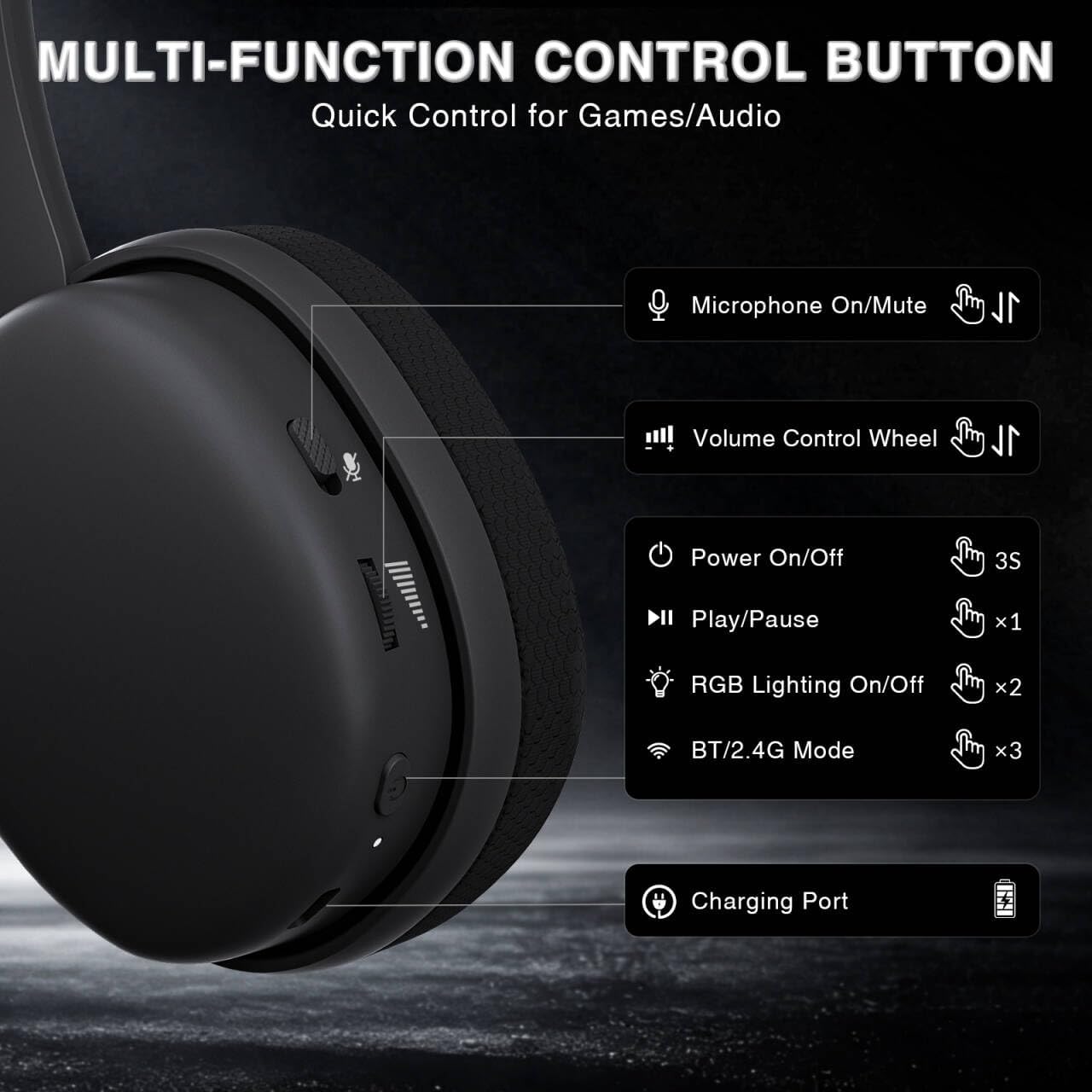
Image: Multi-function control buttons on the AULA G7 Pro headset, showing the microphone on/off toggle, volume control wheel, power switch, play/pause button, RGB lighting on/off button, BT/2.4G mode switch, and charging port.
- Microphone On/Off Toggle: Trượt để tắt hoặc bật tiếng micrô.
- Bánh xe điều khiển âm lượng: Điều chỉnh âm lượng đầu ra.
- Công tắc điện: Nhấn và giữ trong 3 giây để bật / tắt nguồn.
- Nút Phát/Tạm dừng: Nhấn một lần để phát hoặc tạm dừng âm thanh.
- Bật/Tắt đèn RGB: Press twice to toggle RGB lighting.
- BT/2.4G Mode Switch: Press three times to switch between Bluetooth and 2.4G wireless modes.
- Cổng sạc: USB-C port for charging the headset.
- Giắc cắm âm thanh 3.5 mm: Dành cho kết nối có dây.
- Cổng Micro: For attaching the detachable boom microphone.
Video: Một kết thúcview of the AULA G7 Pro Wireless Gaming Headset, showcasing its design, features, and different color options (black and pink).
3. Thiết lập và kết nối
3.1 2.4G Wireless Connection (PC, PS5, PS4, Switch)
For low-latency gaming, use the 2.4G wireless connection.
- Insert the 2.4G USB-A receiver into an available USB port on your PC, PS5, PS4, or Nintendo Switch dock. If your device only has USB-C ports, use the provided USB-C to USB-A adapter.
- Power on the AULA G7 Pro headset by pressing and holding the power button for 3 seconds.
- The headset will automatically attempt to connect to the receiver. The indicator light on the headset will show a stable color once connected.
- On your device, ensure the audio output is set to the AULA G7 Pro headset.

Image: The AULA G7 Pro headset demonstrating its tri-mode connectivity options: 3.5mm wired, Bluetooth 5.3, and 2.4G wireless with USB-C and USB-A receivers, compatible with various devices including PC, PS5, PS4, Switch, and smartphones.
3.2 Bluetooth 5.3 Connection (PC, Smartphones, Tablets)
Connect your headset via Bluetooth for general use with compatible devices.
- Power on the AULA G7 Pro headset.
- Press the BT/2.4G mode switch three times to enter Bluetooth pairing mode. The indicator light will flash.
- On your device (PC, smartphone, tablet), go to Bluetooth settings and search for available devices.
- Select "AULA G7 Pro" from the list to pair. The indicator light on the headset will become stable once connected.
3.3 3.5mm Wired Connection (Xbox, PC, PS5, PS4, Switch, Smartphones)
Use the 3.5mm audio cable for a universal wired connection, especially for Xbox consoles.
- Kết nối một đầu của cáp âm thanh 3.5mm với giắc cắm âm thanh 3.5mm trên tai nghe.
- Connect the other end of the 3.5mm audio cable to the audio output port of your device (e.g., Xbox controller, PC audio jack).
- The headset will operate in wired mode. Note that some advanced features like virtual 7.1 surround sound may not be available in wired mode, depending on the device.
4. Hướng dẫn vận hành
4.1 Sử dụng micrô
The AULA G7 Pro features a detachable noise-canceling microphone.
- Gắn Micrô: Align the 3.5mm plug of the boom microphone with the microphone port on the headset and insert it firmly.
- Muting/Unmuting: Use the microphone on/off toggle switch on the headset to quickly mute or unmute your microphone.
- Khử tiếng ồn: The 360° omnidirectional microphone filters out approximately 80% of background noise. For enhanced noise cancellation and voice clarity, install the driver software (Windows 2.4G mode only).
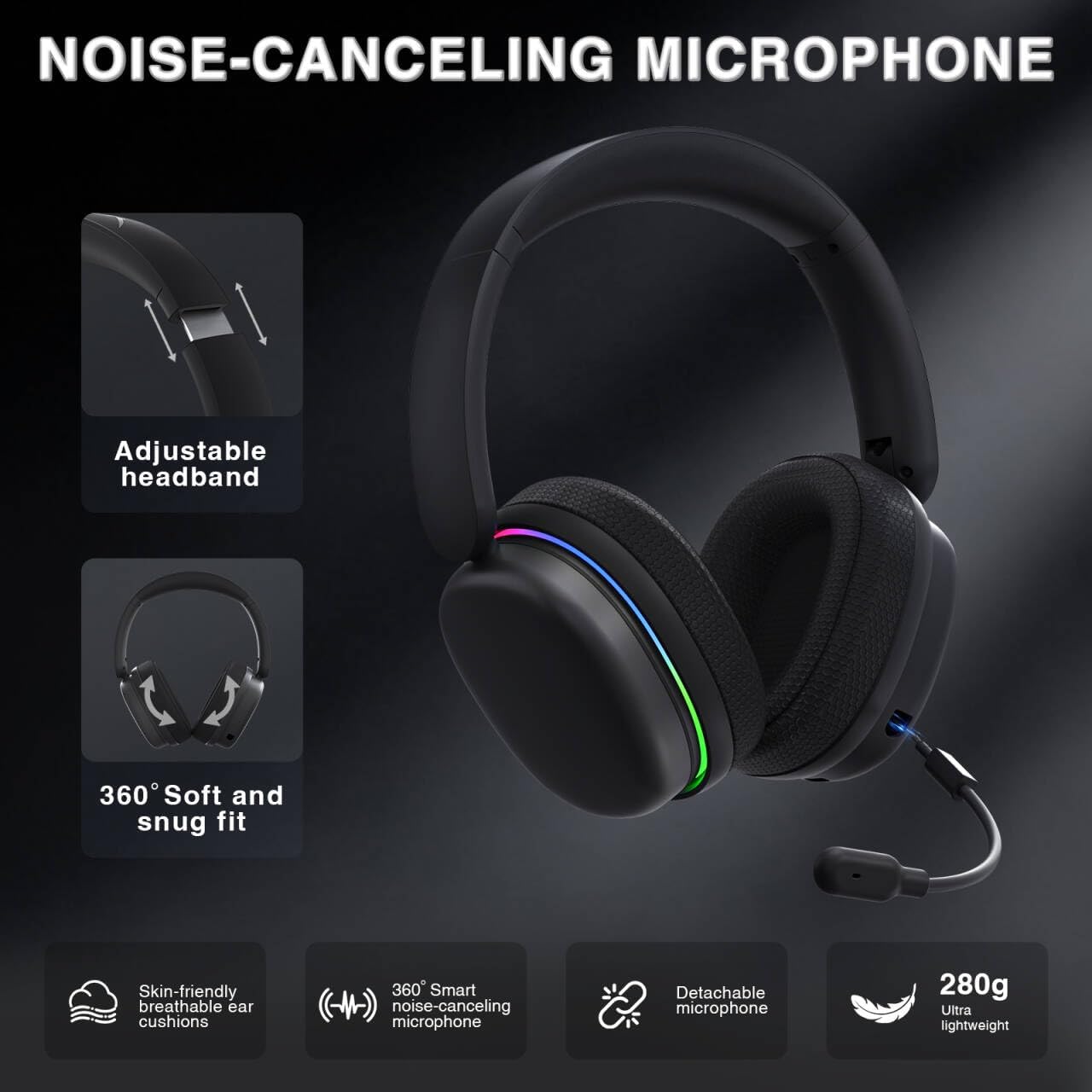
Image: The AULA G7 Pro headset highlighting its adjustable headband, soft and snug fit, skin-friendly breathable ear cushions, 360° smart noise-canceling microphone, detachable microphone, and ultra-lightweight 280g design.
4.2 Virtual 7.1 Surround Sound and EQ Software
Experience immersive audio with virtual 7.1 surround sound and customize your sound profile.
- Âm thanh vòm ảo 7.1: Available in Windows 2.4G mode, this feature provides precise audio positioning for gaming.
- EQ Software: Tải xuống và cài đặt trình điều khiển từ soaidriver.com (Windows 2.4G mode only). The software allows for customizable EQ settings, dynamic bass boost, vocal enhancement, and voice morphing.
- Lưu ý cài đặt: First, insert the 2.4G receiver into your computer, then install the driver. After entering the driver interface, right-click the icon on the left side of the screen to access the audio settings menu.
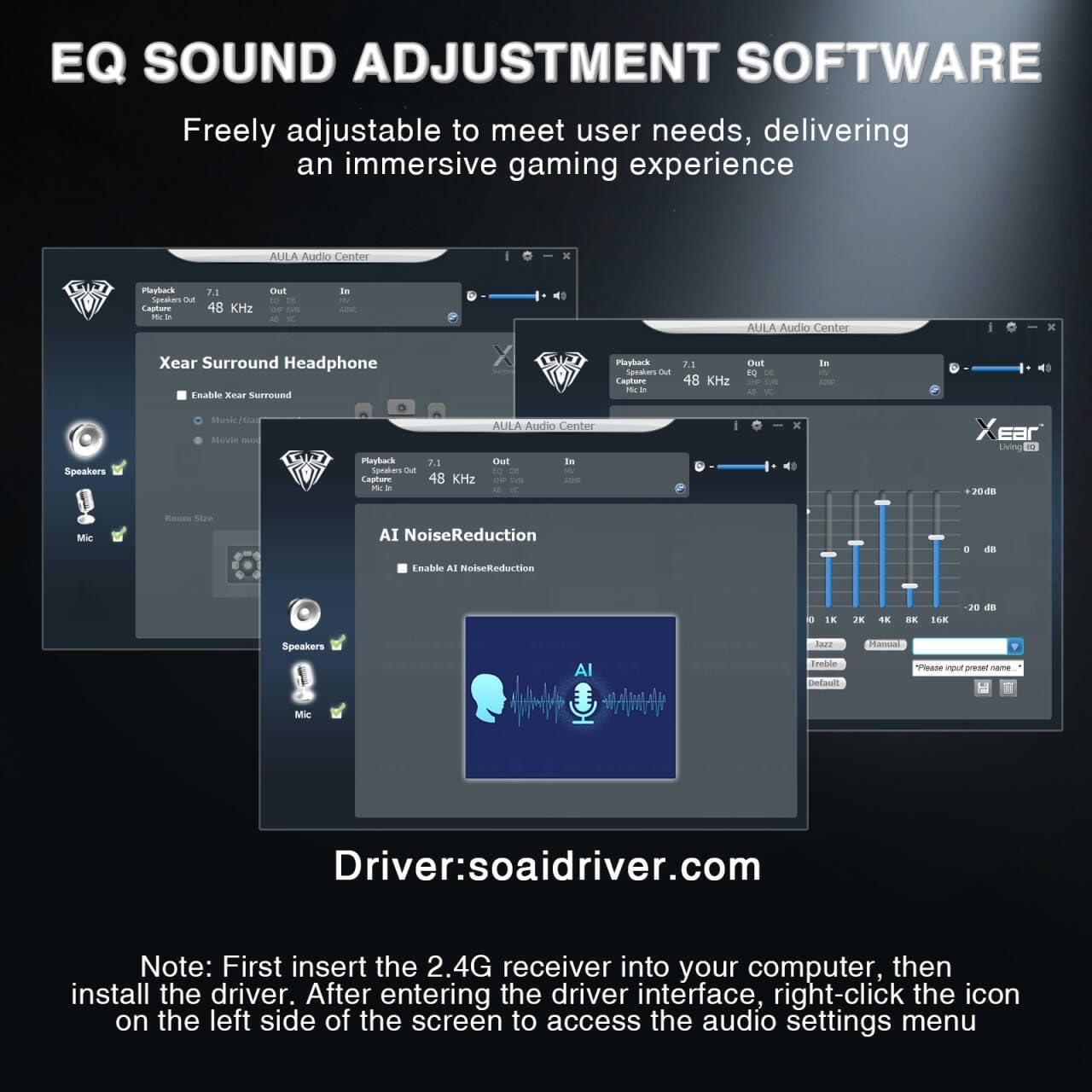
Image: Screenshots of the AULA Audio Center software interface, showing options for Xear Surround Headphone, AI Noise Reduction, and Equalizer settings for sound customization.
4.3 Chiếu sáng RGB
The headset features 16 million-color RGB lighting.
- Bật/tắt RGB: Press the RGB Lighting On/Off button twice to activate or deactivate the lighting.
- Đồng bộ hóa: RGB lighting can synchronize with gaming peripherals for an immersive atmosphere.
5. Sạc và tuổi thọ pin
The AULA G7 Pro is equipped with a 1000mAh rechargeable battery.
- Sạc: Connect the USB-C charging cable to the headset's charging port and the other end to a USB power source (e.g., computer, wall adapter). The indicator light will show charging status.
- Tuổi thọ pin: Up to 65 hours of playback with RGB lighting off, and approximately 20 hours with RGB lighting activated.
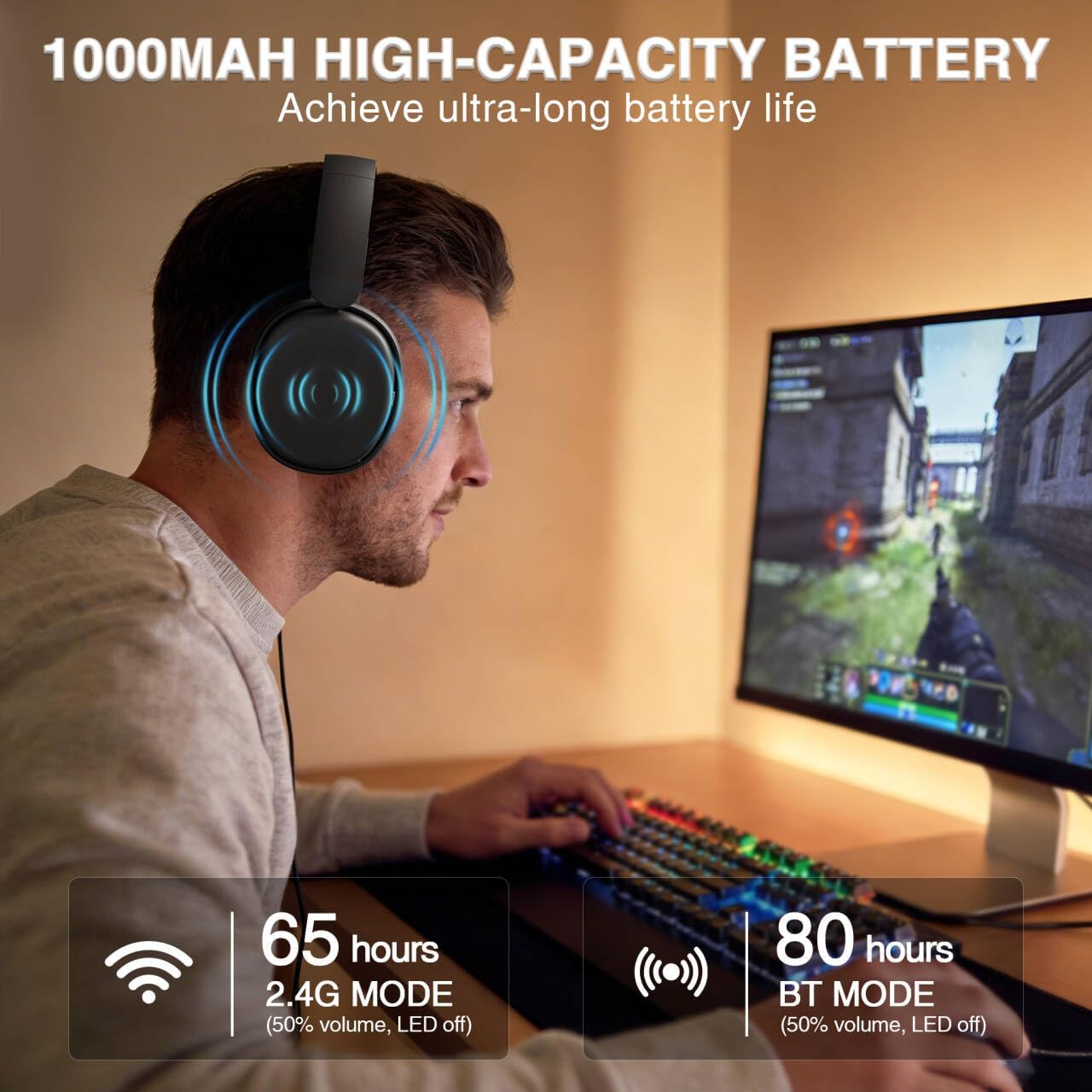
Image: A user wearing the AULA G7 Pro headset while gaming, illustrating the 65 hours of battery life in 2.4G mode (50% volume, LED off) and 80 hours in BT mode (50% volume, LED off).
6. Sự thoải mái và thiết kế
The headset is designed for extended wear comfort.
- Nhẹ: Weighing 280g, the headset is designed to minimize pressure during long gaming sessions.
- Phù hợp với công thái học: Features an ergonomic headband with protein leather padding and breathable mesh ear cushions.
- Có thể điều chỉnh: An 8-position adjustable steel frame and 360° acoustic chamber conform to facial contours, with micro-adjustable horizontal angles for a personalized fit.
7. Thông số kỹ thuật
| Tính năng | Chi tiết |
|---|---|
| Thương hiệu | AULA |
| Tên mẫu | G7 Pro |
| Công nghệ kết nối | 2.4G Wireless, BT5.3, Wired (3.5mm Jack) |
| Phiên bản Bluetooth | 5.3 |
| Kích thước trình điều khiển âm thanh | 40 milimét |
| Trở kháng | 32 Ohm |
| Kiểm soát tiếng ồn | Khử tiếng ồn chủ động (Micrô) |
| Dung lượng pin | 1000mAh |
| Thời lượng pin (chế độ RGB tắt) | Up to 65 Hours (2.4G Mode), Up to 80 Hours (BT Mode) |
| Cân nặng | 280g |
| Thiết bị tương thích | PC, PS5, PS4, Switch, Smartphones, Xbox (wired mode only) |
KHAI THÁC. Xử lý sự cố
If you encounter issues with your AULA G7 Pro headset, refer to the following common solutions:
- Không có âm thanh:
- Đảm bảo tai nghe đã được bật nguồn và sạc đầy.
- Check that the correct audio output device is selected in your system settings.
- Verify the volume control wheel on the headset is not at minimum.
- For 2.4G/BT modes, ensure the headset is properly paired/connected. Try re-pairing if necessary.
- For wired mode, ensure the 3.5mm cable is fully inserted into both the headset and the device.
- Micrô không hoạt động:
- Hãy đảm bảo micro có thể tháo rời được gắn chắc chắn.
- Check the microphone on/off toggle switch on the headset is in the 'on' position.
- Verify the correct microphone input device is selected in your system settings.
- Ensure the microphone is not muted in your operating system or communication software.
- Sự cố kết nối (2.4G/Bluetooth):
- Ensure the headset is within range of the receiver/device.
- Tránh nhiễu điện từ mạnh từ các thiết bị không dây khác.
- Hãy thử khởi động lại cả tai nghe và thiết bị được kết nối.
- Đối với 2.4G, hãy thử cắm bộ thu vào cổng USB khác.
- Âm thanh vòm 7.1 không hoạt động:
- Ensure you are in 2.4G wireless mode on a Windows PC.
- Verify that the AULA driver software is installed and configured correctly.
9. Bảo trì
Để đảm bảo độ bền và hiệu suất tối ưu của tai nghe, hãy tuân theo các hướng dẫn bảo dưỡng sau:
- Vệ sinh: Hãy dùng khăn mềm, khô để lau tai nghe. Không sử dụng chất tẩy rửa có tính ăn mòn hoặc dung môi.
- Kho: Bảo quản tai nghe ở nơi khô ráo, thoáng mát, tránh ánh nắng trực tiếp và nhiệt độ cao.
- Chăm sóc cáp: Tránh uốn cong đột ngột hoặc kéo cáp quá mức để tránh hư hỏng.
- Chăm sóc pin: For optimal battery life, avoid fully discharging the battery frequently. Charge the headset regularly, even if not in use for extended periods.
10. Bảo hành và Hỗ trợ
10.1 Thông tin bảo hành
The AULA G7 Pro Wireless Gaming Headset comes with a Bảo hành 1 năm Kể từ ngày mua. Bảo hành này bao gồm các lỗi sản xuất và chất lượng gia công trong điều kiện sử dụng bình thường. Bảo hành không bao gồm các hư hỏng do sử dụng sai mục đích, tai nạn, sửa đổi trái phép hoặc hao mòn thông thường.
10.2 Hỗ trợ khách hàng
For technical assistance, warranty claims, or any questions regarding your AULA G7 Pro headset, please contact AULA customer support through the retailer where you purchased the product or visit the official AULA webtrang web để biết thông tin liên hệ.
Please have your purchase receipt and product model number (G7 Pro) ready when contacting support.