
1. Giới thiệu
Cảm ơn bạn đã muaasing the OXS Thunder Duo Speaker System. This manual provides essential information for the safe and efficient use of your new speaker system. Please read this manual thoroughly before operating the device and retain it for future reference.
The OXS Thunder Duo is a 3.1.2 channel bookshelf speaker system designed for an immersive audio experience, compatible with various devices including TVs, PCs, gaming consoles, and mobile devices.
2. Thông tin an toàn
- Nguồn điện: Chỉ sử dụng bộ chuyển đổi nguồn được cung cấp. Đảm bảo âm lượngtage phù hợp với nguồn điện địa phương của bạn.
- Vị trí: Place the speakers on a stable, flat surface. Avoid placing near heat sources, direct sunlight, or in areas with high humidity or dust.
- Thông gió: Do not block any ventilation openings. Ensure adequate space around the speakers for proper airflow.
- Nước và độ ẩm: Do not expose the device to water, rain, or moisture. This product is not waterproof.
- Vệ sinh: Disconnect from power before cleaning. Use a soft, dry cloth. Do not use liquid cleaners or aerosols.
- Bảo dưỡng: Do not attempt to repair or disassemble the unit yourself. Refer all servicing to qualified personnel.
- Pin: The remote control uses AAA batteries. Ensure correct polarity when inserting. Do not mix old and new batteries.
3. Nội dung gói hàng
Xác minh rằng tất cả các mục được liệt kê dưới đây đều có trong gói hàng của bạn:
- OXS Thunder Duo Speakers (2 units)
- Điều khiển từ xa (bao gồm 2 pin AAA)
- Cáp HDMI
- Cáp quang
- Bộ đổi nguồn
- Hướng dẫn sử dụng (tài liệu này)
4. Sản phẩm hếtview
The OXS Thunder Duo speaker system consists of two bookshelf speakers designed for tabletop placement. Below is a general representation of the product and its typical components.
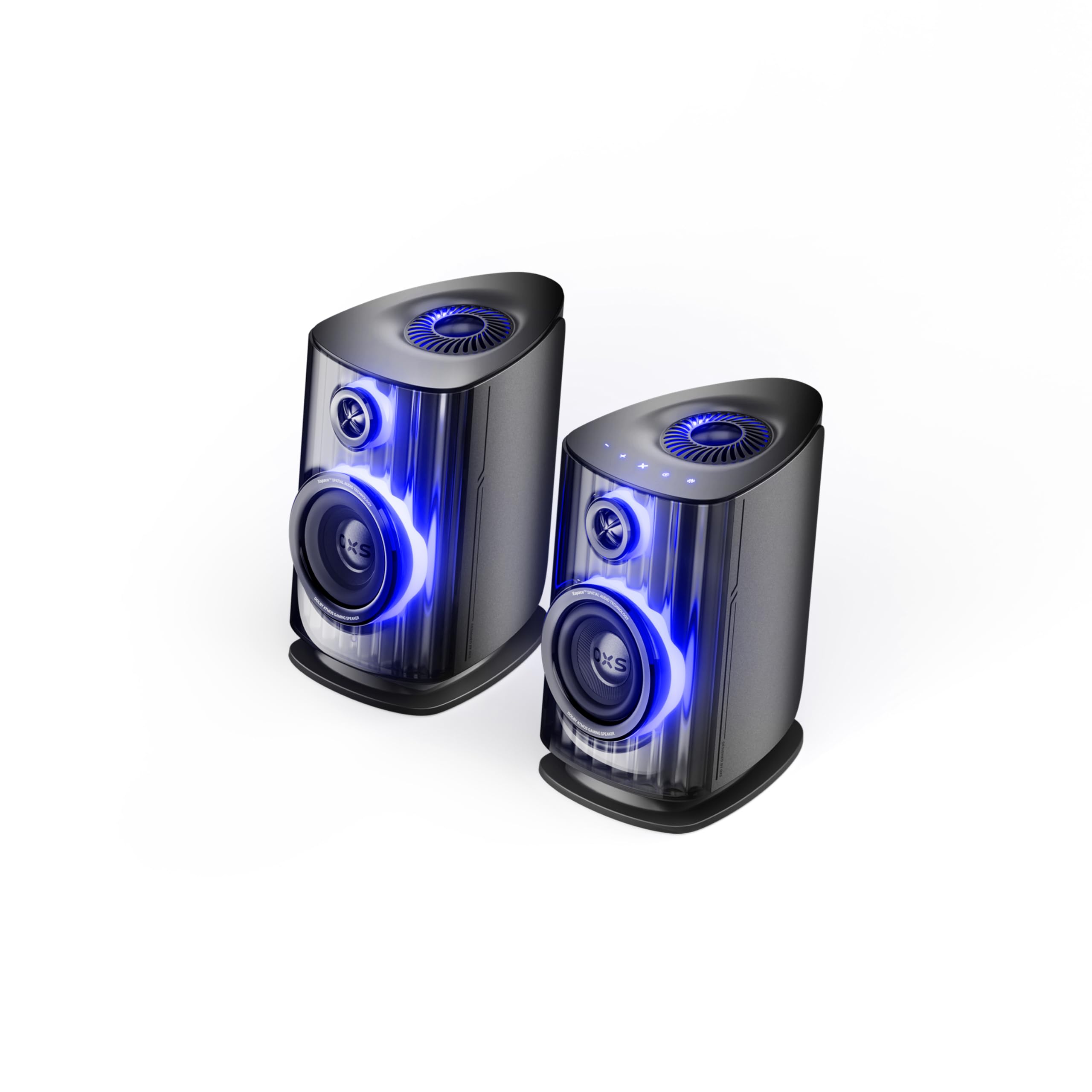
Image: OXS Thunder Duo Speaker System. This image shows the two main speaker units, typically placed on a tabletop. The design features a sleek, modern aesthetic with speaker grilles visible on the front.
4.1. Các thành phần loa
- Loa chính: Houses the primary audio drivers and control circuitry.
- Satellite Speaker Unit: Connects to the main unit to provide a wider soundstage.
- Công suất đầu vào: Để kết nối bộ đổi nguồn.
- Đầu vào âm thanh: HDMI IN, USB-C, eARC, Optical for various source connections.
4.2. Điều khiển từ xa
The included remote control allows for convenient operation of the speaker system from a distance. It typically includes buttons for:
- Bật/Tắt nguồn
- Tăng/Giảm âm lượng
- Input Source Selection (HDMI, USB-C, eARC, Optical)
- Tắt tiếng
- Audio Mode Selection (e.g., Surround)
5. Thiết lập
5.1. Vị trí đặt loa
Place the OXS Thunder Duo speakers on a stable, flat tabletop surface. For optimal sound, position them equidistant from your listening position and at ear level. Ensure there are no obstructions between the speakers and your listening area.
5.2. Kết nối nguồn điện
- Connect the power adapter to the power input port on the main speaker unit.
- Cắm bộ đổi nguồn vào ổ cắm trên tường.
- The power indicator on the speaker will illuminate, indicating it is in standby mode.
5.3. Kết nối nguồn âm thanh
The OXS Thunder Duo offers multiple connectivity options:
- HDMI (eARC): For connecting to TVs with an HDMI eARC/ARC port. Use the provided HDMI cable. This connection supports high-quality audio and allows TV remote control of speaker volume.
- HDMI VÀO: For connecting other HDMI-enabled devices like gaming consoles or Blu-ray players.
- Quang học: For connecting to TVs or other devices with an optical audio output. Use the provided optical cable.
- USB-C: For connecting to PCs, laptops, or compatible mobile devices.
Connect your desired audio source to the corresponding input port on the main speaker unit.
6. Hướng dẫn vận hành
6.1. Bật / Tắt nguồn
Press the Power button on the remote control or the main speaker unit to turn the system on or off. The power indicator will change status accordingly.
6.2. Chọn nguồn đầu vào
Press the 'Input' or dedicated source buttons (e.g., HDMI, Optical, USB-C) on the remote control to switch between connected audio sources. The current input source will typically be indicated by an LED or display on the main speaker unit.
6.3. Điều khiển âm lượng
Use the 'Volume Up' (+) and 'Volume Down' (-) buttons on the remote control to adjust the audio level. Press the 'Mute' button to temporarily silence the audio.
6.4. Chế độ âm thanh
The OXS Thunder Duo supports surround sound audio output. Use the 'Mode' button on the remote control to cycle through available audio modes, if applicable, to optimize your listening experience for different content types.
7. Kết nối
The OXS Thunder Duo offers versatile connectivity for a wide range of devices:
- HDMI VÀO: Connects to various HDMI-enabled devices.
- USB-C: Ideal for direct digital audio connection to computers (PC), laptops, and mobile devices running Windows, Android, or iOS.
- eARC (Kênh phản hồi âm thanh nâng cao): Connects to compatible TVs for high-fidelity audio transmission and simplified control.
- Quang học: Provides a digital audio connection for TVs, game consoles (PlayStation, XBOX, Switch), and other devices with an optical output.
8. Bảo trì
Proper maintenance ensures the longevity and performance of your OXS Thunder Duo speaker system.
- Vệ sinh: Thường xuyên lau chùi bề mặt loa bằng vải mềm, khô, không xơ. Không sử dụng chất tẩy rửa có tính mài mòn, sáp hoặc dung môi.
- Bụi: Keep the speaker grilles free from dust accumulation. Use a soft brush or a vacuum cleaner with a brush attachment on a low setting.
- Kho: Nếu cất loa trong thời gian dài, hãy ngắt nguồn điện và cất ở nơi khô ráo, thoáng mát, tốt nhất là giữ nguyên trong bao bì gốc.
KHAI THÁC. Xử lý sự cố
If you encounter issues with your OXS Thunder Duo, refer to the following common problems and solutions:
| Vấn đề | Nguyên nhân có thể | Giải pháp |
|---|---|---|
| Không có điện | Power cable not connected; Power outlet not active; Speaker is off. | Ensure power cable is securely connected. Test the outlet with another device. Press the Power button on the remote or speaker. |
| Không có âm thanh | Incorrect input source selected; Volume too low or muted; Audio cable not connected properly; Source device not outputting audio. | Select the correct input source. Increase volume and check if muted. Reconnect audio cables. Check audio settings on your source device. |
| Điều khiển từ xa không hoạt động | Batteries are dead or incorrectly inserted; Obstruction between remote and speaker. | Replace batteries, ensuring correct polarity. Remove any obstructions. Ensure remote is pointed at the main speaker unit. |
| Âm thanh bị méo | Âm lượng quá lớn; Chất lượng nguồn âm thanh kém; Kết nối cáp lỏng lẻo. | Lower the volume. Check the audio quality from the source. Ensure all cables are securely connected. |
If the problem persists after trying these solutions, please contact OXS customer support.
10. Thông số kỹ thuật
| Tính năng | Đặc điểm kỹ thuật |
|---|---|
| Thương hiệu | OXS |
| Số hiệu mẫu | Thunder DUO |
| Công suất tối đa của loa | 220 Watt |
| Đáp ứng tần số | 20 KHz |
| Công nghệ kết nối | HDMI IN, USB-C, eARC, Optical |
| Chế độ đầu ra âm thanh | Bao quanh |
| Kiểu lắp đặt | Giá để bàn |
| Product Exterior Material | ABS & PVC |
| Loại loa | Kệ sách |
| Sử dụng được đề xuất | Computer, TV, Gaming Consoles |
| Màu sắc | Người khổng lồ |
| Không thấm nước | SAI |
| Loại bảo hành | Bảo hành có giới hạn |
| Kích thước loa | 1.5 inch |
| Cấu hình kênh loa | 3.1.2 |
| Tỷ lệ S/N | 96 dB |
| Pin | Sử dụng 2 pin AAA (đã bao gồm cho điều khiển từ xa) |
| Kích thước sản phẩm (D x R x C) | 17.8 x 21.5 x 27.6cm |
| Trọng lượng sản phẩm | 11.02 pound |
| Thiết bị tương thích | TV, PC, PlayStation, XBOX, Mobile devices (Windows, Android, iOS), Switch |
| Mã số UPC | 199284067936 |
| ASIN | B0GDFVBVB3 |
11. Bảo hành và Hỗ trợ
The OXS Thunder Duo Speaker System comes with a Limited Warranty. Please refer to the warranty card included in your package for specific terms and conditions, including the duration and coverage details.
For technical support, troubleshooting assistance, or warranty claims, please contact OXS customer service through the contact information provided on the official OXS website or your purchase documentation. Please have your model number (Thunder DUO) and proof of purchase ready when contacting support.