
1. Giới thiệu
This manual provides detailed instructions for setting up, operating, maintaining, and troubleshooting your GMKtec M6 Ultra Mini PC. This compact and powerful desktop computer is equipped with an AMD Ryzen 5 7640HS processor, designed for a wide range of tasks from office productivity to 4K video editing and gaming.

Image: The GMKtec M6 Ultra Mini PC, showcasing thiết kế nhỏ gọn.
2. Nội dung gói hàng
Vui lòng kiểm tra xem tất cả các mục được liệt kê dưới đây có trong gói hàng của bạn không:
- GMKtec M6 Ultra Mini PC Unit
- Bộ đổi nguồn
- Cáp HDMI
- Giá đỡ VESA
- Screw Set for VESA Mount
- Hướng dẫn sử dụng

Image: All items included in the GMKtec M6 Ultra Mini PC package.
3. Sản phẩm hếtview
3.1. Processor and Graphics
The M6 Ultra is powered by the AMD Ryzen 5 7640HS processor, built on TSMC's 4nm FinFET process with Zen4 architecture. It integrates Radeon 760M graphics, utilizing the latest RDNA 3 architecture, providing performance comparable to a dedicated GTX 1650 Ti GPU.

Image: Diagram illustrating the AMD Ryzen 5 7640HS processor.
3.2. Cổng và giao diện
The Mini PC offers a comprehensive set of ports for connectivity:
- Đầu ra video: 1x HDMI 2.0 (4K@60Hz), 1x DisplayPort (up to 8K@60Hz), 1x USB4.0 Type-C (full-featured, PD/DP/40Gbps)
- Cổng USB: 2x USB-A 3.2 Gen2 (front, 10Gbps), 2x USB-A 3.2 Gen2 (rear), 2x USB-A 2.0 (rear)
- Mạng: 2x 2.5GbE LAN ports (Intel i226V)
- Không dây: Wi-Fi 6E, Bluetooth 5.2
- Âm thanh: 1x Giắc cắm tai nghe 3.5 mm
- Quyền lực: DC VÀO
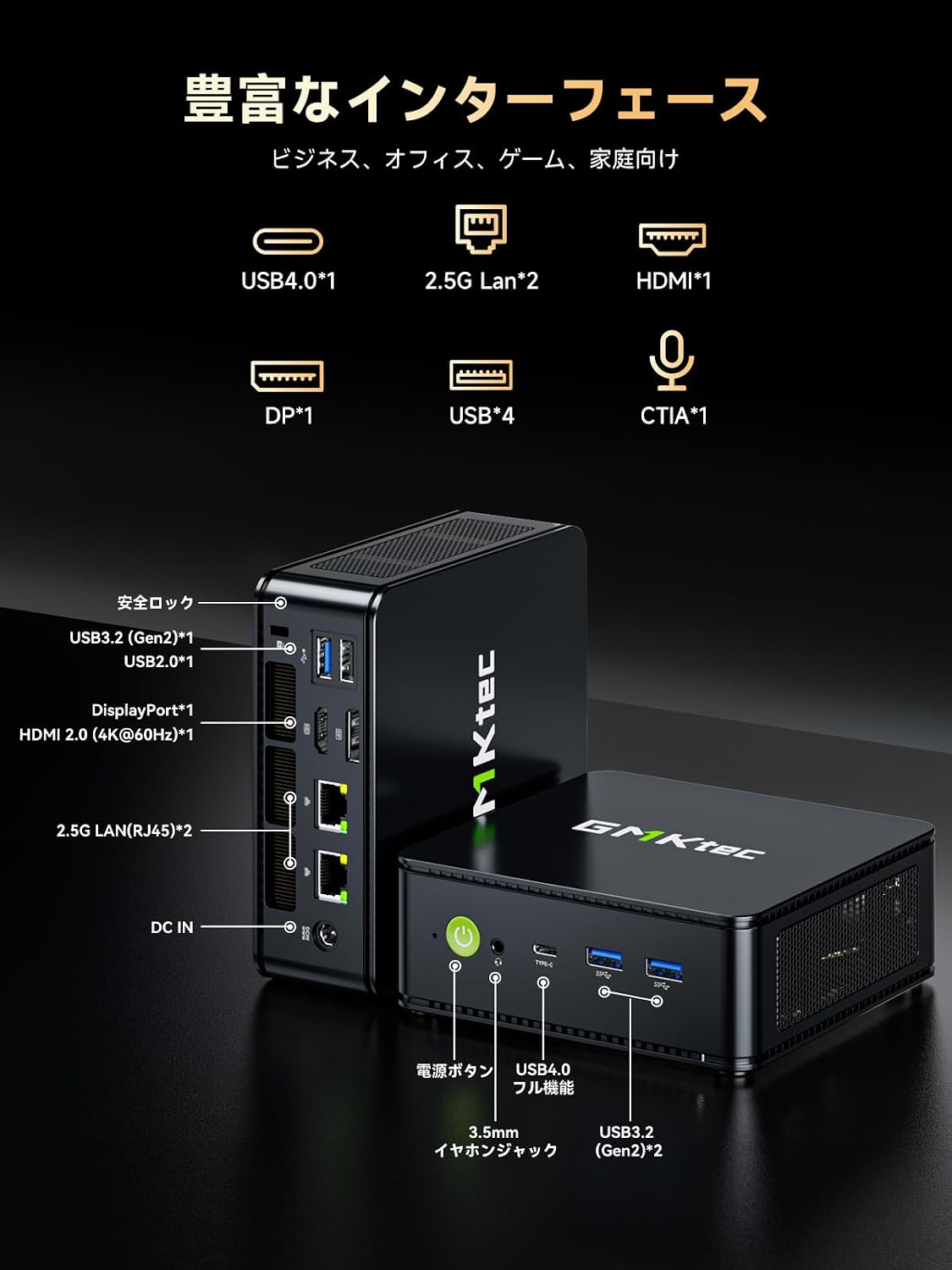
Hình ảnh: Chi tiết view of the GMKtec M6 Ultra Mini PC's front and rear ports.
4. Hướng dẫn cài đặt
4.1. Kết nối ban đầu
- Kết nối với màn hình: Use the provided HDMI cable to connect the Mini PC to your monitor or TV. Alternatively, use a DisplayPort or USB4 Type-C cable for compatible displays.
- Kết nối thiết bị ngoại vi: Hãy cắm bàn phím, chuột và các thiết bị USB khác vào các cổng USB có sẵn.
- Kết nối với nguồn điện: Kết nối bộ chuyển đổi nguồn với cổng DC IN trên máy tính mini, sau đó cắm bộ chuyển đổi vào ổ cắm điện.
- Bật nguồn: Nhấn nút nguồn nằm ở mặt trước của Mini PC. Đèn báo nguồn sẽ sáng.
4.2. Lắp đặt giá đỡ VESA
Giá đỡ VESA đi kèm cho phép bạn gắn Mini PC vào mặt sau của màn hình tương thích, giúp tiết kiệm không gian trên bàn làm việc.
- Attach the VESA mount bracket to the back of your monitor using the provided screws. Ensure it is securely fastened.
- Slide the Mini PC onto the VESA mount bracket until it clicks into place.

Image: The Mini PC shown mounted on a monitor and its compact size for portability.
5. Hướng dẫn vận hành
5.1. Bật/Tắt nguồn
- Bật nguồn: Nhấn nút nguồn một lần.
- Tắt máy: From the operating system, select "Shut down." Alternatively, press and hold the power button for 5 seconds to force a shutdown (not recommended for regular use).
5.2. Chế độ hiệu suất
The Mini PC offers three TDP (Thermal Design Power) modes to optimize performance and noise levels:
- Silent Mode (35W): Prioritizes quiet operation and energy efficiency for light tasks.
- Balanced Mode (45W): Offers a good balance between performance and noise for everyday use.
- Chế độ hiệu năng (50W): Maximizes processing power for demanding applications like gaming or video editing.
These modes can typically be switched via the BIOS settings or a dedicated utility provided by GMKtec (refer to the operating system's documentation for specific instructions).

Image: Visual representation of the three performance modes and their TDPs.
5.3. Thiết lập nhiều màn hình
The M6 Ultra supports up to three simultaneous displays, enhancing productivity for various tasks.
- Connect your monitors to the HDMI 2.0, DisplayPort, and USB4 Type-C ports.
- Configure display settings within your operating system (e.g., Extend, Duplicate) to suit your workflow.

Image: The Mini PC connected to three external displays, demonstrating multi-screen capability.
5.4. Kết nối mạng
The Mini PC offers both wired and wireless high-speed network options.
- Wired: Connect Ethernet cables to the dual 2.5GbE LAN ports for ultra-fast and stable wired connections, ideal for NAS or large file chuyển nhượng.
- Không dây: Utilize Wi-Fi 6E for stable wireless connectivity, especially on the less congested 6GHz band, suitable for online gaming and streaming.

Image: Illustration of the dual 2.5GbE LAN ports and their high-speed capabilities.
6. Memory and Storage Expansion
The GMKtec M6 Ultra Mini PC provides flexible options for upgrading its memory and storage.
- Ký ức: The device comes with 32GB DDR5 memory and can be expanded up to a maximum of 128GB. It features dual-channel SO-DIMM slots, with each slot supporting up to 64GB.
- Kho: It includes a 512GB NVMe SSD. There are two PCIe 4.0 compatible M.2 2280 slots, allowing for expansion or replacement up to a total of 8TB (4TB x 2).
To access the memory and storage slots, carefully open the Mini PC casing. Refer to the detailed instructions in the full user manual for safe component installation.

Hình ảnh: Nội bộ view of the Mini PC, highlighting the DDR5 RAM and M.2 SSD slots for expansion.
7. Hệ thống làm mát
The M6 Ultra features an advanced dual-fan cooling system with an all-around airflow design. This ensures efficient heat dissipation and stable operation even under high loads, while maintaining a quiet environment (as low as 38dB).

Image: Illustration of the Mini PC's advanced dual-fan cooling system and 360-degree airflow.
8. Bảo trì
Bảo trì thường xuyên giúp đảm bảo độ bền và hiệu suất tối ưu cho Mini PC của bạn.
- Vệ sinh: Periodically clean the exterior of the Mini PC with a soft, dry cloth. Use compressed air to gently clear dust from ventilation openings. Do not use liquid cleaners directly on the device.
- Cập nhật phần mềm: Luôn cập nhật hệ điều hành và trình điều khiển để đảm bảo tính bảo mật và hiệu suất.
- Thông gió: Ensure the Mini PC is placed in a well-ventilated area and that its air vents are not obstructed.
KHAI THÁC. Xử lý sự cố
Nếu bạn gặp sự cố với máy tính mini của mình, hãy tham khảo các giải pháp phổ biến sau:
| Vấn đề | Nguyên nhân có thể | Giải pháp |
|---|---|---|
| Không có điện | Dây nguồn chưa được kết nối, bộ chuyển đổi bị lỗi, ổ cắm điện có vấn đề. | Check power connections, try a different outlet, ensure adapter is working. |
| Không hiển thị | Monitor off, incorrect input, faulty cable, weak signal. | Ensure monitor is on and set to correct input. Check/replace display cable. If using an HDMI switch, ensure it is powered. |
| System slow/unresponsive | Too many applications, low memory, overheating. | Close unnecessary programs. Check task manager for resource usage. Ensure proper ventilation. Consider upgrading RAM if frequently experiencing slowdowns. |
| Sự cố kết nối mạng | Cable disconnected, Wi-Fi signal weak, driver issues. | Check Ethernet cable. Restart router/modem. Update network drivers. Ensure Wi-Fi signal is strong. |
Nếu sự cố vẫn tiếp diễn sau khi đã thử các giải pháp này, vui lòng liên hệ với bộ phận hỗ trợ khách hàng.
10. Thông số kỹ thuật
| Tính năng | Chi tiết |
|---|---|
| Thương hiệu | GMKtec |
| Người mẫu | M6 Ultra-7640HS |
| Hệ điều hành | Windows (Đã cài đặt sẵn) |
| Mô hình CPU | AMD Ryzen 5 7640HS |
| Tốc độ CPU | Lên đến 5 GHz |
| Bộ xử lý đồ họa | Radeon 760M (Integrated) |
| RAM đã cài đặt | Bộ nhớ trong 32 GB DDR5 (có thể nâng cấp lên đến 128 GB) |
| Dung lượng lưu trữ | 512 GB NVMe SSD (Expandable up to 8 TB via 2x PCIe 4.0 M.2 slots) |
| Giao diện đầu ra video | HDMI 2.0, DisplayPort, USB4 Type-C |
| Độ phân giải màn hình tối đa | 8K (7680x4320 pixels) @60Hz |
| Cổng USB | 2x USB-A 3.2 Gen2 (front), 2x USB-A 3.2 Gen2 (rear), 2x USB-A 2.0 (rear), 1x USB4.0 Type-C |
| Mạng LAN | Dual 2.5GbE (Intel i226V) |
| Kết nối không dây | Wi-Fi 6E, Bluetooth 5.2 |
| Kích thước sản phẩm | 128.8 x 127 x 47.8mm |
| Cân nặng | Khoảng 523g |
| Phụ kiện kèm theo | Power Adapter, HDMI Cable, VESA Mount, Screws, Manual |
11. Bảo hành và Hỗ trợ
Your GMKtec M6 Ultra Mini PC comes with a Bảo hành 1 năm của nhà sản xuất kể từ ngày mua. Bảo hành này bao gồm các lỗi về vật liệu và tay nghề trong quá trình sử dụng bình thường.
For technical assistance, troubleshooting, or warranty claims, please contact GMKtec customer support. Our support team is available to provide assistance within 24 hours.
Vui lòng giữ lại hóa đơn mua hàng để xác nhận bảo hành.