
GeekShare GC1201A
GeekShare Hall Effect Switch Controller (GC1201A) User Manual
Model: GC1201A
1. Giới thiệu
The GeekShare Hall Effect Switch Controller is a versatile gaming controller designed for multi-platform compatibility, including Nintendo Switch (OLED/NS2/1/Lite), PC (Steam, Windows), and mobile devices (Android, iOS). It features dual-mode connectivity (Bluetooth and 2.4G wireless), a 1000mAh battery, 6-axis gyroscope, dual vibration motors, and customizable RGB lighting for an immersive gaming experience.
Nội dung gói
- 1 x GeekShare Hall Effect Wireless Controller
- Cáp sạc 1 x USB-C
- 1 x Bộ thu không dây 2.4G
- 1 x Hướng dẫn sử dụng
2. Các tính năng chính
- Cần điều khiển hiệu ứng Hall: Provides precise control and prevents stick drift.
- Chế độ kết nối kép: Seamlessly switch between Bluetooth 5.0 for mobile and consoles, and 2.4G wireless with the included dongle for PC.
- Khả năng tương thích đa nền tảng: Supports Nintendo Switch (OLED/NS2/1/Lite), PC (Steam, Windows), Android, and iOS devices.
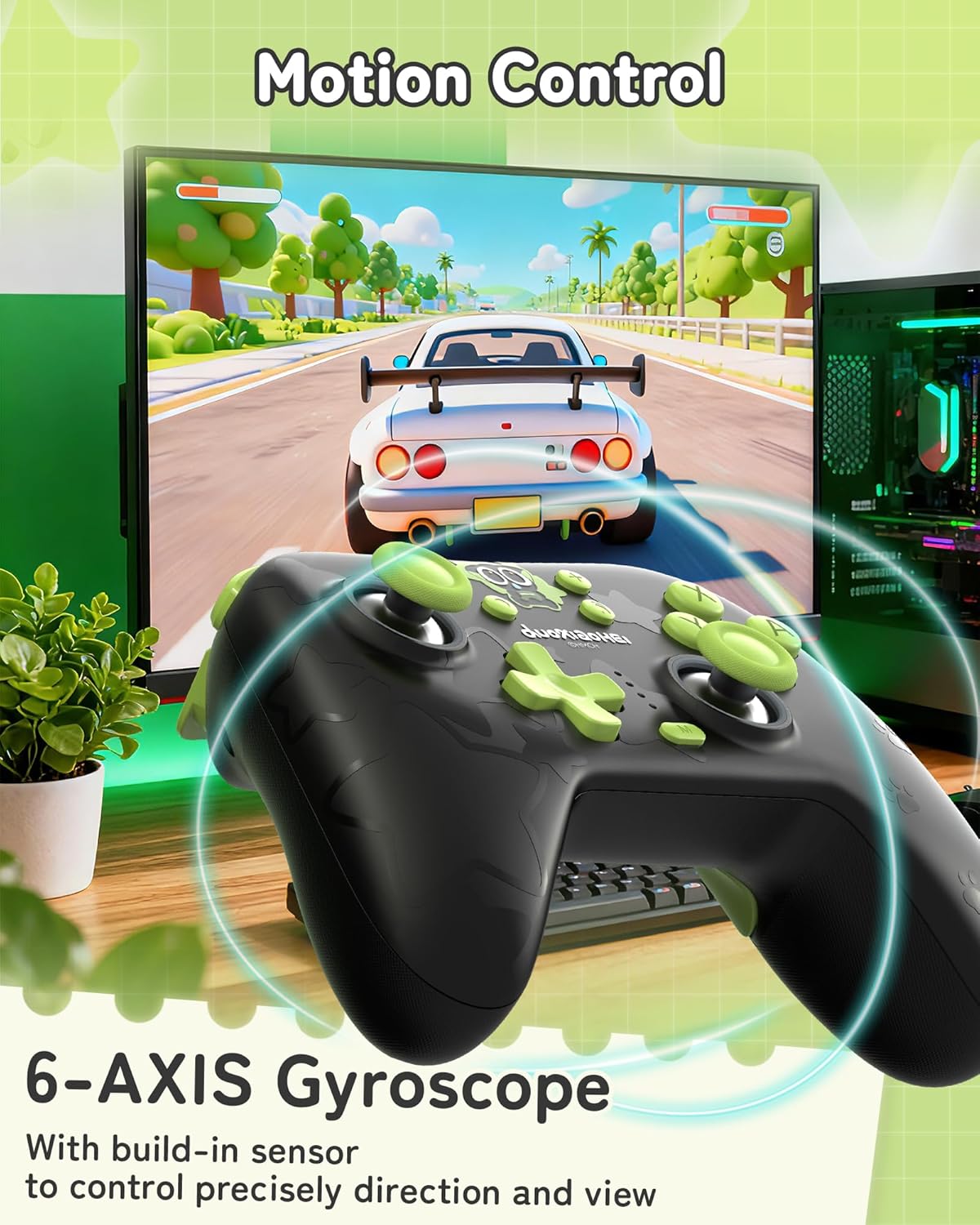
- Phản hồi sâu sắc: Features a 6-axis gyroscope for motion control and dual vibration motors with 5-level adjustment for realistic haptic feedback.
- Pin sử dụng lâu dài: Integrated 1000mAh rechargeable battery offers up to 15 hours of continuous gameplay.
- Ánh sáng RGB có thể tùy chỉnh: Enhance your gaming setup with personalized RGB light effects.
- Các nút có thể lập trình: Two back buttons (M1, M2) can be mapped to complex commands for quick execution.
- Chức năng Turbo: Auto and manual turbo settings for rapid-fire actions.
Tùy chọn kết nối
The controller supports three connection methods: Bluetooth, 2.4G wireless (with dongle), and wired USB-C.

Nút có thể lập trình
The M1 and M2 buttons on the back can be programmed to perform specific actions, allowing for quick execution of complex in-game commands.

Phản hồi rung
Equipped with dual motors, the controller provides adjustable vibration feedback to enhance immersion. There are 5 levels of vibration intensity.

Tuổi thọ pin
The built-in 1000mAh battery provides extended gameplay. A full charge takes approximately 2.5 hours and offers up to 20 hours of continuous use.

Chức năng Turbo
The controller supports both automatic and manual turbo functions, allowing for rapid, repeated input of a button press. This is typically activated by pressing the 'M' button along with a desired action key.

Kiểm soát chuyển động
A built-in 6-axis gyroscope enables precise motion control, allowing for intuitive direction and view adjustments in compatible games.
3. Thiết lập và kết nối
3.1 Sạc bộ điều khiển
Before first use, fully charge the controller. Connect the included USB-C cable to the controller's charging port and the other end to a USB power source (e.g., console, PC, or USB wall adapter). The indicator lights will show charging status and turn off when fully charged.
3.2 Connecting to Nintendo Switch (Bluetooth)
- Trên máy Nintendo Switch của bạn, hãy vào Menu TRANG CHỦ.
- Chọn "Bộ điều khiển" > "Thay đổi kiểu cầm/thứ tự".
- Press and hold the Pairing button on the top of the GeekShare controller until the indicator lights begin to flash rapidly.
- The Switch will detect the controller. Once paired, the indicator light(s) on the controller will remain solid.
- Note: This controller may not support waking up the Switch console from sleep mode. You may need to manually wake the console before connecting.
3.3 Connecting to PC (2.4G Wireless)
- Cắm bộ thu không dây 2.4G vào cổng USB trống trên máy tính của bạn.
- Turn on the GeekShare controller.
- The controller should automatically connect to the receiver. The indicator light(s) on the controller will remain solid once connected.
- If connection fails, press the pairing button on the controller and the button on the 2.4G receiver simultaneously to initiate pairing.
3.4 Kết nối với thiết bị di động (Bluetooth)
- Hãy đảm bảo Bluetooth đã được bật trên thiết bị Android hoặc iOS của bạn.
- On your device, go to Bluetooth settings and scan for new devices.
- Press and hold the Pairing button on the top of the GeekShare controller until the indicator lights begin to flash rapidly.
- Select "GeekShare Controller" (or similar name) from the list of available devices.
- Once paired, the indicator light(s) on the controller will remain solid.
3.5 kết nối có dây
Connect the controller directly to your device (Switch dock, PC) using the USB-C cable. The controller will function as a wired controller and will also charge simultaneously.
4. Hướng dẫn vận hành
4.1 Điều khiển cơ bản
The controller features standard button layouts including A/B/X/Y buttons, D-pad, Left/Right joysticks, L/R/ZL/ZR shoulder buttons, and Home/Capture/Plus/Minus buttons. Refer to in-game prompts for specific button functions.
4.2 Programming M1/M2 Buttons
The M1 and M2 buttons on the back can be assigned to replicate other button presses or sequences. Consult the full user manual (included in the box) for detailed programming instructions, as the process may vary based on desired complexity.
4.3 Turbo Function Activation
To activate the Turbo function for a specific button:
- Press and hold the 'M' button.
- While holding 'M', press the desired action button (e.g., A, B, X, Y, L, R, ZL, ZR).
- Release both buttons. The selected button will now have the Turbo function enabled.
To adjust between manual and auto turbo, or to clear the turbo setting, refer to the detailed instructions in the included user manual.
4.4 Adjusting Vibration Intensity
The controller offers 5 levels of vibration intensity. Specific button combinations (e.g., 'M' button + D-pad Up/Down) are typically used to cycle through these levels. Refer to the included user manual for the exact key combinations.
4.5 Điều khiển ánh sáng RGB
The RGB lighting can be customized. This usually involves pressing a dedicated button or a combination of buttons to change colors, patterns, or turn the lighting on/off. Consult the included user manual for specific instructions.
5. Bảo trì và chăm sóc
- Giữ bộ điều khiển khô ráo và tránh xa nhiệt độ quá cao hoặc quá thấp.
- Vệ sinh bộ điều khiển bằng vải mềm, khô. Không sử dụng hóa chất mạnh hoặc vật liệu mài mòn.
- Tránh làm rơi bộ điều khiển hoặc va chạm mạnh.
- Store the controller in a clean, dust-free environment when not in use.
- Charge the controller regularly, even if not used frequently, to maintain battery health.
KHAI THÁC. Xử lý sự cố
6.1 Bộ điều khiển không kết nối
- Đảm bảo bộ điều khiển được sạc đủ điện.
- Verify that the correct connection mode (Bluetooth, 2.4G, Wired) is selected or attempted for your device.
- For Bluetooth, ensure your device's Bluetooth is on and the controller is in pairing mode (flashing lights).
- For 2.4G, ensure the receiver is properly inserted into the PC and try re-pairing if necessary.
- Hãy thử khởi động lại cả bộ điều khiển và thiết bị mà bạn đang cố gắng kết nối.
- Nếu kết nối với Switch, hãy đảm bảo bạn đang ở trong menu "Thay đổi kiểu cầm/thứ tự cầm".
6.2 Độ trễ đầu vào hoặc mất kết nối
- Hãy đảm bảo không có nhiễu điện từ mạnh nào ở gần đó.
- Move closer to the connected device (for wireless connections).
- For PC, ensure the 2.4G receiver is in a clear line of sight and not obstructed.
- Hãy thử kết nối có dây để loại trừ khả năng nhiễu sóng không dây.
6.3 Buttons or Joysticks Unresponsive
- Kiểm tra xem bộ điều khiển đã được kết nối và cấp nguồn đúng cách chưa.
- Restart the controller and the gaming device.
- Hãy đảm bảo không có mảnh vụn nào mắc kẹt xung quanh các nút hoặc cần điều khiển.
- If the issue persists, a factory reset (if available, consult the included manual) might be necessary.
6.4 Controller Not Charging
- Hãy đảm bảo cáp USB-C được kết nối chắc chắn với cả bộ điều khiển và nguồn điện.
- Hãy thử sử dụng cáp USB-C hoặc nguồn điện khác.
- Verify the power source is active and providing sufficient power.
7. Thông số kỹ thuật
| Số hiệu mẫu | GC1201A |
| Kết nối | Bluetooth 5.0, 2.4G Wireless (with receiver), USB-C Wired |
| Khả năng tương thích | Nintendo Switch (OLED/NS2/1/Lite), PC (Windows), Android, iOS |
| Dung lượng pin | 1000mAh |
| Giờ chơi | Up to 15-20 hours (approx.) |
| Thời gian sạc | Xấp xỉ 2.5 giờ |
| Cảm biến chuyển động | Con quay hồi chuyển trục 6 |
| Rung động | Dual Motors with 5-level adjustment |
| Tính năng đặc biệt | Hall Effect Joysticks, Programmable M1/M2 buttons, Turbo function, RGB Lighting |
8. Bảo hành và Hỗ trợ
For warranty information and technical support, please refer to the official GeekShare webBạn có thể truy cập trang web hoặc liên hệ trực tiếp với bộ phận chăm sóc khách hàng của họ. Thông tin chi tiết thường có thể được tìm thấy trên bao bì sản phẩm hoặc sách hướng dẫn sử dụng đi kèm.
GeekShare Official Webđịa điểm: Visit GeekShare Store on Amazon
Ask a question about this manual
Ask about setup, troubleshooting, compatibility, parts, safety, or missing instructions. Manuals+ will review the question and use this page’s manual context to help answer it.