
1. Giới thiệu
This manual provides essential information for the safe and efficient use of your HP 17.3 Inch FHD Business Laptop. Please read this guide thoroughly before operating your device to ensure optimal performance and longevity. This laptop is designed for business and everyday computing tasks, offering a large display, robust performance, and portability.
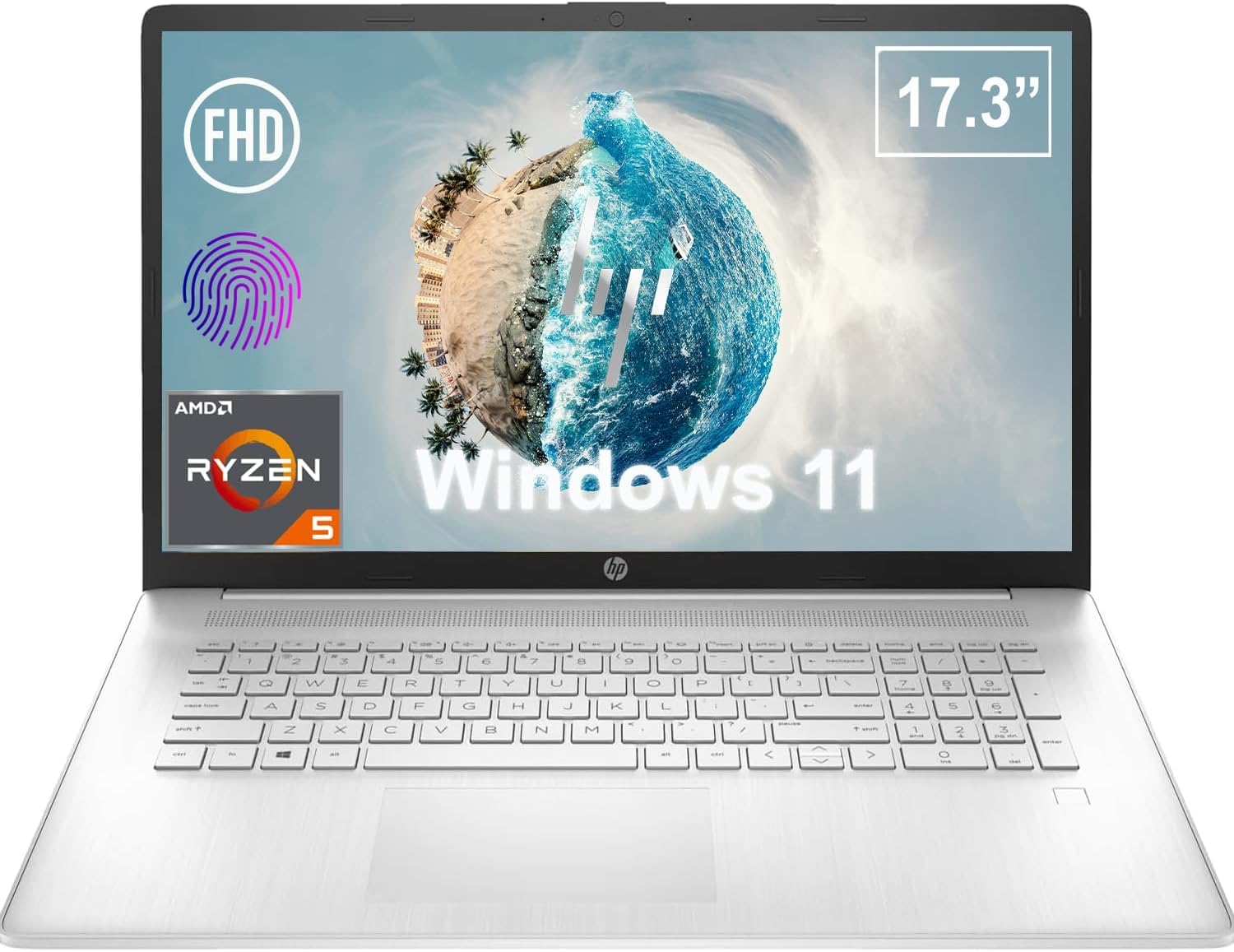
Hình 1.1: Mặt trước view of the HP 17.3 Inch FHD Business Laptop, showcasinMàn hình và bàn phím lớn.
2. Thiết lập
2.1 Mở hộp và kiểm tra ban đầu
Cẩn thận lấy tất cả các thành phần ra khỏi bao bì. Kiểm tra xem có đầy đủ các mục sau không:
- HP 17.3 Inch FHD Business Laptop
- Power Adapter (45 W Smart AC Power Adapter)
- Tài liệu (sách hướng dẫn này, thông tin bảo hành)
Inspect the laptop and accessories for any signs of damage. If any items are missing or damaged, contact your retailer or HP support immediately.
2.2 Kết nối bộ đổi nguồn
Before first use, ensure the laptop is fully charged. Connect the power adapter to the AC smart pin port on the side of the laptop and then plug the adapter into a power outlet.
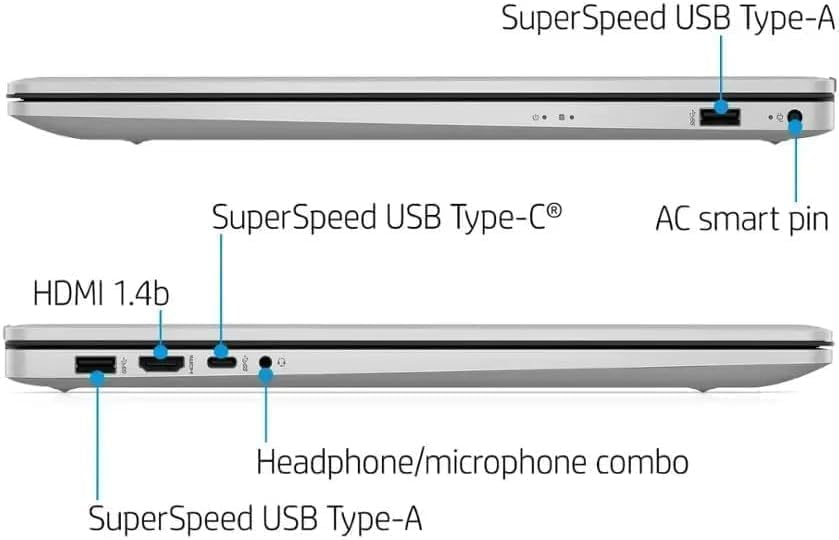
Hình 2.1: Mặt bên view illustrating the location of the AC smart pin and other ports.
2.3 Khởi động ban đầu và thiết lập Windows
Nhấn nút nguồn để bật máy tính xách tay. Làm theo hướng dẫn trên màn hình để hoàn tất quá trình cài đặt Windows 11 Home. Quá trình này bao gồm thiết lập tài khoản người dùng, kết nối mạng và các tùy chọn ban đầu.
3. Vận hành máy tính xách tay
3.1 Bàn phím và bàn di chuột
The laptop features a full-size QWERTY keyboard with a 10-key number pad for efficient data entry. The integrated touchpad provides precise cursor control. Refer to the operating system's settings for customizing touchpad gestures and keyboard shortcuts.
3.2 Đầu đọc dấu vân tay
For enhanced security and convenient login, utilize the integrated fingerprint reader. Set up your fingerprints through Windows Hello in the Windows 11 settings.
3.3 Webcam and Microphones
The HP True Vision 720p HD Camera and integrated dual array digital microphones are located at the top of the display. These are suitable for video conferencing and online communication.
3.4 Kết nối
- Wi-Fi: The laptop supports 802.11a/b/g/n/ac Wi-Fi for wireless internet access. Connect to available networks via the Windows network settings.
- Bluetooth: Bluetooth 5 allows for wireless connection to compatible devices such as headphones, mice, and keyboards. Enable and manage Bluetooth devices through Windows settings.
3.5 Ports and External Devices
The laptop is equipped with various ports for connecting external devices:
- 1 x USB Type-C (5Gbps, Data Only): For connecting USB-C compatible devices and data transfer.
- 2 x USB Type-A (5Gbps): For connecting standard USB devices like external drives, mice, or keyboards.
- 1 x HDMI 1.4b: For connecting to external displays or projectors.
- 1 x Headphone/Microphone Combo: For connecting a headset with a single 3.5mm jack.
- 1 x AC Smart Pin: For connecting the power adapter.

Figure 3.1: Open view of the laptop, highlighting the keyboard and touchpad area.
3.6 Quản lý pin
The laptop is powered by a 3-Cell, 41 Wh Li-ion battery, offering up to 8 hours and 30 minutes of video playback. Use the provided 45 W Smart AC Power Adapter for charging. HP Fast Charge technology allows for quicker charging times.
4. Bảo trì
4.1 Vệ sinh máy tính xách tay
Để duy trì vẻ ngoài và chức năng của máy tính xách tay:
- Sử dụng vải mềm, không có xơ dampened with water or a specialized screen cleaner for the display.
- Để vệ sinh bàn phím và khung máy, hãy sử dụng khăn mềm, khô. Tránh sử dụng hóa chất mạnh hoặc vật liệu mài mòn.
- Đảm bảo máy tính xách tay đã tắt nguồn và rút phích cắm trước khi vệ sinh.
4.2 Cập nhật phần mềm
Regularly update your Windows operating system and drivers to ensure optimal performance, security, and compatibility. Windows Update can be accessed through the Settings menu.
4.3 Security Software
The laptop comes preloaded with McAfee LiveSafe for security. Ensure this software is active and updated to protect against viruses and other threats.
KHAI THÁC. Xử lý sự cố
Phần này đề cập đến các vấn đề thường gặp mà bạn có thể gặp phải với máy tính xách tay HP của mình.
5.1 Các vấn đề về nguồn điện
- Máy tính xách tay không bật nguồn: Hãy đảm bảo bộ chuyển đổi nguồn được kết nối chắc chắn với cả máy tính xách tay và ổ cắm điện đang hoạt động. Kiểm tra xem pin đã được sạc đầy chưa.
- Pin không sạc: Kiểm tra bộ chuyển đổi nguồn và dây cáp xem có bị hư hỏng không. Thử cắm vào ổ cắm điện khác.
5.2 Sự cố hiển thị
- Không có hình ảnh trên màn hình: Kết nối màn hình ngoài để kiểm tra xem vấn đề có phải do màn hình của máy tính xách tay hay không. Khởi động lại máy tính xách tay.
- Hình ảnh nhấp nháy hoặc bị méo mó: Cập nhật trình điều khiển đồ họa. Điều chỉnh độ phân giải màn hình và tốc độ làm mới trong cài đặt Windows.
5.3 Các vấn đề về kết nối
- Wi-Fi không kết nối: Ensure Wi-Fi is enabled. Restart your router and the laptop. Check network settings for correct password and configuration.
- Thiết bị Bluetooth không ghép nối được: Ensure Bluetooth is enabled on both devices. Make sure the device is in pairing mode and within range.
Đối với các vấn đề phức tạp hơn, vui lòng liên hệ bộ phận hỗ trợ của HP. webtrang web hoặc liên hệ với dịch vụ khách hàng.
6. Thông số kỹ thuật
| Tính năng | Chi tiết |
|---|---|
| Thương hiệu | HP |
| Tên mẫu | HP17 |
| Số hiệu mẫu | i5-1135G7 |
| Kích thước màn hình | 17.3 inch |
| Kiểu hiển thị | IPS, Anti-Glare, LED |
| Nghị quyết | 1920 x 1080 (FHD) |
| Tốc độ làm mới | 60Hz |
| Bộ xử lý | AMD Ryzen 5 5500U (6 Cores, 12 Threads, up to 4.0 GHz Max Boost Clock) |
| Đồ họa | Đồ họa tích hợp AMD Radeon |
| Bộ nhớ RAM | 32 GB DDR4-3200 MHz (Max 64 GB) |
| Kho | Ổ SSD PCIe NVMe M.2 1 TB |
| Hệ điều hành | Windows 11 Home, 64-bit, English |
| Kết nối không dây | Wi-Fi 802.11a/b/g/n/ac, Bluetooth 5 |
| Cổng | 1x USB Type-C (5Gbps), 2x USB Type-A (5Gbps), 1x HDMI 1.4b, 1x Headphone/Microphone Combo, 1x AC Smart Pin |
| Webcam | HP True Vision 720p HD Camera |
| Âm thanh | Dual Speakers, Integrated Dual Array Digital Microphones |
| Ắc quy | 3-Cell, 41 Wh Li-ion (Up to 8.5 hours video playback) |
| Bộ đổi nguồn | 45 W Smart AC Power Adapter |
| Kích thước (Rộng x Sâu x Cao) | 40.07 x 25.78 x 2.06 cm (14.14"L x 9.31"W x 0.78"Th) |
| Cân nặng | Bắt đầu từ 2.07 kg |
| Tính năng đặc biệt | Fingerprint Reader, Lightweight Design, HP Fast Charge |
7. Bảo hành & Hỗ trợ
7.1 Thông tin bảo hành
This HP laptop comes with a 1-year manufacturer's limited warranty. For detailed terms and conditions, please refer to the warranty documentation included with your product or visit the official HP support webđịa điểm.
7.2 Hỗ trợ khách hàng
If you encounter issues that cannot be resolved using the troubleshooting steps in this manual, please contact HP customer support. You can find contact information and additional resources on the official HP webđịa điểm:
- Hỗ trợ HP Webđịa điểm: support.hp.com
- Cửa hàng HP: Cửa hàng HP trên Amazon