
Giới thiệu
Thank you for choosing the RAINPOINT 4-Zone Programmable Watering Timer. This device is designed to automate your garden and lawn irrigation, providing flexible and efficient watering schedules for up to four independent zones. Please read this manual carefully to ensure proper installation, operation, and maintenance of your watering timer.
Tính năng sản phẩm
- 4 vùng lập trình riêng biệt: Customize watering schedules (start time, duration, frequency) for each zone independently.
- Multiple Watering Cycle Modes: Set watering duration from 1 minute to 3 hours 59 minutes, and frequency for every 8 hours, every 12 hours, or every 1 to 7 days.
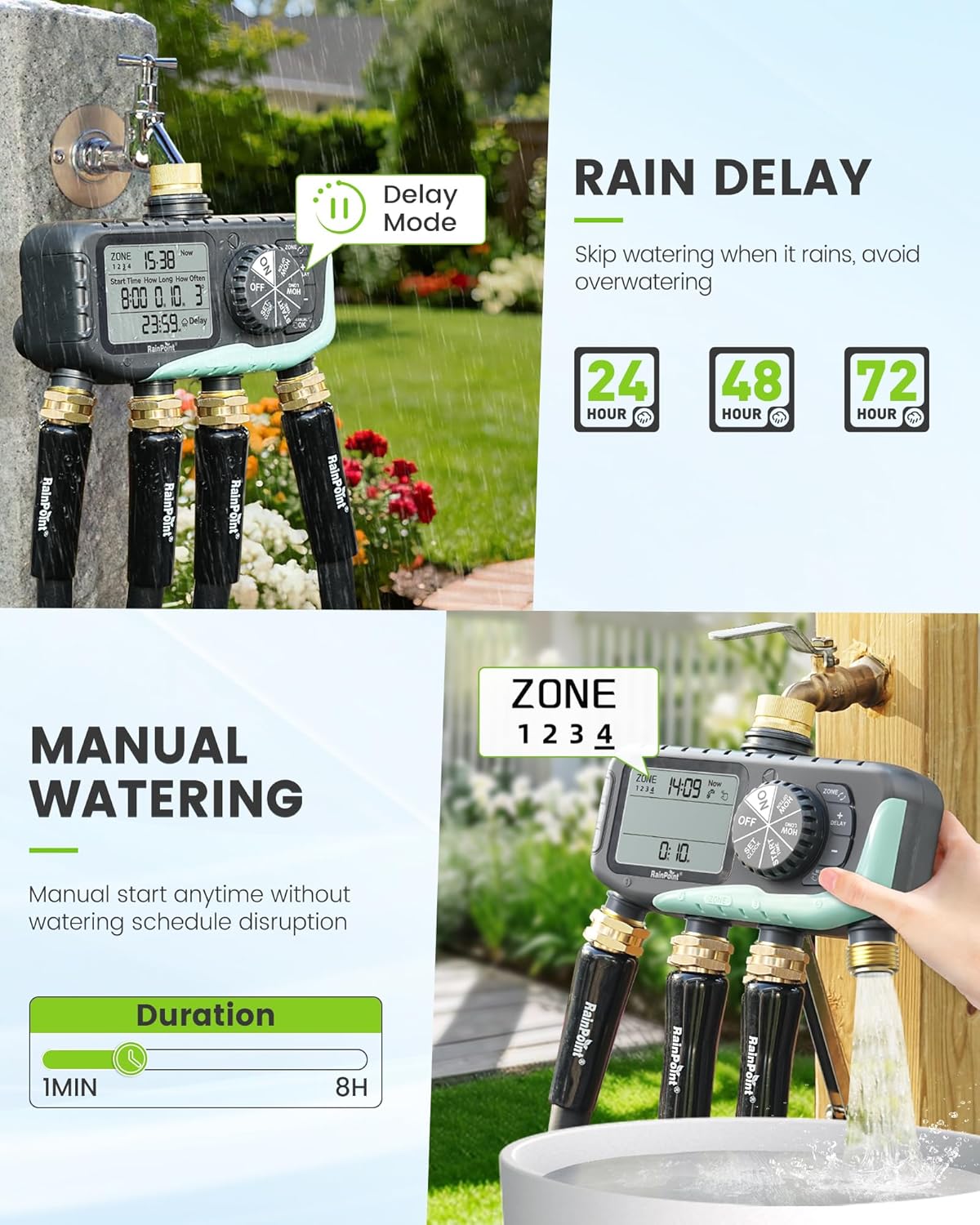
- Chức năng hoãn trận đấu do mưa: Skip watering for 24, 48, or 72 hours to conserve water during rainy periods.
- Chế độ tưới thủ công: Initiate watering instantly for 1 minute to 8 hours without affecting programmed schedules.
- Lập trình dễ dàng: Features a large 3.4-inch LCD screen, a large dial, and clear buttons for intuitive setup.
- Kết cấu bền bỉ: Equipped with solid brass inlet and outlet, leak-proof sealing rings, and an IP65 waterproof rating for outdoor use.
- Upgraded Coil Valve: Provides stronger water pressure and wider coverage compared to standard valves.
- Bảo vệ công suất thấp: Valves automatically close when battery power is low to prevent water waste.


Nội dung gói
- RAINPOINT 4-Zone Programmable Watering Timer
- Hướng dẫn sử dụng
- Standard 3/4-inch faucet adapter (if applicable)
Thiết lập và cài đặt
- Lắp đặt pin: Mở ngăn chứa pin ở phía sau đồng hồ hẹn giờ. Lắp hai (2) pin kiềm AA (không kèm theo), đảm bảo đúng cực. Đóng chặt ngăn chứa pin.
- Kết nối với vòi: Screw the timer onto a standard 3/4-inch outdoor faucet. Ensure the connection is tight to prevent leaks. It is recommended to use a short hose between the faucet and the timer to reduce stress on the faucet connection and allow for easier positioning.
- Kết nối ống: Attach your garden hoses to the four independent outlets (Zone 1, Zone 2, Zone 3, Zone 4) at the bottom of the timer. Ensure each connection is secure.
- Bật nguồn ban đầu: The LCD screen will light up, and the timer will be ready for programming.


Hướng dẫn sử dụng
1. Cài đặt thời gian hiện tại
Rotate the dial to the 'SET CLOCK' position. Use the '+' and '-' buttons to adjust the current time. Press 'OK' to confirm and move to the next setting (e.g., AM/PM or 24-hour format). Rotate the dial away from 'SET CLOCK' to save.
2. Programming Watering Schedules (for each zone)
Bộ hẹn giờ cho phép lập trình riêng biệt cho từng trong bốn vùng của nó.
- Chọn Vùng: Rotate the dial to 'PROGRAM'. Use the 'ZONE' button to select the desired zone (1, 2, 3, or 4) you wish to program.
- Đặt thời gian bắt đầu: Use the '+' and '-' buttons to set the desired watering start time for the selected zone. Press 'OK' to confirm.
- Đặt thời gian tưới nước: Use the '+' and '-' buttons to set how long the watering will last (from 1 minute to 3 hours 59 minutes). Press 'OK' to confirm.
- Đặt tần số: Use the '+' and '-' buttons to set how often the watering will occur (e.g., every 8 hours, every 12 hours, or every 1 to 7 days). Press 'OK' to confirm.
- Repeat steps a-d for each zone you wish to program. Rotate the dial to 'ON' to activate the programmed schedules.

3. Chức năng hoãn trận đấu do mưa
To temporarily pause watering due to rain:
- Rotate the dial to 'ON'.
- Nhấn nút 'DELAY'.
- Use the '+' or '-' buttons to select the desired delay duration (24, 48, or 72 hours).
- Press 'OK' to confirm. The timer will resume its programmed schedule after the delay period.
4. Tưới nước bằng tay
Để tưới nước ngay lập tức mà không ảnh hưởng đến lịch trình đã định của bạn:
- Rotate the dial to 'ON'.
- Press the 'MANUAL/OK' button.
- Use the '+' or '-' buttons to set the desired manual watering duration (from 1 minute to 8 hours).
- Press 'OK' to start manual watering. The timer will automatically return to its programmed schedule after the manual watering duration ends.
5. Low Power Protection
When the battery level is critically low, the timer's valves will automatically close to prevent continuous water flow and waste. Replace batteries promptly when the low battery indicator appears on the screen.

BẢO TRÌ
- Vệ sinh: Thường xuyên lau sạch bề ngoài của bộ hẹn giờ bằng một miếng vải mềm.amp vải. Không sử dụng chất tẩy rửa có tính mài mòn hoặc dung môi.
- Thay thế pin: Replace batteries annually or when the low battery indicator appears. Always use fresh AA alkaline batteries.
- Mùa đông: Before the first frost, disconnect the timer from the faucet and hoses. Drain any remaining water and store the unit indoors in a dry, protected area to prevent freezing damage.
- Check Washers: Regularly inspect the rubber washers in the inlet and outlet connections for wear or damage. Replace if necessary to prevent leaks.
Xử lý sự cố
- No Water Flow or Partial Flow:
- Kiểm tra mức pin và thay thế nếu pin yếu.
- Hãy đảm bảo vòi nước được mở hoàn toàn.
- Verify that the watering schedule is correctly programmed and activated ('ON' mode).
- Inspect hose connections for kinks or blockages.
- Check the timer's inlet filter for debris.
- Rò rỉ thông tin từ các kết nối:
- Ensure all connections (faucet, hoses) are tightened securely.
- Check rubber washers for proper seating and damage; replace if worn.
- Display Fading or Not Working:
- Thay pin mới.
- Avoid prolonged exposure to direct sunlight, which can degrade LCD screens over time. Consider shielding the display if installed in a very sunny area.
- Water Hammer (Pipes Clanging):
- This can occur when valves close rapidly. Consider installing a water hammer arrester between the faucet and the timer.
- Bộ hẹn giờ không phản hồi:
- Remove batteries for a few minutes, then reinsert them to reset the device. Reprogram as needed.
Thông số kỹ thuật
| Số hiệu mẫu | iob447 |
| Thương hiệu | ĐIỂM MƯA |
| ASIN | B0G32Z1HMB |
| Vật liệu | Nhựa, đồng thau |
| Màu sắc | Màu xanh da trời |
| Kích thước sản phẩm (D x R x C) | 2.54 x 2.54 x 2.54 cm (approx. 1 x 1 x 1 inch); 317.51 grams |
| Kích thước màn hình | 3.4 inch |
| Số cài đặt | 7 (liên quan đến các tùy chọn lập trình) |
| Xếp hạng chống thấm nước | IP65 |
| Nguồn điện | 2 pin kiềm AA (không kèm theo) |
Bảo hành và Hỗ trợ
RAINPOINT products are designed for reliability and performance. For warranty information, technical support, or any questions regarding your 4-Zone Programmable Watering Timer, please contact RAINPOINT customer service through the official website or your retailer's support channels. Please have your model number (iob447) and purchase information ready when contacting support.