
1. Giới thiệu
Thank you for choosing the Angrox Backlit Universal Remote Control for LG Smart TVs. This remote is designed to provide a seamless and enhanced television viewing experience, especially in low-light conditions. It serves as a direct replacement for your original LG TV remote, offering broad compatibility and ease of use without requiring complex setup procedures. This manual provides detailed instructions for setting up, operating, maintaining, and troubleshooting your new remote control.
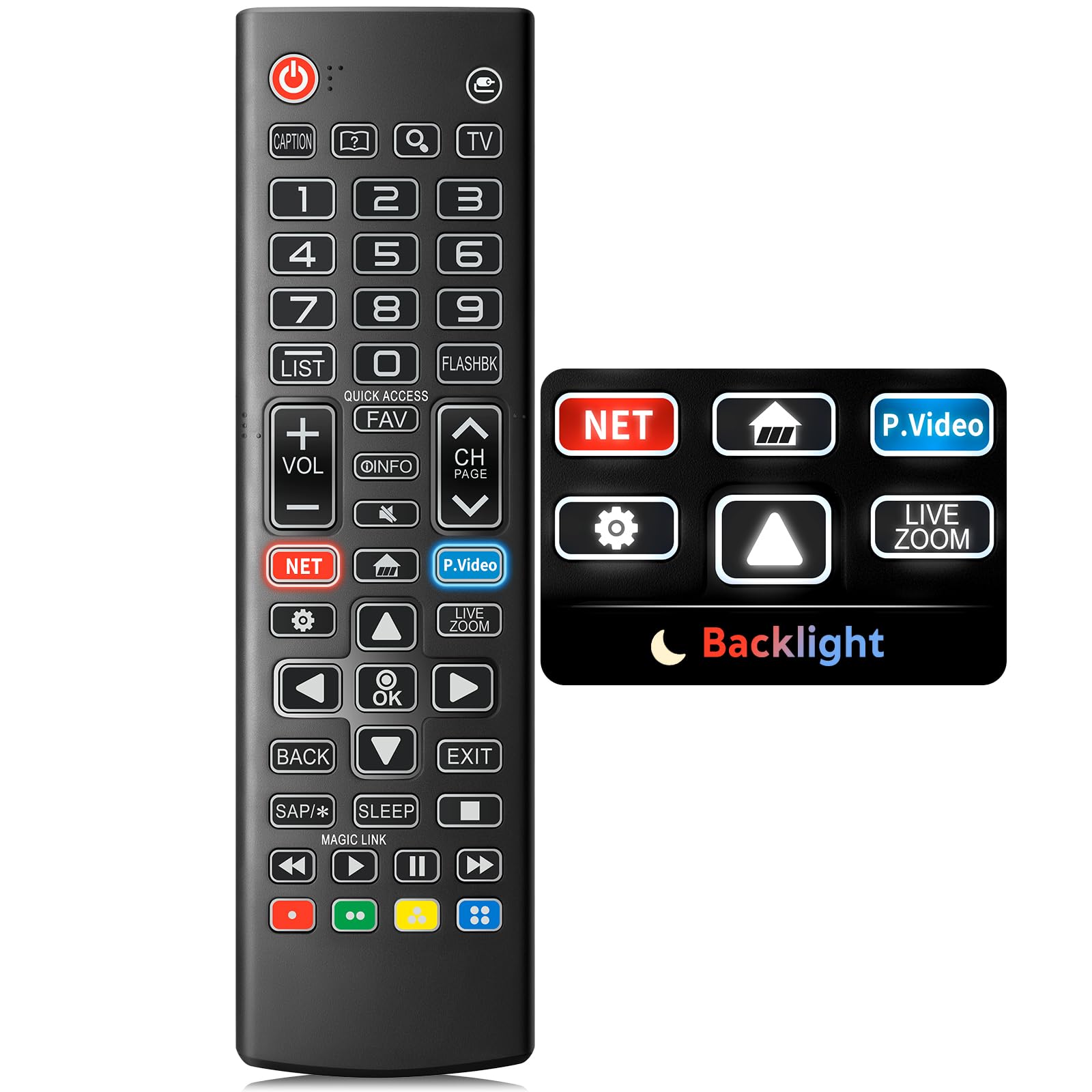
Image: The Angrox Backlit Universal Remote Control, a sleek black remote with clearly labeled buttons.
2. Các tính năng chính
- Easy Nighttime Operation: Features soft glow buttons that illuminate, allowing for clear visibility and use in dark environments without causing glare. The backlight activates with any button press and automatically turns off after 10 seconds of inactivity.
- Tương thích phổ quát: Designed as a direct replacement for LG TV remotes, compatible with all LG TV models. No programming or complex pairing is required; it works immediately out of the box.
- High-Quality Performance: Equipped with sensitive buttons and stable signal transmission for smooth and responsive operation.
- Thiết kế công thái học: Shaped to fit comfortably in the hand, reducing fatigue during extended use. The button layout is intuitive for users of all ages.
- Bền bỉ và đáng tin cậy: Constructed from high-quality, sturdy materials to withstand daily use and accidental drops, ensuring a long lifespan.

Image: A comparison showing the remote control with its backlight off and then with its buttons illuminated, highlighting the easy nighttime operation feature.

Image: The remote control displayed alongside various LG TV models (OLED, UHD, QNED, NanoCell), illustrating its broad compatibility.
3. Hướng dẫn thiết lập
3.1 Lắp đặt pin
- Xác định vị trí nắp ngăn chứa pin ở mặt sau của điều khiển từ xa.
- Trượt nắp xuống hoặc nhấn chốt để mở ngăn.
- Lắp hai (2) pin AAA, đảm bảo cực dương (+) và cực âm (-) thẳng hàng với các chỉ báo bên trong ngăn chứa.
- Đậy nắp ngăn chứa pin lại bằng cách trượt nó trở lại vị trí cũ cho đến khi nghe thấy tiếng tách.
Ghi chú: Batteries are not included with the remote control. Please use new AAA alkaline batteries for optimal performance.

Image: A visual guide demonstrating the correct insertion of two AAA batteries into the remote control's battery compartment.
3.2 Initial Use (No Pairing Required)
The Angrox Backlit Universal Remote Control is designed for immediate use with LG Smart TVs. No pairing or programming steps are necessary. Once batteries are installed, the remote is ready to control your LG television.
4. Hướng dẫn vận hành
This section details the functions of the buttons on your Angrox remote control.

Image: A comprehensive layout of the remote control, with labels pointing to each button and describing its primary function.
4.1 Chức năng cơ bản
- Quyền lực (
 ): Bật hoặc tắt TV.
 - Đầu vào (): Changes the input source (e.g., HDMI 1, HDMI 2).
- Tăng/Giảm âm lượng (VOL +/-): Điều chỉnh mức âm lượng.
- Kênh Lên / Xuống (CH Page): Thay đổi kênh truyền hình.
- Tắt tiếng (): Tắt hoặc bật âm thanh TV.
- Các nút số (0-9): Nhập trực tiếp số kênh hoặc các giá trị số khác.
- Các nút điều hướng (Lên/Xuống/Trái/Phải): Dùng để cuộn qua các menu và tùy chọn.
- Nút OK: Selects menu items or confirms your input.
4.2 Các nút chức năng đặc biệt
- Nút Netflix: Launches the Netflix application directly.
- Amazon Prime Video Button: Launches the Amazon Prime Video application directly.
- Truy cập nhanh: A feature that allows you to enter a specified app or Live TV directly by pressing and holding the number buttons.
- Danh sách: Truy cập danh sách chương trình đã lưu.
- Flashback: Trở về trước đó viewed channel or input.
- Thông tin: Displays information on the current program.
- Yêu thích: Truy cập danh sách kênh yêu thích của bạn.
- Cài đặt (): Accesses the Quick Settings menu.
- Mặt sau: Xóa các hiển thị trên màn hình và quay lại TV viewđang.
- Ra: Thoát khỏi menu hiện tại.
- Ngủ: Accesses the sleep timer.
- Các nút điều khiển đa phương tiện (Phát, Tạm dừng, Dừng, Tua nhanh, Tua lại): Điều khiển việc phát lại nội dung đa phương tiện.
4.3 Chức năng đèn nền
The remote control features a soft backlight for easy use in the dark. Simply press any button, and the backlight will turn on. It will automatically turn off after 10 seconds of inactivity to conserve battery life.
Video: A demonstration of the Angrox Backlit Remote for LG Smart TV, showcasing its easy nighttime use and responsive buttons. This video highlights the convenience of the backlit feature in dark environments.
5. Thông số kỹ thuật
| Thương hiệu | Ăng-ghen |
| Tên mẫu | AKB75095307 |
| Số hiệu mẫu | AKB75095307 |
| Tính năng đặc biệt | Backlit, Ergonomic, Lightweight, No Programming Required, Universal |
| Thiết bị tương thích | Television (All LG TV models) |
| Số lượng thiết bị được hỗ trợ tối đa | 1 |
| Công nghệ kết nối | Hồng ngoại |
| Số lượng nút | 30 |
| Loại bộ điều khiển | Nút điều khiển |
| Phạm vi tối đa | 10 mét (khoảng 33 feet) |
| Số lượng pin cần thiết | 2 pin AAA |
| Loại pin | Kiềm |
| Kích thước sản phẩm (L x W x H) | Dài 9.25" x Rộng 1.89" x Cao 0.73" |
KHAI THÁC. Xử lý sự cố
Nếu bạn gặp sự cố với điều khiển từ xa, vui lòng tham khảo các giải pháp phổ biến sau:
- Điều khiển từ xa không phản hồi:
- Hãy đảm bảo lắp pin đúng cách với đúng cực (+/-).
- Thay pin cũ bằng pin kiềm AAA mới.
- Kiểm tra xem có vật cản nào giữa điều khiển từ xa và bộ thu hồng ngoại của TV hay không.
- Ensure you are within the maximum operating range (10 meters) of the TV.
- Đèn nền không hoạt động:
- Verify battery power. Low batteries may affect backlight functionality.
- The backlight is designed to turn off after 10 seconds of inactivity. Press any button to reactivate it.
- Specific buttons not working (e.g., Netflix, Amazon Prime):
- Ensure your LG Smart TV is connected to the internet and the respective applications are installed and updated.
- Some smart TV features or app shortcuts may vary slightly depending on your TV's model and region.
- Remote feels sluggish or unresponsive:
- Thay pin mới.
- Clean the remote's infrared emitter (at the top) and the TV's IR receiver with a soft, dry cloth to ensure a clear signal path.
7. Bảo trì
To ensure the longevity and optimal performance of your Angrox remote control, follow these maintenance guidelines:
- Vệ sinh: Use a soft, dry cloth to clean the remote's surface. Avoid using liquid cleaners, aerosols, or harsh chemicals, as they may damage the remote.
- Thay thế pin: Replace batteries promptly when the remote's performance declines or if the backlight becomes dim. Remove batteries if the remote will not be used for an extended period to prevent leakage.
- Kho: Hãy bảo quản điều khiển từ xa ở nơi khô ráo, thoáng mát, tránh ánh nắng trực tiếp, nhiệt độ quá cao hoặc quá thấp và độ ẩm cao.
- Tránh rơi: Mặc dù bền chắc, nhưng việc làm rơi nhiều lần có thể làm hỏng các bộ phận bên trong. Hãy sử dụng điều khiển từ xa một cách cẩn thận.
8. Bảo hành & Hỗ trợ
8.1 Thông tin bảo hành
The Angrox Backlit Universal Remote Control (Model AKB75095307) is covered by a Bảo hành 90 ngày from the date of purchase. This warranty covers manufacturing defects and ensures the product functions as described under normal use. It does not cover damage caused by misuse, accidents, unauthorized modifications, or normal wear and tear.
8.2 Hỗ trợ khách hàng
For any questions, technical assistance, or warranty claims, please contact Angrox customer support through the retailer where you purchased the product or visit the official Angrox store online. Please have your purchase receipt and product model number available when contacting support.