
TABWEE T90
TABWEE T90 11-inch Android 16 Tablet User Manual
Model: T90 | Brand: TABWEE
1. Giới thiệu
Welcome to the TABWEE T90 11-inch Android 16 Tablet. This manual provides essential information to help you get started and make the most of your new device. Please read these instructions carefully before using the tablet.

Image: The TABWEE T90 tablet, showcasing thiết kế đẹp mắt.
2. Nội dung gói hàng
Đảm bảo tất cả các mục đều có trong gói hàng:
- Tablet Main Unit
- Bàn phím
- Chuột
- Vỏ bảo vệ
- Bracket (Stand)
- Phim bảo vệ
- Bộ chuyển đổi
- Cáp dữ liệu USB
- Hướng dẫn sử dụng
- Bút cảm ứng

Image: All included accessories for the TABWEE T90 tablet.
3. Thiết lập ban đầu
3.1 Sạc máy tính bảng
Before first use, fully charge the tablet using the provided adapter and USB cable. The charging port is a versatile Type-C port.

Image: The tablet connected to a charger via its Type-C port.
3.2 Bật/Tắt nguồn
- To power on: Press and hold the power button until the screen lights up.
- Để tắt nguồn: Nhấn và giữ nút nguồn, sau đó chọn "Tắt nguồn" từ các tùy chọn.
3.3 Cấu hình ban đầu
Hãy làm theo hướng dẫn trên màn hình để hoàn tất thiết lập ban đầu, bao gồm chọn ngôn ngữ, kết nối Wi-Fi và đăng nhập tài khoản Google.
4. Các tính năng chính
4.1 Android 16 OS & Gemini AI Optimization
The TABWEE T90 runs on the latest Android 16 OS, optimized for 64-bit application processing. It features a refreshed UI for improved operability across work, study, and daily use. Enhanced security and privacy management allow fine control over app permissions and communication. The Android 16 AI function automatically adjusts operation and power consumption based on usage, ensuring smooth multitasking and notification handling. Integration with Gemini AI 2.5 enables intuitive document creation, information organization, and image/video processing, boosting efficiency.

Image: Visual representation of Android 16 OS and Gemini AI capabilities.

Hình ảnh: Chi tiết view of Android 16 user interface and features like security, notifications, and regional optimization.

Image: Gemini AI features for natural language understanding, data analysis, report generation, and translation support.
4.2 11-inch IPS FHD Display & Widevine L1 Support
The TABWEE T90 features a comfortable 11-inch IPS In-Cell TDDI display with a high resolution of 1920x1200, reproducing vivid details and rich colors. Android 16's unique "Full Screen to Edge" function automatically expands applications to the screen edges, providing an immersive viewing experience without black borders. Widevine L1 support allows smooth playback of FHD (1080p) or higher quality video from major streaming services like Netflix and Amazon Prime Video, enhancing your daily entertainment.

Image: The tablet displaying high-definition video, highlighting its 11-inch FHD screen and Widevine L1 support.

Image: Close-up of the tablet screen displaying specifications like 11-inch size, 1920x1200 resolution, and 350 nits brightness.
4.3 Large Capacity RAM & Storage with High-Performance CPU
The TABWEE T90 Android 16 Tablet offers 8GB of RAM, expandable by up to 16GB for a total of 24GB equivalent RAM, ensuring smooth operation. It comes with 128GB of internal storage and supports up to 2TB of expandable storage via an SD card (sold separately). This allows ample space for photos, videos, music, and applications. Powered by the Unisoc T615 Octa-core chip, featuring two high-performance A75 cores at 1.8GHz and six A55 cores, it delivers high-speed processing for smart office tasks, efficient learning, and immersive entertainment. The Mali G57 GPU and intelligent algorithms optimize color and detail expression, providing a beautiful and immersive visual experience for games and video playback.

Image: Visualizing the tablet's 24GB RAM, 128GB ROM, and 2TB expandable storage.

Image: Diagram of the Unisoc T615 Octa-core CPU, highlighting its architecture and performance.

Image: Illustrates the tablet's smooth multitasking capabilities with multiple apps open.
4.4 AI Image Processing, Dual Cameras & Face Recognition
The TABWEE T90 WiFi tablet is equipped with a 5MP front camera and a 13MP auto-focus rear camera, allowing you to capture beautiful photos and videos with ease. The latest Android 16 AI image processing technology ensures natural and vivid images. It also supports HEVC video encoding, maintaining high quality during editing and playback. Smart recognition via Google Lens simplifies scanning, translation, search, and information retrieval. Face recognition provides instant unlocking for a secure and convenient user experience.
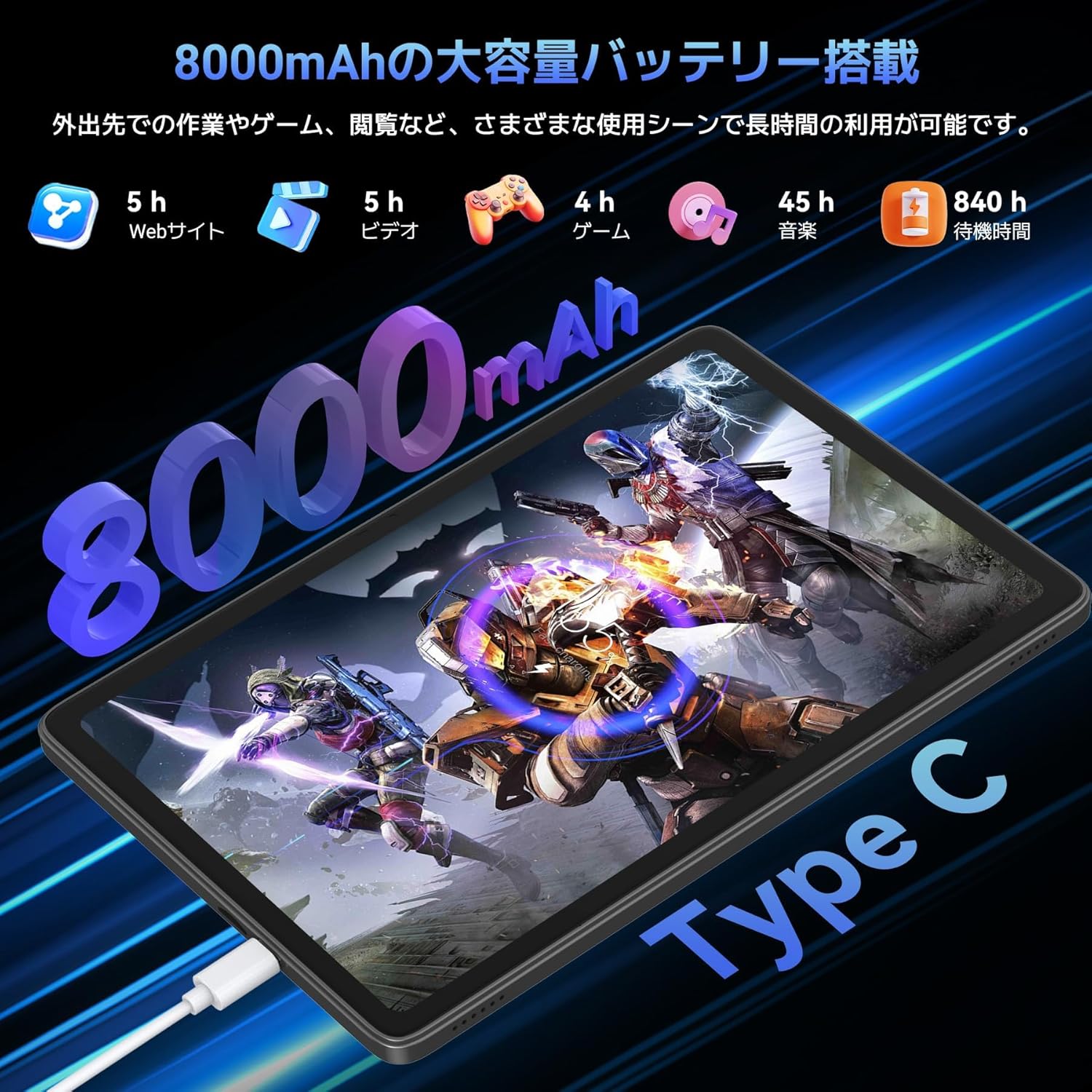
Image: Highlights the 13MP rear camera and 5MP front camera, along with AI image processing and Google Lens features.

Image: Demonstrates various smart scan and recognition features of Google Lens, such as solving math problems, identifying plants, translating foreign languages, and finding similar products.
4.5 8000mAh Large Capacity Battery & Custom Keyboard
The TABWEE T90 Android 16 Tablet offers a large 8000mAh battery, providing extended usage time for commuting, outings, and various daily scenarios without worrying about battery life. The versatile Type-C charging method ensures quick and easy charging. Android 16's custom keyboard function allows you to freely set shortcut keys after connecting a Bluetooth keyboard, enabling one-touch launch of frequently used applications for even more convenient operation.
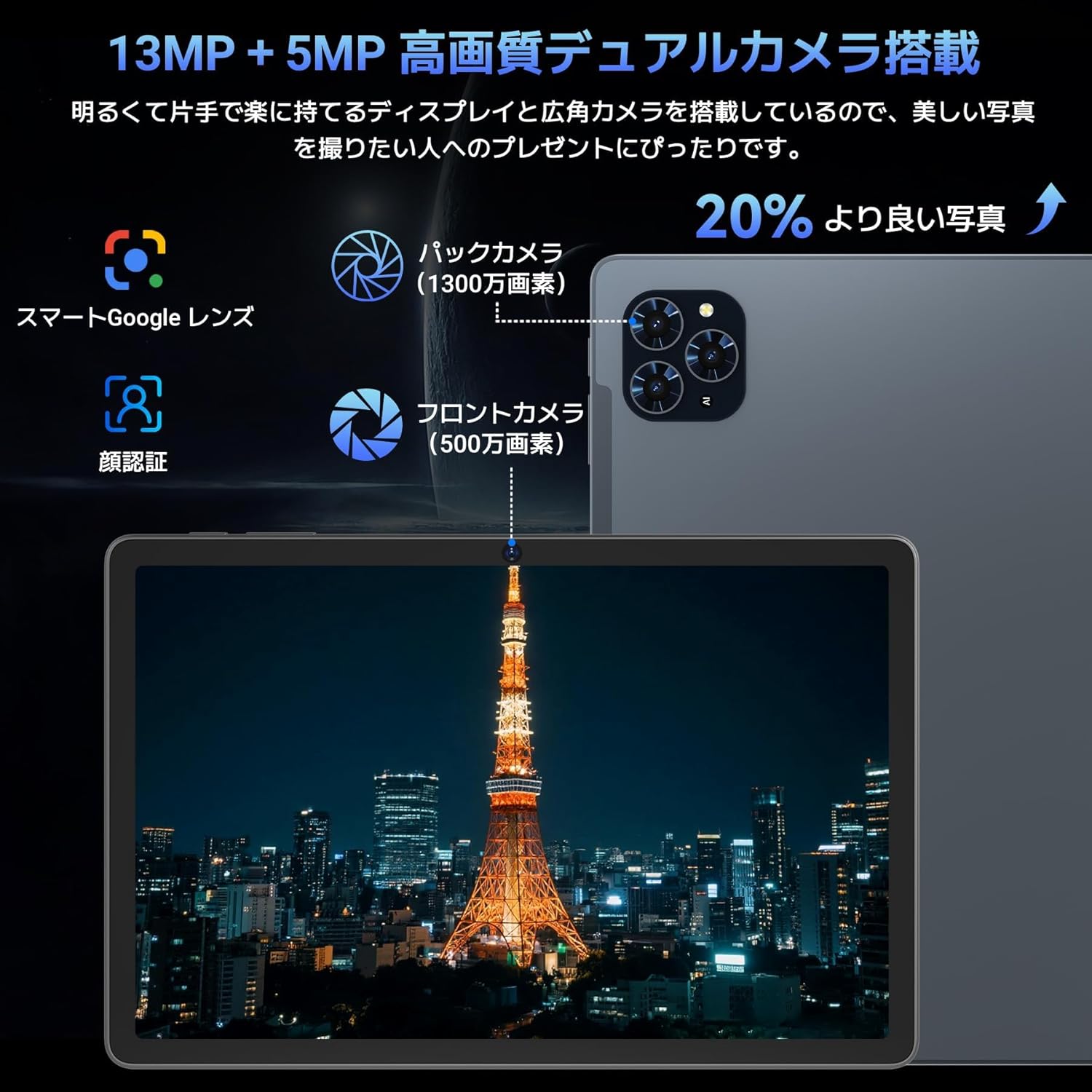
Image: Illustrates the long battery life of the 8000mAh battery for web browsing, video, gaming, and music.

Image: Shows custom keyboard shortcuts and the "forced full screen" feature of Android 16.
4.6 Lightweight Design & Versatile Use
This tablet features a lightweight all-metal design with a thickness of just 8.3mm and a weight of approximately 505g. Its 11-inch size is easy to hold with one hand, making it ideal for work, study, and carrying on the go. It supports various scenarios including remote work, online classes, office tasks, video calls, gaming, and photography.

Image: Depicts the tablet being used in various settings such as remote processing, online classes, office work, video calls, gaming, and taking photos.
5. Hướng dẫn vận hành
5.1 Điều hướng cơ bản
- Cử chỉ chạm: Chạm để chọn, vuốt để cuộn, chụm để phóng to.
- Màn hình chính: Access apps and widgets.
- Thông báo: Vuốt xuống từ đầu màn hình để view thông báo và cài đặt nhanh.
- Ngăn kéo ứng dụng: Vuốt lên từ cuối màn hình để truy cập tất cả các ứng dụng đã cài đặt.
5.2 Kết nối với Wi-Fi
- Đi đến Cài đặt > Mạng & internet > Wi-Fi.
- Bật Wi-Fi.
- Chọn mạng mong muốn và nhập mật khẩu nếu được yêu cầu.
5.3 Sử dụng phụ kiện
- Bàn phìm chuột: Connect via Bluetooth. Refer to the accessory's specific instructions for pairing.
- Touch Pen: Use for precise input on the screen, drawing, or navigating.
- Protective Case & Bracket: Use to protect the tablet and provide a stable viewgóc ing.
6. Bảo trì
- Vệ sinh: Dùng vải mềm, không xơ để lau màn hình và thân máy. Tránh sử dụng hóa chất mạnh.
- Cập nhật phần mềm: Thường xuyên kiểm tra và cài đặt các bản cập nhật hệ thống để đảm bảo hiệu suất và bảo mật tối ưu. Truy cập vào... Cài đặt > Hệ thống > Cập nhật hệ thống.
- Chăm sóc pin: Tránh nhiệt độ quá cao hoặc quá thấp. Để bảo quản lâu dài, hãy sạc pin đến khoảng 50%.
KHAI THÁC. Xử lý sự cố
| Vấn đề | Giải pháp |
|---|---|
| Máy tính bảng không bật được. | Hãy đảm bảo pin đã được sạc đầy. Nhấn và giữ nút nguồn trong 10-15 giây để buộc khởi động lại. |
| Màn hình không phản hồi | Restart the tablet. If the issue persists, perform a factory reset (data will be lost). |
| Sự cố kết nối Wi-Fi | Khởi động lại máy tính bảng và bộ định tuyến Wi-Fi. Xóa mạng trong cài đặt và kết nối lại. |
| Ứng dụng bị sập hoặc đóng băng | Xóa bộ nhớ đệm và dữ liệu của ứng dụng trong Cài đặt > Ứng dụng. Update the app or reinstall it. |
8. Thông số kỹ thuật
| Tính năng | Chi tiết |
|---|---|
| Thương hiệu | TABWEE |
| Tên mẫu | TABWEE T90 |
| Hệ điều hành | Android 16 |
| Kích thước màn hình | 11 inch |
| Độ phân giải màn hình | 1920x1200 pixel |
| Thương hiệu CPU | Unisoc |
| Tốc độ CPU | 1.8 GHz |
| Card đồ họa | Mali-G57 |
| Dung lượng lưu trữ bộ nhớ | 128 GB (Có thể mở rộng lên đến 2TB) |
| Độ phân giải camera trước | 5MP |
| Độ phân giải camera sau | 13 MP (Auto-focus) |
| Kết nối | Bluetooth, Wi-Fi (802.11ac) |
| Dung lượng pin | 8000mAh |
| Trọng lượng máy tính bảng | Khoảng 505g |
| Kích thước gói hàng | 29.1 x 20 x 5.4cm |
| Số hiệu mẫu | JPDYZ+T90+Grey |
| Chứng nhận | PSE, GMS, Technical Conformity (技適) |
9. Bảo hành & Hỗ trợ
The TABWEE T90 Android 16 Tablet comes with a standard two-year quality warranty. By contacting TABWEE official email, you can extend the warranty period to four years. If you encounter any issues or defects, please feel free to contact us. We offer 24-hour support.
Thông tin liên lạc:
- Official Email: [Please refer to your product packaging or official website for the exact email address]
- LINE ID: @647bgvrm

Image: Details about the 4-year quality warranty and 24-hour support service.
10. Video sản phẩm
TABWEE T90 Android 16 Tablet Overview
Video này cung cấp một cái nhìn tổng quátview of the TABWEE T90 Android 16 Tablet, showcasing its design and key functionalities. (Creator: TABWEE Official Store)
Tài liệu liên quan - T90
 |
TABWEE T50 Android Tablet: User Manual & Warranty Comprehensive user manual and warranty information for the TABWEE T50 Android Tablet. Learn about setup, features, safety guidelines, maintenance, and warranty activation for your device. |
 |
ACEMAGIC Notebook User Manual This user manual provides comprehensive information on the ACEMAGIC Notebook, covering its specifications, package contents, safety guidelines, appearance details, and touchpad usage instructions. |
 |
Sách hướng dẫn sử dụng và thẻ bảo hành TABWEE T20 Hướng dẫn sử dụng và thông tin bảo hành cho máy tính bảng TABWEE T20, bao gồm thiết lập, hướng dẫn an toàn, bảo trì và tuân thủ quy định. |
 |
Hướng dẫn sử dụng Android TV Box - Cài đặt, Tính năng và Thông số kỹ thuật Hướng dẫn sử dụng toàn diện cho Android TV Box, bao gồm thiết lập, thao tác cơ bản, kết nối Wi-Fi/Ethernet, quản lý ứng dụng, truyền màn hình, khôi phục cài đặt gốc và thông số kỹ thuật. |
 |
Ulefone Armor 24 User Manual: Features, Operation, and Safety Comprehensive user manual for the Ulefone Armor 24 rugged smartphone. Learn about its IP68/IP69K rating, Android 14 OS, 24GB RAM, 256GB ROM, 64MP Night Camera, 6.78" display, and massive 22000mAh battery. |
 |
VekfulPC Tablet T20 User Manual & Warranty Card Comprehensive user manual and warranty information for the VekfulPC Tablet T20. Learn about setup, features, safety guidelines, maintenance, and access multilingual support. |
Ask a question about this manual
Ask about setup, troubleshooting, compatibility, parts, safety, or missing instructions. Manuals+ will review the question and use this page’s manual context to help answer it.