
1. Giới thiệu
Welcome to the OnePlus 15 user manual. This guide provides essential information for setting up, operating, maintaining, and troubleshooting your new smartphone. The OnePlus 15 is designed for high performance and extended battery life, featuring a Snapdragon 8 Elite Gen 5 processor, a 7300mAh battery, and a triple 50 MP camera system. Please read this manual thoroughly to ensure optimal use of your device.
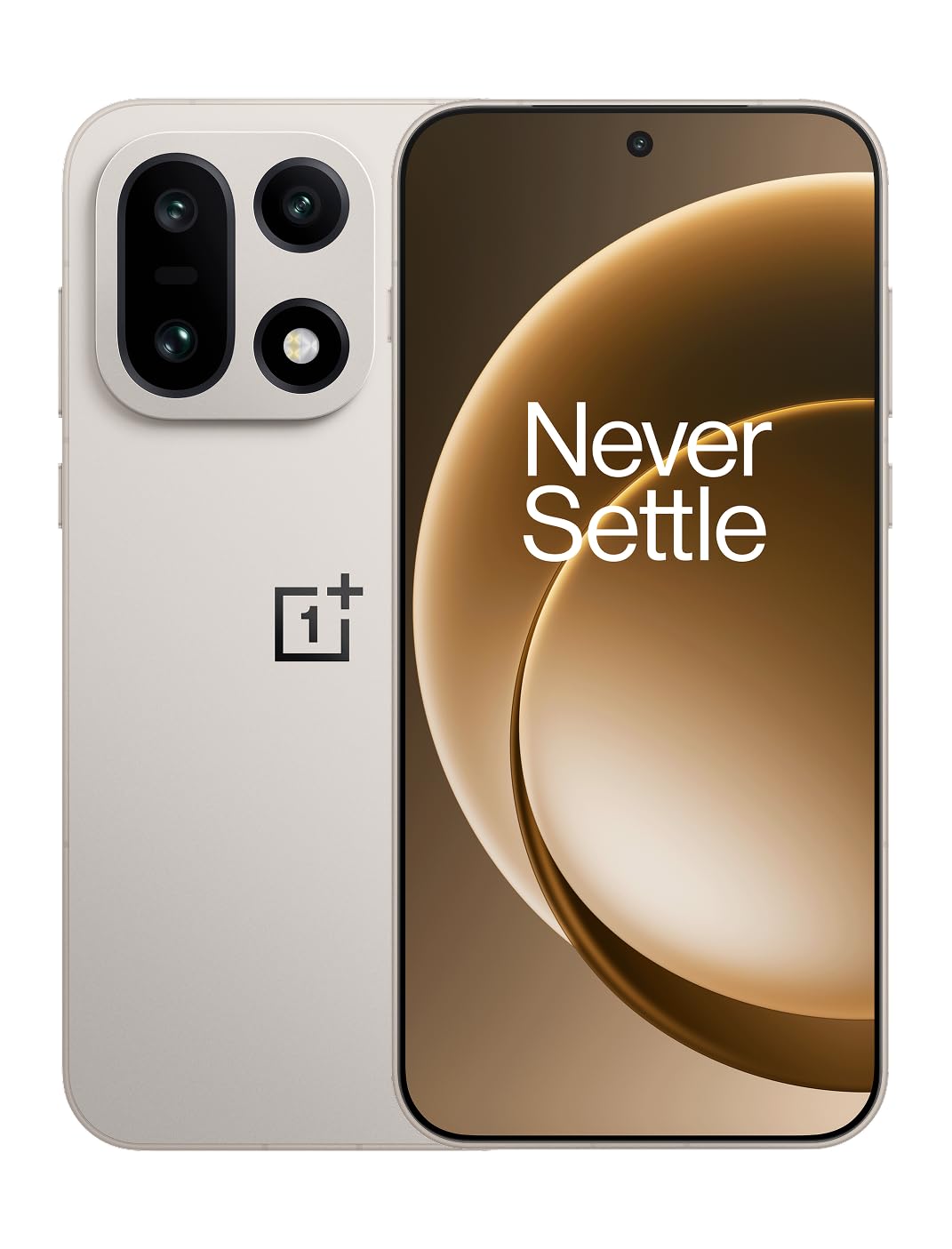
Hình 1: Mặt trước view of the OnePlus 15 smartphone.
2. Có gì trong hộp
Xác minh rằng tất cả các mặt hàng đều có trong bao bì sản phẩm của bạn:
- OnePlus 15 Smartphone (x1)
- Bộ sạc (x1)
- Cáp dữ liệu USB (x1)
- SIM Ejector Tool (x1)
- Hướng dẫn nhanh (x1)
- Safety Guide (x1)

Figure 2: Included items in the OnePlus 15 package.
3. Thiết lập
3.1. Cài đặt thẻ SIM
The OnePlus 15 supports Dual-SIM functionality. To install your SIM card(s):
- Xác định vị trí khay thẻ SIM ở bên cạnh thiết bị.
- Cắm dụng cụ đẩy SIM vào lỗ nhỏ bên cạnh khay và ấn chặt cho đến khi khay bật ra.
- Đặt thẻ Nano-SIM vào khay với các chân tiếp xúc màu vàng hướng xuống dưới. Đảm bảo chúng được lắp đúng vị trí.
- Cẩn thận lắp lại khay SIM vào điện thoại.

Hình 3: Mặt bên view of the OnePlus 15, highlighting the SIM card tray.
3.2. Bật nguồn và thiết lập ban đầu
Để bật thiết bị lần đầu tiên:
- Press and hold the Power button (located on the right side) until the OnePlus logo appears.
- Hãy làm theo hướng dẫn trên màn hình để hoàn tất thiết lập ban đầu, bao gồm chọn ngôn ngữ, kết nối Wi-Fi, đăng nhập tài khoản Google và cài đặt bảo mật.
3.3. Sạc pin
The OnePlus 15 is equipped with a 7300mAh battery. To charge your device:
- Sạc có dây: Connect the provided USB Data Cable to the Type-C port on the bottom of the phone and the other end to the charger. Plug the charger into a power outlet.
- Sạc không dây: Place the phone on a compatible wireless charging pad. Ensure the phone is centered on the pad for efficient charging.
A full charge provides approximately 68.7 hours of talk time.

Figure 4: Illustration of the 7300mAh battery capacity.
4. Vận hành thiết bị của bạn
4.1. Hiển thị
The OnePlus 15 features a 6.78-inch AMOLED display with a 2772x1272 resolution and a 165 Hz refresh rate. This provides smooth visuals and vibrant colors. Adjust display settings such as brightness, color mode, and refresh rate in the device settings menu.
4.2. Hiệu suất
Powered by the Snapdragon 8 Elite Gen 5 processor and 16GB of RAM, the OnePlus 15 delivers fast and efficient performance for multitasking, gaming, and demanding applications. The Tri-Chip System, combining the Snapdragon 8 Elite Gen 5 with a dedicated Wi-Fi chip and CPU scheduler, optimizes for speed, connectivity, and power efficiency.
Video 1: Kết thúcview of the OnePlus 15's performance capabilities and user experience.
4.3. Hệ thống camera
The device is equipped with a Triple 50 MP camera system, offering wide, ultra-wide, and telephoto lenses for versatile photography. The DetailMax Engine enhances photo quality in various lighting conditions, including day, night, and motion shots. Both front and rear cameras are available for capturing images and videos.

Hình 5: Phía sau view of the OnePlus 15, showcasing hệ thống ba camera.

Figure 6: DetailMax Engine for stunning photos.
4.4. Kết nối
The OnePlus 15 supports a range of connectivity options:
- Không dây: Wi-Fi, Bluetooth, NFC, Infrared.
- Wired: USB Type C.
- Điều hướng: Dual-band GPS (L1+L5) and Galileo (E1+E5a).
- SIM: Dual SIM support for managing multiple networks.
4.5. Hệ điều hành
The device runs on Android 16 with OxygenOS 16, providing a fast and smooth user experience. Regular software updates will be provided to enhance features and security.
5. Bảo trì
5.1. Độ bền và khả năng bảo vệ
The OnePlus 15 is built with IP66/IP68/IP69 and IP19K ratings, offering resistance against dust and water. While designed to be durable, avoid exposing the device to extreme conditions or prolonged submersion in water.

Figure 7: OnePlus 15 demonstrating water resistance.
5.2. Vệ sinh thiết bị của bạn
Use a soft, lint-free cloth to clean the screen and body of your phone. Avoid using abrasive materials or harsh chemicals, which can damage the display or finish.
5.3. Cập nhật phần mềm
Periodically check for software updates in the device settings. Keeping your software up-to-date ensures you have the latest features, security patches, and performance improvements.
KHAI THÁC. Xử lý sự cố
This section addresses common issues you might encounter with your OnePlus 15.
6.1. Thiết bị không bật nguồn
- Hãy đảm bảo pin đã được sạc đầy. Kết nối điện thoại với bộ sạc và đợi vài phút trước khi thử bật nguồn lại.
- Nhấn và giữ nút Nguồn trong ít nhất 10-15 giây để buộc khởi động lại.
6.2. Kết nối mạng kém
- Kiểm tra xem thẻ SIM của bạn đã được lắp đúng cách chưa.
- Verify that airplane mode is not enabled.
- Khởi động lại thiết bị.
- Nếu sự cố vẫn tiếp diễn, hãy liên hệ với nhà cung cấp mạng của bạn.
6.3. Ứng dụng bị sập hoặc đóng băng
- Đóng và mở lại ứng dụng.
- Clear the app's cache and data in device settings.
- Đảm bảo ứng dụng được cập nhật lên phiên bản mới nhất.
- If the issue is widespread, consider restarting the phone.
6.4. Pin cạn nhanh
- Giảm độ sáng màn hình và thời gian chờ màn hình.
- Disable unused features like Wi-Fi, Bluetooth, or GPS when not needed.
- Xác định và đóng các ứng dụng tiêu tốn nhiều năng lượng đang chạy ngầm.
- Check for recent software updates, as they often include battery optimizations.
7. Thông số kỹ thuật
Detailed technical specifications for the OnePlus 15 (Model: CPH2749).
| Tính năng | Chi tiết |
|---|---|
| Tên mẫu | OnePlus 15 |
| Số hiệu mẫu sản phẩm | CPH2749 |
| Kích thước sản phẩm | 6.36 x 3.02 x 0.32 inch |
| Trọng lượng sản phẩm | 1.28 pound |
| Hệ điều hành | Android 16 |
| Mô hình CPU | Snapdragon 8 Elite Gen 5 |
| Tốc độ CPU | 4.61 GHz |
| Kích thước bộ nhớ RAM đã cài đặt | 16GB |
| Dung lượng lưu trữ bộ nhớ | 512GB |
| Kích thước màn hình đứng | 6.78 inch |
| Nghị quyết | 2772*1272 |
| Tốc độ làm mới | 165Hz |
| Dung lượng pin | 7300 triệuamp Giờ (7300mAh) |
| Thời gian nói chuyện điện thoại | 68.7 giờ |
| Công nghệ kết nối | Infrared, NFC, USB, Wi-Fi, Bluetooth |
| GPS | Dual band: GPS(L1+L5) Galileo(E1+E5a) |
| Tính năng đặc biệt | Dual SIM, Wireless Charging |
| Jack âm thanh | Type-C headphones: supported Type-C digital headphones & Type-C analog headphones |
| Các tính năng khác của máy ảnh | Front, Rear (Triple 50 MP Camera System) |
| Xếp hạng IP | IP66/IP68/IP69 and IP19K rated |
| Màu sắc | Sand Storm |
8. Thông tin bảo hành
Your OnePlus 15 device is covered by a limited manufacturer's warranty. Please refer to the included Safety Guide or visit the official OnePlus website for detailed warranty terms and conditions, including coverage duration and service procedures. Keep your proof of purchase for warranty claims.
9. Hỗ trợ
For further assistance, technical support, or to access additional resources, please visit the official OnePlus support website or contact customer service. You can find contact details and FAQs on the OnePlus webđịa điểm.
Tài nguyên trực tuyến: www.oneplus.com/support


