
Giới thiệu
This manual provides essential information for setting up, operating, maintaining, and troubleshooting your Apple iPhone 17. This device is a renewed, unlocked US Version with 256GB storage and eSIM capability. Please read these instructions carefully to ensure optimal performance and longevity of your device.
Hết thiết bịview
The Apple iPhone 17 features a sleek design and powerful capabilities. Below are images highlighting key aspects of the device.
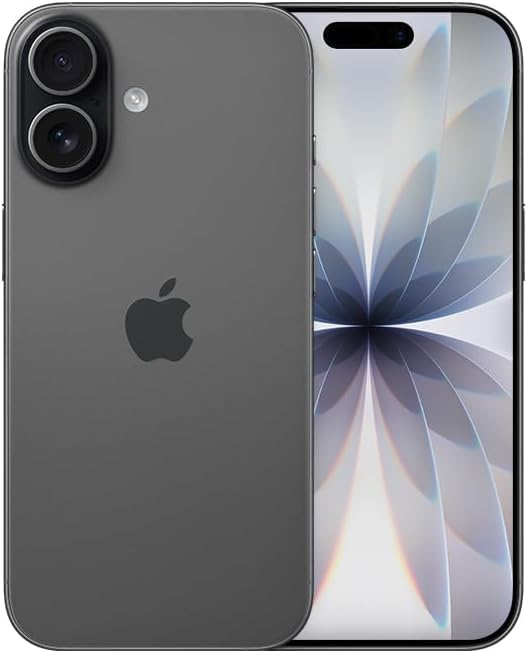
Hình ảnh: Mặt trước view of the Apple iPhone 17 in Black. This image displays the device's screen and overall form factor.

Image: Close-up of the dual camera system on the rear of the Apple iPhone 17. This highlights the camera lenses and flash module.

Hình ảnh: Side profile of the Apple iPhone 17, showing the power button and volume controls. This view emphasizes the device's slim design.
Cài đặt
Follow these steps to set up your renewed Apple iPhone 17:
- Khả năng tương thích của nhà mạng: This phone is unlocked and compatible with GSM and CDMA networks (e.g., AT&T, T-Mobile, Sprint, Verizon, US Cellular, Cricket, Metro, Tracfone, Mint Mobile). Before proceeding, verify compatibility with your chosen carrier.
- Kích hoạt eSIM: The iPhone 17 uses an eSIM. Your carrier will provide instructions for activating the eSIM. Often, this involves scanning a QR code. Important: Do not discard any QR stickers provided with your device, as they may be essential for eSIM activation.
- Bật nguồn: Press and hold the power button on the side of the device until the Apple logo appears.
- Thiết lập ban đầu: Follow the on-screen prompts to select your language, region, connect to a Wi-Fi network, and transfer data from a previous device if applicable.
- Phụ kiện: The device includes a generic (Mfi certified) charger and charging cable. Headphones and a physical SIM card are not included.
Operating Your iPhone 17
Your iPhone 17 runs on iOS 18, offering a user-friendly interface and a wide range of features.
Điều hướng cơ bản
- Màn hình chính: Swipe up from the bottom of the screen to return to the Home Screen.
- Trình chuyển đổi ứng dụng: Swipe up from the bottom and pause in the middle of the screen to view mở ứng dụng.
- Trung tâm điều khiển: Vuốt xuống từ góc trên bên phải để truy cập cài đặt nhanh.
- Thông báo: Swipe down from the top-center to view thông báo.
Tính năng của máy ảnh
The iPhone 17 is equipped with a powerful camera system:
- Camera sau: 48 MP sensor with LED flash and 10x digital zoom for high-quality photos and videos.
- Camera trước: Single front-facing camera for selfies and video calls.
- Quay video: Supports 1080p and 4k video recording.
Hiển thị và kết nối
- Trưng bày: 6.3-inch OLED display with 2622 x 1206 resolution and a 120Hz refresh rate, providing vibrant visuals and smooth scrolling.
- Kết nối: Supports 5G cellular technology, Bluetooth, NFC, USB Type C, and Wi-Fi for seamless communication and data transfer.
Security and Additional Features
- Bảo mật sinh trắc học: Face Recognition for secure unlocking and authentication.
- Các tính năng bổ sung: Includes Always On Display, Built-In GPS, Dual SIM capability (via eSIM), and Wireless Charging.
Video hữu ích
Video: A comparison between the iPhone 17 and another phone model, highlighting design and features. This video is provided by Ersbit.
Video: Một bài đánh giá chân thựcview of the Apple iPhone 17, discussing its performance and user experience. This video is provided by Dimitri.
Video: Một bản re chi tiếtview of the Apple iPhone 17, covering various aspects of the device. This video is provided by Bonfashion.
Video: Một đoạn clip ngắn giới thiệu...asing the Lavender color variant of the iPhone 17. This video is provided by Veronika.
Video: Demonstrating the Apple iPhone 17 in daily use scenarios. This video is provided by Ericka Garcia Garcia.
Video: A design comparison between the iPhone 17 Pro and the standard iPhone 17. This video is provided by Ersbit.
Video: Một kết thúcview of the iPhone Air and iPhone 17's overall design. This video is provided by Ersbit.
BẢO TRÌ
Proper maintenance ensures the longevity and performance of your iPhone 17.
- Tình trạng pin: Your renewed iPhone 17 is guaranteed to have a minimum battery capacity of 80%. To preserve battery life, avoid extreme temperatures and excessive charging cycles.
- Vệ sinh: Dùng vải mềm, không xơ để lau màn hình và bên ngoài. Tránh sử dụng vật liệu mài mòn hoặc hóa chất mạnh.
- Cập nhật phần mềm: Regularly update your iOS to the latest version to benefit from security patches, new features, and performance improvements.
- Quản lý lưu trữ: Định kỳ review và xóa những thứ không cần thiết files, apps, and media to optimize storage and performance.
Xử lý sự cố
If you encounter issues with your iPhone 17, consider the following common solutions:
- Các vấn đề về kết nối mạng: If you experience problems with calls, texts, or data, first ensure your eSIM is properly activated with your carrier. Some carriers may have specific requirements or known compatibility issues. Contact your carrier's support for assistance.
- Thiết bị không phản hồi: Perform a force restart. The exact steps may vary slightly by iOS version, but typically involve pressing and quickly releasing the Volume Up button, then the Volume Down button, then pressing and holding the Side button until the Apple logo appears.
- Tháo pin: Check battery usage in Settings to identify apps consuming significant power. Adjust settings like screen brightness, background app refresh, and location services to optimize battery life.
- Sự cố ứng dụng: If an app is not functioning correctly, try closing and reopening it. If the issue persists, delete and reinstall the app, or check for app updates in the App Store.
- Trục trặc phần mềm: Ensure your device is running the latest iOS version. If problems persist, consider backing up your data and performing a factory reset.
Thông số kỹ thuật
Detailed technical specifications for the Apple iPhone 17 (256GB, Unlocked, Renewed):
| Tính năng | Đặc điểm kỹ thuật |
|---|---|
| Thương hiệu | Quả táo |
| Tên mẫu | iPhone 17 |
| Hệ điều hành | iOS 18 |
| Dung lượng lưu trữ bộ nhớ | 256GB |
| Kích thước bộ nhớ RAM đã cài đặt | 8GB |
| Mô hình CPU | Dòng A |
| Tốc độ CPU | 3.7 GHz |
| Kích thước màn hình | 6.3 inch |
| Kiểu hiển thị | Màn hình OLED |
| Nghị quyết | 2622 x 1206 điểm ảnh |
| Tốc độ làm mới | 120Hz |
| Display Pixel Density | 460 Pixels Per Inch (PPI) |
| Nhà cung cấp dịch vụ không dây | Đã mở khóa |
| Công nghệ di động | 5G |
| Công nghệ kết nối | Bluetooth, NFC, USB, Wi-Fi |
| Số lượng khe cắm thẻ SIM | E Sim |
| Loại đầu nối | USB Loại C |
| Rear Facing Camera Photo Sensor Resolution | 48MP |
| Number of Rear Facing Cameras | 1 |
| Number of Front Cameras | 1 |
| Đèn Flash của máy ảnh | DẪN ĐẾN |
| Zoom kỹ thuật số | 10.0 |
| Độ phân giải quay video | 1080p, 4k |
| Dung lượng pin | 3600 triệuamp Giờ |
| Mô tả pin | Pin Lithium-Ion |
| Tính năng bảo mật sinh trắc học | Nhận dạng khuôn mặt |
| Các tính năng bổ sung | Always On Display, Built-In GPS, Dual SIM, Factory Unlocked, Wireless Charging |
| Mức độ chống nước | Không chống nước |
| Trọng lượng sản phẩm | 14.88 ounce |
| Kích thước mục | 6 x 4 x 2 inch |
| Năm mẫu | 2025 |
| Mã số UPC | 756613503987 |
Bảo hành và Hỗ trợ
Your renewed Apple iPhone 17 is covered by a 90-Day Amazon Renewed Guarantee. This warranty ensures that your device is in excellent working condition and provides options for replacement or refund if issues arise within the warranty period.
For further assistance, please refer to the following:
- Hỗ trợ mới của Amazon: Visit the Amazon Renewed Store for information regarding your purchase and warranty claims.
- Hỗ trợ của Apple: For general iOS and device functionality questions, visit the official Apple Support webđịa điểm.
- Hỗ trợ từ nhà mạng: Contact your mobile carrier for any network-related issues, eSIM activation, or service plan inquiries.


