
Giới thiệu
This manual provides essential instructions for the safe operation, setup, and maintenance of your ROUASD RC ERA C138PRO Bell 206 RC Helicopter. Please read this manual thoroughly before operating the helicopter to ensure proper function and to prevent damage or injury. The C138PRO is a 1/33 scale 6-channel RC helicopter featuring a 6-axis gyroscope, flybarless design, optical flow positioning, and advanced 3D flight capabilities.
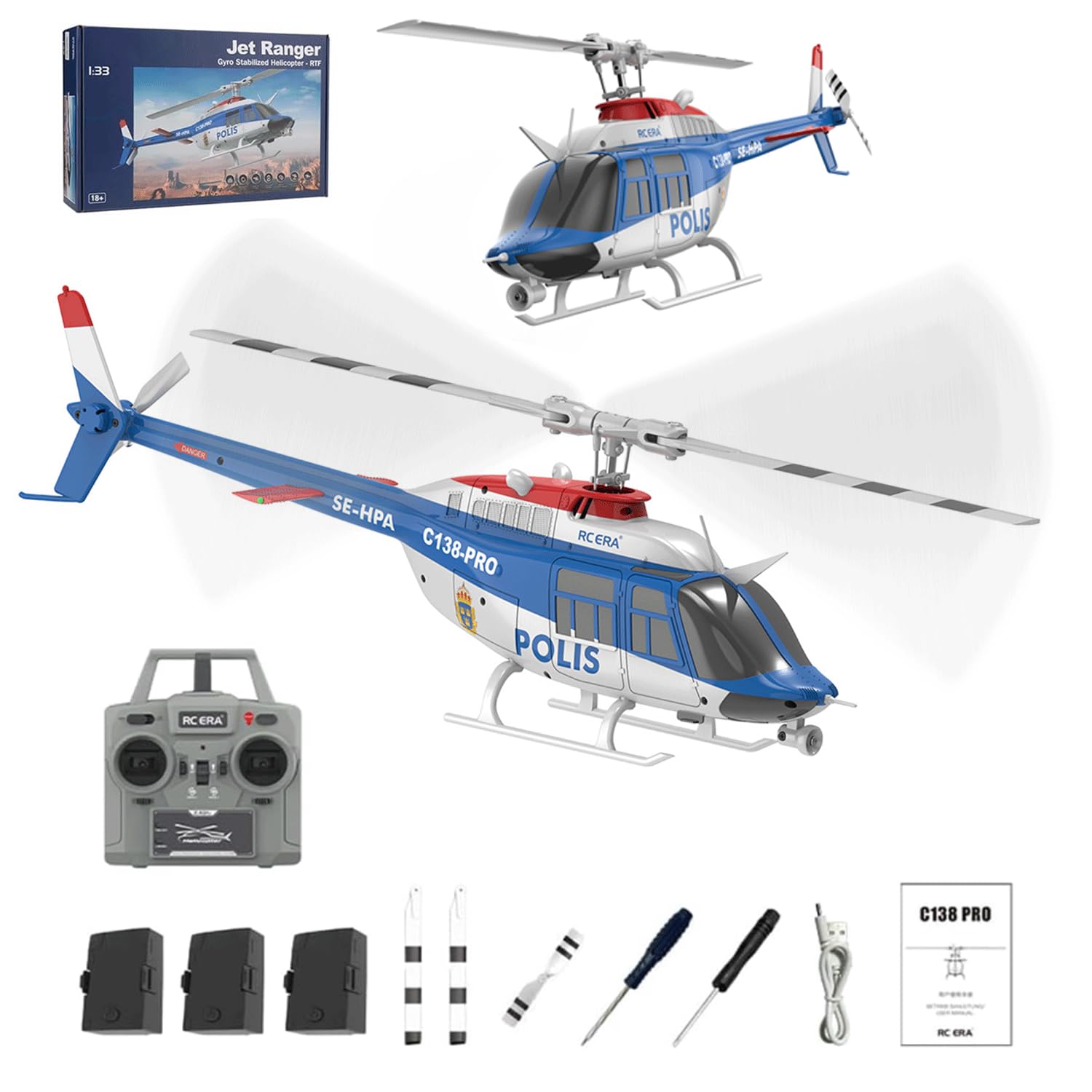
Image: The ROUASD RC ERA C138PRO Bell 206 RC Helicopter, showcasing its blue and white design with "POLIS" markings.
Thông tin an toàn
Operating remote-controlled aircraft requires caution. Failure to follow safety guidelines can result in injury or property damage.
- Always fly in open areas: Ensure there are no obstacles, people, or animals nearby. Maintain a safe distance from crowds, buildings, and power lines.
- Điều kiện thời tiết: Avoid flying in strong winds, rain, or snow. Optimal flight conditions are calm and dry.
- An toàn pin: Use only the provided charger and batteries. Do not overcharge or short-circuit batteries. Disconnect batteries when not in use.
- Cánh quạt: Giữ tay, mặt và quần áo rộng tránh xa các lưỡi dao đang quay. Lưỡi dao có thể gây thương tích nghiêm trọng.
- Sự giám sát của người lớn: This product is recommended for adults. If used by younger individuals, adult supervision is required.
- Kiểm tra trước chuyến bay: Before each flight, inspect the helicopter for any damage, loose parts, or obstructions. Ensure batteries are fully charged and securely installed.
- Dừng khẩn cấp: Hãy làm quen với chức năng dừng khẩn cấp trên điều khiển từ xa.
Nội dung gói
Xác minh rằng tất cả các mục đều có trong gói hàng của bạn:
- RC ERA C138PRO Helicopter (1)
- Điều khiển từ xa (1)
- Hướng dẫn sử dụng (1)
- Cáp sạc USB (1)
- Main Blades (2)
- Tail Blade (1)
- Li-ion Battery (Quantity may vary based on purchase: 1, 2, 3, or 4)
- Tuốc nơ vít (1)
- Cờ lê lục giác (1)
Cài đặt
1. Lắp đặt pin
Pin trực thăng:
- Tìm vị trí ngăn chứa pin trên máy bay trực thăng.
- Lắp pin Li-ion vào ngăn chứa, đảm bảo lắp đúng cực.
- Secure the battery and close the compartment cover.
Pin điều khiển từ xa:
- Mở nắp pin ở mặt sau của bộ điều khiển từ xa.
- Insert four (4) 1.5V AA batteries (not included), observing the correct polarity (+/-).
- Đóng chặt nắp pin.
2. Sạc pin máy bay trực thăng
Use the provided USB charging cable to charge the helicopter's Li-ion battery.
- Kết nối cáp sạc USB với nguồn điện USB (ví dụ: máy tính, bộ chuyển đổi nguồn USB).
- Connect the other end of the cable to the helicopter battery.
- Đèn báo trạng thái sạc sẽ hiển thị trạng thái sạc (tham khảo hướng dẫn sử dụng bộ sạc để biết chức năng cụ thể của đèn).
- Charging time is approximately 50 minutes. Do not leave charging unattended.
3. Kết nối máy bay trực thăng và bộ điều khiển từ xa
Follow these steps to establish a connection between the helicopter and the remote controller:
- Ensure both the helicopter and remote controller batteries are charged.
- Đặt trực thăng trên bề mặt phẳng, cân bằng.
- Bật công tắc nguồn của máy bay trực thăng. Các đèn báo sẽ nhấp nháy.
- Bật bộ điều khiển từ xa.
- Đẩy cần ga (cần điều khiển bên trái) lên hết cỡ, sau đó đẩy xuống hết cỡ.
- The helicopter's indicator lights will stop flashing and remain solid, indicating a successful binding.
Hướng dẫn sử dụng
Hướng dẫn điều khiển từ xa
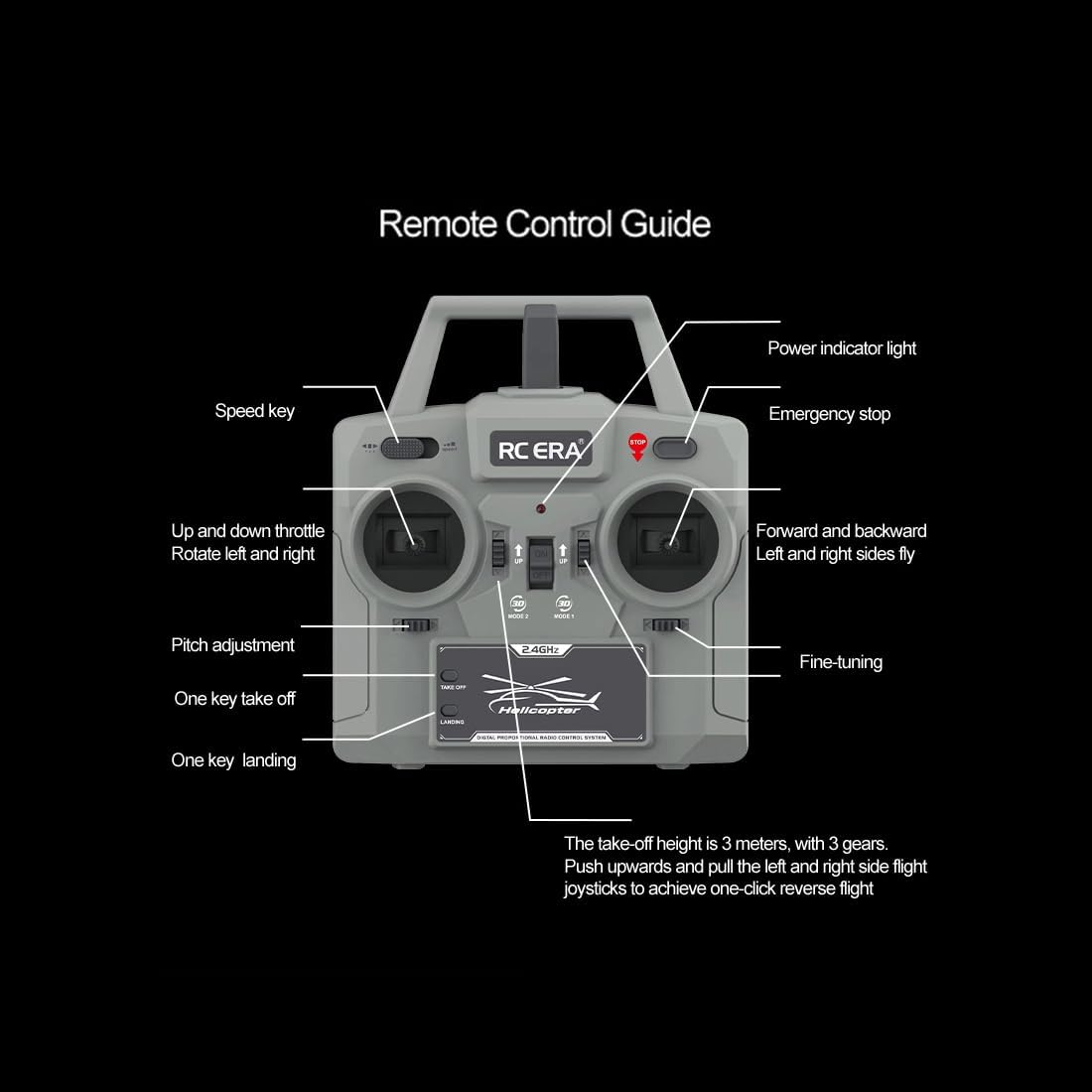
Image: Diagram of the RC ERA C138PRO remote control, labeling the power indicator light, emergency stop, speed key, up/down throttle, rotate left/right, pitch adjustment, one-key takeoff, one-key landing, forward/backward, left/right fly, and fine-tuning controls.
- Up and Down Throttle (Left Joystick): Điều khiển độ cao và sự quay.
- Forward and Backward (Right Joystick): Kiểm soát chuyển động tiến và lùi.
- Left and Right Fly (Right Joystick): Điều khiển chuyển động ngang.
- Điều chỉnh cao độ: Fine-tunes the helicopter's pitch.
- Tinh chỉnh: Adjusts trim for stable flight.
- Speed Key: Cycles through different flight speeds (Low, Medium, High).
- Dừng khẩn cấp: Immediately cuts power to the motors. Use only in emergencies.
Basic Flight Functions
One-Key Takeoff and Landing:

Image: The RC ERA C138PRO helicopter demonstrating one-key takeoff (upward arrows) and landing (downward arrows), highlighting barometric altitude, brushless motor, and 12-minute endurance.
- After binding, press the "One-Key Takeoff" button. The helicopter will automatically ascend to a stable hovering altitude.
- To land, press the "One-Key Landing" button. The helicopter will descend and land automatically.
Điều chỉnh tốc độ:

Image: A diagram illustrating the three-speed adjustment settings (Low, Medium, High) for the RC ERA C138PRO helicopter, with an inset showing the speed key on the remote control.
- Press the "Speed Key" on the remote control to cycle between Low, Medium, and High-speed modes.
- Low speed is recommended for beginners and indoor flight.
- Medium and High speeds offer increased agility and are suitable for experienced pilots and outdoor flight.
3D Stunts and Inverted Flight:

Image: The RC ERA C138PRO helicopter in a reverse flight mode, with text indicating "One click reverse flight mode makes stunt flying easier."

Image: Diagrams illustrating various stunt maneuvers for the RC ERA C138PRO, including "Pot scrubbing stunt (circling flight)" and "One key reverse flight."
- The C138PRO supports one-touch inverted flying and advanced 3D maneuvers.
- To activate 3D mode, switch from 6G stabilization mode (beginner-friendly) to 3D mode using the designated button on the remote (refer to remote diagram).
- Practice these maneuvers in a spacious, open area, away from obstacles.
- For one-click reverse flight, push the throttle stick upwards and pull the left and right flight joysticks simultaneously.
Core Technical Functions Overview
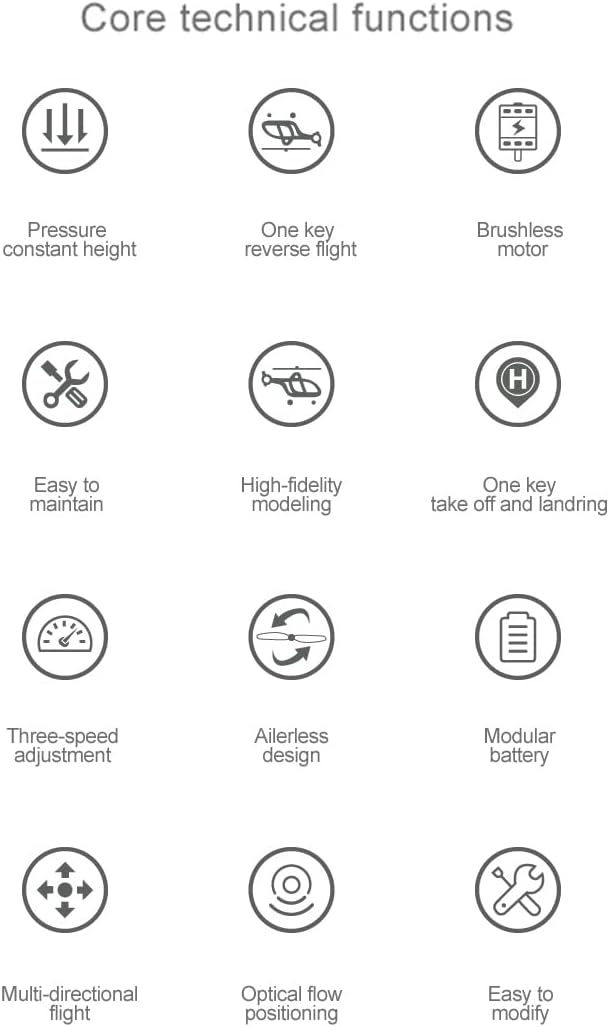
Image: An iconographic representation of the RC ERA C138PRO's core technical functions, including pressure constant height, one-key reverse flight, brushless motor, easy to maintain, high-fidelity modeling, one-key takeoff and landing, three-speed adjustment, ailerless design, modular battery, multi-directional flight, optical flow positioning, and easy to modify.
- Pressure Constant Height (Barometric Altitude Hold): Maintains a stable altitude automatically, simplifying flight control.
- Định vị dòng quang học: Enhances stability and precise hovering, especially in indoor environments.
- Con quay hồi chuyển 6 trục: Provides superior stability and control, making the helicopter easier to fly.
- Động cơ không chổi than: Delivers powerful and efficient performance for extended flight times and robust maneuvers.
- Flybarless Design: Improves aerodynamic efficiency, stability, and responsiveness.
Video sản phẩm chính thức
Video: An official product video demonstrating the RC ERA C138PRO Bell 206 RC Helicopter in flight, showcasing its maneuverability and features. This video is provided by ROUASD TOY.
BẢO TRÌ
- Vệ sinh: Gently wipe the helicopter with a soft, dry cloth after each use to remove dust and debris. Avoid using water or chemical cleaners.
- Kiểm tra lưỡi: Regularly check main and tail blades for cracks, bends, or damage. Replace damaged blades immediately using the provided spare parts and tools.
- Chăm sóc động cơ: Keep the brushless motor free from obstructions. Avoid prolonged operation in dusty environments.
- Lưu trữ pin: Store batteries in a cool, dry place, away from direct sunlight and extreme temperatures. For long-term storage, charge batteries to approximately 50% capacity.
- Kiểm tra thành phần: Periodically inspect all screws and connections to ensure they are secure. Tighten any loose parts with the provided screwdriver or hex wrench.
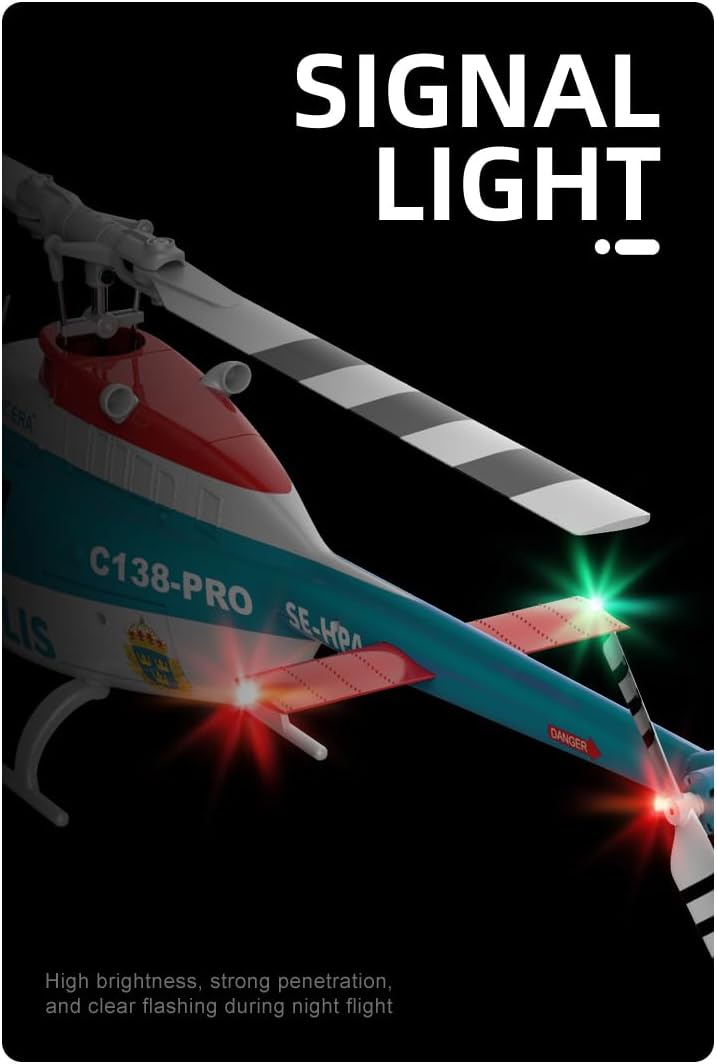
Hình ảnh: Cận cảnh view of the RC ERA C138PRO helicopter's tail, showing the signal lights illuminated, indicating high brightness and strong penetration for night flight.
Xử lý sự cố
| Vấn đề | Nguyên nhân có thể | Giải pháp |
|---|---|---|
| Máy bay trực thăng không phản hồi lệnh điều khiển từ xa. | Not bound, low battery (helicopter or remote), remote off. | Ensure binding process is complete. Charge batteries. Turn on remote. |
| Helicopter cannot take off or lacks power. | Pin máy bay trực thăng yếu, cánh quạt bị hỏng, động cơ gặp sự cố. | Charge helicopter battery. Inspect and replace damaged blades. Contact support if motor issue persists. |
| Máy bay trực thăng bị trôi hoặc không ổn định. | Improper trim adjustment, strong wind, damaged gyroscope. | Adjust fine-tuning/trim on remote. Fly in calm conditions. If issue persists, contact support. |
| Lưỡi dao không quay. | Obstruction, motor connection issue, emergency stop engaged. | Check for obstructions. Ensure all connections are secure. Disengage emergency stop. |
Thông số kỹ thuật
| Tham số | Chi tiết |
|---|---|
| Người mẫu | C138PRO |
| Kiểu | Máy bay trực thăng điều khiển từ xa 3D sáu trục một cánh quạt (phiên bản GPS thông minh không chổi than) |
| Vật liệu | PA / PC (Acrylonitrile Butadiene Styrene (ABS)) |
| Tỉ lệ | 1/33 |
| Đường kính rôto chính | 306mm |
| Chiều dài thân máy bay | 312mm (12.28 inch) |
| Chiều cao | 101mm (3.98 inch) |
| Trọng lượng chuyến bay | 110g |
| Thời gian bay | 8-10 phút |
| Thời gian sạc | Khoảng 50 phút |
| Tần số điều khiển từ xa | 2.4G |
| Khoảng cách xa | 80-100m |
| Kênh | 6 |
| Pin trực thăng | Li-ion 7.4V |
| Pin máy phát | 4*1.5AA (not included) |
| Độ tuổi | Adult (192 months and up) |
Bảo hành và Hỗ trợ
For warranty information, technical support, or replacement parts, please contact the seller or manufacturer directly. Refer to your purchase documentation for specific contact details.
Manufacturer: ROUASD