
1. Giới thiệu
This manual provides detailed instructions for the installation, operation, and maintenance of your SILENTWARE VIEWWHITE A-RGB Mid-Tower PC Case. Please read this manual thoroughly before beginning assembly to ensure proper setup and to maximize the performance and longevity of your system components.
The SILENTWARE VIEWWHITE is a high-performance mid-tower PC case designed for optimal airflow and aesthetic appeal. It features tempered glass panels, four pre-installed 120mm A-RGB fans, and comprehensive compatibility for various PC components.
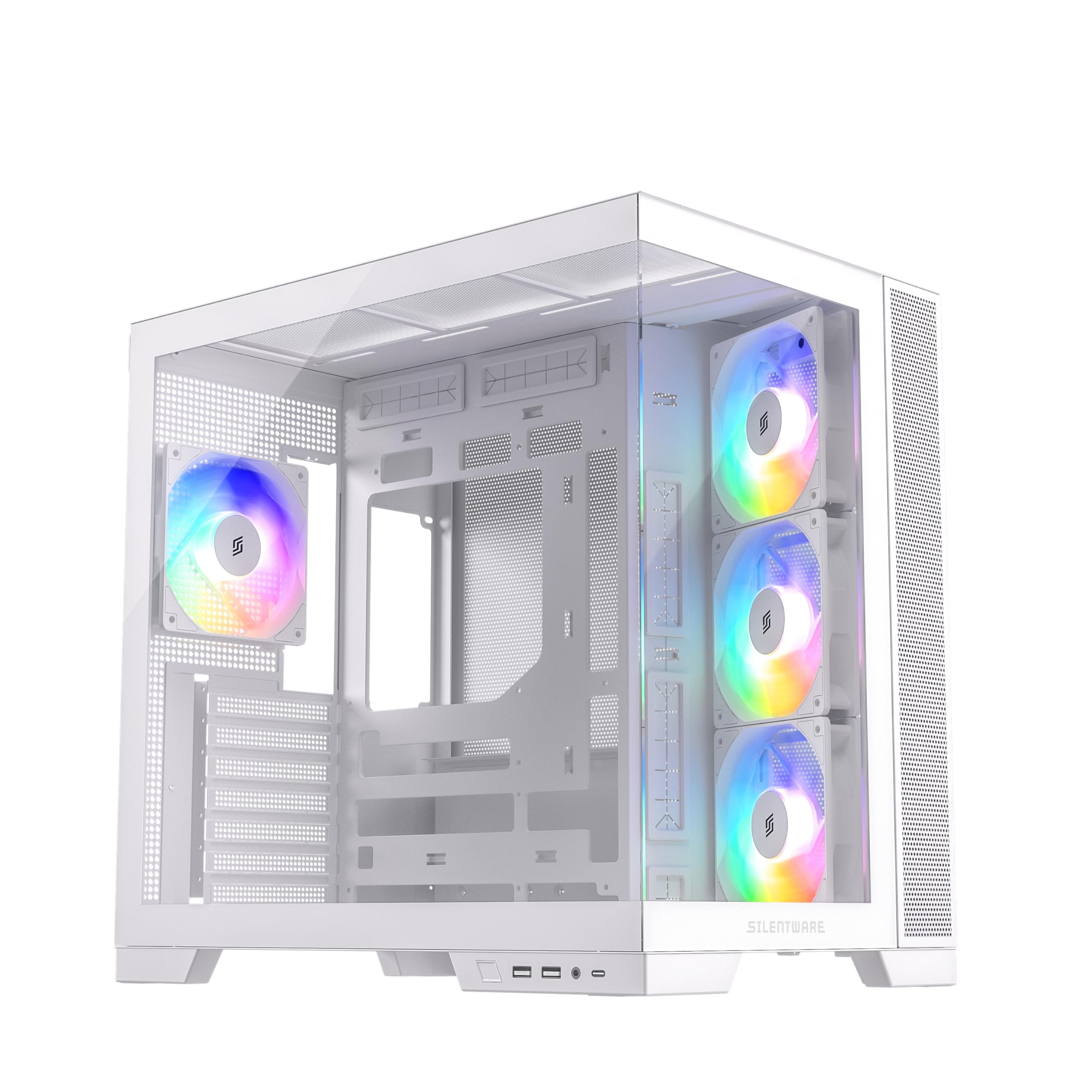
Hình 1.1: Hếtview of the SILENTWARE VIEWWHITE A-RGB Mid-Tower PC Case.
2. Thiết lập và Cài đặt
Before starting, ensure you have all necessary components and tools. It is recommended to work on a clean, flat surface and to use anti-static precautions.
2.1 Unpacking the Case
Carefully remove the PC case from its packaging. Inspect for any damage that may have occurred during shipping. Retain the packaging for future transport or warranty claims.
2.2 Tháo các tấm ốp
The SILENTWARE VIEWWHITE features tempered glass panels on the front and side. To access the interior for component installation:
- Locate the thumbscrews or latches securing the side tempered glass panel.
- Carefully remove the screws/release the latches and gently slide or lift the panel off. Place it on a soft, flat surface to prevent scratches.
- The top panel can also be removed for easier access and radiator installation.

Figure 2.1: Top panel removed for access to the interior.
2.3 Cài đặt bo mạch chủ
The case supports ATX, mATX, and ITX motherboards.
- Install the necessary motherboard standoffs if they are not pre-installed for your motherboard size.
- Hãy căn chỉnh bo mạch chủ sao cho thẳng hàng với các chân đế và khe hở của tấm chắn I/O ở phía sau thùng máy.
- Cố định bo mạch chủ bằng ốc vít.
2.4 Lắp đặt nguồn điện
The power supply unit (PSU) is mounted at the bottom of the case.
- Trượt bộ nguồn vào ngăn chứa được chỉ định từ phía sau thùng máy.
- Cố định bộ nguồn bằng các ốc vít từ phía sau vỏ máy.
- Utilize the integrated cable management system for a clean build. The case supports PSUs up to 200mm in length.
2.5 Cài đặt ổ đĩa lưu trữ
The case provides space for 2x SSDs and 1x HDD.
- Locate the SSD mounting points (typically behind the motherboard tray).
- Secure SSDs with screws.
- Install HDDs in the designated drive cage, usually located near the PSU shroud.
2.6 Cài đặt Card đồ họa (GPU)
Vỏ máy hỗ trợ card đồ họa có chiều dài lên đến 410mm.
- Tháo các nắp đậy khe cắm mở rộng cần thiết ở phía sau thùng máy.
- Insert your GPU into the PCIe slot on the motherboard.
- Cố định GPU bằng ốc vít.
2.7 Hệ thống làm mát (Quạt & Bộ tản nhiệt)
The case comes with four pre-installed 120mm A-RGB fans: three inverted airflow fans at the front and one at the rear. It supports various radiator configurations:
- Đứng đầu: Up to 360mm radiator
- Bên: Up to 280mm radiator
- Ở phía sau: Up to 120mm radiator
Ensure all fans are connected to the motherboard or a fan controller for power and RGB control.
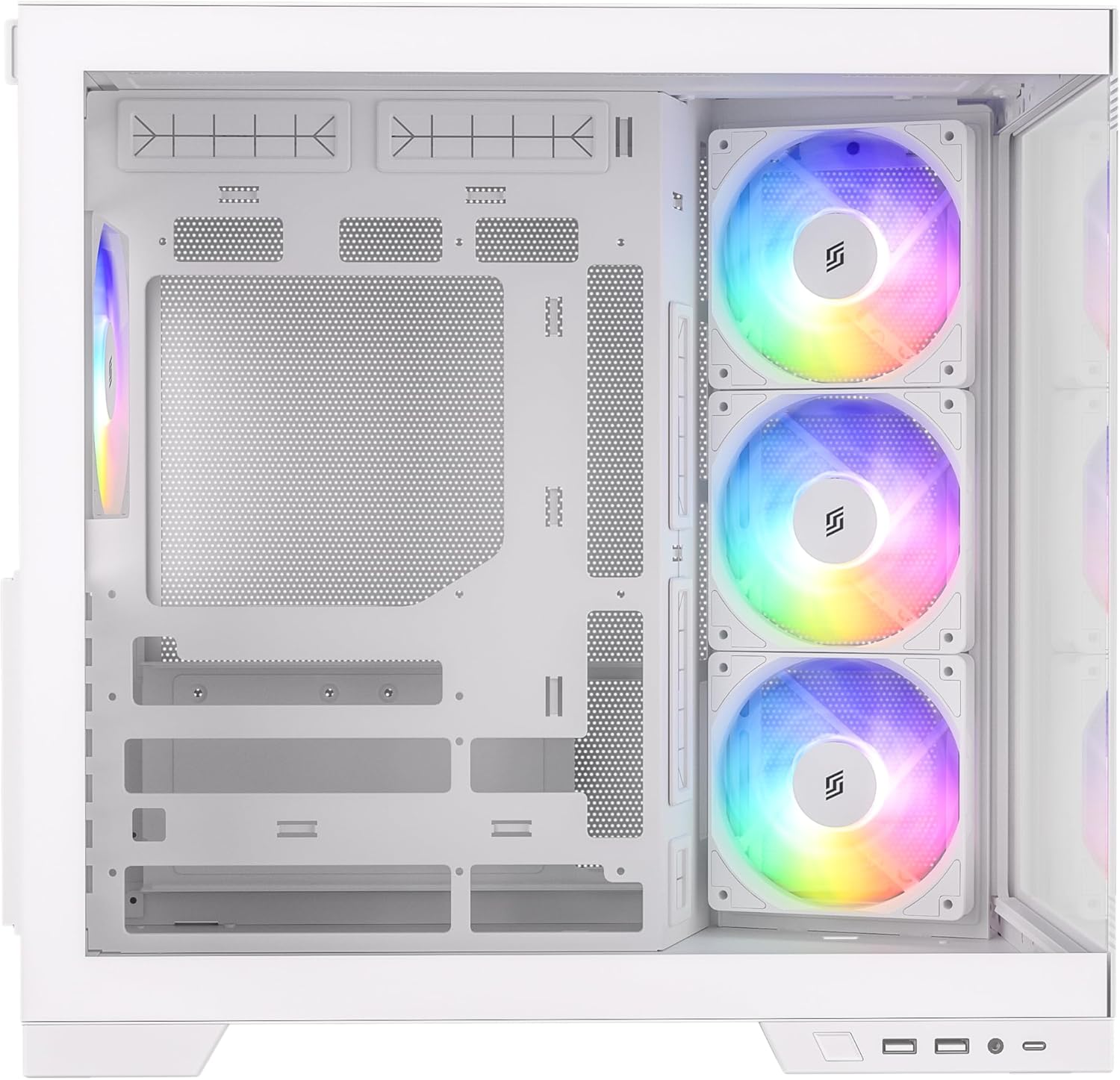
Hình 2.2: Nội bộ view highlighting fan placement and component space.
2.8 Kết nối bảng điều khiển I/O phía trước
Connect the front I/O panel cables to your motherboard. These include:
- USB 3.0 (x2)
- USB-C (x1)
- HD Audio (for headphone and microphone jacks)
- Power Button, Reset Button, Power LED, HDD LED
Refer to your motherboard manual for specific header locations.
3. Operating the A-RGB Fans
The pre-installed A-RGB fans offer flexible lighting and speed control.
3.1 Kết nối quạt
Each fan has two connectors:
- 4-pin PWM connector: For fan speed control. Connect this to a 4-pin fan header on your motherboard.
- 3-pin A-RGB connector: For addressable RGB lighting control. Connect this to a 3-pin 5V A-RGB header on your motherboard. Do not connect to a 4-pin 12V RGB header, as this may damage the LEDs.
3.2 Điều khiển bằng phần mềm
Once connected, you can control the fan speed and A-RGB lighting effects through your motherboard's proprietary software (e.g., ASUS Aura Sync, MSI Mystic Light, Gigabyte RGB Fusion, ASRock Polychrome Sync). Refer to your motherboard's manual for instructions on using its specific software.

Figure 3.1: A-RGB fans providing illumination and airflow.
4. Bảo trì
Việc bảo trì thường xuyên giúp đảm bảo hiệu suất tối ưu và kéo dài tuổi thọ của các linh kiện máy tính.
4.1 Vệ sinh bụi
Dust accumulation can impede airflow and cause components to overheat. It is recommended to clean your PC case every 3-6 months, or more frequently in dusty environments.
- Power off your PC and unplug it from the wall outlet.
- Remove the side and top panels.
- Use compressed air to blow dust out of the case, especially from fan blades, radiator fins, and mesh filters. Hold fan blades gently to prevent over-spinning.
- Wipe down interior surfaces with a microfiber cloth.
4.2 Tempered Glass Care
The tempered glass panels require careful handling.
- Clean glass panels with a soft, lint-free cloth and a non-abrasive glass cleaner.
- Avoid harsh chemicals or abrasive materials that could scratch the glass.
- Always handle glass panels by their edges to prevent fingerprints and smudges.
KHAI THÁC. Xử lý sự cố
Phần này giải quyết những vấn đề phổ biến mà bạn có thể gặp phải.
5.1 Fans Not Spinning or Lighting Up
- Kiểm tra kết nối nguồn điện: Ensure the 4-pin PWM fan connectors are securely plugged into the motherboard fan headers.
- Check RGB Connections: Verify that the 3-pin A-RGB connectors are securely plugged into the 5V A-RGB headers on your motherboard. Confirm you are not using a 12V RGB header.
- Phần mềm bo mạch chủ: Ensure your motherboard's RGB control software is installed and configured correctly. Sometimes, a BIOS update or a fresh installation of the software can resolve issues.
- Bộ điều khiển quạt: If using an external fan controller, ensure it is powered and correctly connected to the fans and motherboard.
5.2 Luồng khí kém / Nhiệt độ cao
- Bụi tích tụ: Clean dust filters and fan blades as described in the Maintenance section.
- Hướng dẫn dành cho người hâm mộ: Ensure fans are oriented correctly for optimal airflow (front fans typically intake, rear/top fans exhaust). The pre-installed front fans are inverted for intake.
- Quản lý cáp: Poor cable management can obstruct airflow. Re-route cables to minimize obstruction.
5.3 Front I/O Ports Not Working
- Kiểm tra các kết nối trên bo mạch chủ: Verify that all front I/O cables (USB 3.0, USB-C, HD Audio, power/reset switches) are correctly connected to their respective headers on the motherboard. Refer to your motherboard manual.
- Cài đặt trình điều khiển: Ensure all necessary motherboard drivers, especially for USB ports, are installed.
6. Thông số kỹ thuật
Below are the technical specifications for the SILENTWARE VIEWWHITE A-RGB Mid-Tower PC Case:
| Tính năng | Đặc điểm kỹ thuật |
|---|---|
| Thương hiệu | SILENTWARE |
| Số hiệu mẫu | VIEWTRẮNG |
| Loại trường hợp | Tháp giữa |
| Màu sắc | Trắng |
| Vật liệu | Tempered Glass (Front & Side), Steel |
| Khả năng tương thích của bo mạch chủ | ATX, mATX, ITX |
| Quạt được cài đặt sẵn | 4x 120mm A-RGB (3x Front, 1x Rear) |
| Khoảng trống chiều dài GPU | Lên đến 410 mm |
| Khoảng cách chiều cao giữa bộ tản nhiệt CPU và bề mặt | Lên đến 160 mm |
| Giá đỡ bộ tản nhiệt (Phía trên) | Lên đến 360 mm |
| Giá đỡ két nước (bên hông) | Lên đến 280 mm |
| Giá đỡ bộ tản nhiệt (phía sau) | Lên đến 120 mm |
| Khoang ổ đĩa | 2 ổ SSD 2.5 inch, 1 ổ HDD 3.5 inch |
| Cổng I / O phía trước | 2x USB 3.0, 1x USB-C, Audio In/Out |
| Loại nguồn điện | ATX (Bottom Mount, up to 200mm) |
| Kích thước (D x W x H) | 28.5 x 42.5 x 41.5cm |

Hình 6.1: Kích thước sản phẩm.
7. Thông tin bảo hành
SILENTWARE products are covered by a limited warranty against defects in materials and workmanship. The specific warranty period and terms may vary by region and retailer. Please retain your proof of purchase for warranty claims.
For detailed warranty information, please refer to the warranty card included with your product or visit the official SILENTWARE webđịa điểm.
8. Hỗ trợ
If you encounter any issues not covered in this manual or require further assistance, please contact SILENTWARE customer support.
- Webđịa điểm: Visit the official SILENTWARE webTrang web cung cấp các câu hỏi thường gặp, tải xuống trình điều khiển và tài nguyên hỗ trợ.
- E-mail: Refer to your product packaging or the SILENTWARE webtrang web cung cấp địa chỉ email dịch vụ khách hàng.
- Điện thoại: Check the SILENTWARE website for regional support contact numbers.
Khi liên hệ với bộ phận hỗ trợ, vui lòng mang theo số hiệu sản phẩm của bạn (VIEWWHITE) and proof of purchase ready.