
1. Giới thiệu
The Puig 22152N Beam 3.0 Auxiliary Lights are designed to enhance visibility and safety for motorcycles in various driving conditions. Featuring low-consumption, high-performance LED technology, these lights provide 2200 total lumens, significantly improving night vision and performance in adverse weather such as fog, rain, snow, or on winding roads. Their intermediate size offers a balanced option for those seeking power, efficiency, and a compact design. This manual provides essential information for the proper installation, operation, and maintenance of your auxiliary lights.
2. Sản phẩm hếtview và các thành phần
The Puig 22152N Beam 3.0 Auxiliary Lights kit includes all necessary accessories for mounting and operation. Please ensure all components are present before beginning installation.
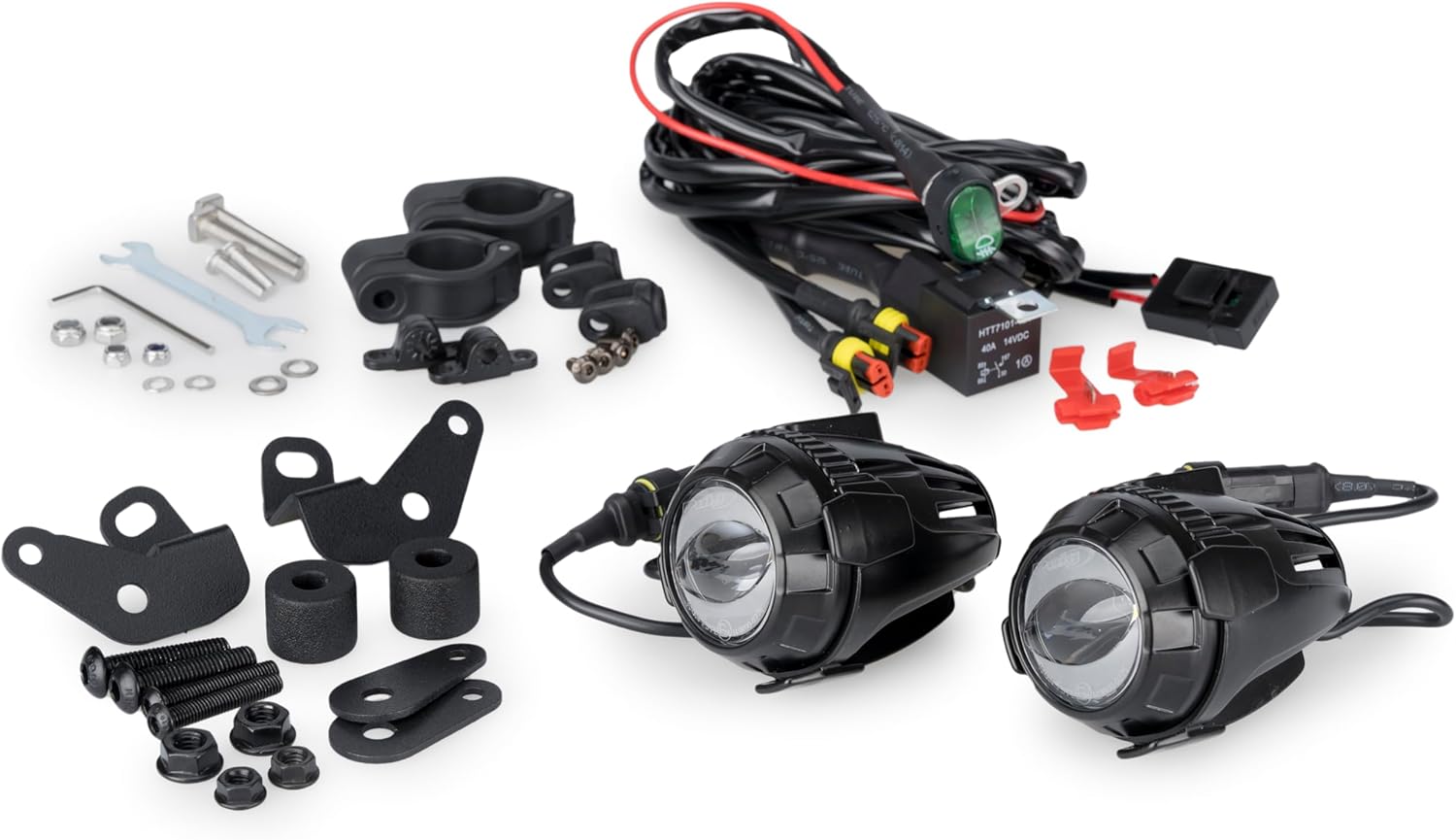
Figure 1: All components included in the Puig 22152N Beam 3.0 Auxiliary Lights kit. This includes two auxiliary lights, a wiring harness with an integrated switch, various mounting brackets, screws, washers, and Allen keys for installation.
2.1. Có gì trong hộp:
- 2 x Puig Beam 3.0 Auxiliary Lights (Black)
- 1 x Wiring Harness with Integrated Switch
- Various Mounting Brackets (specific for direct fixation, adaptable to 25 mm diameter tubes)
- Installation Hardware (screws, washers, nuts, Allen keys)
- Hướng dẫn sử dụng (tài liệu này)
3. Các tính năng chính
- Tăng cường khả năng hiển thị: Designed to provide additional visibility and safety in all driving situations.
- High Performance LED: Low consumption and high performance LED technology, delivering 2200 total lumens.
- Kết cấu bền bỉ: Lightweight and resistant aluminum housing for durability, heat dissipation, and protection against gravel impact.
- Resistant Lenses: Polycarbonate lenses offer resistance and clarity in illumination.
- Adjustable System: Features an adjustable system for precise light beam orientation.
- Cài đặt dễ dàng: Includes all necessary accessories for quick and secure mounting without the need for crash bars.
- Homologated: These auxiliary lights are homologated, ensuring compliance with safety standards.
4. Khả năng tương thích
The Puig 22152N Beam 3.0 Auxiliary Lights are compatible with the following motorcycle models:
- BMW R1300GS (2023, 2024, 2025, 2026)
- BMW R1300GS OPTION 719 TRAMONTANA (2023, 2024, 2025)
- BMW R1300GS TRIPLE BLACK (2023, 2024, 2025, 2026)
- BMW R1300GS TROPHY (2023, 2024, 2025, 2026)
Ghi chú: These lights are not compatible with Puig R19 protectors.
5. Thiết lập và Cài đặt
Follow these steps for proper installation of your Puig Beam 3.0 Auxiliary Lights. Professional installation is recommended if you are unsure about any steps.
5.1. Lắp đặt đèn
- Chuẩn bị khu vực lắp đặt: Identify a suitable location on your motorcycle's crash bars or frame tubes (up to 25 mm diameter) for mounting the auxiliary lights.
- Assemble the Brackets: Attach the appropriate mounting brackets to the auxiliary lights using the provided screws and Allen keys. Ensure all connections are secure but do not overtighten initially.
- Attach Lights to Motorcycle: Secure the assembled lights and brackets to the chosen location on your motorcycle. Use the provided washers and nuts, tightening them firmly to prevent movement.
- Điều chỉnh góc sáng: Once mounted, adjust the angle of each light to achieve the desired beam orientation. Ensure they do not interfere with other motorcycle components or visibility.

Figure 2: Puig 22152N Beam 3.0 Auxiliary Lights mounted on a motorcycle, showcasing their compact design and integration.
5.2. Kết nối điện
- Ngắt kết nối pin: For safety, disconnect the motorcycle's battery (negative terminal first) before making any electrical connections.
- Kết nối nguồn: Connect the red wire from the wiring harness to the positive (+) terminal of the motorcycle battery. Connect the black wire to the negative (-) terminal or a suitable ground point on the motorcycle frame.
- Connect ACC Line: Connect the ACC (Accessory) wire from the harness to an original ACC line on your motorcycle. This ensures the auxiliary lights turn on/off with the ignition.
- Connect Lights to Harness: Plug the auxiliary lights into the quick connectors on the wiring harness. Ensure a secure connection.
- Công tắc gắn: Install the included switch in a convenient and accessible location on your handlebars.
- Kết nối lại pin: Once all connections are secure and verified, reconnect the motorcycle's battery (positive terminal first).
Cảnh báo: Incorrect wiring can damage your motorcycle's electrical system or the auxiliary lights. If you are not confident in performing electrical work, seek assistance from a qualified technician.
Note: No relevant installation videos from the seller were available for this specific product. Please refer to the detailed text instructions and diagrams provided.
6. Hướng dẫn vận hành
The Puig Beam 3.0 Auxiliary Lights are operated via the integrated switch on the wiring harness. The lights offer multiple modes for different driving conditions.
- Bật/Tắt nguồn: Press the switch once to turn the lights on or off.
- Thay đổi chế độ: With the lights on, press the switch repeatedly to cycle through the available lighting modes (e.g., low beam, high beam, combination, safety flash). Refer to the specific instructions provided with the switch for detailed mode descriptions.
7. Bảo trì
Regular maintenance ensures the longevity and optimal performance of your auxiliary lights.
- Vệ sinh: Clean the lenses and housing regularly with a soft cloth and mild soap solution. Avoid abrasive cleaners that could scratch the polycarbonate lenses.
- Điều tra: Periodically check all mounting hardware for tightness. Vibrations from riding can loosen screws over time.
- Kiểm tra hệ thống dây điện: Inspect the wiring harness for any signs of wear, fraying, or damage. Ensure all connections remain secure and free from corrosion.
- Lens Condition: Check the polycarbonate lenses for cracks or significant scratches that could impair light output.
KHAI THÁC. Xử lý sự cố
If you encounter issues with your auxiliary lights, refer to the following common troubleshooting steps:
| Vấn đề | Nguyên nhân có thể | Giải pháp |
|---|---|---|
| Đèn không bật. |
|
|
| Đèn nhấp nháy hoặc mờ dần. |
|
|
| Light beam is misaligned. |
|
|
If the problem persists after attempting these solutions, please contact Puig customer support for further assistance.
9. Thông số kỹ thuật
| Tính năng | Chi tiết |
|---|---|
| Số hiệu mẫu | 22152N |
| Thương hiệu | puig |
| Màu sắc | Đen |
| Loại ánh sáng | DẪN ĐẾN |
| Đầu ra Lumen | 2200 total lumens (as per product description) |
| Vật liệu ống kính | Polycarbonat |
| Vật liệu nhà ở | Aluminum (as per product description) |
| Tính năng đặc biệt | Lightweight, Impact Resistant |
| Loại dịch vụ xe | Xe máy |
| Mounting Required | Đúng |
| Kích thước gói hàng | 23.5 x 21.2 x 10.7cm |
| Trọng lượng sản phẩm | 1.42kg |
10. Bảo hành và Hỗ trợ
Bảo hành của nhà sản xuất: The Puig 22152N Beam 3.0 Auxiliary Lights come with a 2-year manufacturer's warranty.
For technical support, warranty claims, or any questions regarding your product, please contact Puig customer service through their official website or the retailer where the product was purchased. Please have your model number (22152N) and proof of purchase ready.
You can visit the official Puig store for more information: Puig Official Store