
1. Giới thiệu
Thank you for choosing the EasySMX X05PRO PC Controller. This manual provides detailed instructions for setting up, operating, and maintaining your controller. The X05PRO offers versatile connectivity options, advanced features, and multi-platform compatibility for an enhanced gaming experience.
2. Nội dung gói hàng
- EasySMX X05PRO PC Controller
- Bộ thu không dây 2.4G
- Cáp sạc/dữ liệu USB-C
- Hướng dẫn sử dụng (tài liệu này)
3. Bố cục sản phẩm
Familiarize yourself with the buttons and components of your EasySMX X05PRO controller.
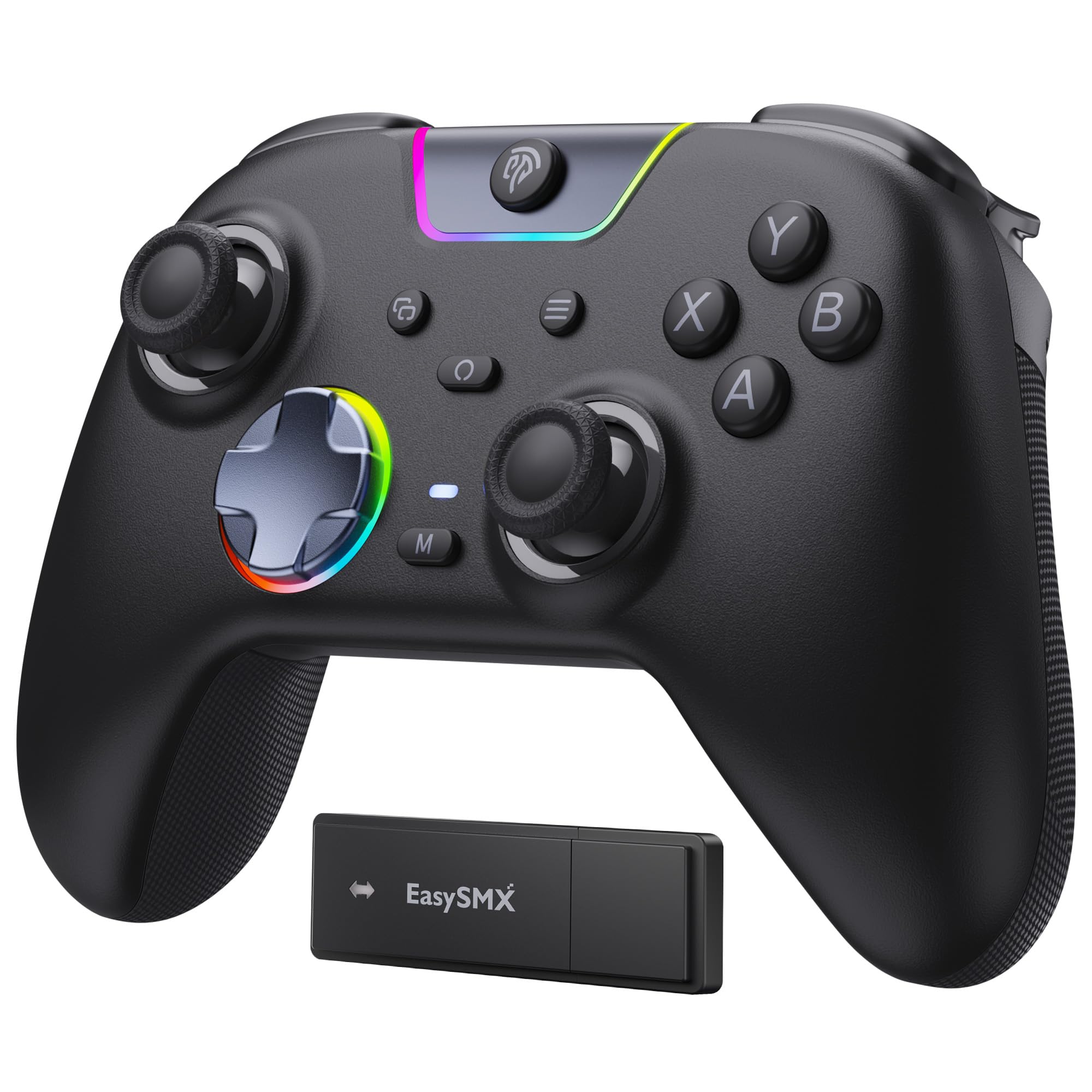
Figure 1: EasySMX X05PRO Controller Overview
- Các nút A/B/X/Y: Các nút hành động tiêu chuẩn.
- D-Pad: 8-direction digital input.
- Cần điều khiển Analog Trái/Phải: Để di chuyển chính xác và điều khiển máy ảnh.
- Các nút LB/RB: Các nút Bumper trái và phải.
- Các yếu tố kích hoạt LT/RT: Left and Right Analog Triggers with two-stagChức năng điện tử.
- Nút Home: Chức năng này dùng để bật/tắt bộ điều khiển và truy cập vào menu hệ thống.
- Nút BẮT ĐẦU/CHỌN: Các chức năng dành riêng cho trò chơi.
- Nút M1/M2: Programmable buttons on the top of the controller.
- Cổng USB-C: Dùng để kết nối có dây và sạc pin.
- Chuyển đổi chế độ: For selecting connection modes (if applicable).
4. Thiết lập & Kết nối
4.1. 2.4G Wireless Connection (PC Windows)
- Cắm bộ thu không dây 2.4G vào cổng USB trống trên máy tính của bạn.
- Press and hold the HOME button on the controller until the indicator lights turn on, indicating it's powered on.
- The controller will automatically connect to the receiver. Once connected, the indicator light will stabilize.
4.2. Bluetooth Connection (Switch, Android, iOS)
- Đảm bảo Bluetooth trên thiết bị của bạn đã được bật.
- On the controller, press and hold the HOME button along with the appropriate mode button (refer to the controller's specific button combination for Bluetooth pairing, usually a small button near the USB port or a combination with HOME).
- The indicator lights will flash rapidly, indicating pairing mode.
- On your device, search for new Bluetooth devices and select "EasySMX X05PRO" (or similar) to pair.
- Sau khi ghép nối thành công, đèn báo trên bộ điều khiển sẽ ổn định.
4.3. Wired Connection (PC, Switch, Steam Deck)
- Connect the USB-C end of the cable to the controller and the USB-A end to your device (PC, Switch dock, Steam Deck).
- The controller will automatically be recognized by your device and switch to wired mode.
- This mode is ideal for competitive gaming due to minimal input lag and also allows charging while playing.

Figure 2: Multi-platform Connectivity
5. Hướng dẫn vận hành
5.1. Nút bấm im lặng
The X05PRO features a redesigned full-button structure with silicone dampers, providing ultra-quiet operation. This is ideal for late-night gaming sessions without disturbing others.

Hình 3: Thiết kế nút bấm im lặng
5.2. Hai chữ StagBộ kích hoạt Hall e
The adjustable trigger locks allow you to switch between short (3mm) and long (9mm) trigger strokes. Short strokes are optimized for rapid firing in FPS games, while long strokes provide precise control for racing games.

Hình 4: Hai chữ StagBộ kích hoạt Hall e
5.3. Upgraded 8-Direction D-Pad
The D-pad features a dome switch and concave pivot design, enabling smooth diagonal inputs and precise 8-direction operation, ideal for fighting games and retro titles.

Figure 5: Upgraded 8-Direction D-Pad
5.4. Đèn nền RGB động
Customize your gaming experience with dynamic RGB lighting effects. The controller offers various lighting modes and 7 color combinations. Refer to the manual for detailed settings.

Hình 6: Chiếu sáng RGB động
5.5. Programmable Buttons (M1/M2)
The two additional customizable buttons (M1 and M2) located on the top of the controller are designed to prevent accidental presses during intense gameplay, a common issue with back paddles. These buttons can be programmed to various functions. Consult the full manual for programming instructions.

Hình 7: Các nút M1/M2 có thể lập trình
5.6. 1000Hz Polling Rate & Hall Effect Sticks
Experience virtually no input delay with a 1000Hz polling rate in both wired and 2.4G wireless modes. The high-precision 11-bit Hall effect sensors ensure drift-free accuracy and extended lifespan for the joysticks and triggers.

Figure 8: Hall Effect Technology and 1000Hz Polling Rate
5.7. Phản hồi rung động
The controller features a 2+2 internal rumble motor system, providing realistic feedback for impacts, drifts, and collisions. Vibration intensity can be adjusted to your preference.

Figure 9: 4-Zone Vibration Feedback
5.8. Chức năng Turbo
The controller supports a manual Turbo function for rapid, repeated button presses. This feature can be configured for specific action buttons (A/B/X/Y/LB/RB/LT/RT) and offers 3 speed levels.
5.9. Tay cầm Ergonomic
The soft-touch silicone coating provides a sweat-resistant, non-slip grip, ensuring comfort during extended gaming sessions.

Figure 10: Ergonomic Grip
6. Sạc
The controller is equipped with a built-in 1000mAh rechargeable battery, ensuring long playtimes. To charge, connect the controller to a power source using the provided USB-C cable. Charging typically takes approximately 3 hours. An indicator light will show charging status (e.g., red for charging, green for fully charged).
7. Thông số kỹ thuật
| Tính năng | Sự miêu tả |
|---|---|
| Số hiệu mẫu | X05PRO |
| Kết nối | Kết nối có dây (USB-C), kết nối không dây 2.4G, Bluetooth |
| Tỷ lệ bỏ phiếu | 1000Hz (Có dây & 2.4G), 125Hz (Bluetooth) |
| Dung lượng pin | Lithium-ion 1000mAh |
| Thời gian sạc | Xấp xỉ 3 giờ |
| Rung động | 4-zone adjustable rumble motors |
| Kích hoạt | Hai-stage Hall Effect Triggers (3mm/9mm) |
| Cần điều khiển | Cần điều khiển hiệu ứng Hall |
| Phím D | Upgraded 8-direction with dome switch and concave pivot |
| Chiếu sáng | Dynamic RGB Backlight (customizable) |
| Nút có thể lập trình | M1, M2 |
| Kích thước | 18.1 x 14.4 x 7.4cm |
| Cân nặng | 390 gam |
| Nền tảng được hỗ trợ | PC (Windows), Steam Deck, Switch, Android, iOS |
8. Bảo trì
- Hãy giữ cho bộ điều khiển luôn sạch sẽ bằng cách lau chùi bằng một miếng vải mềm, khô.
- Tránh để bộ điều khiển tiếp xúc với nhiệt độ quá cao, độ ẩm quá cao hoặc ánh nắng trực tiếp.
- Không được tự ý tháo rời bộ điều khiển, vì việc này có thể làm mất hiệu lực bảo hành.
- Hãy cất giữ bộ điều khiển ở nơi an toàn khi không sử dụng để tránh hư hỏng.
KHAI THÁC. Xử lý sự cố
- Bộ điều khiển không kết nối:
Ensure the controller is charged. For 2.4G, verify the receiver is properly inserted. For Bluetooth, ensure the device's Bluetooth is on and the controller is in pairing mode. Try restarting both the controller and the device. - Độ trễ đầu vào ở chế độ không dây:
Ensure there are no obstructions between the controller and the receiver/device. Move closer to the receiver/device. For critical gaming, consider using a wired connection. - Các nút bấm hoặc cần điều khiển không phản hồi:
Check if the controller is properly connected. If using wired, try a different USB port or cable. If the issue persists, perform a factory reset (refer to the full manual for specific instructions, usually a small reset button or button combination). - Rung không hoạt động:
Ensure vibration is enabled in the game settings and on the controller. Some games may require specific in-game support for trigger vibration. - Đèn RGB không hoạt động/không thể tùy chỉnh:
Refer to the full manual for specific button combinations to adjust RGB modes and colors. Ensure the controller is powered on. - D-Pad diagonal inputs are difficult:
The upgraded D-pad is designed for precision. Practice with the new design. If issues persist, ensure the controller firmware is up to date (check EasySMX support webĐịa điểm).
10. Bảo hành và Hỗ trợ
EasySMX products come with a standard warranty. For specific warranty terms, technical support, or any issues not covered in this manual, please contact EasySMX customer service or visit the official EasySMX website. Please have your product model (X05PRO) and purchase information ready when contacting support.

Figure 11: Technical Compliance Information