
OPPO Reno14 F CPH2743
Hướng dẫn sử dụng điện thoại thông minh OPPO Reno14 F 5G
Model: Reno14 F (CPH2743)
Giới thiệu
This manual provides essential information for the safe and efficient use of your OPPO Reno14 F 5G smartphone. Please read this manual thoroughly before using the device to ensure optimal performance and longevity.

Image: The OPPO Reno14 F 5G smartphone in Luminous Green, accompanied by its 45W SUPERVOOC charger. This image illustrates the primary device and a key accessory included in the package.
1. Thiết lập ban đầu
1.1 Mở hộp và các thành phần
Carefully unpack your OPPO Reno14 F 5G. The standard package includes:
- Điện thoại thông minh OPPO Reno14 F 5G
- Cáp USB
- Công cụ đẩy SIM
- 45W SUPERVOOC Charger (included)
1.2 Lắp thẻ SIM và bật nguồn
- Xác định vị trí khay thẻ SIM ở bên cạnh thiết bị.
- Cắm dụng cụ đẩy SIM vào lỗ nhỏ bên cạnh khay và ấn nhẹ cho đến khi khay bật ra.
- Đặt thẻ Nano-SIM vào khay với các điểm tiếp xúc màu vàng hướng xuống dưới. Đảm bảo đặt đúng hướng.
- Cẩn thận lắp lại khay vào điện thoại.
- Press and hold the Power button (located on the right side) until the OPPO logo appears on the screen.
- Làm theo hướng dẫn trên màn hình để hoàn tất quá trình thiết lập ban đầu, bao gồm chọn ngôn ngữ, kết nối Wi-Fi và thiết lập tài khoản Google.
1.3 Phí ban đầu
It is recommended to fully charge your device before first use. Connect the USB cable to the phone's charging port and the 45W SUPERVOOC charger. Plug the charger into a power outlet. The device supports fast charging.

Image: The OPPO Reno14 F 5G display showing 100% charge with the SUPERVOOC 45W fast charging indicator. This highlights the device's rapid charging capability, achieving a full charge in approximately 79 minutes.
2. Vận hành thiết bị của bạn
2.1 Hiển thị và Điều hướng
The OPPO Reno14 F features a 6.57-inch 120Hz AMOLED display. Navigate the interface using touch gestures:
- Vỗ nhẹ: Chọn một mục hoặc mở một ứng dụng.
- Vuốt: Cuộn qua màn hình hoặc danh sách.
- Nhón: Phóng to hoặc thu nhỏ hình ảnh và web trang.
- Nhấn lâu: Truy cập menu ngữ cảnh hoặc di chuyển biểu tượng.

Image: A close-up of the OPPO Reno14 F 5G's 6.57-inch 120Hz AMOLED display, highlighting its FHD+ resolution and 1.07 billion colors. This image emphasizes the visual quality and responsiveness of the screen.
2.2 Chức năng của máy ảnh
Your device is equipped with an AI Triple Camera system (50+8+2 MP) and a 32 MP selfie camera. The AI features automatically optimize photos for various scenarios.
- Camera chính (50MP): Để có ảnh có độ phân giải cao.
- Ultra Wide-Angle Camera (8MP): For expansive landscapes and group shots.
- Camera macro (2MP): Dùng để chụp ảnh cận cảnh chi tiết.
- Selfie Camera (32MP): Features autofocus for clear self-portraits.

Hình ảnh: Một chi tiết view of the OPPO Reno14 F 5G's camera module, illustrating the 50MP main sensor, 8MP ultra-wide, 2MP macro, and the 32MP selfie camera. This graphic highlights the AI Portrait Expert capabilities.
2.3 ColorOS 15 Features
The device runs on ColorOS 15, offering intelligent and fluid user experience. Key features include:
- Mở khóa kỹ thuật số: Truy cập an toàn và thuận tiện.
- Universal IR Remote Control: Điều khiển các thiết bị gia dụng tương thích.
- NFC: Dùng cho thanh toán không tiếp xúc và truyền dữ liệu.
- Quét tài liệu: Integrated tool for digitizing documents.
- Ảnh tự sướng nhận dạng bằng AI: Các tính năng chụp ảnh selfie được nâng cao nhằm mục đích nhận dạng.

Image: A screenshot of the ColorOS 15 interface on the OPPO Reno14 F 5G, showcasing various widgets and app icons. This image demonstrates the intelligent and fluid design of the operating system.
3. Bảo trì và chăm sóc
3.1 Vệ sinh thiết bị của bạn
To clean your smartphone, use a soft, lint-free cloth. Avoid abrasive materials or harsh chemicals. For stubborn smudges, slightly damplau bằng vải với nước hoặc chất tẩy rửa màn hình chuyên dụng cho thiết bị điện tử.
3.2 Khả năng chống nước và bụi (IP69)
The OPPO Reno14 F 5G is rated IP69 for water and dust resistance. This means it offers superior protection against dust ingress and can withstand high-pressure, high-temperature water jets. However, it is not recommended for prolonged submersion or use in extreme conditions. Damage caused by liquid immersion is not covered under warranty.
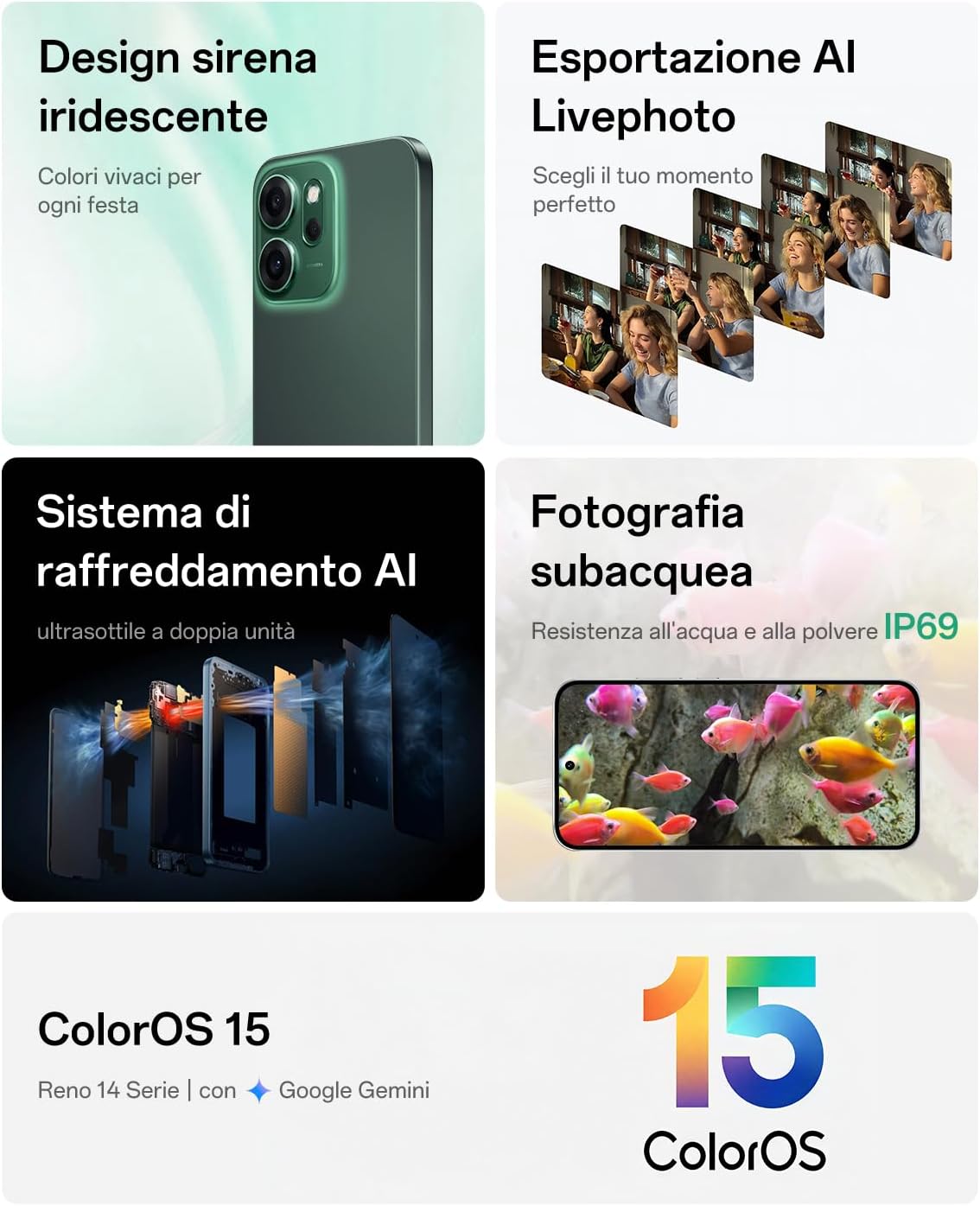
Hình ảnh: Một hình ảnh tổng hợp thể hiện...asing various features of the OPPO Reno14 F 5G, including its iridescent design, AI Livephoto export, AI cooling system, and IP69 underwater photography capability. This highlights the device's durability and advanced features.
3.3 Chăm sóc pin
Để kéo dài tuổi thọ pin:
- Tránh để thiết bị tiếp xúc với nhiệt độ quá cao.
- Use only the original 45W SUPERVOOC charger and cable.
- Không nên để pin cạn kiệt hoàn toàn thường xuyên.
- Để lưu trữ lâu dài, hãy sạc pin đến khoảng 50% và tắt thiết bị.
KHAI THÁC. Xử lý sự cố
4.1 Thiết bị không bật nguồn
- Đảm bảo pin đã được sạc. Kết nối bộ sạc và đợi vài phút trước khi thử bật lại.
- Nhấn và giữ nút Nguồn trong ít nhất 10-15 giây để buộc khởi động lại.
4.2 Ứng dụng bị sập hoặc đóng băng
- Đóng ứng dụng có vấn đề và mở lại.
- Xóa bộ nhớ đệm và dữ liệu của ứng dụng trong Cài đặt > Ứng dụng.
- Ensure the app and your ColorOS are updated to the latest version.
- Khởi động lại thiết bị.
4.3 Tuổi thọ pin kém
- Kiểm tra mức sử dụng pin trong Cài đặt để xác định các ứng dụng tiêu hao nhiều pin.
- Giảm độ sáng màn hình và đặt thời gian chờ màn hình ngắn hơn.
- Tắt các tính năng không cần thiết như Wi-Fi, Bluetooth hoặc GPS khi không sử dụng.
- Hãy đảm bảo việc làm mới ứng dụng nền được giới hạn đối với các ứng dụng ít quan trọng hơn.
5. Thông số kỹ thuật
| Thương hiệu | OPPO |
| Tên mẫu | Reno14 F |
| Số hiệu mẫu | CPH2743 |
| Hệ điều hành | Android (ColorOS 15) |
| Bộ xử lý | Snapdragon 6 Gen 1, 3.45 GHz |
| ĐẬP | 8GB |
| Bộ nhớ trong | 256GB |
| Trưng bày | 6.57-inch AMOLED, 120Hz, 2340x1080 (FHD+) |
| Camera sau | 50MP Main + 8MP Ultra Wide-Angle + 2MP Macro |
| Camera trước | 32MP with Autofocus |
| Dung lượng pin | 6000mAh |
| Sạc | Sạc nhanh SUPERVOOC 45W |
| Chống nước & bụi | IP69 |
| Kết nối | 5G, NFC |
| Kích thước (Độ dày) | Xấp xỉ 7.74 mm |
| Cân nặng | Xấp xỉ 180 g |
| Các thành phần bao gồm | USB Cable, SIM Eject Tool, 45W SUPERVOOC Charger |

Hình ảnh: Một nội bộ view of the OPPO Reno14 F 5G's components, highlighting the Snapdragon 6 Gen 1 processor, 8GB RAM, and 256GB ROM. This graphic illustrates the performance enhancements, including a 35% increase in CPU and 30% in GPU performance.
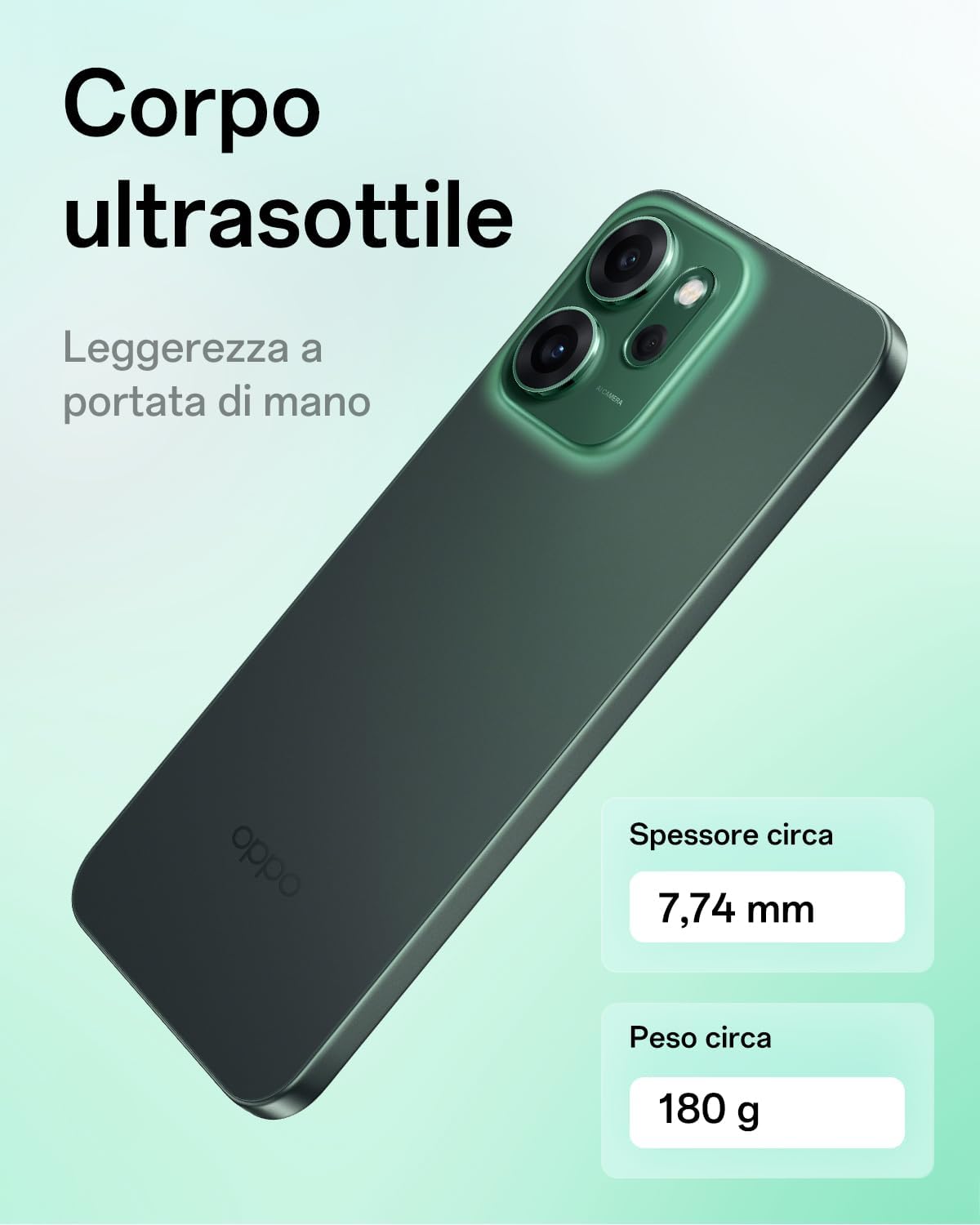
Hình ảnh: Một mặt chuyên nghiệpfile view of the OPPO Reno14 F 5G, emphasizing its ultra-thin body with a thickness of approximately 7.74 mm and a weight of approximately 180 g. This highlights the device's ergonomic and lightweight design.

Image: The energy efficiency label for the OPPO Reno14 F 5G (CPH2743), showing an 'A' rating and battery life of 63 hours. It also indicates IP68 resistance and durability ratings.
For more details, refer to the official EPREL database: https://eprel.ec.europa.eu/qr/2318911
6. Thông tin bảo hành
Your OPPO Reno14 F 5G smartphone comes with a minimum warranty period of 25 tháng provided by the supplier. This warranty covers manufacturing defects under normal use. Please retain your proof of purchase for warranty claims.
Bảo hành không bao gồm các thiệt hại gây ra bởi:
- Hư hỏng do tai nạn hoặc sử dụng sai cách.
- Sửa chữa hoặc sửa đổi trái phép.
- Liquid damage (beyond IP69 rating).
- Hao mòn thông thường.
For detailed warranty terms and conditions, please refer to the official OPPO support webđịa điểm.
7. Hỗ trợ và Liên hệ
For further assistance, technical support, or service inquiries, please contact OPPO customer support:
- Hỗ trợ chính thức Webđịa điểm: https://support.oppo.com/
- Hỗ trợ qua Email: support@oppo.com
- Thông tin về phụ tùng thay thế: https://support.oppo.com/en/answer/?aid=2204306
- Repair Instructions for End-Users: https://support.oppo.com/en/answer/?aid=2204306
Please have your device model number (CPH2743) and proof of purchase ready when contacting support.
Tài liệu liên quan - Reno14 F CPH2743
 |
Hướng dẫn an toàn và bảo hành OPPO Reno14 F/FS (CPH2743) Thông tin toàn diện về an toàn, bảo hành và hướng dẫn sử dụng cho điện thoại thông minh OPPO Reno14 F/FS (CPH2743), bao gồm tuân thủ quy định, tiếp xúc với sóng RF và chăm sóc thiết bị. |
 |
ColorOS 15.0 User Manual - OPPO Guide Explore the features and functionalities of ColorOS 15.0 with this comprehensive user manual. Learn how to navigate your OPPO device, manage settings, enhance photography, optimize gaming, and secure your data. |
 |
Hướng dẫn sử dụng và nhanh OPPO Reno14 FS Sách hướng dẫn chính thức và cẩm nang nhanh này dành cho điện thoại thông minh OPPO Reno14 FS cung cấp thông tin chi tiết về thiết lập thiết bị, di chuyển dữ liệu, thông số kỹ thuật, quản lý pin và phụ kiện. Có sẵn nhiều ngôn ngữ. |
 |
Hướng dẫn an toàn và thông số kỹ thuật của OPPO Reno14 CPH2737 Hướng dẫn an toàn toàn diện, thông tin bảo hành và thông số kỹ thuật của điện thoại thông minh OPPO Reno14 (CPH2737). Tìm hiểu về cách sử dụng an toàn, chăm sóc pin, tuân thủ quy định và các tính năng của thiết bị. |
 |
Hướng dẫn nhanh về OPPO Zhuque-S3(5G) - Thông số kỹ thuật và thông tin an toàn Hướng dẫn ngắn gọn về điện thoại thông minh OPPO Zhuque-S3(5G), bao gồm các thao tác cơ bản, biện pháp phòng ngừa an toàn, thông tin quy định và thông số kỹ thuật. Bao gồm giá trị SAR và chi tiết thiết bị. |
 |
OPPO Reno14 5G(15) APN Hỗ trợ OPPO Reno14 5G(15)スマートフォンでモバイルデータ通うためのアクセスポイント( APN) hỗ trợ Wi-Fi và Wi-Fi, 5G NET có nghĩa là gì? |