1. Thông tin an toàn quan trọng
Vui lòng đọc kỹ tất cả hướng dẫn trước khi sử dụng thiết bị. Giữ lại sách hướng dẫn này để tham khảo trong tương lai.
- Do not use if you have a pacemaker, artificial joints, or electronic medical devices.
- Consult a physician before use if you have any pre-existing medical conditions, skin sensitivities, or are pregnant.
- Do not use on open wounds, swollen areas, or areas with skin irritation.
- Để xa tầm tay trẻ em.
- Không được nhúng thiết bị vào nước hoặc sử dụng trong môi trường quá ẩm ướt.
- Chỉ sử dụng cáp sạc và bộ đổi nguồn được cung cấp.
- Ngừng sử dụng ngay lập tức nếu bạn cảm thấy khó chịu hoặc đau.
2. Sản phẩm hếtview
The HX-601/603 Wireless Knee Massager is designed to provide therapeutic massage and integrated heating for your knees. Its ergonomic and portable design allows for comfortable use at home, in the office, or during travel.
2.1 Thành phần
- Main Massager Unit with Control Panel
- Dây đeo có thể điều chỉnh
- Magnetic Battery Compartment
- Cáp sạc USB
2.2 Tính năng
- Hoạt động không dây: Enjoy massage without tangled cords.
- Integrated Heating: Therapeutic heat to improve circulation and relax muscles.
- 3 mức cường độ: Customize your massage experience.
- Hẹn giờ 15 phút: Automatic shut-off for safety and optimal session duration.
- Bảng điều khiển kỹ thuật số: Easy adjustment of settings with LED display.
- Thiết kế công thái học: Conforms to the knee for maximum comfort and effectiveness.
- Comfortable Fabrics: Made with breathable materials for extended use.

The image displays the wireless knee massager worn on a knee, illustrating the integrated heating function with red arrows indicating heat flow.
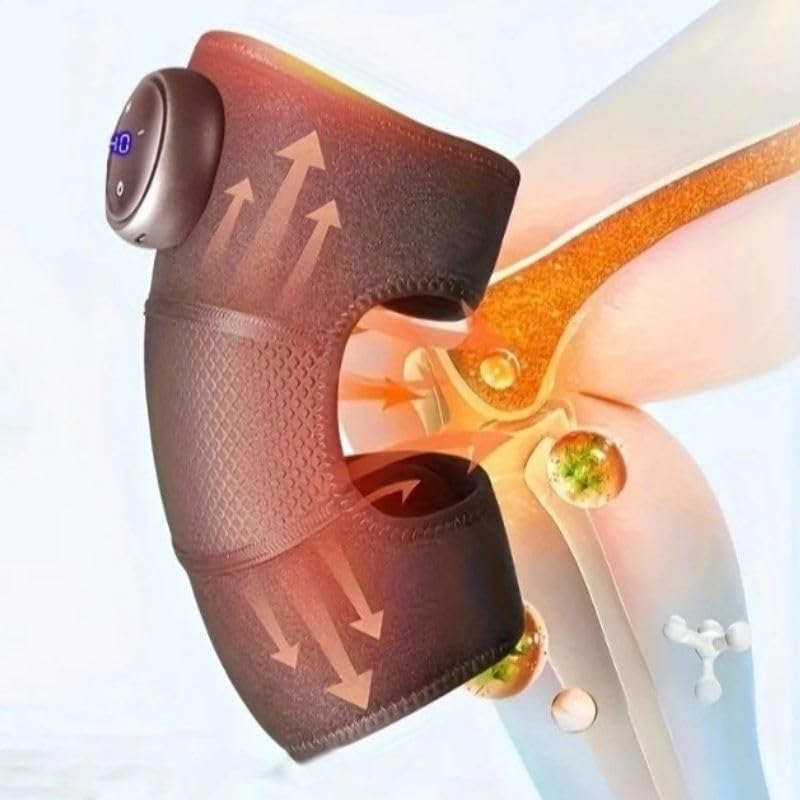
This image highlights the device's control panel with a digital display and buttons, along with the magnetic battery compartment for wireless operation.

Một chi tiết view of the massager's fabric, emphasizing its comfortable, breathable, and non-stuffy texture.
3. Thiết lập
3.1 Sạc thiết bị
- Locate the charging port on the massager unit.
- Connect the USB charging cable to the device and to a compatible USB power adapter (not included) or computer USB port.
- The LED indicator on the control panel will show charging status. A full charge typically takes several hours.
- Hãy đảm bảo thiết bị được sạc đầy trước khi sử dụng lần đầu để có tuổi thọ pin tối ưu.
3.2 Attaching to the Knee
- Unfold the knee massager.
- Position the main unit over your knee, ensuring the massage elements are centered.
- Secure the massager using the adjustable straps, ensuring a snug but comfortable fit. Do not overtighten.
4. Hướng dẫn vận hành
4.1 Bật/Tắt nguồn
- To turn on: Press and hold the Power button (usually marked with a circle or power symbol) on the control panel for 2-3 seconds. The LED display will illuminate.
- To turn off: Press and hold the Power button again for 2-3 seconds. The display will turn off.
4.2 Điều chỉnh cường độ massage
- Once powered on, press the Intensity button (usually marked with '+' or '-') to cycle through the 3 available intensity levels.
- The current intensity level will be indicated on the LED display.
4.3 Kích hoạt chức năng làm nóng
- Press the Heat button (usually marked with a wave or heat symbol) to activate or deactivate the integrated heating function.
- The heating indicator on the display will light up when active.
4.4 Hẹn giờ tự động
The device is equipped with an automatic 15-minute timer. After 15 minutes of continuous operation, the massager will automatically shut off. You can restart the device for another session if desired, but it is recommended to take breaks between sessions.
5. Bảo trì
5.1 Vệ sinh
- Đảm bảo thiết bị đã tắt và rút phích cắm trước khi vệ sinh.
- Lau sạch bề mặt máy mát xa bằng khăn mềm.amp vải.
- Không sử dụng chất tẩy rửa có tính mài mòn, dung môi hoặc hóa chất mạnh.
- Không nhúng thiết bị vào nước.
5.2 Lưu trữ
- Bảo quản thiết bị ở nơi khô ráo, thoáng mát, tránh ánh nắng trực tiếp và nhiệt độ cao.
- Tránh để sản phẩm gần các vật sắc nhọn có thể làm hỏng vải hoặc các bộ phận bên trong.
KHAI THÁC. Xử lý sự cố
| Vấn đề | Nguyên nhân có thể | Giải pháp |
|---|---|---|
| Thiết bị không bật. | Pin yếu hoặc thiết bị chưa được sạc. | Sạc đầy pin thiết bị. Đảm bảo nhấn và giữ nút nguồn trong 2-3 giây. |
| Không có nhiệt hoặc nhiệt yếu. | Heating function not activated or low battery. | Ensure the heat button is pressed. Charge the device. |
| Cường độ massage quá yếu/quá mạnh. | Cài đặt cường độ không chính xác. | Adjust the intensity using the '+' or '-' buttons. |
| Thiết bị dừng đột ngột. | Automatic 15-minute timer activated or low battery. | This is normal operation due to the timer. Recharge the device if the battery is low. |
7. Thông số kỹ thuật
| Số hiệu mẫu | HX-601/603 |
| Thương hiệu | Chung chung |
| Nguồn điện | Pin chạy bằng |
| Tậptage | 5V |
| Quyền lực | 7W |
| Kích thước sản phẩm | 25 x 14 x 8cm |
| Trọng lượng sản phẩm | 100 gam |
| Vật liệu | Electronic Components, Plastic, Fabric |
| Bộ đếm thời gian | 15 phút (tự động tắt) |
| Mức độ cường độ | 3 |
| Nước xuất xứ | Brazil |
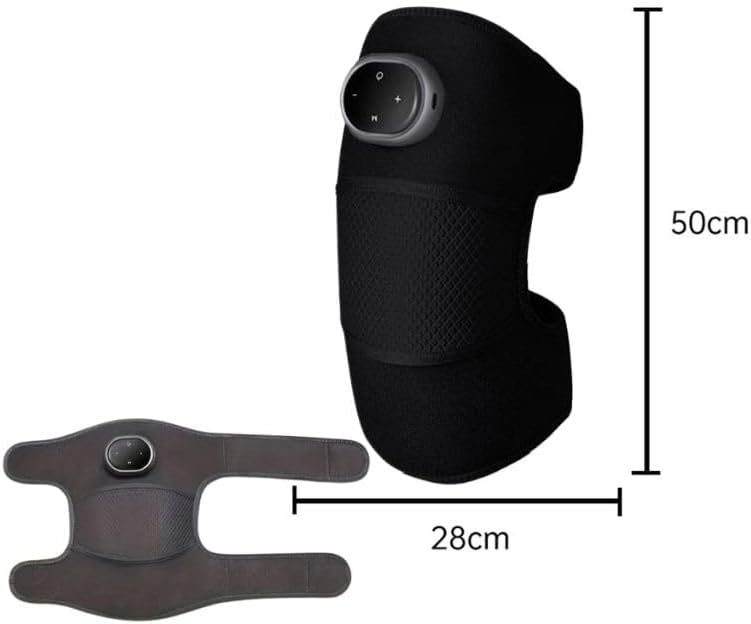
This image provides the physical dimensions of the knee massager, indicating a length of 50cm and a width of 28cm when laid flat.
8. Bảo hành và Hỗ trợ
This product is manufactured by Knee. For warranty information or technical support, please contact your retailer or the manufacturer directly. Please retain your proof of purchase.
Lưu ý: Điều khoản bảo hành cụ thể có thể khác nhau tùy theo khu vực và nhà bán lẻ.


