
1. Hướng dẫn an toàn quan trọng
Vui lòng đọc kỹ tất cả hướng dẫn trước khi sử dụng thiết bị này và giữ lại để tham khảo trong tương lai. Việc không tuân theo các hướng dẫn này có thể dẫn đến điện giật, hỏa hoạn hoặc thương tích nghiêm trọng.
- Đảm bảo nguồn điện voltage phù hợp với nhãn đánh giá trên thiết bị.
- Không vận hành quạt khi dây điện hoặc phích cắm bị hỏng. Nếu dây điện bị hỏng, phải được thay thế bởi nhà sản xuất, đại lý dịch vụ hoặc người có trình độ tương đương để tránh nguy hiểm.
- Luôn rút phích cắm quạt ra khỏi ổ cắm điện trước khi vệ sinh, bảo dưỡng hoặc di chuyển quạt.
- Không được đưa ngón tay hoặc bất kỳ vật gì vào lưới quạt khi quạt đang hoạt động.
- Keep the fan away from water or other liquids. Do not use it in wet or damp môi trường.
- Thiết bị này chỉ sử dụng trong nhà. Không sử dụng ngoài trời.
- Không đặt quạt gần các nguồn nhiệt như lò sưởi, lỗ thông hơi, bếp hoặc các thiết bị khác sinh nhiệt.
- Giám sát trẻ em để đảm bảo chúng không nghịch thiết bị.
- Do not use the fan in areas where gasoline, paint, or flammable liquids are stored.
2. Sản phẩm hếtview
The Altus AL 40 TFB is a sleek and efficient tower air cooler designed for indoor use. It features a compact design, multiple speed settings, and easy-to-use push-button controls.
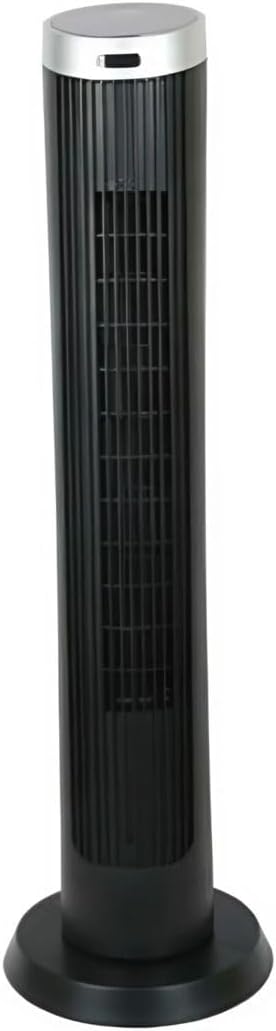
Hình 2.1: Đằng trước view of the Altus AL 40 TFB Tower Air Cooler. This image shows the tall, slender black body of the fan with its air outlet grille and a stable round base.
Thành phần:
- Bảng điều khiển: Located on the top of the unit for easy access to all functions.
- Lưới thông gió: Vertical grille on the front for air dispersion.
- Căn cứ: Stable round base for secure placement.
- Dây nguồn: Nằm ở phía sau của căn hộ.

Hình 2.2: Chi tiết view of the control panel on top of the Altus AL 40 TFB Tower Air Cooler. The panel features a digital display showing '28' and several push buttons for various functions.
3. Thiết lập
Follow these steps to set up your Altus AL 40 TFB Tower Air Cooler:
- Giải nén: Cẩn thận lấy quạt ra khỏi bao bì. Giữ lại bao bì để bảo quản hoặc vận chuyển trong tương lai.
- Lắp ráp cơ sở (nếu cần): Some models may require minor base assembly. If your unit's base is detached, align the base sections and secure them according to the diagrams in the packaging. Ensure it is firmly attached.
- Vị trí: Place the fan on a firm, level surface. Ensure there is adequate space around the fan for proper airflow, at least 30 cm (12 inches) from walls or furniture. This appliance is designed for indoor use only.
- Kết nối nguồn điện: Plug the power cord into a standard electrical outlet. Ensure the outlet meets the voltage yêu cầu ghi trên nhãn sản phẩm.
4. Hướng dẫn vận hành
Your Altus AL 40 TFB Tower Air Cooler is equipped with user-friendly push-button controls on the top panel.
Chức năng của bảng điều khiển:
- Nút nguồn (⏻): Press once to turn the fan ON, press again to turn it OFF.
- Nút Tốc độ (💨): Press repeatedly to cycle through the 3 available fan speeds: Low, Medium, and High. The current speed setting may be indicated on the digital display.
- Nút Chế độ (M): If available, press to select different operating modes (e.g., Normal, Natural, Sleep). Refer to the digital display for the active mode.
- Nút dao động (↔): Press to activate or deactivate the oscillation function, which allows the fan to rotate from side to side to distribute air over a wider area.
- Nút hẹn giờ (🕒): If available, press to set an automatic shut-off timer. Each press typically increases the timer duration by a set increment (e.g., 1 hour).
Hoạt động chung:
- Cắm quạt vào ổ điện phù hợp.
- Bấm nút nguồn (⏻) to turn on the fan.
- Select your desired fan speed using the Speed Button (💨).
- Activate oscillation if desired by pressing the Oscillation Button (↔).
- To turn off the fan, press the Power Button (⏻) lại.
5. Bảo trì
Regular maintenance ensures optimal performance and extends the lifespan of your Altus AL 40 TFB Tower Air Cooler.
Vệ sinh:
- Luôn rút phích cắm của quạt trước khi vệ sinh.
- Vệ sinh bên ngoài: Lau sạch bề mặt bên ngoài của quạt bằng vải mềm,amp cloth. Do not use abrasive cleaners, waxes, or polishes as they may damage the finish.
- Lưới thông gió hút/thoát khí: Use a vacuum cleaner with a brush attachment to gently remove dust and debris from the air inlet and outlet grilles. Do not attempt to disassemble the fan for cleaning.
- Hãy đảm bảo quạt đã khô hoàn toàn trước khi cắm điện và vận hành trở lại.
Kho:
Khi không sử dụng trong thời gian dài, hãy bảo quản quạt ở nơi khô ráo, thoáng mát. Nên cất giữ quạt trong bao bì gốc để tránh bụi bẩn và hư hỏng.
KHAI THÁC. Xử lý sự cố
If you encounter any issues with your Altus AL 40 TFB Tower Air Cooler, please refer to the following common problems and solutions:
- Quạt không bật:
- Kiểm tra xem dây nguồn đã được cắm chặt vào ổ điện đang hoạt động chưa.
- Ensure the power button on the control panel has been pressed.
- Verify that the household circuit breaker or fuse has not tripped.
- Luồng khí yếu:
- Check if the fan speed is set to a higher setting.
- Ensure the air inlet and outlet grilles are not blocked by dust or obstructions. Clean them if necessary.
- Tiếng ồn bất thường:
- Hãy đảm bảo quạt được đặt trên bề mặt bằng phẳng và ổn định.
- Check for any foreign objects that might have fallen into the fan grilles.
- Nếu tiếng ồn vẫn tiếp diễn, hãy ngừng sử dụng và liên hệ với bộ phận hỗ trợ khách hàng.
If the problem cannot be resolved using the above steps, please contact Altus customer support.
7. Thông số kỹ thuật
Detailed technical specifications for the Altus AL 40 TFB Tower Air Cooler:
| Tính năng | Đặc điểm kỹ thuật |
|---|---|
| Thương hiệu | Altus |
| Tên mẫu | AL 40 TFB |
| Màu sắc | Đen |
| Thiết kế quạt điện | Floor Fan (Tower Type) |
| Nguồn điện | Điện có dây |
| Kích thước sản phẩm (D x R x C) | 29D x 29W x 101H cm |
| Kiểu lắp đặt | Giá treo sàn |
| Loại hoàn thiện | Đã sơn |
| Sử dụng trong nhà/ngoài trời | Trong nhà |
| Phương pháp kiểm soát | Nút nhấn |
| Số mức công suất | 3 |
| Không dây | KHÔNG |
8. Bảo hành và Hỗ trợ
Altus provides comprehensive support for its products. For any assistance or warranty-related inquiries, please contact our customer service.

Hình 8.1: Altus customer service and warranty information. The image displays the Altus logo, a message about service availability, and a contact number for support.
Our services are always available for your Altus products. You can benefit from our door-to-door service by calling our support line for any assistance you may need.
Arçelik Service Warranty: For products under warranty, our home product pickup service is provided free of charge.
Customer Support Line: 0850 210 0 888
Please have your product model number (AL 40 TFB) and purchase details ready when contacting support.