
Giới thiệu
Welcome to the user manual for your new HP OMEN 16-ae0002TX Gaming Laptop. This document provides essential information to help you set up, operate, maintain, and troubleshoot your device. Designed for high-performance gaming and demanding tasks, this laptop features a 14th Gen Intel Core i7 processor, NVIDIA GeForce RTX 4060 graphics, 16GB DDR5 RAM, and a 1TB SSD, all presented on a vibrant 16.1-inch FHD 165Hz display.
1. Thiết lập ban đầu
1.1 Unpacking Your Laptop
Cẩn thận lấy tất cả các thành phần ra khỏi bao bì. Đảm bảo có đầy đủ các mục sau:
- HP OMEN 16-ae0002TX Gaming Laptop
- Bộ đổi nguồn
- Dây nguồn
- Hướng dẫn sử dụng (tài liệu này)
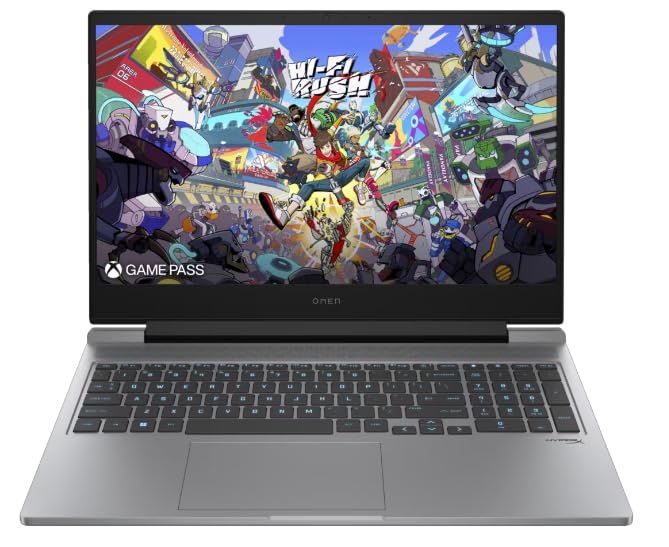
Figure 1: HP OMEN 16-ae0002TX Gaming Laptop overview.
1.2 Kết nối bộ đổi nguồn
- Kết nối dây nguồn với bộ đổi nguồn.
- Cắm bộ đổi nguồn vào ổ cắm trên tường.
- Connect the adapter's output plug to the power port on your laptop.
Nên sạc đầy pin máy tính xách tay trước khi sử dụng lần đầu.
1.3 Khởi động lần đầu và thiết lập Windows
Press the power button located on the laptop chassis. The laptop will boot up, and you will be guided through the Windows 11 Home setup process. Follow the on-screen instructions to configure your operating system, network settings, and user account.
1.4 Kết nối các thiết bị bên ngoài
Your HP OMEN laptop provides various ports for connecting external devices:
- Cổng USB: Dùng cho chuột, bàn phím, thiết bị lưu trữ ngoài và các thiết bị USB khác.
- Cảng HDMI: Dùng để kết nối với màn hình ngoài hoặc TV.
- Jack âm thanh: Dành cho tai nghe hoặc loa ngoài.
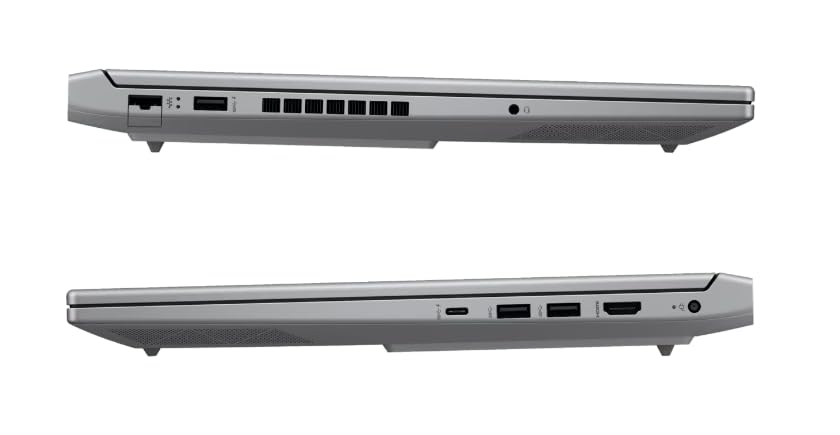
Hình 2: Mặt bên view illustrating available ports.
2. Vận hành máy tính xách tay của bạn
2.1 Bật/Tắt nguồn và Chế độ ngủ
- Bật nguồn: Nhấn nút nguồn.
- Tắt máy: Nhấp vào nút Bắt đầu trong Windows, sau đó chọn Nguồn > Tắt máy.
- Chế độ ngủ: Đóng nắp hoặc chọn Nguồn > Chế độ ngủ từ menu Bắt đầu.
2.2 Bàn phím và bàn di chuột
The laptop features a 1-zone RGB backlit full-size keyboard with HyperX tactile feedback for an enhanced gaming and typing experience. The integrated touchpad supports multi-touch gestures for navigation.
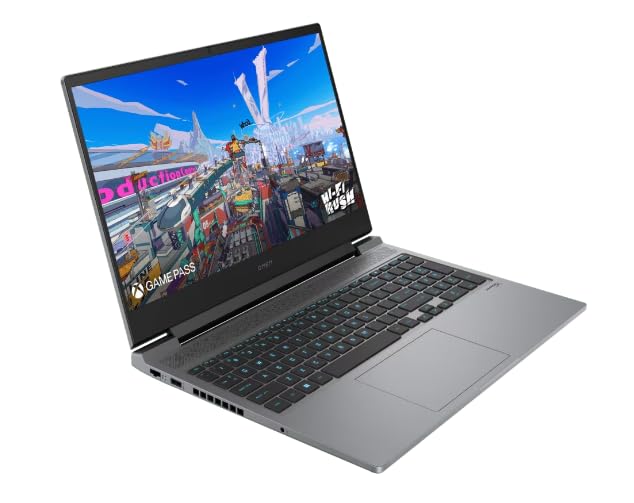
Hình 3: Bố cục bàn phím và bàn di chuột.
2.3 Tính năng hiển thị
The 16.1-inch FHD (1920 x 1080) IPS display offers a 165Hz refresh rate and 7ms response time, providing smooth and responsive visuals for gaming and multimedia. Adjust brightness and display settings through Windows display options.
2.4 Kết nối mạng và không dây
- Wi-Fi: Connect to wireless networks via the Windows network settings.
- Bluetooth: Ghép nối các thiết bị hỗ trợ Bluetooth như tai nghe, chuột hoặc tay cầm chơi game.
2.5 HP True Vision 1080p FHD Camera
The integrated 1080p FHD webcam is suitable for video calls, online meetings, and streaming. Ensure proper lighting for optimal image quality.
3. Bảo trì và chăm sóc
3.1 Tổng vệ sinh
- Màn hình: Dùng vải mềm, không có xơ vải nhẹ nhàng damprửa sạch bằng nước hoặc chất tẩy rửa màn hình. Tránh sử dụng hóa chất mạnh.
- Bàn phím và khung máy: Use a soft cloth. For dust, use compressed air.
- Đảm bảo máy tính xách tay đã tắt nguồn và rút phích cắm trước khi vệ sinh.
3.2 Chăm sóc pin
The laptop is equipped with a Lithium Ion battery. To maximize battery lifespan:
- Tránh nhiệt độ quá cao.
- Không nên để pin cạn kiệt hoàn toàn thường xuyên.
- Nếu cất giữ máy tính xách tay trong thời gian dài, hãy đảm bảo pin được sạc đến khoảng 50%.
3.3 Cập nhật phần mềm
Regularly update your Windows operating system, drivers, and HP software to ensure optimal performance, security, and compatibility. These updates often include performance enhancements and bug fixes.
4. Xử lý sự cố thường gặp
This section addresses common issues you might encounter. For more complex problems, refer to the HP support webđịa điểm.
4.1 Các vấn đề về nguồn điện
- Máy tính xách tay không bật nguồn: Ensure the power adapter is securely connected to both the laptop and a working power outlet. Check if the power adapter's indicator light is on.
- Pin không sạc: Verify the power adapter connection. Try a different outlet.
4.2 Vấn đề hiển thị
- Không có hình ảnh trên màn hình: Ensure the laptop is powered on. Try connecting an external monitor to check if the issue is with the laptop's display.
- Hình ảnh nhấp nháy hoặc bị méo mó: Cập nhật trình điều khiển đồ họa. Điều chỉnh tốc độ làm mới màn hình trong cài đặt Windows.
4.3 Các vấn đề về kết nối
- Wi-Fi không kết nối: Kiểm tra xem Wi-Fi đã được bật trong cài đặt Windows chưa. Khởi động lại bộ định tuyến và máy tính xách tay của bạn.
- Thiết bị Bluetooth không ghép nối được: Ensure the Bluetooth device is in pairing mode and within range. Check Bluetooth settings on your laptop.
5. Thông số kỹ thuật sản phẩm
| Tính năng | Đặc điểm kỹ thuật |
|---|---|
| Thương hiệu | HP |
| Tên mẫu | HP laptopOMEN (ae0002tx) |
| Bộ xử lý | 14th Gen Intel® Core™ i7-14650HX (up to 5.2 GHz) |
| Bộ nhớ RAM | 16 GB DDR5 (Max 32 GB) |
| Kho | Ổ cứng SSD 1 TB (ổ cứng thể rắn) |
| Card đồ họa | NVIDIA GeForce RTX 4060 (8 GB GDDR6 chuyên dụng) |
| Trưng bày | 16.1-inch FHD (1920 x 1080) IPS, 165Hz, 7ms, 300 nits |
| Hệ điều hành | Windows 11 Trang chủ |
| Bàn phím | 1-zone RGB Backlit, HyperX tactile feedback |
| Webcam | HP True Vision 1080p FHD |
| Kết nối | Wi-Fi, Bluetooth |
| Cổng | USB (Total: 1), HDMI (Total: 1) |
| Kích thước (Dài x Rộng x Dày) | 30L x 25W x 6Th Centimeters |
| Trọng lượng sản phẩm | 1.9 Kilôgam |
| Loại pin | Lithium Ion (2.6 Watt Hours) |
6. Thông tin bảo hành
Your HP OMEN 16-ae0002TX Gaming Laptop comes with an onsite warranty. Please retain your proof of purchase for warranty claims. For detailed terms and conditions, refer to the warranty card included with your product or visit the official HP support webđịa điểm.
7. Hỗ trợ khách hàng
For technical assistance, service, or further inquiries, please contact HP customer support:
- Nhà sản xuất / Nhà nhập khẩu: HP India Sales Pvt. Ltd., 24 Salarpuria Arena, Hosur Main Road, Adugodi, Bangalore-560030
- Hỗ trợ trực tuyến: Ghé thăm chính thức Hỗ trợ HP Webđịa điểm Bao gồm tài liệu hướng dẫn sử dụng, sách hướng dẫn và cẩm nang khắc phục sự cố.