
1. Giới thiệu
The FLSUN S1 Pro is an advanced FDM Delta 3D printer designed for high-speed and high-precision additive manufacturing. It features an ultra-fast printing speed of up to 1200mm/s and an acceleration of 40,000mm/s², significantly reducing print times. Equipped with Klipper firmware, a 7-inch smart touch screen, and a 350℃ all-metal hotend, the S1 Pro supports a wide range of filaments, including high-performance engineering materials. Its large build volume of Φ320*320*430 mm³ accommodates substantial projects. This manual provides essential information for setting up, operating, maintaining, and troubleshooting your FLSUN S1 Pro 3D Printer.
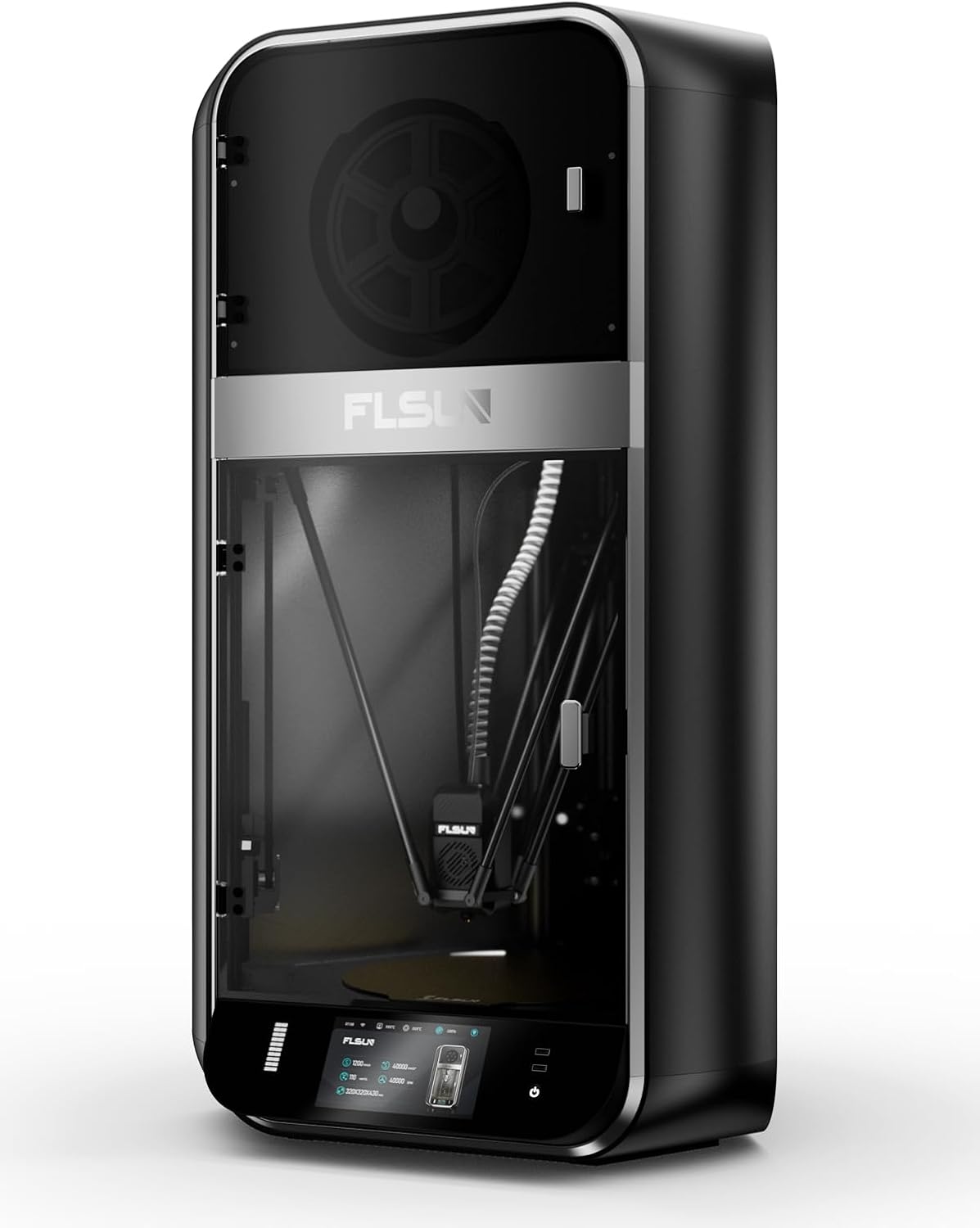
Hình ảnh 1.1: Mặt trước view of the FLSUN S1 Pro 3D Printer, showcasing its sleek design and enclosed build chamber.
2. Có gì trong hộp
Khi mở hộp, vui lòng kiểm tra xem có đầy đủ tất cả các thành phần không:
- FLSUN S1 Pro 3D Printer (main unit)
- Hộp sấy sợi
- Cáp nguồn
- Cáp USB
- Tool Kit (various wrenches, screwdrivers, etc.)
- Sampdây tóc
- Hướng dẫn sử dụng (tài liệu này)
- Hướng dẫn bắt đầu nhanh

Image 2.1: The FLSUN S1 Pro 3D Printer and its included accessories, demonstrating its 95% pre-assembled state.
3. Hướng dẫn thiết lập
The FLSUN S1 Pro is designed for quick setup, being 95% pre-assembled. The initial setup typically takes less than 10 minutes.
- Tháo hộp: Cẩn thận lấy máy in và tất cả các phụ kiện ra khỏi bao bì.
- Vị trí: Đặt máy in trên bề mặt phẳng, ổn định ở khu vực thông thoáng.
- Cuộc họp: Install the door and glass panels as per the instructions in the detailed Hướng dẫn cài đặt (PDF).
- Kết nối nguồn điện: Kết nối cáp nguồn với máy in và ổ cắm điện phù hợp.
- Bật nguồn ban đầu: Turn on the printer using the main power switch. The device will perform self-checks to ensure stability.
- San lấp mặt bằng tự động: The printer features automatic leveling. Follow the on-screen prompts on the 7-inch touch screen to initiate and complete the leveling process. This ensures optimal print bed calibration.
- Tải dây tóc: Load your desired filament into the filament dryer box and then guide it into the extruder as instructed on the display.
- Kết nối mạng: Connect the printer to your local Wi-Fi network via the touch screen interface for remote monitoring and control.
Để biết hướng dẫn trực quan chi tiết, vui lòng tham khảo chính thức Hướng dẫn cài đặt (PDF).
4. Hướng dẫn vận hành
4.1 User Interface and Control
The FLSUN S1 Pro utilizes a 7-inch Klipper firmware smart touch screen for intuitive control. The visual operation interface allows for smart adjustment and monitoring directly from the printer. Additionally, with advanced Microtac radar control and Wi-Fi connectivity, you can monitor and control your printer in real-time from mobile phones and PCs.

Image 4.1: Remote control and monitoring capabilities via the FLSUN World app on a mobile device.
- Điều khiển từ xa: Manage your printers remotely from anywhere.
- Tap it, Print it, Like it: Start printing tasks with a quick tap on the FLSUN World app, utilizing cloud storage for G-code files.
- Monitor in Pocket: Real-time checking of your printing progress.
- Nhắc nhở thông minh: Receive notifications when print errors occur.
4.2 Quy trình in
- Chuẩn bị mô hình: Use compatible slicing software (FLSUN Slicer V2.0 or other slicers like PrusaSlicer, Cura) to prepare your 3D model. Ensure settings are optimized for the S1 Pro's capabilities, including its high speed and acceleration.
- Chuyển khoản File: Chuyển mã G đã cắt lát file to the printer via USB or Wi-Fi (FLSUN World app).
- Bắt đầu in: Chọn file on the touch screen or through the app and initiate the print.
- Giám sát: Utilize the built-in camera for real-time monitoring and time-lapse recording. The printer's low noise level (55dB) ensures a quiet operating environment.
- Power-Off Resume: In case of power interruption, the printer supports power-off continuous printing, resuming from where it left off. Vibration compensation further ensures print quality.

Image 4.2: Illustration of the FLSUN S1 Pro's epic speed capabilities: 1200mm/s max printing speed, 40000mm/s² max acceleration, and 110mm³/s peak flow rate.

Image 4.3: Key features for smooth and consistent printing, including AI-powered functions, auto-leveling, spaghetti detection, and perfect first layer adhesion.

Image 4.4: Advanced features like the Air Filter, Filament Dryer, Built-in camera, Intelligent Zoned Heating, and 16GB EMMC storage.
5. Bảo trì
Regular maintenance ensures the longevity and optimal performance of your FLSUN S1 Pro 3D Printer.
- Vệ sinh: Regularly clean the print bed, nozzle, and internal components to prevent debris buildup. Use a soft cloth and appropriate cleaning solutions.
- Bộ lọc khí: The printer is equipped with a combined HEPA + activated carbon air filter. Check and replace the filter periodically as needed to maintain air quality and prevent odors.
- Filament Dryer Box: Ensure the filament dryer box is functioning correctly to keep your filament dry, which is crucial for print quality.
- Kiểm tra vòi phun: Periodically inspect the 0.4mm hardened steel nozzle for wear or clogs. Replace if necessary. The all-metal hot end can reach up to 350°C, supporting various high-temperature filaments.
- Bôi trơn: Refer to the detailed manual for any lubrication requirements for moving parts.

Image 5.1: Diagram illustrating the 350°C hotend, 50°C chamber, and 120°C hot bed for optimal material handling.
KHAI THÁC. Xử lý sự cố
Phần này đề cập đến những vấn đề thường gặp mà bạn có thể gặp phải trong quá trình vận hành.
| Vấn đề | Nguyên nhân có thể | Giải pháp |
|---|---|---|
| Hình in không dính vào giấy | Improper bed leveling, dirty print surface, incorrect bed temperature. | Re-run auto-leveling. Clean the print surface with isopropyl alcohol. Adjust hot bed temperature according to filament type (Max 120°C). |
| Tắc nghẽn sợi | Dust in filament, incorrect hotend temperature, worn nozzle, heat creep. | Ensure filament is dry (use filament dryer). Verify hotend temperature (Max 350°C). Clean or replace nozzle. Check cooling fan operation. |
| "Spaghetti" Prints | Poor bed adhesion, model detaching, extrusion issues. | The S1 Pro features Phát hiện mì spaghetti. Ensure proper bed adhesion. Monitor print progress via the built-in camera. |
| Máy in không phản hồi | Software glitch, loose connection, power issue. | Restart the printer. Check all cable connections. Ensure stable power supply. |
| Chất lượng in kém | Incorrect slicing settings, worn nozzle, vibration, wet filament. | Optimize slicing parameters. Replace nozzle if worn. The printer has Bù rung; ensure it's active. Use filament dryer. |

Image 6.1: Features like the 55dB quiet fan and Power Off Resume Print (UPS) contribute to a reliable printing experience.
7. Thông số kỹ thuật
| Loại | Đặc điểm kỹ thuật | Chi tiết |
|---|---|---|
| Tổng quan | Tốc độ in tối đa | 1200mm/giây |
| Tăng tốc tối đa | 40000mm/giây² | |
| Tốc độ dòng chảy đỉnh | 110mm³/s | |
| Xây dựng khối lượng | Φ320*320*430 mm³ (Maximum height of the cylinder: 383mm) | |
| Phòng | Đã đóng | |
| Mức độ tiếng ồn | 55dB | |
| đầu công cụ | Vòi phun | 0.4mm Hardened Steel Nozzle (supports various nozzle sizes) |
| Max Hot End Temp | 350℃ | |
| Đường kính sợi | 1.75mm | |
| Sợi | Dây tóc được hỗ trợ | Ideal: PLA, PETG, TPU. Satisfactory: ABS, ASA, PA, PC, PET. Capable: Carbon/Glass Fiber Reinforced PLA, PPS-CF, PPA-CF/GF. |
| Active Heating Dry Box | Đúng | |
| Phát hiện tắc nghẽn dây tóc | Đúng | |
| Nhiệt | Xây dựng tấm | Tấm PEI có kết cấu |
| Max Build Plate Temp | 120℃ | |
| Hệ thống sưởi vùng thông minh | Inner Circle Ø220mm, Outer Ring 220-320mm | |
| Điện tử | Trưng bày | 7" Color Touch Screen |
| Kho | 16GB EMMC, 32GB USB Flash | |
| Nguồn điện | 110-240V, 50/60Hz | |
| Mức tiêu thụ nguồn khi bật chế độ | 400 watt | |
| Phần mềm | Nâng cấp phần mềm | OTA (Trực tuyến) |
| Phần mềm cắt lát | FLSUN Slicer V2.0, Other Slicers | |
| Hệ điều hành được hỗ trợ | Hệ điều hành MacOS, Windows | |
| Đặc trưng | Camera giám sát | Realtime, Timelapse |
| Phát hiện sợi | Đúng | |
| Bù rung | Đúng | |
| Phát hiện mảnh vỡ | Đúng | |
| Phát hiện mì spaghetti | Đúng | |
| Screen Auto Sleep | Đúng | |
| Printer Auto Power Off | Đúng | |
| Tự động san lấp mặt bằng | Đúng | |
| Phục hồi mất điện | Yes (Z lift, Backup Battery) | |
| Bộ lọc không khí | HEPA + Activated Carbon | |
| Kích thước vật lý | Kích thước sản phẩm (D x R x C) | 23.62"D x 34.25"W x 9.45"H (600mm x 870mm x 240mm approx.) |
| Physical Dimension (Printer) | 550*596*1030mm | |
| Trọng lượng sản phẩm | 113 pound (khoảng 51.2 kg) | |
| Màu sắc | Đen |

Image 7.1: Comprehensive technical specifications for the FLSUN S1 Pro 3D Printer.
8. Bảo hành và Hỗ trợ
FLSUN is committed to providing reliable products and excellent customer service.
- Trả về: The product is eligible for 30-day easy returns. Please refer to the retailer's return policy for specific details.
- Hỗ trợ khách hàng: For technical assistance, troubleshooting, or warranty inquiries, please contact FLSUN Customer Support. You can often find support resources and contact information on the official FLSUN webtrang web hoặc thông qua nhà bán lẻ nơi sản phẩm được mua.
- Kế hoạch bảo vệ: Extended protection plans, such as a 4-Year Protection Plan, may be available for purchase separately to provide additional coverage beyond the standard warranty.
- Tài nguyên trực tuyến: Ghé thăm FLSUN Store on Amazon for additional product information, FAQs, and support.