
1. Giới thiệu
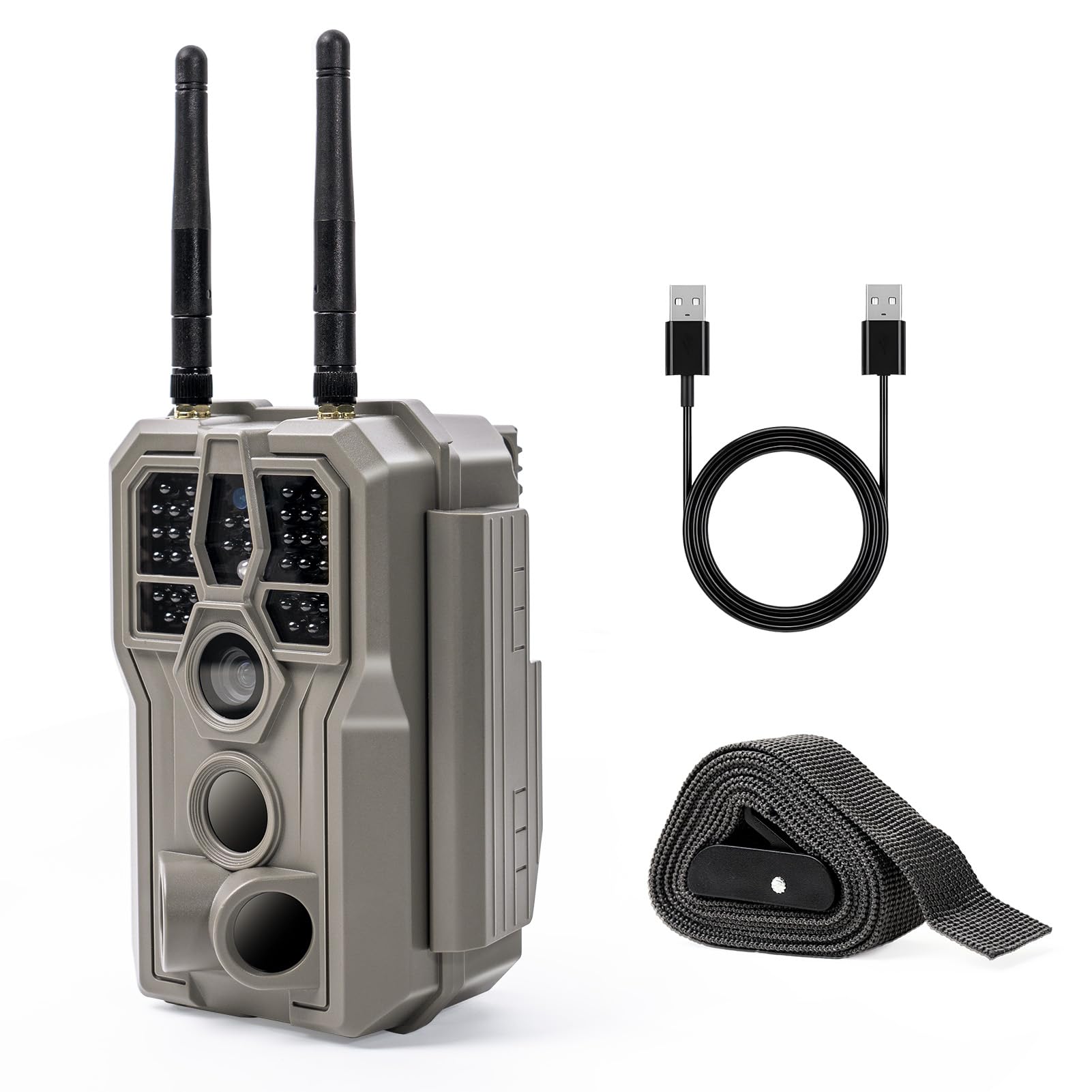
The GardePro E8 2.0 WiFi Trail Camera is designed for capturing high-quality images and videos of wildlife or for property surveillance. It features 4K Ultra HD video recording, 64MP photo resolution, and no-glow infrared night vision. The camera incorporates innovative low-power WiFi and Bluetooth connectivity, allowing for convenient control and media access via the GardePro Mobile App on your smartphone. Its dual-antenna design enhances WiFi stability and range, making it suitable for various outdoor environments.
PHIM 1.1: GardePro E8 2.0 Series Product Introduction. This video provides a general overview of the camera's features and design.
2. Nội dung gói hàng
Xác minh rằng tất cả các mục đều có trong gói hàng của bạn:
- 1 x GardePro E8 2.0 Trail Camera
- 2 x Ăng-ten
- 1 x Hướng dẫn sử dụng
- 1 x Gắn dây đeo
Ghi chú: 8 AA batteries and an SDHC/SDXC memory card (up to 512GB) are required for operation and are not included. The GardePro SP350 solar panel is sold separately.
3. Máy ảnh kết thúcview
Familiarize yourself with the main components of your GardePro E8 2.0 camera.

Hình ảnh 3.1: Đằng trước view of the GardePro E8 2.0 camera, highlighting the main lens, motion sensors, and dual antennas for enhanced connectivity.

Hình ảnh 3.2: Nội bộ view of the camera, displaying the LCD screen, navigation buttons (MENU, OK, directional arrows), and the ON/OFF/START switch. The SD card slot and USB port are also visible.
4. Thiết lập
4.1 Cấp nguồn cho máy ảnh
The GardePro E8 2.0 can be powered by 8 AA batteries (not included) or an optional GardePro SP350 solar panel (sold separately). The E8 2.0 Pro variant includes a built-in 7800mAh rechargeable battery.
- Pin AA: Insert 8 new AA batteries into the battery compartment, ensuring correct polarity.
- Rechargeable Battery (E8 2.0 Pro only): The built-in battery can be charged via a USB-C cable.
- Tấm pin mặt trời (Tùy chọn): Connect the GardePro SP350 solar panel to the camera's external power port for continuous charging and extended outdoor use.

Hình ảnh 4.1: Illustration of battery installation and optional solar panel connection for continuous power.
4.2 Cài đặt thẻ SD
A full-size SDHC/SDXC memory card (up to 512GB) is required to store photos and videos. Insert the SD card into the designated slot with the metal contacts facing the correct direction, as indicated on the camera.
4.3 Gắn máy ảnh
Use the included mounting strap to secure the camera to a tree or post. The camera also features dual copper mounting posts for tripod or wall compatibility, offering flexible installation options. Ensure the camera is positioned to capture the desired area, avoiding obstructions.

Hình ảnh 4.2: The GardePro E8 2.0 camera securely mounted to a tree using the provided strap, ready for outdoor use.
5. Vận hành máy ảnh
5.1 Bật/Tắt nguồn và Chọn chế độ
Locate the ON/OFF/START switch inside the camera. Switch it to 'ON' to activate the camera. The camera will enter setup mode, allowing you to adjust settings. To begin recording, switch to 'START'.
5.2 App Connection and Control
The GardePro E8 2.0 connects directly to your smartphone via Bluetooth for initial pairing, then uses the camera's built-in WiFi for data transfer and live view. Download the free GardePro Mobile App from your device's app store.
- Ghép nối: Enable Bluetooth on your smartphone and open the GardePro Mobile App. Follow the in-app instructions to connect to your camera.
- Phạm vi WiFi: The dual antennas provide a connection range of up to 165 ft (50 m) in open conditions. Physical obstructions may reduce this range.
- Chức năng: Ứng dụng cho phép bạn view and download original photos and videos, adjust camera settings, and use the Live View tính năng.
Lưu ý quan trọng: The E8 2.0 does not connect to home WiFi routers or cellular networks. It supports direct connection to a smartphone only. PCs, laptops, and web browsers are not supported for WiFi connection.

Hình ảnh 5.1: The GardePro Mobile App interface, showing options for live view, status, and gallery access, enabling remote control and media management.
5.3 Trực tiếp View for Real-Time Observation
Utilize the Live View function in the GardePro Mobile App to see what the camera is capturing in real-time. This is useful for precise camera aiming during installation and for observing wildlife without disturbance from a distance of up to 165 ft in open areas.

Hình ảnh 5.2: A user monitoring the camera's live feed on a smartphone, demonstrating the long-range WiFi connectivity for remote observation.
5.4 Chế độ ghi
The camera supports multiple recording modes:
- Chế độ chuyển động: Captures photos or videos when motion is detected by the PIR sensors.
- Chế độ tua nhanh thời gian: Takes photos at set intervals, regardless of motion.
- Chế độ kết hợp: Combines motion-triggered events with time-lapse photography.
5.5 Chất lượng hình ảnh và video
The E8 2.0 captures 4K Ultra HD videos and 64MP still images, providing clear and detailed footage. The 0.1s fast trigger speed and 120° wide PIR detection angle ensure that fast-moving subjects are captured effectively.

Hình ảnh 5.3: Example of 4K Ultra HD video quality, showcasing a fox in clear detail during daytime.
5.6 No-Glow IR Night Vision
Equipped with invisible 940nm no-glow infrared LEDs, the camera delivers clear night images and videos without emitting visible light, preventing animals from being startled and ensuring discreet surveillance.

Hình ảnh 5.4: Night vision footage of a raccoon, demonstrating the effectiveness of the 940nm no-glow infrared technology for clear, discreet nighttime recording.
6. Bảo trì
6.1 Quản lý pin
Regularly check battery levels, especially if not using a solar panel. Replace AA batteries when low. For the E8 2.0 Pro, ensure the rechargeable battery is fully charged before deployment for optimal performance.
6.2 Bảo vệ thời tiết
The GardePro E8 2.0 camera is IP66 rated, providing protection against dust and strong jets of water. This ensures reliable operation in various weather conditions, including rain and snow. However, avoid submerging the camera in water.
Hình ảnh 6.1: The camera operating in rainy conditions, illustrating its robust IP66 waterproof design for outdoor durability.
KHAI THÁC. Xử lý sự cố
- Máy ảnh không bật: Check if batteries are inserted correctly and fully charged. For E8 2.0 Pro, ensure the internal battery is charged.
- Sự cố kết nối WiFi: Ensure your smartphone is within 165 ft (50 m) of the camera in open conditions. Avoid physical obstructions like thick walls or dense foliage. Remember, it connects directly to your smartphone, not home WiFi.
- Chất lượng hình ảnh/video kém: Check the lens for dirt or condensation. Ensure the camera is stable and not subject to excessive movement. Verify settings in the app for desired resolution.
- Camera không ghi hình: Ensure an SD card is inserted and has sufficient free space. Check if the camera is in 'START' mode and not in standby after app use. Format the SD card if issues persist.
- Thời lượng pin ngắn: Use high-quality AA batteries. Consider using the GardePro SP350 solar panel for extended operation. Reduce video length or frequency of captures if possible.
8. Thông số kỹ thuật
| Tính năng | Đặc điểm kỹ thuật |
|---|---|
| Tên mẫu | E8 2.0 |
| Độ phân giải tĩnh hiệu quả | 64MP |
| Độ phân giải quay video | 4K |
| Công nghệ kết nối | Không dây (Bluetooth, Wi-Fi) |
| Giao thức kết nối | Bluetooth, WiFi |
| Nguồn điện | Battery Powered (8xAA, or 7800mAh rechargeable for Pro model) |
| Bộ nhớ Flash được hỗ trợ Kích thước tối đa | 512 GB (SDHC/SDXC) |
| Tầm nhìn ban đêm | 100 feet |
| Viewgóc ing | 70 Độ |
| Tốc độ kích hoạt | 0.1 giây |
| Góc phát hiện PIR | 120° |
| Bảo vệ quốc tế Rating | IP66 |
| Kích thước sản phẩm (D x R x C) | 4.2 x 2.9 x 5.6 inch |
| Trọng lượng sản phẩm | 1.3 pound |
9. Bảo hành và Hỗ trợ
For warranty information, technical support, or any inquiries regarding your GardePro E8 2.0 WiFi Trail Camera, please refer to the official GardePro webtrang web hoặc liên hệ trực tiếp với bộ phận dịch vụ khách hàng của họ. Giữ lại biên lai mua hàng để yêu cầu bảo hành.