
Giới thiệu
The RAPOO E9050L is a versatile wireless keyboard designed for seamless connectivity across multiple devices and operating systems. Its ultra-slim profile, quiet keys, and long-lasting rechargeable battery make it ideal for various environments, from office to travel. This manual provides detailed instructions for setup, operation, maintenance, and troubleshooting to ensure optimal use of your keyboard.
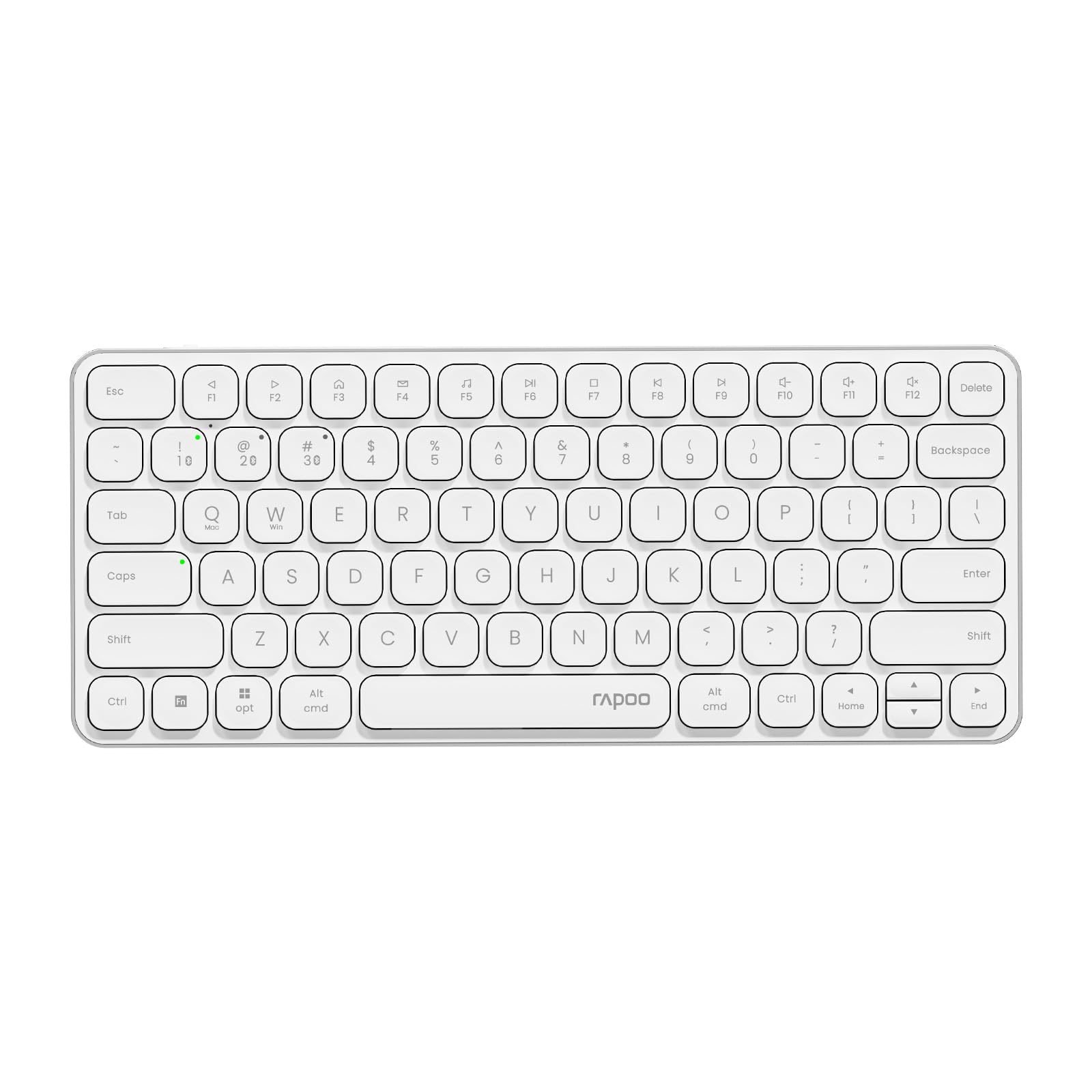
Image: The RAPOO E9050L Wireless Keyboard, showcasing thiết kế đẹp mắt.
Cài đặt
Nội dung gói
- RAPOO E9050L Wireless Keyboard
- Cáp sạc USB-C
- Hướng dẫn sử dụng
Sạc bàn phím
The E9050L features a built-in rechargeable battery. Before first use, fully charge the keyboard using the provided USB-C cable. A full charge can provide up to 90 days of continuous use. A quick 10-minute charge can provide enough power for one day of use.

Image: Diagram illustrating the rechargeable battery and charging indicators.
Connecting to Devices (Multi-Device & Multi-OS)
The keyboard supports wireless connection via 2.4GHz USB receiver or Bluetooth 5.0/4.0, allowing connection to up to 4 devices simultaneously. You can seamlessly switch between a notebook PC, desktop PC, tablet, or smartphone.

Image: Visual representation of multi-device and multi-OS connectivity options.
- Kết nối không dây 2.4 GHz:
Insert the USB receiver into an available USB port on your computer. The keyboard should connect automatically. - Kết nối Bluetooth:
Press and hold the Bluetooth pairing key (usually indicated by a Bluetooth icon or a specific Fn key combination) until the indicator light flashes. On your device (PC, tablet, smartphone), enable Bluetooth and search for "RAPOO E9050L". Select it to pair. - Chuyển đổi giữa các thiết bị:
Use the dedicated device switching keys (e.g., Fn + 1, Fn + 2, Fn + 3, Fn + 4) to switch between your paired devices. The corresponding indicator light will show which device is currently active.

Image: Icons representing compatibility with various operating systems including Windows, Mac OS, Linux, iOS, Android, and Chrome OS.
Hướng dẫn sử dụng
Key Functions and Multimedia Hotkeys
The E9050L features a compact 78-key layout with 12 multimedia hotkeys for quick access to common functions like play/pause, volume control, and email. These functions are accessed by pressing the Fn key in combination with the corresponding F-keys (F1-F12).

Image: Diagram showing the multimedia hotkeys and their functions when used with the Fn key.
Chuyển đổi hệ điều hành
The keyboard supports dual system compatibility. To switch between Windows and Mac OS layouts, use the following key combinations:
- Đối với Windows: Nhấn Fn + W
- Đối với Mac OS: Nhấn Fn + Q
Đèn báo
The keyboard includes indicator lights for device connection, Caps Lock status, and battery level. These lights provide clear visual feedback on the keyboard's current state, addressing user feedback for improved clarity.

Hình ảnh: Cận cảnh view of the device indicator lights and Caps Lock indicator.
Trải nghiệm đánh máy
The E9050L utilizes thin chiclet keycaps and a scissor-switch mechanism, providing a quiet and comfortable typing experience. The ultra-thin design (0.2 inches / 0.53 cm) reduces wrist strain, eliminating the need for a separate palm rest.

Hình ảnh: Chi tiết view of the thin chiclet keycaps and scissor-switch mechanism.
BẢO TRÌ
To ensure the longevity and optimal performance of your RAPOO E9050L keyboard, follow these maintenance guidelines:
- Vệ sinh: Sử dụng một miếng vải mềm, không xơ vải lau nhẹampened with water or a mild cleaning solution to wipe the keycaps and surface. Avoid harsh chemicals or abrasive materials.
- Loại bỏ bụi: Sử dụng khí nén để loại bỏ bụi và mảnh vụn giữa các phím.
- Tránh chất lỏng: Do not expose the keyboard to excessive moisture or submerge it in liquids. In case of spills, immediately disconnect the keyboard and allow it to dry completely before reuse.
- Kho: Bảo quản bàn phím ở nơi khô ráo, thoáng mát, tránh ánh nắng trực tiếp và nhiệt độ cao.
Xử lý sự cố
If you encounter issues with your RAPOO E9050L keyboard, refer to the following common solutions:
- Bàn phím không kết nối:
- Đảm bảo bàn phím đã được sạc.
- Verify that the 2.4GHz USB receiver is properly inserted or that Bluetooth is enabled and paired on your device.
- Try re-pairing the Bluetooth connection or re-inserting the USB receiver.
- Ensure you are on the correct device channel (Fn + 1/2/3/4).
- Keys Not Responding or Delayed Response:
- Kiểm tra mức pin; pin yếu có thể ảnh hưởng đến hiệu suất.
- Ensure the keyboard is within range of your device (for Bluetooth/2.4GHz).
- Interference from other wireless devices can cause issues; try moving closer to your device or away from other wireless sources.
- Khởi động lại máy tính hoặc thiết bị của bạn.
- Incorrect Key Output (e.g., @ key types "):
- This often indicates an incorrect keyboard layout setting on your operating system. Ensure your device's keyboard settings match the US layout of the E9050L.
- Verify the correct OS mode is selected on the keyboard (Fn + W for Windows, Fn + Q for Mac).
- Caps Lock / Device Indicator Not Working:
- Hãy đảm bảo bàn phím đã được bật nguồn và kết nối.
- If the issue persists, try restarting the keyboard and your device.
Thông số kỹ thuật
| Tính năng | Chi tiết |
|---|---|
| Thương hiệu | RAPOO |
| Số hiệu mẫu | E9050L |
| Thiết bị tương thích | Smartphones, Tablets, Notebook PCs, Desktop PCs |
| Công nghệ kết nối | Bluetooth, USB (2.4GHz) |
| Mô tả bàn phím | Tích hợp |
| Sử dụng được đề xuất | Personal, Business, Student, Everyday Use |
| Tính năng đặc biệt | Ergonomic, Silent |
| Màu sắc | Trắng |
| Kích thước sản phẩm (D x R x C) | 28.4 cm x 11.9 cm x 1.3 cm (11.18 inch x 4.69 inch x 0.51 inch) |
| Vật liệu | Plastic (with aluminum frame) |
| Nguồn điện | Chạy bằng pin (Có thể sạc lại) |
| Loại công tắc | Cơ học (Công tắc kiểu kéo) |
| Bố trí bàn phím | QWERTY (US Layout) |
| Hệ điều hành được hỗ trợ | Linux, Windows, Mac OS, iOS, Android, Chrome OS |
| Số lượng chìa khóa | 78 |

Image: Diagram showing the precise dimensions of the RAPOO E9050L keyboard.
Bảo hành và Hỗ trợ
Thông tin bảo hành
The RAPOO E9050L Wireless Keyboard comes with a Bảo hành 1 năm của nhà sản xuất kể từ ngày mua. Bảo hành này bao gồm các lỗi về vật liệu và tay nghề trong điều kiện sử dụng bình thường. Vui lòng giữ lại hóa đơn mua hàng để yêu cầu bảo hành.
Hỗ trợ khách hàng
For technical assistance, troubleshooting, or warranty inquiries, please contact RAPOO customer support through the official website or your retailer. Detailed contact information can typically be found on the product packaging or the RAPOO official support page.