
1. Giới thiệu
Thank you for choosing the MOCREO LS1 Waterproof Thermometer. This device is designed for accurate and reliable temperature monitoring in various environments, including refrigerators, freezers, greenhouses, and warehouses. It provides real-time data and alerts when paired with the MOCREO H5Pro LoRa Hub and the MOCREO Smart App. This manual provides detailed instructions for setup, operation, and maintenance to ensure optimal performance.
2. Sản phẩm hếtview
2.1 Các tính năng chính
- Upgraded Waterproofing: IP66 rated for use in humid environments like refrigerators, measuring from -0.4°F to 131°F with ±0.9°F accuracy.
- Kết nối tầm xa: Requires MOCREO H5Pro LoRa Hub (sold separately, ASIN B0DRHQT24P) for an open-air range of up to 1,640 ft (500m). Not compatible with H5Lite, H1B, H2 hubs.
- Cảnh báo tức thời: Provides app notifications, email alerts, and an 80dB hub beep for critical temperature changes. Includes smart settings for low battery and anti-false alarms.
- Kéo dài tuổi thọ pin: Powered by three replaceable AAA batteries, offering up to 2 years of operation.
- 2 Years Data Logging: No subscription required. View clear charts online and export up to 2 years of data in CSV format for analysis.
2.2 Nội dung gói
- 1 MOCREO LS1 Wireless Thermometer (three AAA batteries included)
2.3 thành phần sản phẩm

Hình ảnh 1: The MOCREO LS1 Waterproof Thermometer sensor, a compact white device with a silver button and yellow accent.

Hình ảnh 2: Comparison of MOCREO LS1 and ST4 models, highlighting LS1's long range (1640ft/500m), whole IP66 waterproofing, and 2-year replaceable battery life.

Hình ảnh 3: Visual representation of the LS1 sensor's IP66 waterproof rating, showing it resistant to water splashes, ideal for humid environments.

Hình ảnh 4: Một nội bộ view of the MOCREO LS1, illustrating the three AAA replaceable batteries that provide up to 2 years of operation.
3. Hướng dẫn thiết lập
3.1 Trước khi bạn bắt đầu
- Ensure you have the MOCREO H5Pro LoRa Hub (ASIN B0DRHQT24P) as it is required for the LS1 sensor to function.
- Download the MOCREO Smart App from your device's app store.
- Ensure your H5Pro Hub is powered on and connected to your network.
3.2 Lắp đặt pin
- Gently open the LS1 sensor casing để truy cập vào ngăn chứa pin.
- Insert the three included AAA batteries, ensuring correct polarity (+/-).
- Đóng casing securely to maintain its IP66 waterproof rating.
3.3 Pairing with H5Pro Hub
- Open the MOCREO Smart App on your smartphone.
- Làm theo hướng dẫn trong ứng dụng để thêm thiết bị mới.
- Select the LS1 sensor from the list of available devices. The app will guide you through the pairing process with your H5Pro Hub.
- Once paired, you can name the sensor and assign it to a specific location (e.g., 'Kitchen Fridge', 'Greenhouse').

Hình ảnh 5: Diagram illustrating the long-range monitoring capability of the MOCREO LS1 sensors connecting wirelessly to the LoRa H5-Pro Hub over a wide area.

Hình ảnh 6: An apartment building with multiple MOCREO sensors connected to a single H5Pro Hub, demonstrating the ability to add up to 100 sensors for comprehensive monitoring.
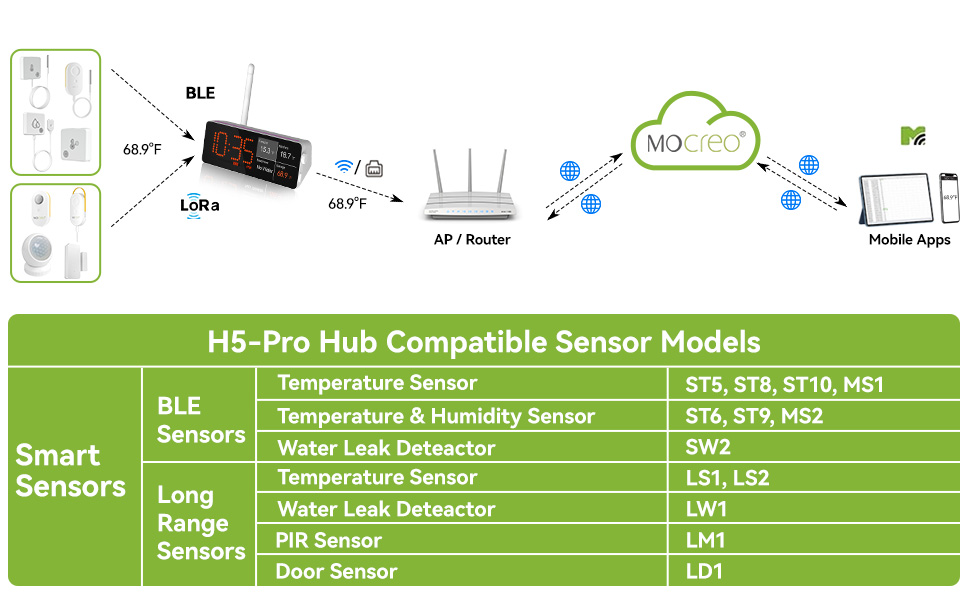
Hình ảnh 7: A table listing various MOCREO smart sensors compatible with the H5-Pro Hub, categorized by BLE and Long Range sensors, including the LS1 and LS2 temperature sensors.
4. Hướng dẫn vận hành
4.1 Giám sát thời gian thực
- Once paired, the LS1 sensor will begin transmitting temperature data to your H5Pro Hub, which then sends it to the MOCREO Smart App.
- Mở ứng dụng để view real-time temperature readings for all your connected sensors.
- The app displays current temperatures and historical data in clear charts.

Hình ảnh 8: A smartphone screen displaying the MOCREO Smart App interface, showing real-time temperature monitoring for multiple locations and alert notifications.
4.2 Hệ thống cảnh báo
- Configure temperature thresholds within the MOCREO Smart App for each sensor.
- When the temperature exceeds or falls below your set limits, you will receive instant alerts via:
- Thông báo ứng dụng: Push notifications directly to your smartphone.
- Thông báo qua Email: Notifications sent to your registered email address.
- Hub Beep: An 80dB audible alarm from the H5Pro Hub.
- Utilize smart settings like "low battery alert" and "anti-false alarm" to enhance monitoring reliability.

Hình ảnh 9: Một người sử dụng viewing urgent temperature alerts on their smartphone via the MOCREO Smart App, indicating a temperature deviation in a monitored area.
4.3 Ghi nhật ký và xuất dữ liệu
- The LS1 sensor automatically logs temperature data for up to 2 years.
- Access historical data and charts directly within the MOCREO Smart App.
- Export data in CSV format for in-depth analysis by selecting the desired date range within the app.

Hình ảnh 10: A smartphone screen showing the MOCREO Smart App's data export function, allowing users to select a date range and export temperature data in CSV format.
5. Bảo trì
5.1 Thay thế pin
- When the low battery alert is triggered, replace the three AAA batteries.
- Follow the steps in Section 3.2 for battery installation, ensuring the casing is sealed properly after replacement to maintain waterproofing.
5.2 Vệ sinh
- Lau sạch cảm biến bằng khăn mềm.amp vải. Không sử dụng chất tẩy rửa có tính mài mòn hoặc dung môi.
- Ensure the sensor is dry before placing it back in its monitoring environment.
KHAI THÁC. Xử lý sự cố
6.1 Các vấn đề chung
- Không có dữ liệu trong ứng dụng:
- Ensure the LS1 sensor has fresh batteries and is powered on.
- Verify the H5Pro Hub is online and connected to your network.
- Check the distance between the sensor and the hub; reduce obstacles if possible.
- Re-pair the sensor with the hub via the MOCREO Smart App.
- Alerts Not Triggering:
- Confirm that temperature thresholds are correctly set in the app.
- Kiểm tra cài đặt thông báo ứng dụng trên điện thoại thông minh của bạn.
- Verify email address for alerts is correct and check spam folders.
- Đọc không chính xác:
- Ensure the sensor is placed in a location that accurately reflects the environment you wish to monitor.
- Avoid placing the sensor near heat sources or direct sunlight unless intended.
7. Thông số kỹ thuật
7.1 Thông số kỹ thuật
| Tính năng | Đặc điểm kỹ thuật |
|---|---|
| Số hiệu mẫu | LS1 |
| Phạm vi nhiệt độ | -0.4°F đến 131°F (-18°C đến 55°C) |
| Độ chính xác nhiệt độ | ± 0.9 ° F (± 0.5 ° C) |
| Xếp hạng chống thấm nước | IP66 |
| Nguồn điện | 3 x Pin AAA (đã bao gồm) |
| Tuổi thọ pin | Lên đến 2 năm |
| Kết nối | LoRa (requires MOCREO H5Pro Hub) |
| Wireless Dải | Cao tới 1,640 ft (500m) trong không gian mở. |
| Ghi dữ liệu | 2 years, exportable in CSV format |
| Các loại cảnh báo | App Notification, Email Alert, 80dB Hub Beep |
| Kích thước | 5.2 x 2.44 x 1.54 inch |
| Cân nặng | 4.66 ounce |
| Màu sắc | Trắng |
8. Bảo hành và Hỗ trợ
8.1 Thông tin bảo hành
- Đảm bảo sự hài lòng trong 90 ngày: MOCREO offers a 90-day 100% satisfaction guarantee, including money-back and free returns.
- Bảo hành 1 năm: The MOCREO LS1 Waterproof Thermometer is covered by a 1-year warranty from the date of purchase.
8.2 Hỗ trợ khách hàng
- For technical assistance, troubleshooting, or warranty claims, please contact MOCREO customer support.
- Hỗ trợ trực tuyến: 24/7 online support is available. Refer to the MOCREO Smart App or the official MOCREO webtrang web để biết chi tiết liên hệ.


