
1. Giới thiệu
This manual provides essential information for the safe and efficient operation of your FASTWD Android 15 Tablet 11-inch. Please read this manual thoroughly before using the device and retain it for future reference. This tablet features an 11-inch 2K display, Android 15 operating system, Octa-Core processor, 36GB RAM, 256GB ROM (expandable up to 1TB), 4G LTE, and 5G WiFi connectivity.
2. Thông tin an toàn
- Không để máy tính bảng tiếp xúc với nhiệt độ quá cao, ánh nắng trực tiếp hoặc độ ẩm cao.
- Tránh làm rơi hoặc để máy tính bảng chịu va đập mạnh.
- Chỉ sử dụng bộ sạc và phụ kiện đã được phê duyệt để tránh hư hỏng và đảm bảo an toàn.
- Tránh để thuốc tiếp xúc với nước và các chất lỏng khác.
- Do not attempt to disassemble or repair the tablet yourself. Contact customer support for assistance.
- Vứt bỏ pin và thiết bị theo quy định của địa phương.
3. Nội dung gói hàng
Upon opening your FASTWD Android 15 Tablet package, please verify that all the following items are included:
- FASTWD Tablet
- Bàn phím Bluetooth
- Chuột
- Vỏ bảo vệ
- Bút cảm ứng
- Cáp Type-C
- Bộ sạc
- Hướng dẫn sử dụng

Image: The FASTWD Android 15 Tablet displayed with its full set of accessories, including the keyboard, mouse, protective case, stylus, and charging components.
4. Hết thiết bịview
The FASTWD Android 15 Tablet features a sleek metal body with an 11-inch 2K INCell display. It is designed for both productivity and entertainment.
4.1 Đặc điểm vật lý
- Trưng bày: 11-inch 2K UHD INCell display with 120Hz refresh rate.
- Máy ảnh: 8MP front camera, 13MP rear camera with LED flash.
- Cổng: Cổng USB Type-C dùng để sạc và truyền dữ liệu.
- Khe cắm thẻ: Dual SIM card slot, also supports MicroSD card expansion up to 1TB.
- Diễn giả: Bốn amplitude speakers for enhanced audio.

Image: A visual representation of the FASTWD tablet's slim design, 11-inch screen, and Type-C charging port.
5. Thiết lập
5.1 Bật nguồn ban đầu
- Press and hold the Power button located on the side of the tablet until the FASTWD logo appears.
- Làm theo lời nhắc trên màn hình để chọn ngôn ngữ, khu vực và kết nối với mạng Wi-Fi.
- Đăng nhập bằng tài khoản Google của bạn hoặc tạo tài khoản mới để truy cập Cửa hàng Google Play và các dịch vụ khác.
5.2 Cài đặt thẻ SIM và thẻ MicroSD
Your tablet supports dual SIM cards for 4G LTE connectivity and a MicroSD card for expanded storage.
- Tìm khay SIM/thẻ MicroSD ở cạnh bên của máy tính bảng.
- Sử dụng dụng cụ tháo SIM được cung cấp để nhẹ nhàng ấn vào lỗ nhỏ bên cạnh khay cho đến khi SIM bật ra.
- Đặt thẻ Nano-SIM và/hoặc thẻ MicroSD vào các khe cắm được chỉ định trên khay. Đảm bảo chúng được đặt đúng hướng.
- Cẩn thận lắp lại khay vào máy tính bảng cho đến khi khớp vào đúng vị trí.

Hình ảnh: Một chi tiết view of the tablet's SIM card tray, showing slots for two SIM cards and one MicroSD card.
6. Hướng dẫn vận hành
The FASTWD tablet runs on Android 15, offering an intuitive and customizable user experience.
6.1 Điều hướng cơ bản
- Kéo mạnh lên: Truy cập vào ngăn kéo ứng dụng.
- Vuốt xuống: Mở bảng thông báo và cài đặt nhanh.
- Vỗ nhẹ: Chọn mục hoặc mở ứng dụng.
- Nhấn lâu: Truy cập menu ngữ cảnh hoặc di chuyển biểu tượng.
- Chụm để phóng to: Adjust zoom level in apps like browser or gallery.
6.2 Tính năng của Android 15
Android 15 introduces several enhancements for privacy, security, and user experience:
- Improved Privacy Controls: Granular permissions for apps, allowing you to authorize access more precisely.
- Tối ưu hóa AI: Intelligent AI features for improved performance and battery life.
- Điều hướng bằng cử chỉ: New touch control gestures for a more fluid interaction.
- Global Dark Mode: System-wide dark theme for reduced eye strain and power consumption.
- Face Recognition Unlock: Mở khóa máy tính bảng của bạn một cách an toàn bằng nhận diện khuôn mặt.
- Kiểm soát của phụ huynh: Quản lý thời gian sử dụng màn hình và quyền truy cập ứng dụng cho trẻ em.
- Màn hình chia đôi: Use two applications simultaneously side-by-side.
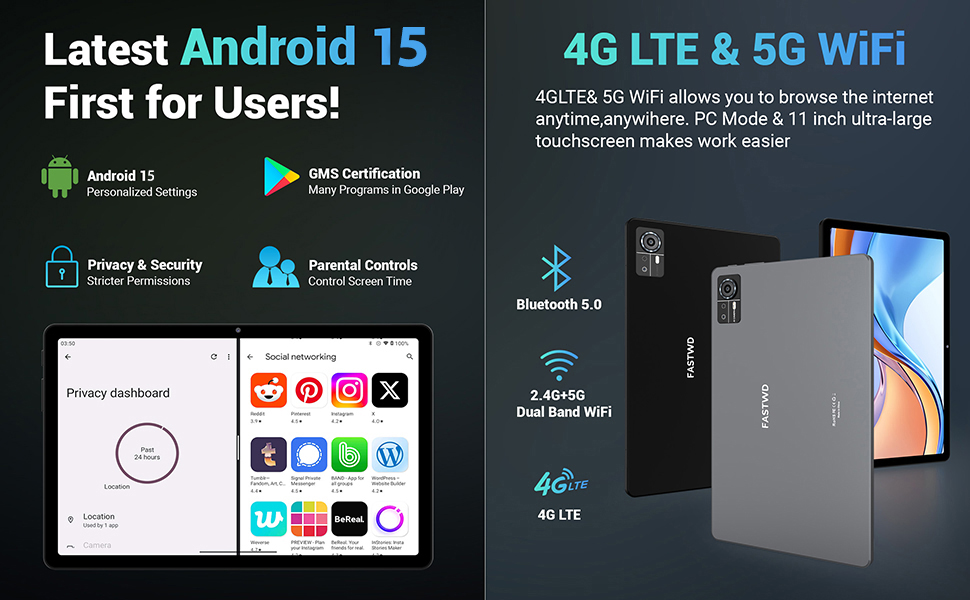
Image: A visual guide to key Android 15 features such as easy app pairing, storage management, quick Bluetooth connection, face recognition unlock, double-tap to wake, and parental control settings.
7. Kết nối
Your FASTWD tablet offers versatile connectivity options for internet access and peripheral devices.
7.1 Kết nối Wi-Fi
- Đi đến Cài đặt > Mạng & internet > Wi-Fi.
- Chuyển đổi Wi-Fi On.
- Chọn mạng mong muốn từ danh sách và nhập mật khẩu nếu được yêu cầu.
- The tablet supports dual-band 2.4G/5G Wi-Fi for stable and fast connections.
7.2 4G LTE Mobile Data
With a compatible SIM card installed, you can access 4G LTE mobile data.
- Ensure your SIM card is correctly installed (refer to Section 5.2).
- Đi đến Cài đặt > Mạng & internet > Mạng di động.
- Cho phép Dữ liệu di động and configure APN settings if required by your carrier.
7.3 Ghép nối Bluetooth
Connect Bluetooth accessories like the included keyboard and mouse.
- Đi đến Cài đặt > Thiết bị được kết nối > Bluetooth.
- Chuyển đổi Bluetooth On.
- Đưa phụ kiện Bluetooth của bạn vào chế độ ghép nối.
- Select the accessory from the list of available devices and follow any on-screen prompts to complete pairing.
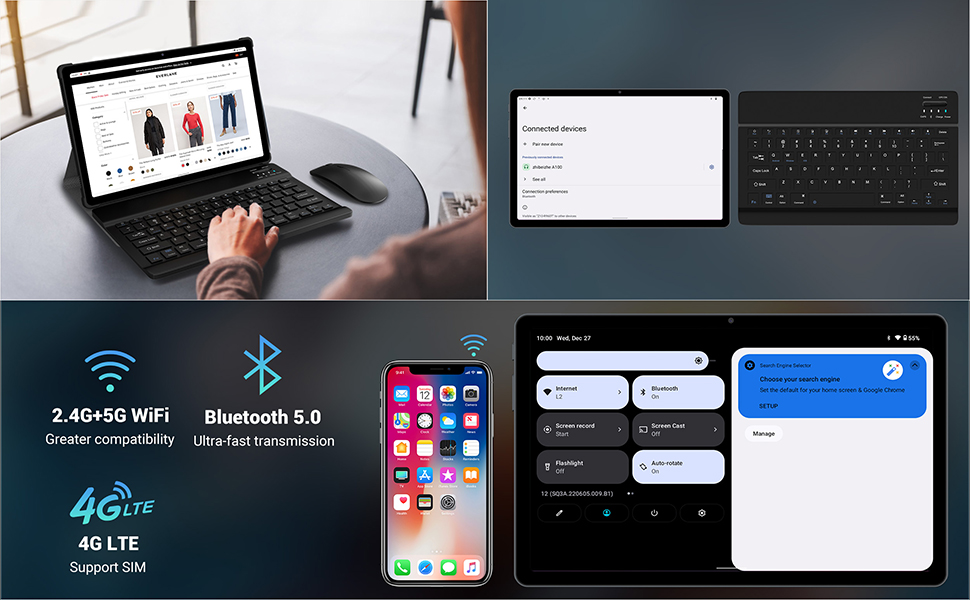
Image: The FASTWD tablet connected to its keyboard and mouse, illustrating its 2.4G+5G WiFi, Bluetooth 5.0, and 4G LTE SIM support for comprehensive connectivity.
8. Máy ảnh
The tablet is equipped with an 8MP front camera and a 13MP rear camera for photos and video calls.
- Mở Máy ảnh ứng dụng.
- Nhấn nút chụp để chụp ảnh.
- Chuyển đổi giữa camera trước và sau bằng biểu tượng chuyển đổi camera.
- AI post-processing technology enhances photo quality, making images more realistic.

Hình ảnh: Một chi tiết view of the tablet's rear camera, highlighting its 13MP sensor and AI Camera branding.
9. Quản lý pin
The tablet features a 9580mAh battery for extended usage and supports 12W fast charging.
9.1 Sạc máy tính bảng
- Kết nối cáp Type-C với cổng sạc của máy tính bảng.
- Cắm đầu còn lại của dây cáp vào bộ sạc được cung cấp, sau đó cắm vào ổ cắm điện.
- Biểu tượng pin trên màn hình sẽ cho biết trạng thái sạc.
9.2 Tối ưu hóa pin
- Điều chỉnh độ sáng màn hình ở mức thoải mái.
- Đóng các ứng dụng không sử dụng đang chạy ngầm.
- Bật chế độ tiết kiệm pin trong Cài đặt > Ắc quy.
- Tắt Wi-Fi, Bluetooth hoặc GPS khi không sử dụng.

Image: The FASTWD tablet connected to a Type-C charger, illustrating its 9580 mAh battery and 12W fast charging capability.
10. Lưu trữ
The tablet comes with 256GB of internal storage (ROM) and supports expansion up to 1TB via a MicroSD card.
10.1 Quản lý lưu trữ
- Để kiểm tra dung lượng lưu trữ đã sử dụng, hãy truy cập vào... Cài đặt > Kho.
- You can free up space by uninstalling unused apps, deleting old files, or moving media to a MicroSD card.
10.2 RAM Management
The tablet features 36GB RAM (12GB LPDDR4 + 24GB expandable virtual memory) for smooth multitasking.
- The system automatically manages RAM for optimal performance.
- You can activate additional virtual RAM in the settings if needed for demanding applications.
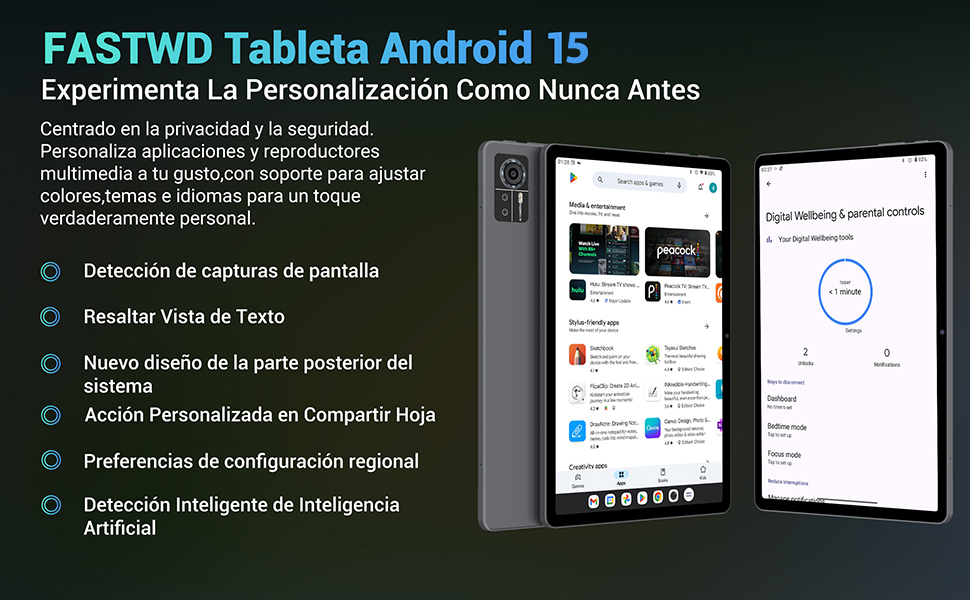
Image: An illustration highlighting the tablet's 36GB RAM (12+24GB), 256GB ROM, and 1TB MicroSD expansion capabilities, alongside its Octa-core processor.
11. Bảo trì
11.1 Vệ sinh
- Hãy dùng khăn mềm, không xơ để lau màn hình và thân máy tính bảng.
- Không sử dụng hóa chất khắc nghiệt hoặc vật liệu mài mòn.
11.2 Cập nhật phần mềm
- Thường xuyên kiểm tra các bản cập nhật hệ thống trong Cài đặt > Hệ thống > Cập nhật hệ thống để đảm bảo hiệu suất và an ninh tối ưu.
KHAI THÁC. Xử lý sự cố
Nếu bạn gặp sự cố với máy tính bảng của mình, hãy tham khảo các giải pháp phổ biến sau:
| Vấn đề | Giải pháp |
|---|---|
| Máy tính bảng không bật nguồn. | Hãy đảm bảo pin đã được sạc đầy. Kết nối bộ sạc và đợi vài phút trước khi thử bật nguồn lại. Nếu vẫn không phản hồi, hãy thực hiện khởi động lại cưỡng chế bằng cách giữ nút Nguồn trong 10-15 giây. |
| Ứng dụng bị lỗi hoặc treo. | Close background applications. Clear the cache of the problematic app (Settings > Apps > [App Name] > Storage & cache > Clear cache). Restart the tablet. |
| Kết nối Wi-Fi kém | Ensure you are within range of the Wi-Fi router. Restart your router and the tablet. Forget the network and reconnect. |
| Thẻ SIM không được phát hiện | Ensure the SIM card is correctly inserted into the tray. Restart the tablet. Verify the SIM card is active with your mobile carrier. |
| Pin hết nhanh | Reduce screen brightness. Disable unused connectivity features (Wi-Fi, Bluetooth, GPS). Close background apps. Check for apps consuming excessive battery in Settings > Battery. |
13. Thông số kỹ thuật
Detailed technical specifications for the FASTWD Android 15 Tablet 11-inch (Model M986):
| Tính năng | Đặc điểm kỹ thuật |
|---|---|
| Thương hiệu | NHANH CHÓNG |
| Tên mẫu | FASTWD Android 15 Tablet 11 Pulgadas |
| Hệ điều hành | Android 15 |
| Tốc độ xử lý | 2 GHz Octa-Core |
| ĐẬP | 36 GB (12GB LPDDR4 + 24GB expandable) |
| Bộ nhớ trong (ROM) | 256GB |
| Lưu trữ mở rộng | Up to 1 TB via MicroSD card |
| Kích thước màn hình | 11 Pulgadas (Inches) |
| Độ phân giải màn hình | 2560 x 1440 pixels (2K UHD INCell) |
| Tốc độ làm mới | 120Hz |
| Camera sau | 13MP |
| Camera trước | 8MP |
| Dung lượng pin | 9580mAh |
| Battery Life (average) | 8 giờ (phát lại video) |
| Sạc | 12W Fast Charging, Type-C Interface |
| Kết nối | 4G LTE (Cellular), 5G Wi-Fi (802.11ac), Bluetooth 5.0 |
| Kích thước | 29.7 x 19.6 x 4cm |
| Cân nặng | 1.36kg |
| Tính năng đặc biệt | Gaming Tablet, Face Recognition, Parental Control, GPS (Beidou, Galileo, Glonass, GPS) |
14. Bảo hành và Hỗ trợ
FASTWD offers two years of premium after-sales service and long-term technical support for your tablet.
- Thời hạn bảo hành: 2 năm kể từ ngày mua.
- Hỗ trợ kỹ thuật: For any issues or inquiries, please contact the FASTWD after-sales team through your Amazon purchase platform.
- Our support team aims to respond within 24 hours.