
1. Bắt đầu
1.1 Nội dung gói
Đảm bảo tất cả các mục đều có trong gói hàng:
- EZON Smart Watch
- Hướng dẫn sử dụng
- Cáp sạc từ tính
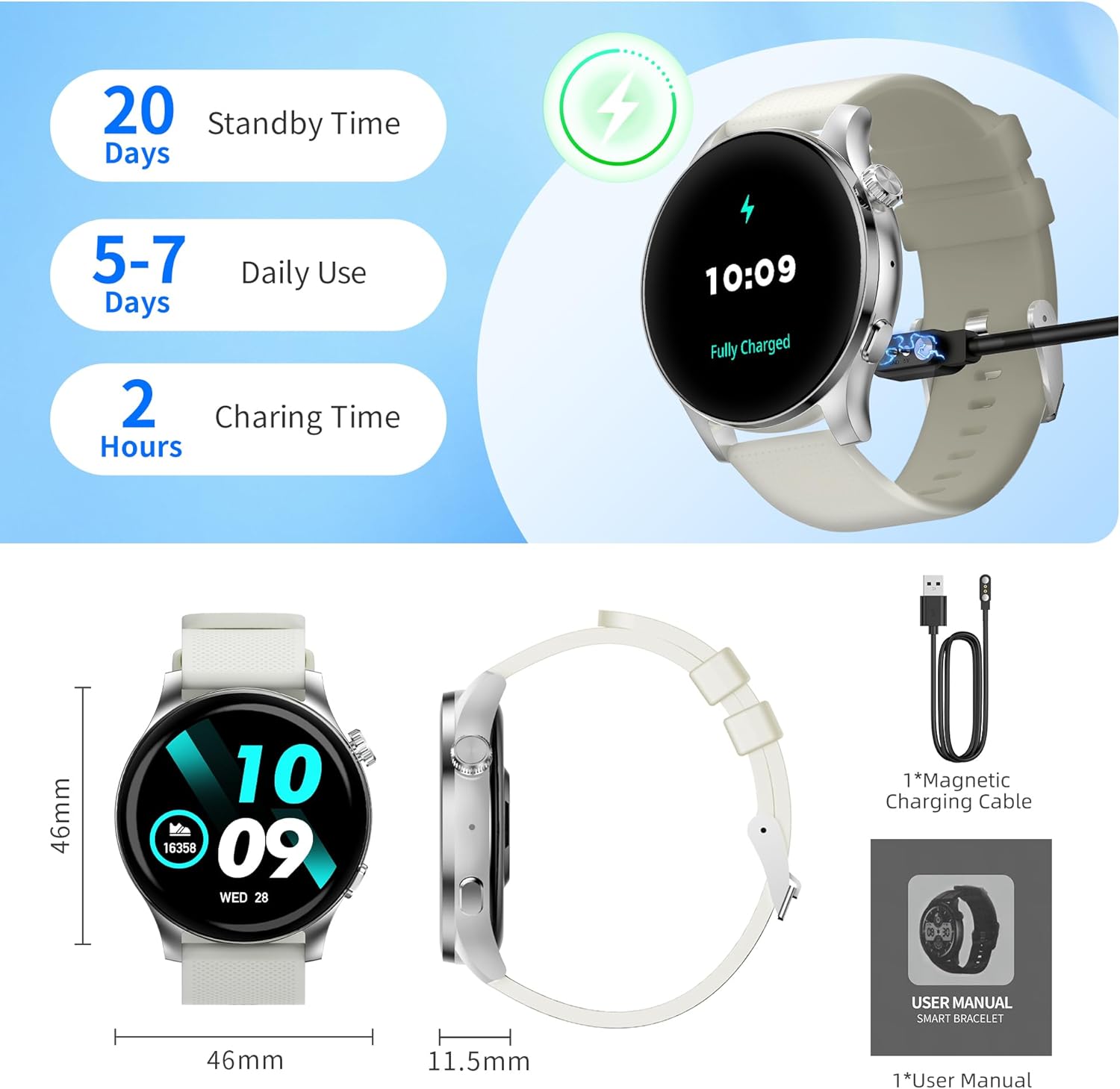
Image: EZON Smart Watch S8 and its accessories, including the watch, magnetic charging cable, and user manual.
1.2 Sạc thiết bị
Before first use, fully charge your EZON Smart Watch S8. Connect the magnetic charging cable to the charging points on the back of the watch and plug the USB end into a power adapter (not included) or computer USB port. The watch will display a charging indicator.
- Thời gian sạc: Khoảng 2 giờ cho một lần sạc đầy.
- Tuổi thọ pin: Up to 5-7 days of daily use, up to 20 days standby time.
Image: The EZON Smart Watch S8 connected to its magnetic charging cable, showing the charging process.
1.3 Bật/Tắt nguồn
- Để bật nguồn: Long press the upper right button until the screen lights up.
- Để Tắt Nguồn: Long press the upper right button. A power-off confirmation screen will appear. Select 'X' to cancel or confirm to power off.
1.4 Kết nối ứng dụng
To unlock the full features of your EZON Smart Watch S8, download and connect to the companion app on your smartphone (Android or iOS).
- Scan the QR code in the watch manual or search for the "Wa Kit" app in your phone's app store.
- Cài đặt và mở ứng dụng.
- Follow the in-app instructions to pair your watch via Bluetooth. Ensure Bluetooth is enabled on your phone.
2. Hướng dẫn vận hành
2.1 Điều hướng cơ bản
- Bật/Tắt màn hình: Click the upper right button.
- Trung tâm điều khiển: Swipe down from the watch face to access quick settings like brightness, power saving mode, and flashlight.
- Thông báo tin nhắn: Vuốt lên từ mặt đồng hồ để view recent notifications from your connected phone.
- Daily Functions: Swipe right from the watch face to access features like AI Voice, Timer, Alarm, Stopwatch, Find Phone, and Settings.
- Health Monitoring & Weather: Swipe left from the watch face to view health data (Heart Rate, Blood Pressure, SpO2, Sleep) and weather forecasts.
Video: This video demonstrates basic operations of the EZON Smart Watch S8, including powering on/off, navigating the interface, accessing control center, message notifications, health monitoring, and daily functions.
2.2 Thay đổi mặt đồng hồ
Cá nhân hóa đồng hồ của bạn với nhiều mặt đồng hồ khác nhau:
- Using the Dial Button: Rotate the upper right dial button to cycle through available watch faces.
- Long Press Screen: Long press the watch face, then swipe left or right to select a different face. Tap to confirm.
- Thông qua ứng dụng: The "Wa Kit" app offers over 100 watch faces and allows you to upload your own photos or generate AI-powered designs.
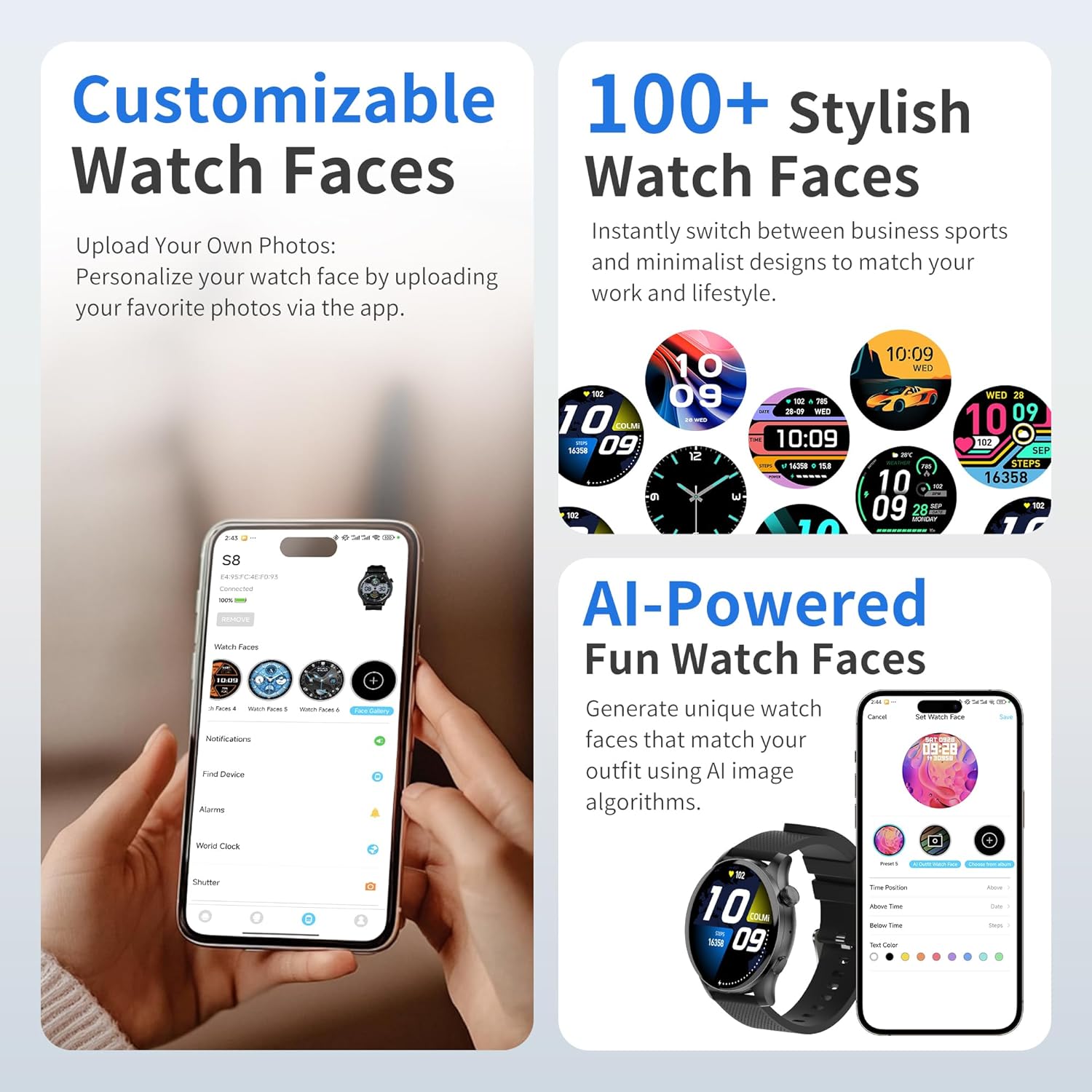
Image: The EZON Smart Watch S8 showcasing a selection of customizable watch faces, including options to upload personal photos or use AI-generated designs via the app.
Gọi Bluetooth 2.3
Once connected to the app, you can make and answer calls directly from your watch.
- Trả lời cuộc gọi: Khi có cuộc gọi đến, đồng hồ sẽ hiển thị số người gọi. Chạm vào biểu tượng màu xanh lá cây để trả lời.
- Gọi điện: Access the phone dialer, call records, or contacts list from the watch interface to initiate a call.
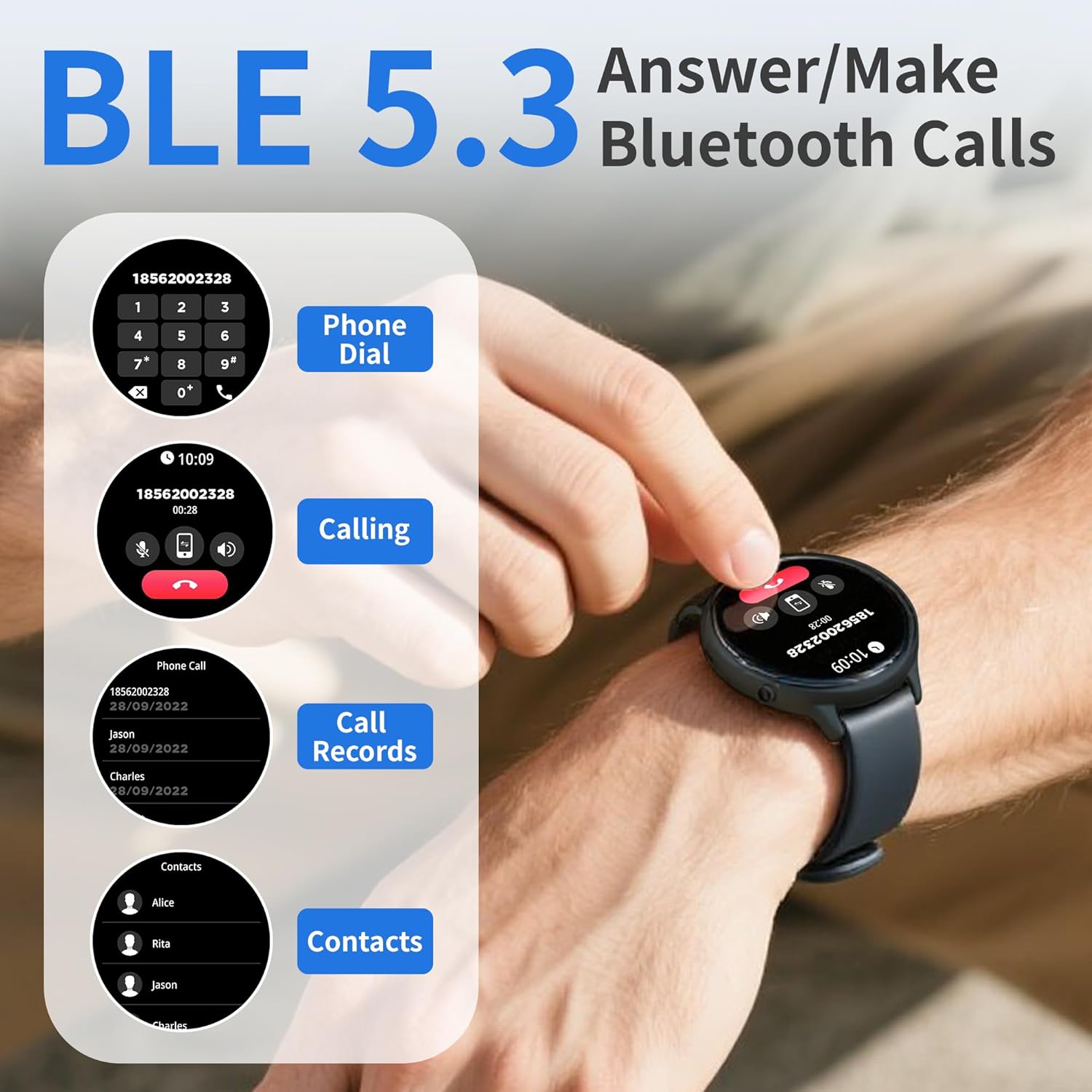
Image: A user interacting with the EZON Smart Watch S8 to use its Bluetooth calling functions, showing the phone dialer, call records, and contacts interface.
2.4 Thông báo thông minh
Receive instant alerts for messages, app notifications, and calls directly on your wrist when connected to your smartphone.
- Ensure notification permissions are enabled in the "Wa Kit" app and your phone settings.
- Vuốt lên từ mặt đồng hồ để view lịch sử thông báo của bạn.

Image: The EZON Smart Watch S8 showing an incoming message notification from a social media application.
2.5 Trợ lý giọng nói AI
Activate your phone's smart voice assistant (e.g., Siri) directly from your watch to make calls, search for information, and set reminders.
- Access the AI Voice Assistant feature from the daily functions menu (swipe right from watch face).
- Tap to activate and speak your command.

Image: The EZON Smart Watch S8 displaying its AI Voice Assistant interface, ready to receive voice commands.
2.6 Kiểm soát âm nhạc
Điều khiển phát nhạc trên điện thoại thông minh trực tiếp từ đồng hồ của bạn.
- Access the Music Control feature from the daily functions menu.
- Phát, tạm dừng, chuyển bài hát và điều chỉnh âm lượng.

Image: The EZON Smart Watch S8 displaying its music control interface, allowing users to manage playback on their connected smartphone.
3. Theo dõi sức khỏe
The EZON Smart Watch S8 provides comprehensive health insights, tracking various metrics throughout the day.
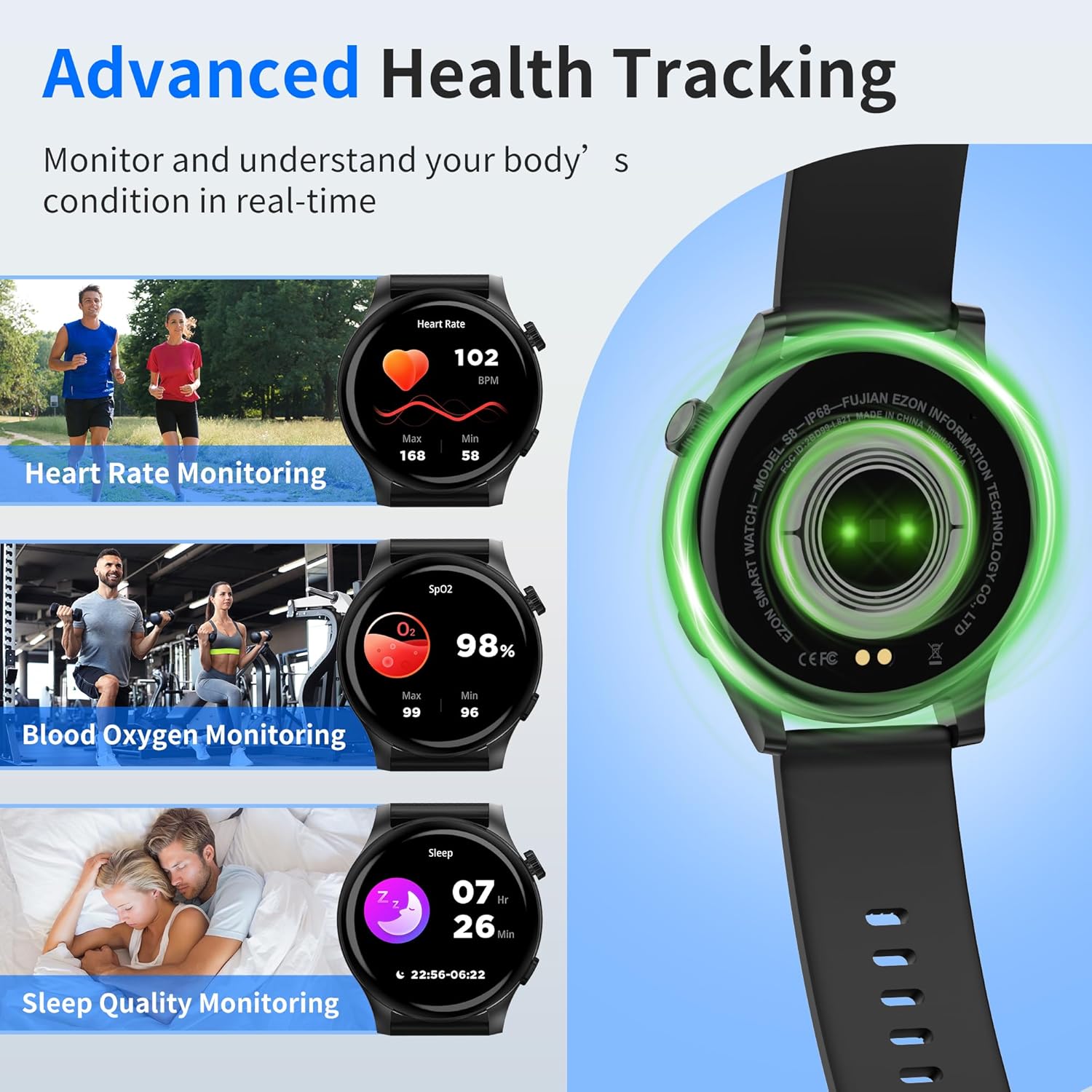
Image: The EZON Smart Watch S8 showing real-time data for heart rate, blood oxygen saturation (SpO2), and sleep quality monitoring.
3.1 Theo dõi nhịp tim
Continuously tracks your heart rate, providing real-time insights into your cardiovascular health. View your current heart rate, as well as historical data in the app.

Image: The EZON Smart Watch S8 displaying heart rate data, including current BPM and a graph of heart rate trends over time.
3.2 Theo dõi nồng độ oxy trong máu (SpO2)
Monitors your blood oxygen levels to help ensure your vital indicators stay within a healthy range. Access current SpO2 readings and trends in the app.

Image: The EZON Smart Watch S8 displaying blood oxygen saturation (SpO2) levels, with current percentage and historical data.
3.3 Giám sát chất lượng giấc ngủ
Tracks your sleep cycles, including awake time, REM sleep, light sleep, and deep sleep, to provide a better understanding of your sleep quality and help improve rest.

Image: The EZON Smart Watch S8 displaying sleep quality data, including duration of different sleep stages like awake, REM, light, and deep sleep.
3.4 Menstrual Cycle Monitoring
The watch, in conjunction with the companion app, can assist in tracking menstrual cycles, providing predictions and reminders.

Image: The EZON Smart Watch S8 displaying its menstrual cycle tracking interface, showing a calendar view with cycle predictions.
4. Chế độ thể thao
The EZON Smart Watch S8 features over 100 built-in sports modes to track various physical activities. Each mode provides specific metrics relevant to the activity.
- Truy cập các Chế độ Thể thao: Press the lower right button on the watch to enter the sports mode menu.
- Selecting an Activity: Scroll through the list and tap on your desired activity (e.g., Walking, Running, Cycling, Swimming, Yoga, Basketball, Football, etc.).
- Theo dõi: The watch will begin tracking your duration, steps, calories burned, heart rate, and other relevant data.

Image: The EZON Smart Watch S8 showing a selection of over 100 sports modes, including icons for walking, running, cycling, and more, alongside activity tracking data.
5. Thông số kỹ thuật
| Tính năng | Chi tiết |
|---|---|
| Thương hiệu | EZON |
| Tên mẫu | S8 |
| Kích thước màn hình | Màn hình AMOLED 1.43 inch |
| Hình dạng | Tròn |
| Hệ điều hành | RTOS |
| Công nghệ kết nối | Bluetooth (BLE 5.3) |
| Tính năng đặc biệt | Activity Tracker, Daily Workout Memory, Notifications, Phone Call, Touchscreen, Heart Rate, SpO2, Sleep Monitor, AI Voice Assistant, 100+ Sports Modes |
| Xếp hạng chống thấm nước | IP68 |
| Tuổi thọ pin (Sử dụng thông thường) | 5-7 ngày |
| Thời gian chờ | Lên đến 20 ngày |
| Thời gian sạc | Khoảng 2 giờ |
| Trọng lượng sản phẩm | 6.3 ounce (180 gram) |
| Khả năng tương thích | Thiết bị Android và iOS |
6. Bảo trì
6.1 Vệ sinh
- Thường xuyên lau chùi đồng hồ và dây đeo bằng khăn mềm.amp vải.
- Đảm bảo các điểm tiếp xúc sạc ở mặt sau của đồng hồ sạch sẽ và khô ráo trước khi sạc.
- Tránh sử dụng hóa chất mạnh hoặc vật liệu mài mòn để làm sạch.
6.2 Khả năng chống nước (IP68)
The EZON Smart Watch S8 is IP68 waterproof, meaning it is resistant to dust and can withstand immersion in water up to 1.5 meters for up to 30 minutes. It is suitable for daily use, hand washing, and light rain. However, it is not recommended for hot showers, saunas, or diving, as steam and high water pressure can compromise the seal.
- Hãy lau khô đồng hồ thật kỹ sau khi bị dính nước.
- Không vận hành các nút dưới nước.
6.3 Lưu trữ
Bảo quản đồng hồ ở nơi khô ráo, thoáng mát khi không sử dụng. Tránh nhiệt độ quá cao.
KHAI THÁC. Xử lý sự cố
- Đồng hồ không bật: Đảm bảo đồng hồ đã được sạc đầy. Kết nối đồng hồ với bộ sạc từ tính trong ít nhất 10 phút.
- Không thể ghép nối với điện thoại:
- Đảm bảo Bluetooth được bật trên điện thoại của bạn.
- Đảm bảo đồng hồ nằm trong phạm vi kết nối của điện thoại.
- Khởi động lại cả đồng hồ và điện thoại.
- Check if the "Wa Kit" app has necessary permissions.
- Không có thông báo:
- Verify the watch is connected to the app.
- Check notification settings in the "Wa Kit" app and your phone's system settings.
- Đảm bảo ứng dụng đang chạy ở chế độ nền.
- Dữ liệu sức khỏe không chính xác:
- Đảm bảo đồng hồ được đeo vừa vặn trên cổ tay, không quá chặt hoặc quá lỏng.
- Vệ sinh cảm biến ở mặt sau của đồng hồ.
- Xin lưu ý rằng đồng hồ thông minh không phải là thiết bị y tế và dữ liệu chỉ mang tính chất tham khảo.
- Màn hình không phản hồi: Restart the watch by long-pressing the upper right button.
8. Bảo hành và Hỗ trợ
EZON is committed to providing quality products and customer satisfaction.
- Hỗ trợ trọn đời: Access to ongoing customer assistance.
- Phản hồi 24 giờ: Expect a response to inquiries within 24 hours.
- Chính sách đổi trả trong vòng 30 ngày: Được phép đổi trả trong vòng 30 ngày kể từ ngày mua.
- Bảo hành thay thế miễn phí 1 năm: Product replacement for manufacturing defects within one year.
Để được hỗ trợ thêm, vui lòng truy cập Cửa hàng chính thức EZON hoặc liên hệ với bộ phận hỗ trợ khách hàng.