
1. Giới thiệu
Thank you for choosing the GKU D1000 3-Camera 4K Dash Cam. This device is designed to provide comprehensive vehicle surveillance with its advanced features, including 4K front recording, 2.5K interior recording, 1080P rear recording, enhanced night vision, 5GHz WiFi connectivity, GPS tracking, G-sensor emergency recording, and 24-hour parking monitoring. This manual will guide you through the setup, operation, and maintenance of your dash cam to ensure optimal performance and safety.
2. Sản phẩm hếtview
2.1. Nội dung gói hàng
Vui lòng kiểm tra gói hàng để biết các mục sau:
- GKU D1000 Dash Cam Main Unit
- Rear Camera (6m cable)
- Cáp nguồn bật lửa (3m)
- Thẻ SD 64GB
- 3M Double-Sided Tape (x2)
- Electrostatic Protection Film (x2)
- Hướng dẫn sử dụng tiếng Nhật
- Công cụ loại bỏ Trim
- Kẹp cáp

Hình 2.1: Nội dung gói hàng
2.2. Device Layout and Camera Views
The GKU D1000 features a compact design with integrated front and interior cameras, and a separate rear camera. The interior camera offers 360-degree rotation for flexible monitoring.

Figure 2.2: GKU D1000 Dash Cam Overview

Figure 2.3: 3-Camera Recording Modes

Hình 2.4: Góc máy quay có thể điều chỉnh
3. Thiết lập
3.1. Cài đặt
- Lau sạch khu vực kính chắn gió nơi sẽ lắp camera hành trình.
- Apply the electrostatic protection film to the windshield, then attach the 3M double-sided tape to the dash cam mount and secure it to the film.
- Connect the power cable to the dash cam and route it along the windshield trim to the cigarette lighter socket.
- Install the rear camera on the rear windshield. Route its cable to the main unit and connect it.
- Adjust the front and interior camera angles to ensure optimal coverage.

Figure 3.1: Dash Cam Installation Diagram
3.2. Initial Power On and SD Card Insertion
Insert the provided 64GB SD card into the dash cam's SD card slot. The device will automatically power on and begin recording when connected to your vehicle's power supply. It is recommended to format the SD card upon first use and periodically thereafter to maintain optimal performance.
4. Hướng dẫn vận hành
4.1. Ghi âm cơ bản
Once powered on, the dash cam automatically starts continuous loop recording. Video files are saved in segments (e.g., 1, 3, or 5 minutes) and the oldest files are overwritten when the SD card is full, ensuring continuous recording.
4.2. Emergency Recording (Manual)
Press the emergency button on the dash cam to manually trigger emergency recording. This locks the current video segment, preventing it from being overwritten by loop recording. These files are stored in a dedicated folder.

Figure 4.1: Manual Emergency Recording
4.3. Voice Guidance
The dash cam provides voice prompts for key operations and status updates, such as "Recording started," "Emergency recording activated," or "SD card formatted." This allows you to operate the device without diverting your attention from the road.

Figure 4.2: Voice Guidance Feature
5. Tính năng nâng cao
5.1. Enhanced Night Vision (WDR & IR)
The GKU D1000 is equipped with an F/1.8 large aperture lens and a 6-layer glass lens for superior light capture. Wide Dynamic Range (WDR) technology balances exposure in high-contrast scenes, preventing overexposure and underexposure. The interior camera features 4 infrared (IR) lights, ensuring clear recording of the cabin even in complete darkness.
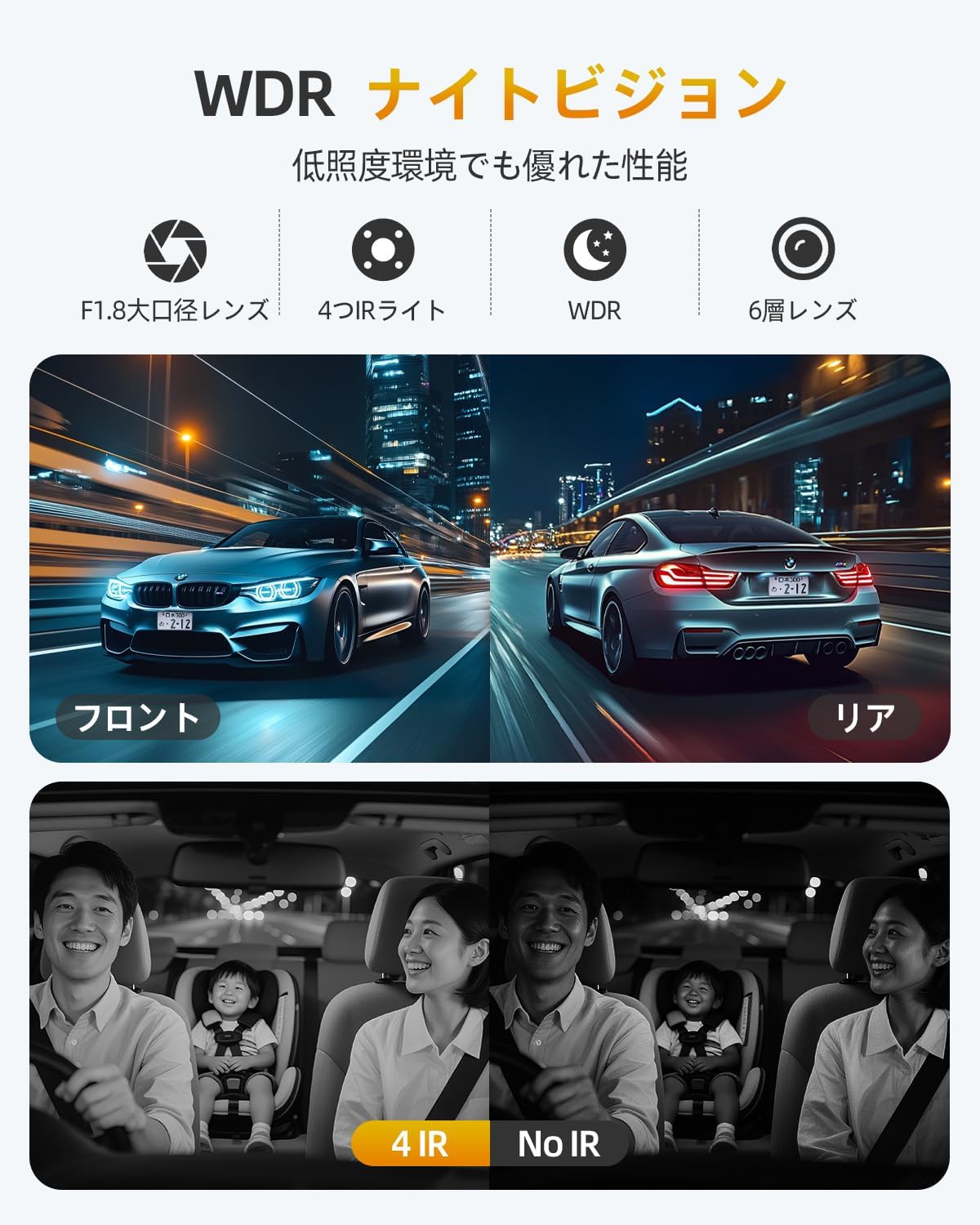
Hình 5.1: Hiệu suất nhìn đêm
5.2. 5GHz WiFi & Smartphone App Control
Connect your dash cam to your smartphone via 5GHz WiFi using the dedicated "GKU GO" app. This allows for high-speed transfer of video and photo files, real-time viewing, playback, and sharing. You can also manage dash cam settings directly from your phone.

Figure 5.2: 5GHz WiFi and App Control
5.3. GPS Route Tracking
The built-in GPS module accurately records your driving route, location, and speed. This data can be viewđược chỉnh sửa cùng với video của bạn footage using the "GKU GO" app or a dedicated PC player, providing crucial evidence in case of an incident.

Figure 5.3: GPS Route Tracking
5.4. Ghi vòng lặp
The dash cam continuously records video in a loop. When the memory card is full, the oldest unlocked files are automatically overwritten by new recordings. This ensures that you always have the most recent footage without manually managing storage. The device supports SD cards from 32GB up to 512GB (U3 specification recommended).

Hình 5.4: Chức năng ghi vòng lặp
5.5. G-Sensor Emergency Recording (Automatic)
The built-in G-sensor detects sudden impacts or collisions. When an event is detected, the current video segment is automatically locked and saved to a protected folder, preventing it from being overwritten. The G-sensor sensitivity can be adjusted through the settings (6 levels: Off, Highest, High, Medium, Low, Lowest).

Figure 5.5: G-Sensor Activated Emergency Recording
5.6. Giám sát bãi đậu xe 24 giờ
The GKU D1000 offers 24-hour parking monitoring to protect your vehicle while parked. This feature requires a dedicated ACC hardwire kit (sold separately, ASIN: B0F4MWB1Z3 / B0CD222SYB) to connect directly to your car's fuse box.
- Ghi thời gian trôi đi: Records continuously at a low frame rate, saving storage space and power.
- Impact Detection Recording: If an impact is detected while parked, the G-sensor triggers emergency recording to capture the event.

Hình 5.6: Giám sát bãi đậu xe 24 giờ
5.7. LED Signal Light Interference Countermeasures
The recording frame rate has been adjusted from the traditional 30fps to 27.5fps to prevent the "signal light disappearing phenomenon" caused by synchronization with LED traffic light cycles. This ensures clear recording of traffic signals, providing reliable evidence.
6. Bảo trì
6.1. Quản lý thẻ SD
Regularly format your SD card (at least once a month) to prevent data corruption and ensure smooth operation. Use a high-quality U3 speed class SD card for best performance. If the SD card is not recognized or shows errors, try formatting it or replacing it.
6.2. Vệ sinh
Gently wipe the camera lenses with a soft, lint-free cloth to remove dust or smudges. Avoid using abrasive cleaners or solvents that could damage the lens coating. Keep the dash cam unit clean and free from obstructions.
KHAI THÁC. Xử lý sự cố
| Vấn đề | Nguyên nhân có thể | Giải pháp |
|---|---|---|
| Camera hành trình không bật được. | No power supply; faulty power cable; loose connection. | Check power connection; try a different power source; ensure cable is securely plugged in. |
| Quá trình ghi bị dừng hoặc đóng băng. | SD card error; low-quality SD card; full SD card. | Format the SD card; use a U3 speed class SD card; replace the SD card. |
| Chất lượng video kém (mờ, tối). | Ống kính bẩn; cài đặt không chính xác; điều kiện ánh sáng yếu. | Clean the lens; adjust exposure settings; ensure WDR is enabled. |
| Sự cố kết nối WiFi. | Incorrect password; out of range; app issues. | Verify WiFi password; move closer to the dash cam; restart the app and dash cam. |
| Camera sau không hiển thị. | Kết nối cáp lỏng; camera sau bị lỗi. | Check the rear camera cable connection to the main unit. |
8. Thông số kỹ thuật
| Tính năng | Đặc điểm kỹ thuật |
|---|---|
| Thương hiệu | GKU |
| Số hiệu mẫu | Ngày 1000 |
| Kích thước sản phẩm | 7D x 11W x 14H cm |
| Trọng lượng sản phẩm | 300 gram |
| Khẩu độ tối đa | f/1.8 |
| Vị trí | Trước sau |
| Bao gồm pin | Đúng |
| Included Memory Card Capacity | 64GB |
| Bảo hành | 1 năm |
9. Bảo hành và Hỗ trợ
9.1. Thông tin bảo hành
The GKU D1000 Dash Cam comes with a 1-year manufacturer's warranty from the date of purchase. This warranty covers defects in materials and workmanship under normal use. Please retain your proof of purchase for warranty claims.
9.2. Hỗ trợ khách hàng
For technical assistance, troubleshooting, or warranty inquiries, please contact GKU customer support through the Amazon platform or visit the official GKU website. Our support team is available to help you with any questions or issues you may encounter.