
Giới thiệu
The ATK VXE Dragonfly R1 Wireless Gaming Mouse is engineered for high-performance gaming, offering a lightweight design, advanced sensor technology, and versatile connectivity. This manual provides detailed instructions for setting up, operating, and maintaining your R1 gaming mouse to ensure optimal performance.

Hình ảnh: Trên cùng view of the ATK VXE Dragonfly R1 Wireless Gaming Mouse in black, showcasinnhờ hình dáng tiện dụng và bố trí nút bấm hợp lý.
Nội dung gói
Vui lòng kiểm tra xem có đầy đủ các mục trong gói hàng của bạn không:
- ATK VXE Dragonfly R1 Wireless Gaming Mouse
- Cáp sạc/dữ liệu USB-C
- Bộ thu không dây 2.4GHz (USB Dongle)
- Hướng dẫn sử dụng (tài liệu này)
- Nonstandard Battery (pre-installed)
Cài đặt
1. Sạc chuột
Trước khi sử dụng lần đầu, nên sạc đầy pin cho chuột. Kết nối cáp USB-C đi kèm với cổng sạc của chuột và đầu còn lại với nguồn điện USB (ví dụ: cổng USB của máy tính, bộ chuyển đổi nguồn USB).
2. Tùy chọn kết nối
The ATK VXE Dragonfly R1 supports multiple connection modes:
- Không dây 2.4 GHz: For optimal gaming performance. Insert the 2.4GHz USB receiver into an available USB port on your computer. The mouse should automatically connect.
- Bluetooth: For general use and compatibility with various devices. Activate Bluetooth pairing mode on the mouse (refer to operating instructions for specific button combinations) and select "ATK VXE R1" from your device's Bluetooth settings.
- Có dây (USB-C): Kết nối chuột trực tiếp với máy tính bằng cáp USB-C. Chế độ này cũng giúp sạc pin cho chuột.

Image: Diagram illustrating the Tri-Mode connectivity options: Bluetooth, 2.4GHz wireless, and wired USB-C connection for the ATK VXE Dragonfly R1 mouse.
Hướng dẫn sử dụng
1. Bật/Tắt nguồn
Locate the power switch on the underside of the mouse. Slide it to the "ON" position to power on and "OFF" to power off.
2. Điều chỉnh DPI
The mouse features adjustable DPI settings. Press the DPI button (usually located on the underside or top of the mouse, depending on the model) to cycle through preset DPI levels. An indicator light may change color to show the current DPI setting.
3. Programmable Macro Keys
The ATK VXE Dragonfly R1 includes programmable macro keys. To customize these keys, download and install the official ATKGEAR software from the manufacturer's website. The software allows you to assign functions, macros, and adjust other mouse settings.
Các tính năng chính
- Lightweight Design (48g): The R1 mouse is designed for agility and comfort during extended gaming sessions.
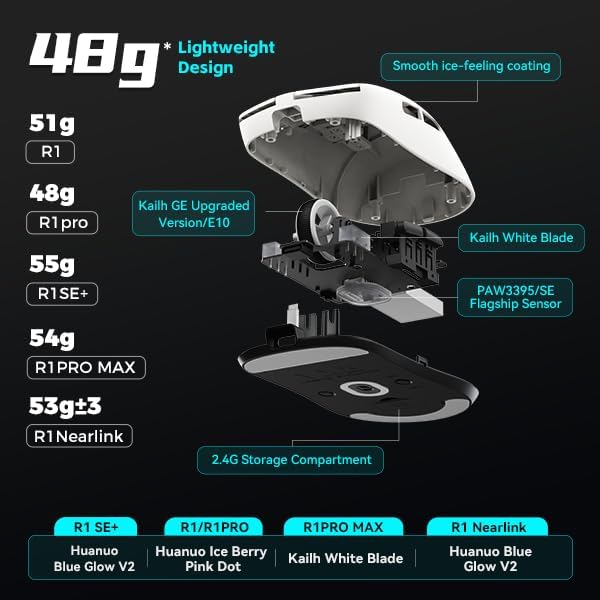
Hình ảnh: Nổ tung view of the ATK VXE Dragonfly R1 mouse highlighting its lightweight internal components and showing weight comparisons for different R1 series models.
- PAW3395/SE Flagship Sensor: Equipped with a high-end optical sensor for precise tracking and accuracy, essential for competitive gaming.
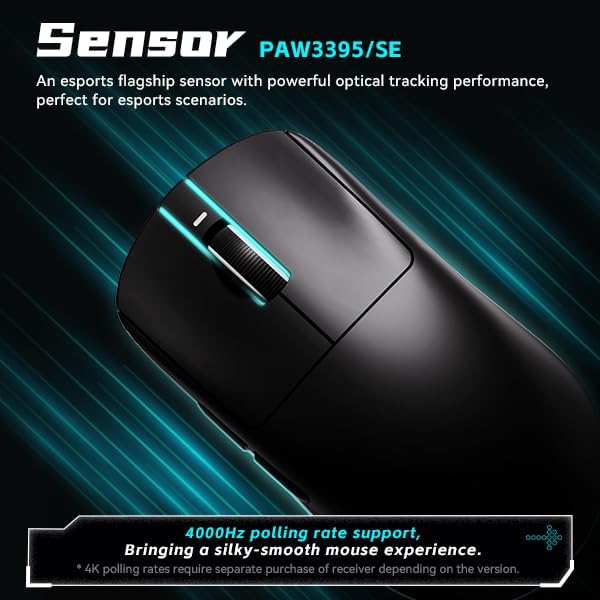
Image: Close-up of the ATK VXE Dragonfly R1 mouse, emphasizing the PAW3395/SE sensor and indicating 4000Hz polling rate support.
- Smart Speed X Transmission Technology: VXE's proprietary wireless technology ensures ultra-low latency and enhanced signal stability, even in environments with interference.

Image: Depiction of the ATK VXE Dragonfly R1 mouse with text highlighting "Smart Speed X" wireless transmission technology for low latency.
- Nordic/BEKEN(compx)/Hisilicon Nearlink MCU: Features a flagship-level chip for powerful performance, low power consumption, and improved interference resistance.

Image: Graphic showing the ATK VXE Dragonfly R1 mouse and its MCU, emphasizing 4K polling rate capability for both office and gaming.
- ATK Micro Switches (Kailh White Blade / Ice Berry Pink Dot): Designed for a consistent click feel and long lifespan.
- Kailh White Blade: 100 Million Click Lifespan, balanced feel.
- Ice Berry Pink Dot: 90 Million Click Lifespan, soft bounce feel.

Image: Detailed illustration comparing Kailh White Blade and Ice Berry Pink Dot micro switches, showing their click lifespan and feel characteristics.
- Lớp phủ mịn màng, tạo cảm giác như băng: A dirt-resistant and easy-to-clean surface that provides a comfortable and grippy feel.

Image: Visual representation of the smooth ice-feeling coating on the ATK VXE Dragonfly R1 mouse, contrasting smooth and matte textures available on different R1 series models.
BẢO TRÌ
- Vệ sinh: Dùng khăn mềm, khô để lau bề mặt chuột. Đối với vết bẩn cứng đầu, hãy dùng khăn hơi ẩm.amp cloth with mild soap can be used, ensuring no liquid enters the mouse. The "Ice-Feel" coating is designed to be dirt-resistant and easy to clean.
- Chăm sóc pin: Để kéo dài tuổi thọ pin, tránh xả hết pin chuột thường xuyên. Sạc chuột khi đèn báo pin yếu. Bảo quản chuột ở nơi khô ráo, thoáng mát khi không sử dụng trong thời gian dài.
- Bảo trì cảm biến: Hãy giữ cho cảm biến quang học ở mặt dưới của chuột luôn sạch sẽ và không bị bám bụi bẩn để đảm bảo khả năng theo dõi chính xác.
Xử lý sự cố
- Chuột không phản hồi:
- Đảm bảo chuột đã được bật nguồn.
- Kiểm tra mức pin và sạc nếu cần.
- For 2.4GHz wireless, ensure the USB receiver is securely plugged in and within range.
- Đối với Bluetooth, hãy đảm bảo Bluetooth được bật trên thiết bị của bạn và chuột đã được ghép nối.
- Hãy thử kết nối qua cáp USB-C để loại trừ các sự cố không dây.
- Theo dõi không nhất quán:
- Vệ sinh cảm biến quang học ở mặt dưới của chuột.
- Đảm bảo bạn đang sử dụng chuột trên bề mặt phù hợp (ví dụ: tấm lót chuột).
- Check for software updates for the mouse driver or ATKGEAR software.
- Các vấn đề về kết nối:
- Move the mouse closer to the 2.4GHz receiver or Bluetooth device.
- Avoid sources of strong electromagnetic interference (e.g., Wi-Fi routers, other wireless devices).
- Re-pair the Bluetooth connection or re-insert the 2.4GHz receiver.
Thông số kỹ thuật
| Tính năng | Chi tiết |
|---|---|
| Người mẫu | R1 |
| Kích thước | 6.3 x 4.72 x 2.36 inch (Gói hàng) |
| Trọng lượng sản phẩm | 7 ounces (approx. 48g for mouse only) |
| Cảm biến | PAW3395/SE Quang học |
| Kết nối | Bluetooth, Không dây 2.4 GHz, Có dây USB-C |
| Tỷ lệ bỏ phiếu | Up to 4000Hz (requires separate receiver for some versions) |
| Công tắc Micro | Kailh White Blade (100M clicks) / Ice Berry Pink Dot (90M clicks) |
| Lớp phủ | Cảm giác mịn màng như băng |
| Ắc quy | Pin không tiêu chuẩn (đã bao gồm) |
| Nhà sản xuất | ATKGEAR |

Image: Detailed table outlining specifications for various models within the VXE Dragonfly R1 series, including dimensions, coating, sensor, chip, polling rate, battery life, weight, microswitches, scroll wheel, mouse feet, and connection methods.
Bảo hành và Hỗ trợ
For warranty information and technical support, please refer to the official ATKGEAR website or contact their customer service. Specific warranty terms may vary by region and retailer. Keep your proof of purchase for warranty claims.
Manufacturer: ATKGEAR