
1. Giới thiệu
The MiBOXER ML5 5-in-1 LED Controller is designed for versatile smart lighting applications, integrating Matter over WiFi and 2.4GHz wireless control. This controller supports five output modes: RGB, RGBW, RGB+CCT, CCT, and single color, offering flexibility for various LED strip configurations. It is compatible with the Matter protocol, enabling broad interoperability with smart home ecosystems such as Apple Home, Google Home, Amazon Alexa, and Samsung SmartThings. This manual provides essential information for the safe installation, operation, and maintenance of your ML5 controller.
2. Thông tin an toàn
- Hãy đảm bảo ngắt nguồn điện trước khi lắp đặt hoặc bảo trì để tránh bị điện giật.
- This device is designed for indoor use only. Avoid exposure to moisture or extreme temperatures.
- Không vượt quá âm lượng đầu vào được chỉ địnhtage (DC12V~48V).
- Nếu bạn không chắc chắn về bất kỳ bước lắp đặt nào, hãy tham khảo ý kiến của thợ điện có chuyên môn.
- Để thiết bị tránh xa tầm tay trẻ em.
3. Sản phẩm hếtview
3.1 Các tính năng chính
- Certified Matter Over WiFi: Supports Matter standard protocol for multi-platform collaboration.
- Wide Compatibility: Works with products from different brands that comply with the Matter ecosystem.
- Simple Configuration: Easy pairing via QR code.
- 5-in-1 Functionality: Supports RGB, RGBW, RGB+CCT, CCT, and single color LED strips.
- 2.4G RF Wireless Control: Allows control via MiBOXER 2.4GHz remotes.
- Đầu vào Voltage: DC12V~48V.
3.2 Có gì trong hộp
- 1 x MiBOXER ML5 5-in-1 LED Controller
3.3 thành phần sản phẩm

Hình ảnh 3.3.1: Đứng đầu view of the MiBOXER ML5 controller, showing input terminals, output terminals, and control buttons (Link, Frequency, Mode).

Hình ảnh 3.3.2: Góc cạnh view of the MiBOXER ML5 controller, highlighting its compact design and connection points.

Hình ảnh 3.3.3: The MiBOXER ML5 controller alongside its retail packaging and a small instruction leaflet.
4. Thông số kỹ thuật
| Tính năng | Chi tiết |
|---|---|
| Thương hiệu | MIBOXER |
| Số hiệu mẫu | ML5 |
| Màu sắc | Trắng |
| Sử dụng trong nhà/ngoài trời | Trong nhà |
| Tính năng đặc biệt | 2.4G RF wireless, Matter Over WiFi |
| Loại nguồn sáng | DẪN ĐẾN |
| Nguồn điện | DC12V~48V (LED) |
| Vật liệu | Nhựa |
| Trọng lượng sản phẩm | 2.72 ounce |
| Chiều dài mục | 30 Meters (Control Distance) |

Hình ảnh 4.1: Dimensional drawing of the ML5 controller (124mm x 38mm x 23mm) and its packaging (125mm x 39mm x 29mm), with a gross weight of 0.078 KGS.
5. Thiết lập và Cài đặt
5.1 Sơ đồ đấu dây
The ML5 controller supports various LED strip configurations. Ensure correct polarity and voltage matching for your LED strips. Connect the DC12V~48V power supply to the input terminals and the LED strip to the corresponding output terminals.

Hình ảnh 5.1.1: Connection diagrams for Single Color (V+, W), Dual White (V+, CW, WW), and RGB (V+, R, G, B) LED strip configurations. An AC to DC power adapter is shown connecting to the controller's input.

Hình ảnh 5.1.2: Connection diagrams for RGBW (V+, R, G, B, W) and RGB+CCT (V+, R, G, B, CW, WW) LED strip configurations. An AC to DC power adapter is shown connecting to the controller's input.
5.2 Pairing and Network Connection
The ML5 controller supports Matter over WiFi and 2.4GHz RF pairing.
- Ghép nối vấn đề: Long press the "Link" button for 3 seconds to activate Matter pairing mode. Follow the instructions in your Matter-compatible smart home app (e.g., Apple Home, Google Home, Amazon Alexa, Samsung SmartThings) to scan the QR code on the device for easy pairing.
- 2.4GHz RF Remote Pairing: Short press the "Link" button 3 times to activate 2.4GHz remote pairing mode. Refer to your MiBOXER 2.4GHz remote's manual for specific pairing instructions.
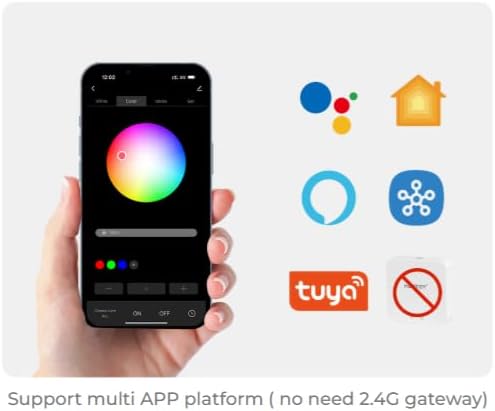
Hình ảnh 5.2.1: Illustration of a smartphone app interface for controlling LED lighting, featuring a color wheel and compatibility logos for Google Home, Apple Home, Amazon Alexa, Samsung SmartThings, and Tuya.
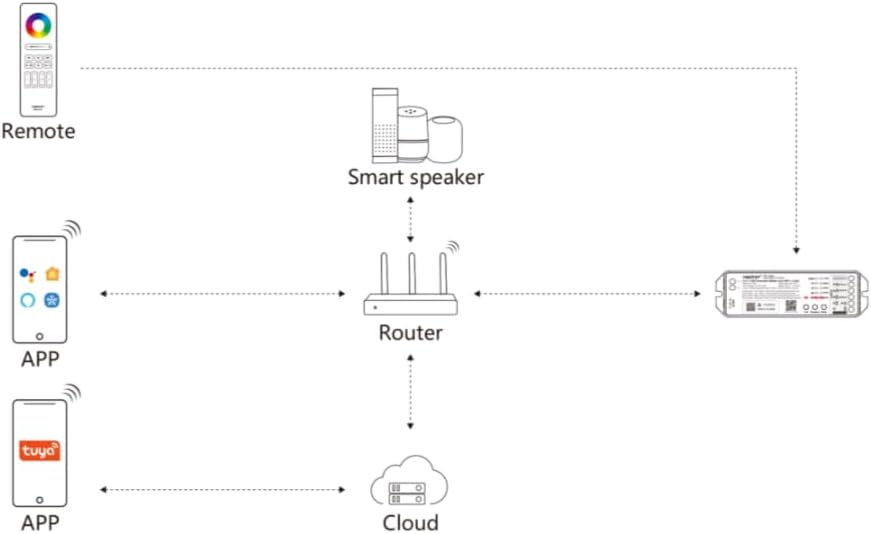
Hình ảnh 5.2.2: Diagram illustrating the ML5 controller's connectivity: it connects to a router, which then allows control via mobile apps (Matter-compatible and Tuya) and smart speakers (e.g., Alexa, Google Assistant).
6. Hướng dẫn vận hành
6.1 Lựa chọn chế độ
- Chuyển đổi chế độ đầu ra: Short press the "Mode" button to cycle through the five output modes (RGB, RGBW, RGB+CCT, CCT, Single Color). Ensure the connected LED strip matches the selected mode.
6.2 Kiểm soát ứng dụng
Once paired with your smart home ecosystem via Matter, you can control the ML5 controller using your preferred smart home app. Functions typically include:
- Turning lights On/Off.
- Điều chỉnh độ sáng (làm mờ).
- Changing colors (for RGB, RGBW, RGB+CCT modes).
- Adjusting color temperature (for CCT, RGB+CCT modes).
- Setting scenes and schedules.
6.3 2.4GHz RF Remote Control
If paired with a MiBOXER 2.4GHz RF remote, you can control the controller directly. Refer to your specific remote's manual for detailed button functions, which typically include:
- Bật/Tắt.
- Điều chỉnh độ sáng.
- Color selection.
- Mode switching (e.g., dynamic effects).
7. Bảo trì
- Vệ sinh thiết bị bằng vải mềm, khô. Không sử dụng hóa chất mạnh hoặc chất tẩy rửa có tính mài mòn.
- Đảm bảo thông gió tốt xung quanh bộ điều khiển để tránh quá nhiệt.
- Thường xuyên kiểm tra tất cả các kết nối về tính bảo mật và tính toàn vẹn.
KHAI THÁC. Xử lý sự cố
| Vấn đề | Nguyên nhân có thể | Giải pháp |
|---|---|---|
| Dải đèn LED không sáng. | No power, incorrect wiring, faulty LED strip. | Check power supply connection. Verify wiring matches the selected mode. Test LED strip with another power source if possible. |
| Cannot pair with Matter app. | Controller not in pairing mode, WiFi issue, incorrect QR code scan. | Long press "Link" button for 3 seconds. Ensure your smartphone is on the same 2.4GHz WiFi network. Rescan QR code. |
| 2.4GHz remote not working. | Remote not paired, remote battery low, interference. | Short press "Link" button 3 times to enter pairing mode, then pair with remote. Replace remote battery. Reduce interference sources. |
| Incorrect colors or modes. | Wrong output mode selected. | Short press "Mode" button to cycle to the correct output mode for your LED strip. |
9. Bảo hành và Hỗ trợ
MiBOXER products are designed for reliability and performance. For warranty information and technical support, please refer to the official MiBOXER webhoặc liên hệ với nhà bán lẻ. Giữ lại biên lai mua hàng để yêu cầu bảo hành.
Để được hỗ trợ thêm, bạn có thể truy cập Cửa hàng MiBOXER trên Amazon.