
1. Giới thiệu
Thank you for choosing the RAINPOINT 3 Zone Water Timer. This device is designed to automate your garden and lawn watering, providing precise control and water-saving features. With its durable construction and user-friendly interface, you can manage up to three independent watering zones efficiently. Please read this manual thoroughly before installation and operation to ensure proper use and longevity of your water timer.
2. Thông tin an toàn
- Do not immerse the timer in water. The device is IP65 waterproof, meaning it is protected against water jets, but not submersion.
- Use only alkaline batteries (2 x AA, not included). Do not mix old and new batteries or different types of batteries.
- Nếu không sử dụng bộ hẹn giờ trong thời gian dài, hãy tháo pin ra.
- Protect the timer from freezing temperatures. Disconnect and store indoors during winter months to prevent damage.
- Ensure all connections are tight to prevent leaks. Use plumber's tape if necessary.
- Để xa tầm tay trẻ em.
3. Tính năng sản phẩm
- Durable & Reliable Performance: Features an upgraded metal inlet and coil valve for stable water flow and reduced leakage. Reinforced connectors and a metal head enhance overall durability.
- Precision Control for Diverse Needs: Three independent zones allow for customized scheduling, with durations from 1 minute to 8 hours and frequencies from every 1 hour up to every 7 days.
- Water-Saving & Weather-Resistant: Includes a rain delay function (24h/48h/72h) and boasts an IP65 waterproof rating with a UV-resistant ABS shell for outdoor resilience.
- Easy Installation & Flexible Operation: Installs easily on standard 3/4" faucets without tools. Offers both manual operation (1 minute to 8 hours) and automatic scheduling.
- User-Friendly & Clear Display: Ergonomic design with a large, sunlight-readable LCD screen and a low battery indicator for straightforward programming and operation.
4. Thiết lập
4.1. Lắp đặt pin
The water timer requires 2 AA alkaline batteries (not included). To install:
- Xác định vị trí ngăn chứa pin ở mặt sau của bộ hẹn giờ.
- Trượt nắp pin ra.
- Lắp hai pin kiềm AA mới, đảm bảo đúng cực (+/-).
- Replace the battery cover securely. The LCD screen will activate.

Image: A person's hands installing batteries into the back of the water timer.
4.2. Kết nối bộ hẹn giờ với vòi nước
Connect the timer to a standard 3/4-inch outdoor faucet.
- Hãy đảm bảo vòi nước sạch sẽ và không bị tắc nghẽn.
- Screw the timer's brass inlet connector onto the faucet by hand until it is snug. Do not overtighten.
- If leakage occurs, unscrew, apply plumber's tape to the faucet threads, and re-tighten.

Hình ảnh: Một chi tiết view highlighting the reinforced brass inlet and outlet connections of the water timer, emphasizing durability.
4.3. Connecting Hoses to Outlets
Connect your garden hoses to the three independent outlets at the bottom of the timer.
- Screw each hose onto its respective outlet (Zone 1, Zone 2, Zone 3) by hand.
- Ensure connections are secure to prevent leaks.
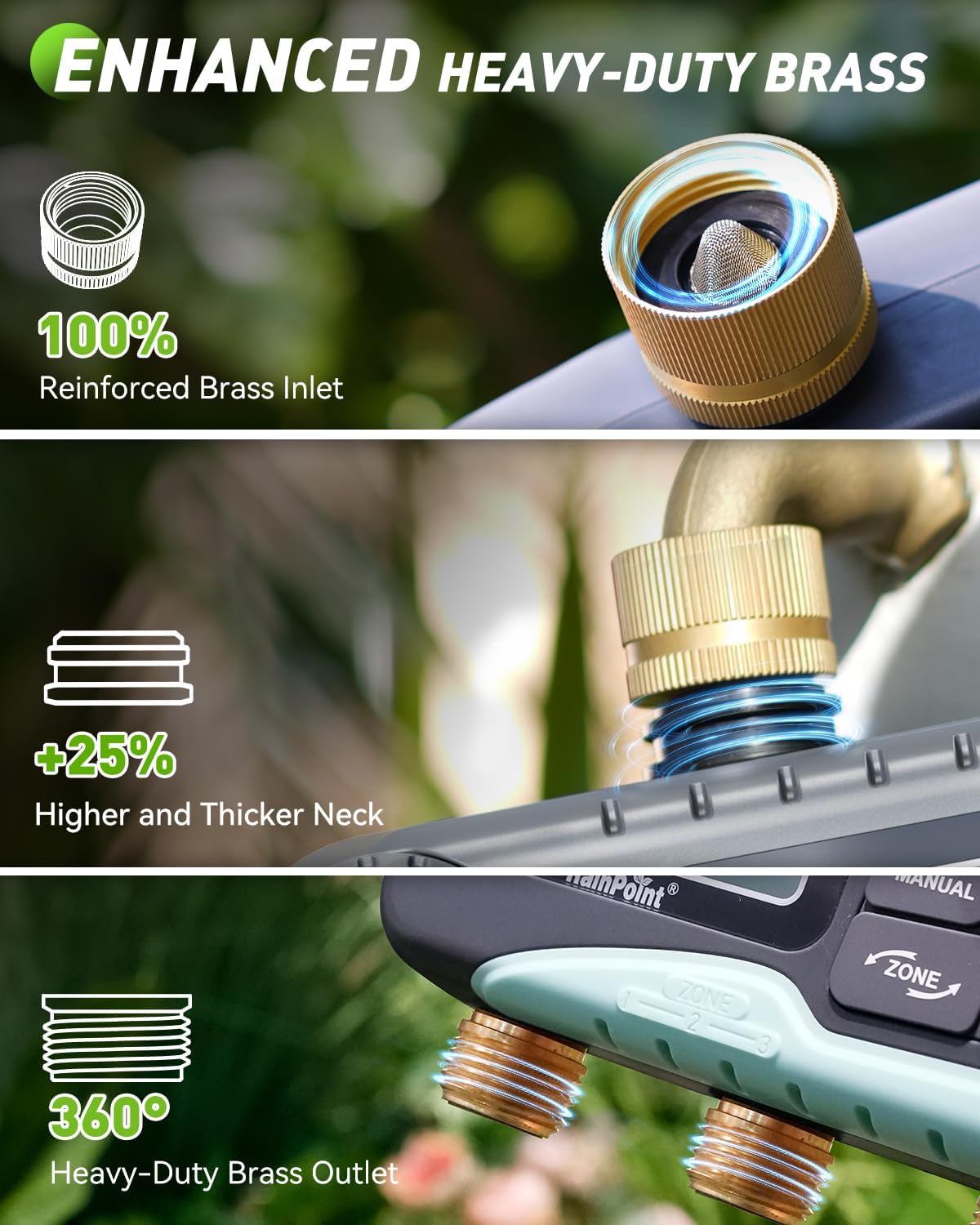
Image: The RAINPOINT 3 Zone Water Timer installed on an outdoor faucet, with three hoses extending to water different garden beds.
5. Hướng dẫn vận hành
5.1. Thiết lập thời gian hiện tại
After battery installation, the LCD will display the default time. Set the current time:
- Turn the dial to the 'SET CLOCK' position.
- Use the '+' and '-' buttons to adjust the hour, then press 'OK' to confirm.
- Lặp lại trong vài phút.
- Press 'OK' to save and move to the next setting, or turn the dial to 'ON' to exit.
5.2. Programming Automatic Watering Schedules
The timer allows for independent programming of up to three zones.

Image: The water timer's LCD screen displaying options for setting clock, start time, watering duration, and frequency.
- Chọn Vùng: Press the 'ZONE' button to cycle through Zone 1, Zone 2, or Zone 3.
- Đặt thời gian bắt đầu: Turn the dial to 'START TIME'. Use '+' and '-' to set the desired start time for the selected zone, then press 'OK'.
- Thiết lập thời lượng (thời gian): Turn the dial to 'HOW LONG'. Use '+' and '-' to set the watering duration (1 minute to 8 hours), then press 'OK'.
- Thiết lập tần suất: Turn the dial to 'HOW OFTEN'. Use '+' and '-' to set the watering frequency (e.g., every 1 hour, every 12 hours, every 1 day, every 7 days), then press 'OK'.
- Repeat steps for each zone you wish to program.
- Turn the dial to 'ON' to activate the programmed schedules.
5.3. Tưới nước bằng tay
Để tưới nước ngay lập tức mà không ảnh hưởng đến lịch trình đã định của bạn:
- Ensure the dial is in the 'ON' position.
- Press the 'MANUAL' button.
- Use '+' and '-' to set the desired manual watering duration (1 minute to 8 hours).
- Press 'OK' to start manual watering. The selected zone(s) will water for the set duration.
- To stop manual watering, press 'MANUAL' again or turn the dial to 'OFF' and then back to 'ON'.

Image: A man manually watering plants with a hose connected to the RAINPOINT water timer, illustrating the manual watering feature.
5.4. Chức năng hoãn trận đấu do mưa
To pause your watering schedule due to rain or wet conditions:
- Ensure the dial is in the 'ON' position.
- Nhấn nút 'DELAY'.
- Use '+' and '-' to select a delay period (24, 48, or 72 hours).
- Press 'OK' to activate the rain delay. The timer will pause for the selected duration and resume its schedule automatically afterward.
- To cancel rain delay, press 'DELAY' again.
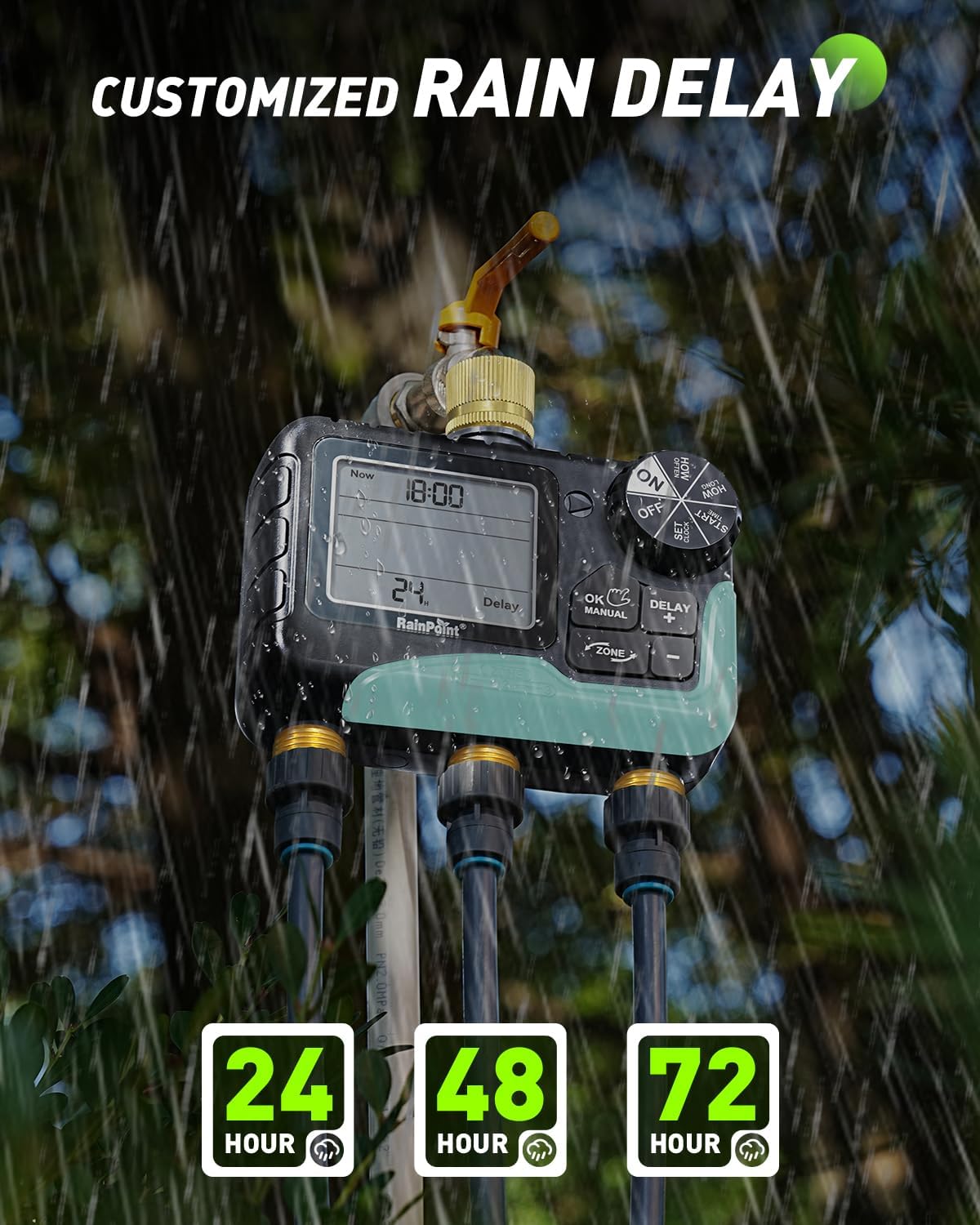
Image: The water timer's display showing the rain delay function activated for 24 hours, with raindrops falling in the background.
6. Bảo trì
6.1. Thay thế pin
When the low battery indicator appears on the LCD, replace the batteries promptly to avoid interruption of watering schedules. The timer features a low battery auto shut-off valve to prevent continuous watering if batteries die during operation.

Image: The water timer's display indicating a low battery reminder and explaining the auto shut-off valve feature.
6.2. Vệ sinh
Periodically check the inlet filter for debris and clean it to ensure proper water flow. Use a soft brush and water to clean the exterior of the timer.
6.3. Chuẩn bị cho mùa đông
Before the first frost, disconnect the timer from the faucet and hoses. Remove the batteries. Store the timer indoors in a dry, protected area to prevent freezing and potential damage to internal components.
KHAI THÁC. Xử lý sự cố
| Vấn đề | Nguyên nhân có thể | Giải pháp |
|---|---|---|
| Không có dòng nước chảy | Faucet off, low batteries, clogged filter, incorrect programming. | Ensure faucet is fully open. Replace batteries. Clean inlet filter. Check programmed start times and durations. |
| Rò rỉ nước | Loose connections, damaged O-ring/washer, high water pressure. | Tighten all connections. Check and replace O-rings/washers if damaged. Use plumber's tape. Ensure water pressure is within acceptable limits. |
| Màn hình trống hoặc không đọc được | Dead batteries, moisture inside screen. | Replace batteries. If moisture is present, disconnect, remove batteries, and allow to dry in a warm, dry place. If issue persists, contact customer support. |
| Bộ hẹn giờ không tưới nước vào thời gian đã lên lịch. | Incorrect clock setting, rain delay active, incorrect program. | Verify current time. Check if rain delay is active. Review and re-program watering schedules for each zone. |
8. Thông số kỹ thuật
- Số hiệu mẫu: IOB347
- Thương hiệu: ĐIỂM MƯA
- Số vùng: 3
- Thời gian tưới nước: 1 phút đến 8 giờ
- Tần suất tưới nước: Every 1 hour to every 7 days
- Các phương án hoãn trận đấu do trời mưa: 24h, 48h, 72h
- Inlet/Outlet Material: Thau
- Xếp hạng chống thấm nước: IP65
- Nguồn điện: 2 pin kiềm AA (không kèm theo)
- Trọng lượng sản phẩm: 0.85 Kilôgam
9. Thông tin bảo hành
RAINPOINT offers a 5-year warranty for this product, covering defects in materials and workmanship under normal use. This warranty does not cover damage caused by misuse, neglect, freezing, accident, or unauthorized modification. Please retain your proof of purchase for warranty claims.
10. Hỗ trợ khách hàng
For any questions, technical assistance, or warranty claims, please contact RAINPOINT customer support. We are committed to providing lifetime support for our products.
- Hỗ trợ trực tuyến: Ghé thăm RAINPOINT chính thức webtrang web dành cho các câu hỏi thường gặp và tài nguyên hỗ trợ.
- Hỗ trợ qua Email: Available 24/7. Refer to your product packaging or the official webtrang web để biết chi tiết liên hệ.
- Hỗ trợ qua điện thoại: Call our customer service center during business hours.

Image: A customer support representative wearing a headset, working at a computer, symbolizing available assistance.