1. Giới thiệu
Thank you for choosing the UGREEN 100W 5-Port GaN Charger. This manual provides essential information for the safe and efficient use of your new charging device. Please read these instructions carefully before use and retain them for future reference.
2. Sản phẩm hếtview
The UGREEN 100W 5-Port GaN Charger is a versatile and powerful charging solution designed to power multiple devices simultaneously. Featuring advanced GaN technology, a smart digital display with touch control, and comprehensive safety protections, it offers efficient and reliable charging for laptops, smartphones, tablets, and smartwatches.
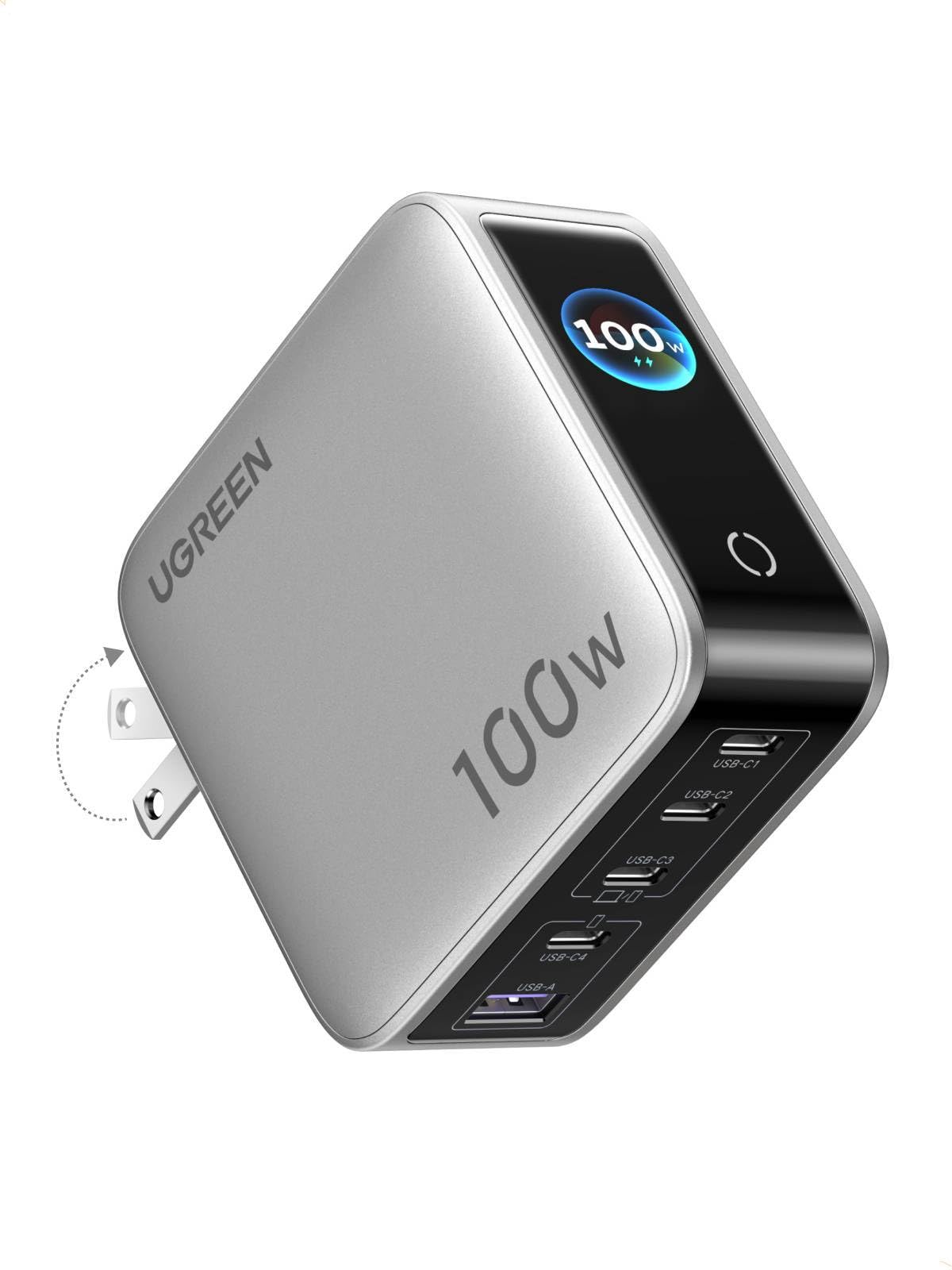
Image: UGREEN 100W 5-Port GaN Charger, showcasinVới thiết kế nhỏ gọn và màn hình hiển thị kỹ thuật số.
Các tính năng chính:
- Smart Digital Display with Touch Control: Monitor real-time charging data including total output power, individual port power, charging protocol (PD/QC), device battery level, and charger core temperature.
- 100W PD High-Speed Fast Charging: Delivers up to 100W max Power Delivery for rapid charging of laptops, smartphones, and tablets.
- 5-in-1 Multi-Port Charging: Equipped with 4 USB-C ports and 1 USB-A port for simultaneous charging of up to 5 devices.
- Phân phối điện thông minh: Automatically optimizes power delivery to connected devices, preventing power competition.
- Multi-Layer Safety Certified: Built-in protections against over-voltage, over-current, over-heat, short-circuit, and over-charge.
- Portable & Fire-Resistant Design: Features a foldable plug for easy travel and a 94-V0 fire-resistant PC material shell for durability.
3. Thiết lập
3.1 Mở hộp và kiểm tra ban đầu
Upon opening the package, ensure all components are present and undamaged. The package typically includes the UGREEN 100W 5-Port GaN Charger and a user manual.
3.2 Kết nối bộ sạc
- Gập các chấu cắm AC ra khỏi thân bộ sạc.
- Plug the charger firmly into a standard wall outlet.
- The digital display will illuminate, indicating the charger is ready for use.

Image: The UGREEN charger with its foldable plug extended, ready to be plugged into an outlet.
4. Hướng dẫn vận hành
4.1 Sạc thiết bị của bạn
- Connect your devices to the available USB-C or USB-A ports using appropriate charging cables.
- The charger will automatically detect the connected devices and begin charging.
- The intelligent power distribution system will optimize charging speeds across all connected devices.

Image: The UGREEN charger simultaneously charging a laptop, smartphone, and smartwatch, demonstrating its 5-in-1 capability.
4.2 Using the Smart Digital Display
The integrated digital display provides real-time charging information. Use the touch control button to cycle through different display modes:
- Tổng công suất đầu ra: Shows the combined wattage being delivered to all connected devices.
- Individual Port Power: Hiển thị wattage being delivered by each specific port (USB-C1, USB-C2, USB-C3, USB-A).
- Giao thức sạc: Indicates the active charging protocol (e.g., PD, QC) for each port.
- Real-time Device Battery Level: Hiển thị phần trăm pin hiện tạitage of connected devices (if supported).
- Charger Core Temperature: Monitors the internal temperature of the charger for safety.
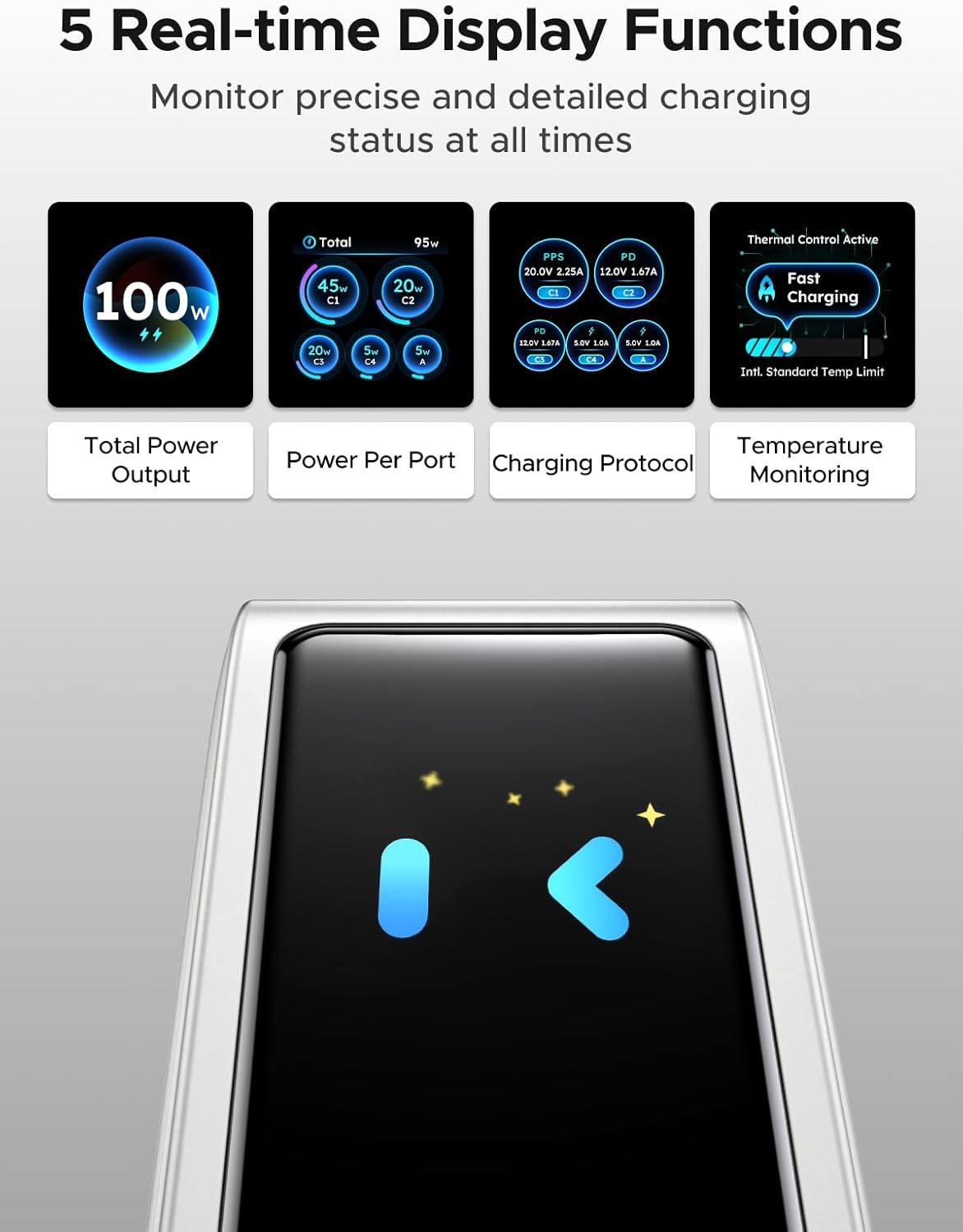
Image: The charger's digital display showing different real-time data points such as total power output, power per port, charging protocol, and temperature monitoring.
Note: The charger features an energy-saving function. The screen will automatically turn off after 2 minutes of inactivity.
5. Thông tin an toàn
The UGREEN 100W 5-Port GaN Charger is designed with multiple safety features to protect your devices and ensure safe operation:
- Quá âm lượngtage Bảo vệ: Ngăn ngừa thiệt hại do vol quá mứctage đầu vào.
- Bảo vệ quá dòng: Bảo vệ chống lại dòng điện quá mức.
- Bảo vệ quá nhiệt: Intelligent temperature control system automatically adjusts power to prevent overheating.
- Bảo vệ ngắn mạch: Protects against short-circuit damage.
- Bảo vệ quá phí: Prevents devices from being overcharged.
- Fire-Resistant Design: Constructed with 94-V0 fire-resistant PC material for enhanced safety.

Image: A visual representation of the charger's internal components and various safety features, including over-temperature, over-voltage, bảo vệ quá dòng và ngắn mạch.
Always use the charger in a well-ventilated area and avoid covering it during operation.
6. Bảo trì
6.1 Vệ sinh
To clean the charger, unplug it from the power outlet and disconnect all devices. Use a soft, dry cloth to wipe the surface. Do not use liquid cleaners or abrasive materials.
6.2 Lưu trữ
When not in use, store the charger in a cool, dry place away from direct sunlight and extreme temperatures. Ensure the foldable plug is retracted to prevent damage.
KHAI THÁC. Xử lý sự cố
7.1 Bộ sạc không hoạt động
- Hãy đảm bảo bộ sạc được cắm chắc chắn vào ổ cắm điện đang hoạt động.
- Kiểm tra xem ổ cắm điện có nhận được điện hay không bằng cách thử cắm vào một thiết bị khác.
7.2 Devices Not Charging or Charging Slowly
- Verify that the charging cables are properly connected to both the charger and your devices.
- Ensure your charging cables are in good condition and support fast charging if desired.
- Some devices may have specific charging requirements; refer to your device's manual.
- If multiple devices are connected, the charger intelligently distributes power. Charging speed may vary depending on the number and power requirements of connected devices.
7.3 Màn hình hiển thị kỹ thuật số không hoạt động
- The display has an energy-saving function and turns off after 2 minutes of inactivity. Tap the touch control button to reactivate it.
- Ensure the charger is receiving power.
8. Thông số kỹ thuật
| Tính năng | Chi tiết |
|---|---|
| Thương hiệu | UGREEN |
| Người mẫu | X773 |
| Mã số sản phẩm | 65619 |
| Cái gì?tage | 100 watt |
| Số lượng cổng | 5 (4 USB-C, 1 USB-A) |
| Tính năng đặc biệt | Fast Charging, Multi Device Charging, Smart Digital Display, Touch Control, Travel |
| Thiết bị tương thích | Điện thoại di động, máy tính xách tay, đồng hồ thông minh, máy tính bảng |
| Các mẫu điện thoại tương thích | Galaxy S25 Ultra, S24 Ultra, S24, S23 Ultra, S23+, S22, S22 Ultra, S22+, S21 Ultra, S21, S21 Plus, S20 Ultra, S10, S10 Plus, S10e, S9, S9 Plus, S8, S8 Plus; Galaxy Note 20, Note10, Note 9, Note 8; Pixel 10, 9, 8, 7, 6, 6 Pro, 5, 4A, 3a, 3XL, 3, 2 XL; MacBook Pro 16''/ 15'' / 13"; MacBook Air 13''(M2) / 13''; MacBook 12''; Dell XPS 15/ 13; Steam Deck; iPhone 17, 17 Pro, 17 Pro Max, 16, 16 Plus, 16 Pro, 16 Pro Max, 15, 15 Plus, 15 Pro, 15 Pro Max, 14, 14 Plus, 14 Pro, 14 Pro Max, 13 Pro, 13 Pro Max, 13 mini, 13, 12 Pro, 12 Pro Max, 12 mini, 12, 11 Pro, 11 Pro Max, 11, SE, XS, XS Max, XR, X, 8, 8 Plus |
| Kích thước bưu kiện | 11.6 x 11.5 x 4.6 cm; 440 g |
| Nhà sản xuất | Tập đoàn Ugreen Limited |
| Ngày đầu tiên có sẵn | Ngày 5 tháng 2026 năm XNUMX |
9. Bảo hành và Hỗ trợ
9.1 Thông tin bảo hành
Các sản phẩm của UGREEN thường đi kèm với chế độ bảo hành tiêu chuẩn của nhà sản xuất. Vui lòng tham khảo bao bì sản phẩm hoặc trang web chính thức của UGREEN. webtrang web để biết các điều khoản và điều kiện bảo hành cụ thể.
9.2 Hỗ trợ khách hàng
Để được hỗ trợ kỹ thuật, trợ giúp khắc phục sự cố hoặc yêu cầu bảo hành, vui lòng liên hệ với bộ phận chăm sóc khách hàng của UGREEN thông qua trang web chính thức của họ. webtrang web hoặc thông tin liên lạc được cung cấp trên bao bì sản phẩm của bạn.