
SUNLU SP2
SUNLU Filament Dryer SP2 User Manual
Kiểu: SP2
1. Giới thiệu
The SUNLU Filament Dryer SP2 is designed to dry 3D printer filaments and provide sealed storage, improving print quality by removing moisture. This device features a heating element, an HD LCD touch screen for control, and compatibility with various filament types and spool sizes.

Image 1.1: SUNLU Filament Dryer SP2, highlighting its purpose.
2. Thông tin an toàn
- Hãy đảm bảo nguồn điện phù hợp với yêu cầu của thiết bị.
- Do not touch the heating element or interior surfaces during operation, as they can become hot.
- Giữ thiết bị tránh xa nước hoặc các chất lỏng khác.
- Không chặn các lỗ thông gió.
- Rút phích cắm của thiết bị trước khi vệ sinh hoặc bảo trì.
- Để xa tầm tay trẻ em.
3. Nội dung gói hàng
Xác minh rằng tất cả các mục đều có trong gói hàng:

Image 3.1: Detailed packing list for the SP2 FilaDryer Set.
- Drying Chamber x1
- Heating Base x1
- Air Lock x2
- Cáp nguồn x1
- Spool Roller x1
- Rollers & Bearings x1
- Hướng dẫn sử dụng x1
- Desiccant Box x1
- Chất hút ẩm x1
- Hygrometer x1
- PTFE Tube 1m x2
- PTFE Tube 8cm x2
4. Sản phẩm hếtview
The SUNLU Filament Dryer SP2 consists of a detachable drying chamber and a heating base, allowing for both drying and sealed storage. Key components include:
- Bìa trên: Seals the drying chamber.
- Drying Chamber: Transparent enclosure for filament spools.
- Máy đo độ ẩm: Displays real-time interior humidity.
- Cơ sở sưởi ấm: Contains the PTC heating element and control panel.
- Spool Rollers: Support filament spools for smooth rotation.
- PTFE Tubes: Guide filament to the 3D printer.

Hình ảnh 4.1: Nổ tung view of the SP2 components.
5. Hướng dẫn thiết lập
- Giải nén: Cẩn thận loại bỏ tất cả các thành phần khỏi bao bì.
- Assemble Rollers: Place the spool rollers and bearings into the designated slots within the drying chamber.
- Thêm chất hút ẩm: Place the desiccant into the desiccant box and insert it into its compartment in the drying chamber.
- Kết nối nguồn: Plug the power cable into the heating base and then into a suitable power outlet.
- Tải sợi: Open the top cover and place your filament spool(s) onto the rollers inside the drying chamber. The unit can accommodate up to two 1kg spools or one 3kg spool.
- Route Filament (for printing): If you intend to print while drying, route the filament through one of the PTFE tubes and out through an air lock to your 3D printer.
- Đóng nắp: Securely close the top cover using the two sliding latches to ensure a tight seal.
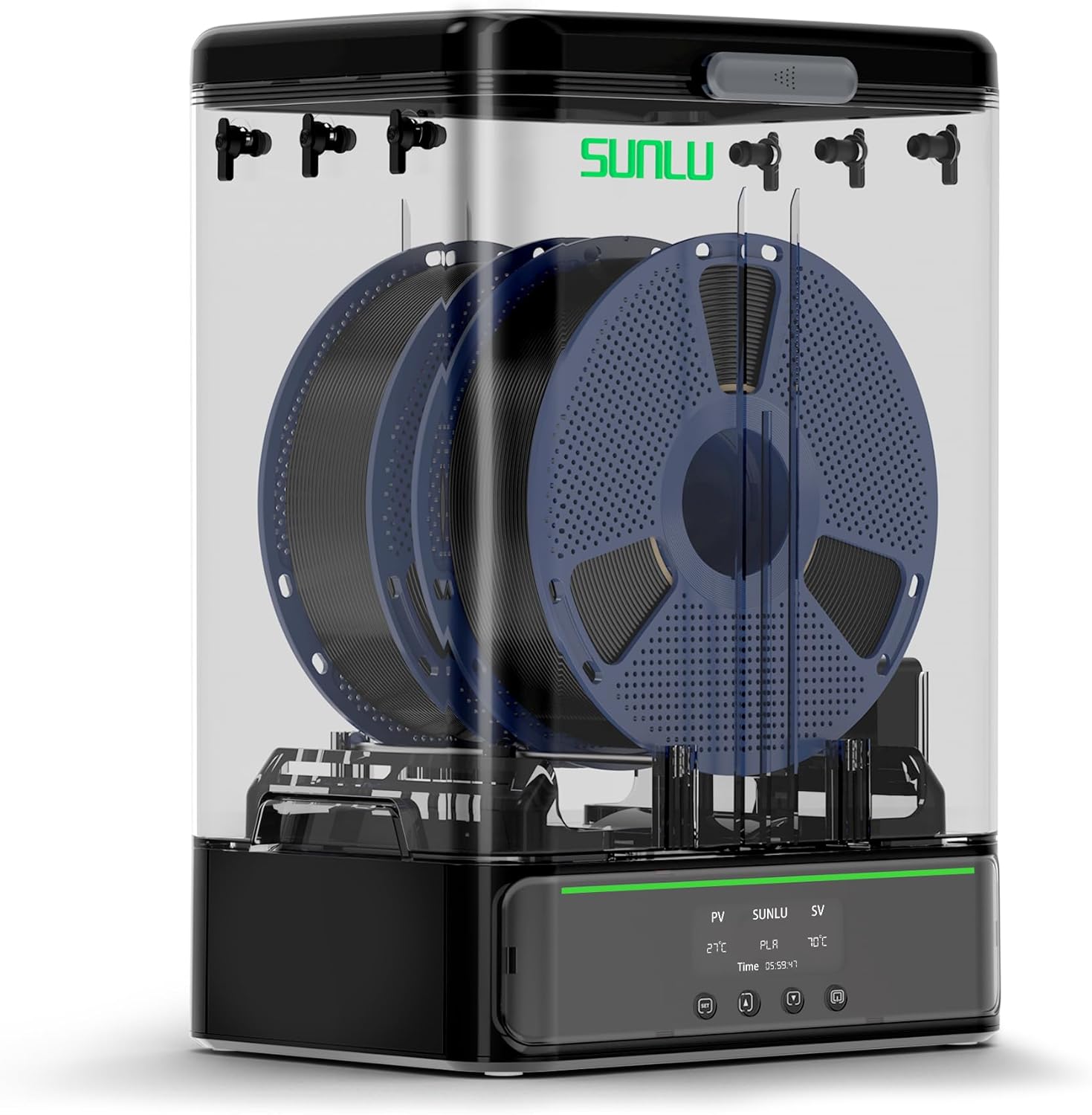
Image 5.1: Fully assembled SUNLU Filament Dryer SP2 with filament spools.
6. Hướng dẫn vận hành
6.1 Bật/Tắt nguồn
Press the power button on the HD LCD touch screen to turn the device on or off.
6.2 Using the HD LCD Touch Screen
The touch screen allows you to monitor and adjust drying parameters. It displays current temperature (PV), target temperature (SV), selected filament type, and remaining drying time.

Image 6.1: HD LCD Touch Screen interface.
6.3 Cài đặt nhiệt độ và thời gian
- Chọn loại sợi: Tap the filament type icon to cycle through presets (PLA, PETG, TPU, ABS, PA, PC, WOOD, PVA, PVB, ASA). Each preset has recommended temperature and time settings.
- Điều chỉnh nhiệt độ: Tap the temperature display (SV) and use the up/down arrows to set the desired drying temperature (range: 35-70°C).
- Điều chỉnh thời gian: Tap the time display and use the up/down arrows to set the desired drying duration (range: 0-99 hours).
- The device will begin heating to the set temperature and maintain it for the specified duration.

Image 6.2: Recommended Filament Drying Temperatures and Times.
6.4 Monitoring Humidity
The integrated hygrometer displays the current humidity level inside the drying chamber, allowing you to monitor the drying process. For optimal results, aim for a low humidity percentage.
6.5 Drying and Storage Functionality
The SP2 can be used for active drying or passive sealed storage. The detachable design allows the drying chamber to be lifted from the heating base for convenient storage after drying. The superior sealing mechanism, including silicone holes and sliding latches, helps maintain low humidity for stored filaments.

Image 6.3: Drying and Storage capabilities with various spool sizes.
7. Bảo trì
- Vệ sinh: Wipe the exterior with a soft, dry cloth. Do not use abrasive cleaners or immerse the device in water. Ensure the device is unplugged and cool before cleaning.
- Chất hút ẩm: Periodically check the desiccant. If it changes color (indicating saturation), it needs to be recharged or replaced. Follow the desiccant manufacturer's instructions for recharging.
- PTFE Tubes: Inspect PTFE tubes for wear or blockages. Replace if necessary to ensure smooth filament feeding.
KHAI THÁC. Xử lý sự cố
| Vấn đề | Nguyên nhân có thể | Giải pháp |
|---|---|---|
| Filament still exhibits moisture-related print issues (stringing, poor adhesion). | Insufficient drying time or temperature; saturated desiccant; poor seal. | Increase drying time or temperature; replace/recharge desiccant; ensure top cover is securely latched. |
| Device not heating. | Power cable not connected; device not powered on; internal fault. | Check power connections; press power button; contact support if problem persists. |
| LCD touch screen unresponsive. | Temporary software glitch; power issue. | Power cycle the device (turn off, unplug, wait 30 seconds, plug in, turn on). |
| Filament spool not rotating smoothly. | Rollers obstructed or dirty; filament tangled. | Clean rollers; untangle filament; ensure PTFE tubes are clear. |

Image 8.1: Visual comparison of print quality with moist vs. dry filament.
9. Thông số kỹ thuật
- Người mẫu: SUNLU Filament Dryer SP2
- Bộ phận làm nóng: Công suất 250W
- Nhiệt độ tối đa: 70°C
- Khả năng tương thích dây tóc: 1.75mm, 2.85mm (PLA, PETG, TPU, ABS, PA, PC, WOOD, PVA, PVB, ASA)
- Sức chứa cuộn dây: Up to 2 x 1kg spools or 1 x 3kg spool. Supports 250g, 500g spools.
- Kích thước sản phẩm (D x R x C): 278mm x 208mm x 396mm (khoảng 10.9 x 8.2 x 15.6 inch)
- Trọng lượng sản phẩm: 3.6 kg (7.92 pound)
- Điều khiển: HD LCD Touch Screen
- Theo dõi độ ẩm: Integrated Hygrometer

Image 9.1: Product dimensions of the SUNLU Filament Dryer SP2.
10. Bảo hành và Hỗ trợ
For warranty information and technical support, please refer to the warranty card included with your product or visit the official SUNLU website. You may also contact SUNLU customer service directly for assistance with product operation, troubleshooting, or parts replacement.
Ask a question about this manual
Ask about setup, troubleshooting, compatibility, parts, safety, or missing instructions. Manuals+ will review the question and use this page’s manual context to help answer it.