
Sản phẩm trênview
The Kisnt FD17 is a versatile 17-key wireless mechanical number pad designed to enhance productivity for various computing tasks. It offers dual-mode connectivity, allowing seamless switching between Bluetooth 5.0 and 2.4G wireless connections. Featuring a gasket-mounted structure for a comfortable typing experience and creamy sound, along with hot-swappable linear switches and durable PBT keycaps, this numpad is built for both performance and customization.

Đằng trước view of the Kisnt FD17 Wireless Mechanical Number Pad, showcasing its 17-key layout, including the 'Pair' key and the included USB receiver, indicating its dual wireless capabilities.
Các tính năng chính:
- Kết nối chế độ kép: Supports Bluetooth 5.0 and 2.4G wireless connections for broad compatibility and minimal latency.
- Bố cục thực tiễn 17 phím: Includes essential keys like ESC, Tab, Backspace, and Calculator for enhanced functionality.
- Thiết kế lắp gioăng: Absorbs sound effectively, providing a comfortable and quiet typing experience.
- Công tắc có thể hoán đổi nóng: Compatible with 3-pin and 5-pin switches, allowing for easy customization and maintenance.
- Thiết kế công thái học: Có thiết kế dốc chuyên nghiệpfile for comfortable use during extended periods.
- Chế độ tiết kiệm năng lượng: Automatically enters sleep mode after inactivity to conserve battery life.
Thiết lập và kết nối
The Kisnt FD17 offers two primary connection methods: 2.4G wireless via a USB receiver and Bluetooth 5.0. Ensure you have one AAA battery (not included) installed before proceeding.
Lắp đặt pin:
- Locate the battery compartment on the back of the number pad.
- Mở nắp pin.
- Insert one AAA battery, ensuring correct polarity.
- Đóng nắp pin.

Ở phía sau view of the number pad, illustrating the AAA battery compartment and the storage slot for the 2.4G USB receiver.
Kết nối không dây 2.4G:
- Take out the 2.4G USB receiver from the battery compartment.
- Cắm đầu thu vào cổng USB có sẵn trên máy tính của bạn.
- Locate the power and mode switch on the side of the number pad and slide it to the '2.4G' position.
- The number pad will automatically connect to your computer.
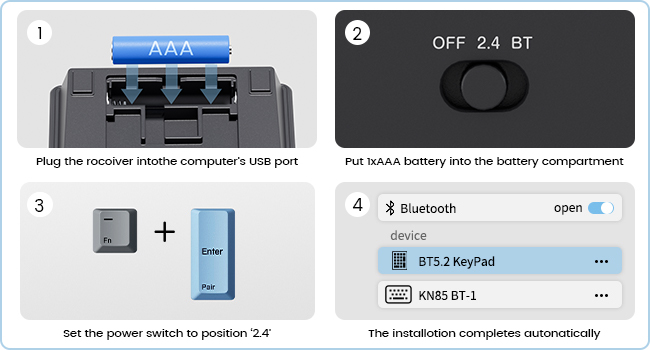
Step-by-step guide for connecting the number pad via 2.4G wireless, including battery insertion, receiver plug-in, and switch setting.
Kết nối Bluetooth 5.0:
- Locate the power and mode switch on the side of the number pad and slide it to the 'BT' (Bluetooth) position.
- Nhấn và giữ Fn + Enter (Pair) keys simultaneously for 5 seconds until the indicator light flashes, indicating pairing mode.
- Trên máy tính hoặc thiết bị của bạn, hãy mở cài đặt Bluetooth và tìm kiếm thiết bị mới.
- Select 'BT 5.2 KeyPad' from the list of available devices to complete the pairing process.
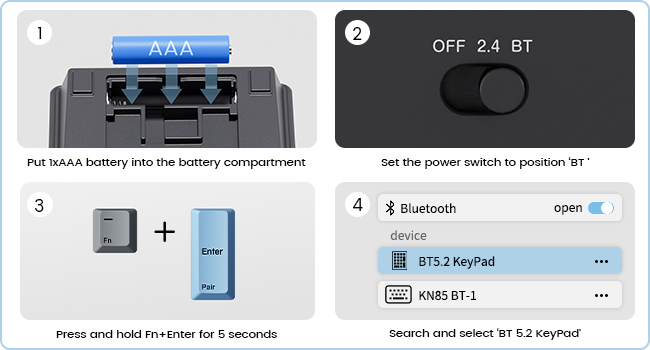
Step-by-step guide for connecting the number pad via Bluetooth, including switch setting, pairing key combination, and device selection.

The Kisnt FD17 number pad shown connected to both a desktop computer via 2.4G wireless and a laptop via Bluetooth, demonstrating its dual-mode capability.
Hướng dẫn sử dụng
The Kisnt FD17 number pad is designed for intuitive use with its practical 17-key layout and additional functions.
Chức năng chính:
- The numpad includes standard numeric keys (0-9), arithmetic operators (+, -, *, /), and Enter.
- Additional keys include Thoát, Thẻ, Phím xóa lùi, and a dedicated Máy tính chìa khóa.
- Các Máy tính key functions only in Windows OS.
- Các Fn key can be used in combination with other keys for specific functions, such as pairing.
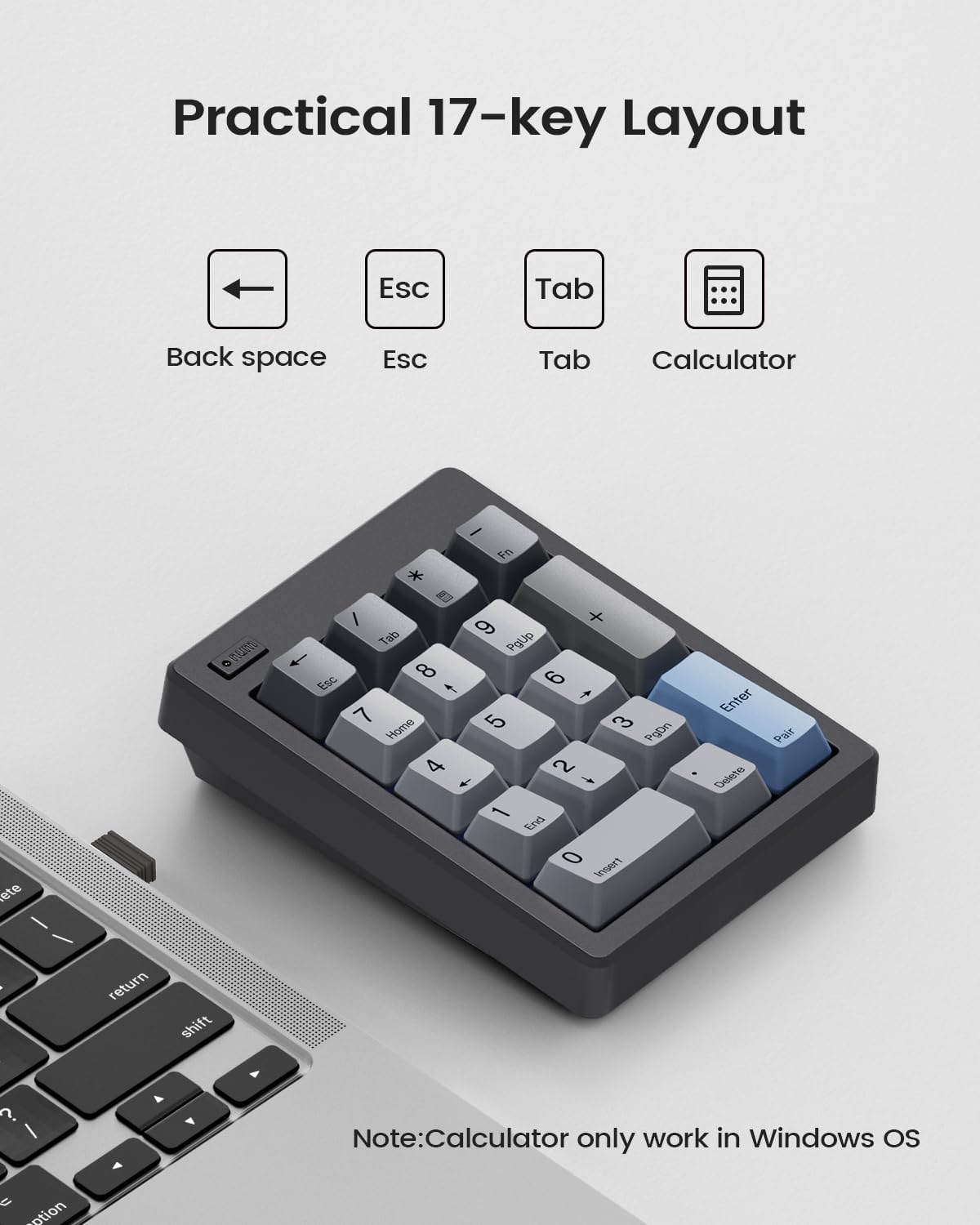
Một chi phí chung view of the 17-key layout, highlighting the Backspace, Esc, Tab, and Calculator keys, with a note on Calculator key compatibility.
Auto Sleep & Power-Saving Mode:
To conserve battery life, the number pad automatically enters a sleep mode after a period of inactivity. It has an independent power switch for manual control.
- In 2.4G mode, the numpad will enter sleep mode after 5 minutes of inactivity.
- In Bluetooth mode, the numpad will enter sleep mode after 60 minutes of inactivity.
- To wake the numpad, simply press any key.

The number pad from a side angle, showing the power switch and details about its auto-sleep duration for both 2.4G and Bluetooth modes.
BẢO TRÌ
Proper maintenance ensures the longevity and optimal performance of your Kisnt FD17 number pad.
Vệ sinh:
- Use a soft, dry cloth to wipe the surface of the number pad.
- Đối với vết bẩn cứng đầu, hãy chà nhẹampNhúng khăn vào nước hoặc dung dịch tẩy rửa nhẹ, sau đó lau khô ngay lập tức.
- Tránh sử dụng hóa chất mạnh hoặc vật liệu mài mòn.
Công tắc có thể hoán đổi nóng:
The FD17 features hot-swappable switches, allowing you to easily change switches without soldering. It supports both 3-pin and 5-pin switches.
- Nhẹ nhàng tháo nắp phím ra khỏi công tắc bằng dụng cụ tháo nắp phím (không kèm theo).
- Sử dụng dụng cụ tháo công tắc (không kèm theo) để cẩn thận tháo công tắc ra khỏi mạch in.
- Căn chỉnh các chân của công tắc mới với các lỗ trên PCB.
- Nhấn chặt công tắc mới vào đúng vị trí cho đến khi nghe thấy tiếng tách.
- Lắp lại nắp phím.

The number pad with several keycaps and switches removed, illustrating the hot-swappable design that supports both 3-pin and 5-pin switches.
Xử lý sự cố
If you encounter issues with your Kisnt FD17 number pad, refer to the following common solutions.
Sự cố kết nối:
- Numpad not connecting: Ensure the battery is correctly installed and has sufficient charge. Check that the mode switch is set to the correct position (2.4G or BT).
- Sự cố kết nối 2.4G: Try plugging the USB receiver into a different USB port on your computer. Ensure the receiver is not too far from the numpad.
- Sự cố kết nối Bluetooth: Make sure Bluetooth is enabled on your device. Forget the device from your Bluetooth settings and attempt to re-pair it. Ensure no other Bluetooth devices are causing interference.
Các vấn đề về chức năng:
- Calculator key not working: The Calculator key is only compatible with Windows operating systems. It will not function on Mac OS or ChromeBook.
- Limited functionality on Mac OS: Apple products do not fully support external function key buttons, which may limit the use of certain special keys on the numpad when connected to Mac OS.
- Phím không phản hồi: Check if the numpad is in sleep mode and press any key to wake it. If individual keys are not responding, the switch or keycap may need to be re-seated or replaced.
Thông số kỹ thuật
| Tính năng | Chi tiết |
|---|---|
| Người mẫu | FD17 |
| Công nghệ kết nối | Bluetooth 5.0 / Wireless 2.4GHz |
| Số lượng chìa khóa | 17 |
| Mô tả bàn phím | Bàn phím số cơ học |
| Tính năng đặc biệt | Creamy Sound, Ergonomic, Hot-Swappable, PBT Dye-Sub Keycap, Powered by AAA Battery |
| Thiết bị tương thích | Máy tính xách tay, PC, Điện thoại thông minh |
| Loại nguồn điện | Pin (1x AAA, không bao gồm) |
| Loại vật liệu | Nhựa |
| Kích thước sản phẩm | 12.29 x 9.19 x 3.3 cm (4.84 x 3.62 x 1.3 inch) |
| Trọng lượng sản phẩm | 197.88 g (6.98 oz) |

The ergonomic design of the Kisnt FD17, highlighting its sloped profile and compact dimensions for comfortable use.
Bảo hành và Hỗ trợ
Specific warranty details for the Kisnt FD17 Wireless Mechanical Number Pad are not provided in this manual. For warranty information, technical support, or further assistance, please contact Kisnt customer service directly or visit their official webđịa điểm.
You can often find support contact information on the product packaging or through the retailer where the product was purchased.