
1. Giới thiệu
Cảm ơn bạn đã muaasing the JVC XS-N3214PB Portable Bluetooth Party Speaker. This manual provides important information regarding the setup, operation, and maintenance of your speaker. Please read it thoroughly before using the product to ensure proper function and to maximize your listening experience. Keep this manual for future reference.
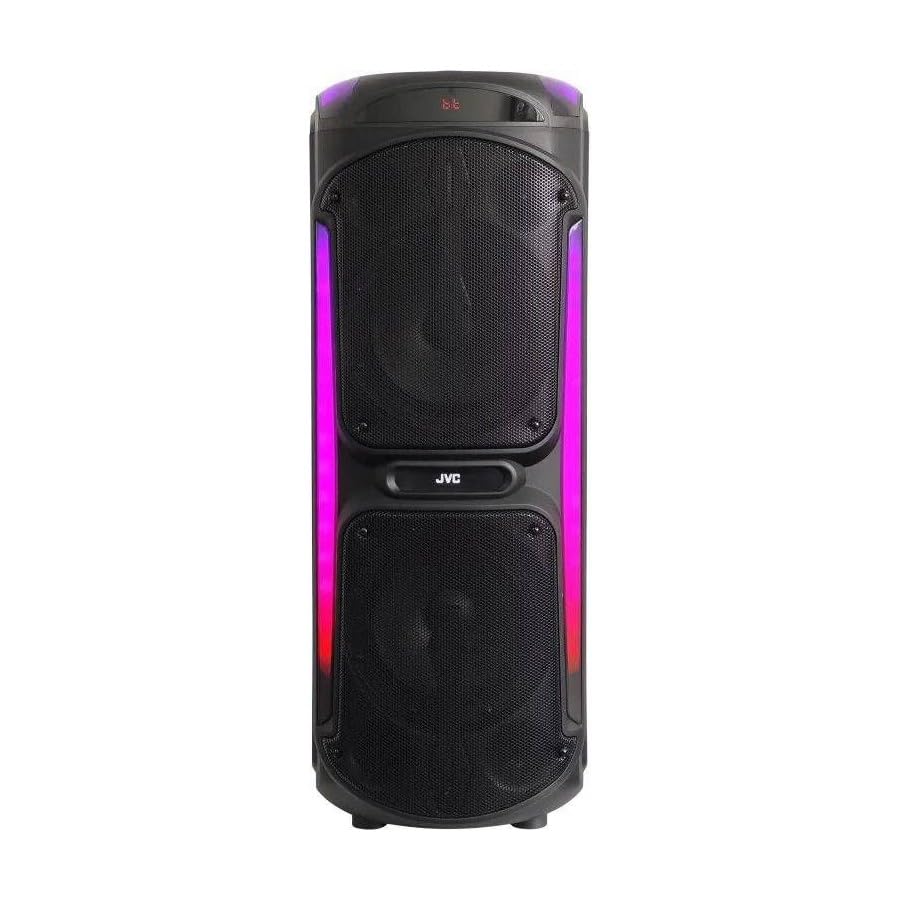
Image: The JVC XS-N3214PB Portable Bluetooth Party Speaker, shown with two microphones, highlighting its versatile connectivity options including Bluetooth, FM Radio, MP3 playback, AUX input, and USB input. The speaker features integrated LED lighting.
2. Thông tin an toàn
Để đảm bảo hoạt động an toàn và tránh hư hỏng, vui lòng tuân thủ các biện pháp phòng ngừa sau:
- Không để loa tiếp xúc với nước, hơi ẩm hoặc nhiệt độ quá cao.
- Không được tự ý tháo rời hoặc sửa chữa loa. Vui lòng liên hệ nhân viên có trình độ để được hỗ trợ bảo dưỡng.
- Đặt loa tránh xa các nguồn nhiệt, ánh nắng trực tiếp và các vật liệu dễ cháy.
- Chỉ sử dụng bộ sạc được chỉ định.
- Tránh đặt vật nặng lên loa.
- Lau sạch loa bằng vải mềm, khô. Không sử dụng chất tẩy rửa dạng lỏng hoặc dạng xịt.
- Hãy đảm bảo thông gió tốt xung quanh loa trong quá trình sử dụng.
3. Nội dung gói hàng
Xác minh rằng tất cả các mục đều có trong gói hàng:
- JVC XS-N3214PB Portable Bluetooth Party Speaker (1 unit)
- Power Adapter/Charging Cable (1 unit)
- Điều khiển từ xa (1 chiếc)
- Hướng dẫn sử dụng (tài liệu này)
- (Optional: Microphone, if included with your specific purchase)
4. Sản phẩm hếtview
4.1. Tính năng
- Powerful 800W Audio Output
- Kết nối không dây Bluetooth
- Pin sạc tích hợp cho tính di động
- Integrated LED Party Lights
- Bộ dò đài FM
- Phát lại USB
- Đầu vào AUX
- Microphone Input for Karaoke
- Hoạt động điều khiển từ xa
- Deep Bass Performance
4.2. Điều khiển và Cổng
Familiarize yourself with the speaker's control panel and connection ports. (Refer to diagrams in the full printed manual for exact locations).
- Nút nguồn: Bật/tắt loa.
- Nút chế độ: Chuyển đổi giữa các chế độ Bluetooth, FM, USB và AUX.
- Kiểm soát âm lượng: Điều chỉnh âm lượng chính.
- Nút Phát/Tạm dừng: Kiểm soát phát lại phương tiện.
- Các nút theo dõi trước/tiếp theo: Điều hướng qua các bản nhạc hoặc đài FM.
- Nút đèn LED: Bật/tắt hiệu ứng ánh sáng LED.
- Điều khiển âm lượng/tiếng vọng micro: Adjusts microphone input and echo effect.
- Cổng USB: Để phát lại bằng ổ USB.
- Đầu vào AUX (3.5mm): Để kết nối các thiết bị âm thanh bên ngoài.
- Ngõ vào micro (6.35mm): Để kết nối micro có dây.
- Cổng DC IN: Dùng để kết nối bộ chuyển đổi nguồn để sạc loa.
5. Thiết lập
5.1. Sạc loa
- Connect the power adapter to the DC IN port on the speaker.
- Cắm đầu kia của bộ đổi nguồn vào ổ cắm trên tường.
- The charging indicator light will illuminate (color may vary) to show the speaker is charging.
- Allow approximately 4-6 hours for a full charge. The indicator light may change or turn off when fully charged.
- Disconnect the power adapter once charging is complete or when using the speaker on battery power.
5.2. Bật / Tắt nguồn
- Để bật nguồn: Nhấn và giữ nút nguồn trong vài giây cho đến khi màn hình sáng lên.
- Để Tắt Nguồn: Nhấn và giữ nút Nguồn một lần nữa trong vài giây cho đến khi màn hình tắt.
6. Hướng dẫn vận hành
6.1. Ghép nối Bluetooth
- Power on the speaker. It will automatically enter Bluetooth pairing mode, indicated by a flashing Bluetooth icon or voice prompt.
- Trên thiết bị di động (điện thoại thông minh, máy tính bảng, v.v.), hãy bật Bluetooth và tìm kiếm các thiết bị khả dụng.
- Select "JVC XS-N3214PB" from the list of devices.
- Once paired, the speaker will confirm with an audible tone or a solid Bluetooth icon.
- Bây giờ bạn có thể phát âm thanh từ thiết bị của mình qua loa.
6.2. Đài phát thanh FM
- Press the Mode button until "FM" is displayed.
- Nhấn nút Phát/Tạm dừng để tự động quét và lưu các đài FM có sẵn.
- Sử dụng các nút Bài hát trước/Tiếp theo để điều hướng giữa các đài đã lưu.
6.3. Phát lại USB
- Insert a USB flash drive (formatted to FAT32) containing MP3 audio files vào cổng USB.
- The speaker will automatically switch to USB mode and begin playing the first track. If not, press the Mode button to select USB.
- Sử dụng các nút Phát/Tạm dừng và Bài trước/Bài tiếp theo để điều khiển phát lại.
6.4. Đầu vào AUX
- Kết nối một đầu của cáp âm thanh 3.5mm (không kèm theo) vào cổng AUX IN trên loa.
- Kết nối đầu còn lại của dây cáp với đầu ra âm thanh của thiết bị ngoại vi (ví dụ: máy nghe nhạc MP3, máy tính xách tay).
- Press the Mode button until "AUX" is displayed.
- Kiểm soát phát lại và âm lượng từ thiết bị bên ngoài.
6.5. Microphone and Karaoke Function
- Connect a wired microphone (not included) to the Microphone Input port.
- Adjust the microphone volume and echo effect using the dedicated controls on the speaker.
- Play music via Bluetooth, USB, or AUX, and sing along through the microphone.
6.6. Đèn LED trang trí tiệc
Press the LED Light button to cycle through different lighting modes or to turn the lights off.
6.7. Điều khiển từ xa
The included remote control allows for convenient operation of the speaker from a distance. Functions include power on/off, mode selection, volume adjustment, track control, and LED light control. Ensure the remote control has working batteries and is pointed towards the speaker's sensor.
7. Bảo trì
- Vệ sinh: Wipe the speaker's exterior with a soft, dry, lint-free cloth. Do not use abrasive cleaners, waxes, or solvents.
- Kho: If storing the speaker for an extended period, ensure it is fully charged, then power it off. Store in a cool, dry place away from direct sunlight. Recharge the battery every few months to maintain its lifespan.
- Chăm sóc pin: To prolong battery life, avoid fully discharging the speaker frequently. Charge it before the battery is completely depleted.
KHAI THÁC. Xử lý sự cố
| Vấn đề | Nguyên nhân có thể | Giải pháp |
|---|---|---|
| Loa không bật được. | Pin đã hết. Dây nguồn chưa được kết nối. | Charge the speaker. Ensure power cable is securely connected to both speaker and outlet. |
| Không có âm thanh. | Volume is too low. Incorrect mode selected. Device not paired (Bluetooth). AUX cable loose. | Increase volume on speaker and source device. Press Mode button to select correct input. Re-pair Bluetooth device. Check AUX cable connection. |
| Thiết bị Bluetooth không thể ghép nối. | Loa không ở chế độ ghép nối. Thiết bị ở quá xa. Có nhiễu. | Ensure speaker is in Bluetooth mode and flashing. Move device closer to speaker. Turn off other Bluetooth devices. |
| Phát lại qua USB không hoạt động. | USB drive not formatted correctly (FAT32). Unsupported file format. USB drive faulty. | Ensure USB drive is FAT32 and contains MP3 fileHãy thử một ổ USB khác. |
| Điều khiển từ xa không hoạt động. | Batteries depleted. Obstruction between remote and speaker. | Replace remote control batteries. Ensure clear line of sight to speaker's IR sensor. |
9. Thông số kỹ thuật
| Số hiệu mẫu | XS-N3214PB |
| Thương hiệu | JVC |
| Công suất đầu ra | 800W (Cao điểm) |
| Kết nối | Bluetooth, USB, AUX (3.5mm), FM Radio, Microphone Input (6.35mm) |
| Chế độ đầu ra âm thanh | Âm thanh nổi |
| Vật liệu | Nhựa |
| Kiểu lắp đặt | Đứng sàn |
| Phương pháp kiểm soát | Điều khiển từ xa, nút |
| Kích thước (D x W x H) | 35D x 31W x 94H cm |
| Các thành phần bao gồm | 1 x JVC XS-N3214PB 800W Party Portable Bluetooth Speaker, Power Adapter, Remote Control, User Manual |
10. Bảo hành và Hỗ trợ
10.1. Thông tin bảo hành
This JVC XS-N3214PB speaker comes with a Bảo hành 1 năm Kể từ ngày mua. Bảo hành này bao gồm các lỗi sản xuất và chất lượng gia công trong điều kiện sử dụng bình thường. Bảo hành không bao gồm các hư hỏng do sử dụng sai mục đích, tai nạn, sửa đổi trái phép hoặc hao mòn thông thường. Vui lòng giữ lại hóa đơn mua hàng để yêu cầu bảo hành.
10.2. Hỗ trợ khách hàng
For technical assistance, warranty claims, or product inquiries, please contact JVC customer support through the retailer where the product was purchased or visit the official JVC webtrang web cung cấp thông tin liên hệ cụ thể cho khu vực của bạn.