
1. Giới thiệu
Thank you for choosing EARMOR M300T/M300A Electronic Hearing Protection Earmuffs. These earmuffs are designed to protect your hearing from harmful noise while allowing you to hear important ambient sounds and communicate effectively. The M300T model includes Bluetooth connectivity for enhanced functionality.

Image 1.1: EARMOR M300T Electronic Hearing Protection Earmuffs (Black, Bluetooth model shown).
2. Các tính năng chính
- Advanced Hearing Protection: Suppresses harmful noises above 82 dB in less than 1 millisecond, providing a Noise Reduction Rating (NRR) of 23dB.
- Environmental Sound Ampsự hóa lỏng: Enhances situational awareness by capturing and amplifying low-level ambient sounds.
- Nhiều chế độ quét: Offers three distinct ambient sound modes to adapt to various environments.
- Thiết kế công thái học: Features comfortable gel cushions and an adjustable padded headband for a secure and comfortable fit across various head sizes.
- Integrated Controls (M300T & M300A): A single, continuously adjustable knob controls power and volume.
- Bluetooth 5.4 Connectivity (M300T only): Allows connection to mobile devices for music and calls, even in noise-canceling mode.
- Bền và chống thấm nước: IPX5 waterproof rating ensures performance in various conditions.
- Tự động tắt máy: Unit automatically powers off after 4 hours of inactivity to conserve battery life.

Image 2.1: Illustration of active noise suppression, highlighting the 23dB NRR and rapid suppression of sounds over 82dB.
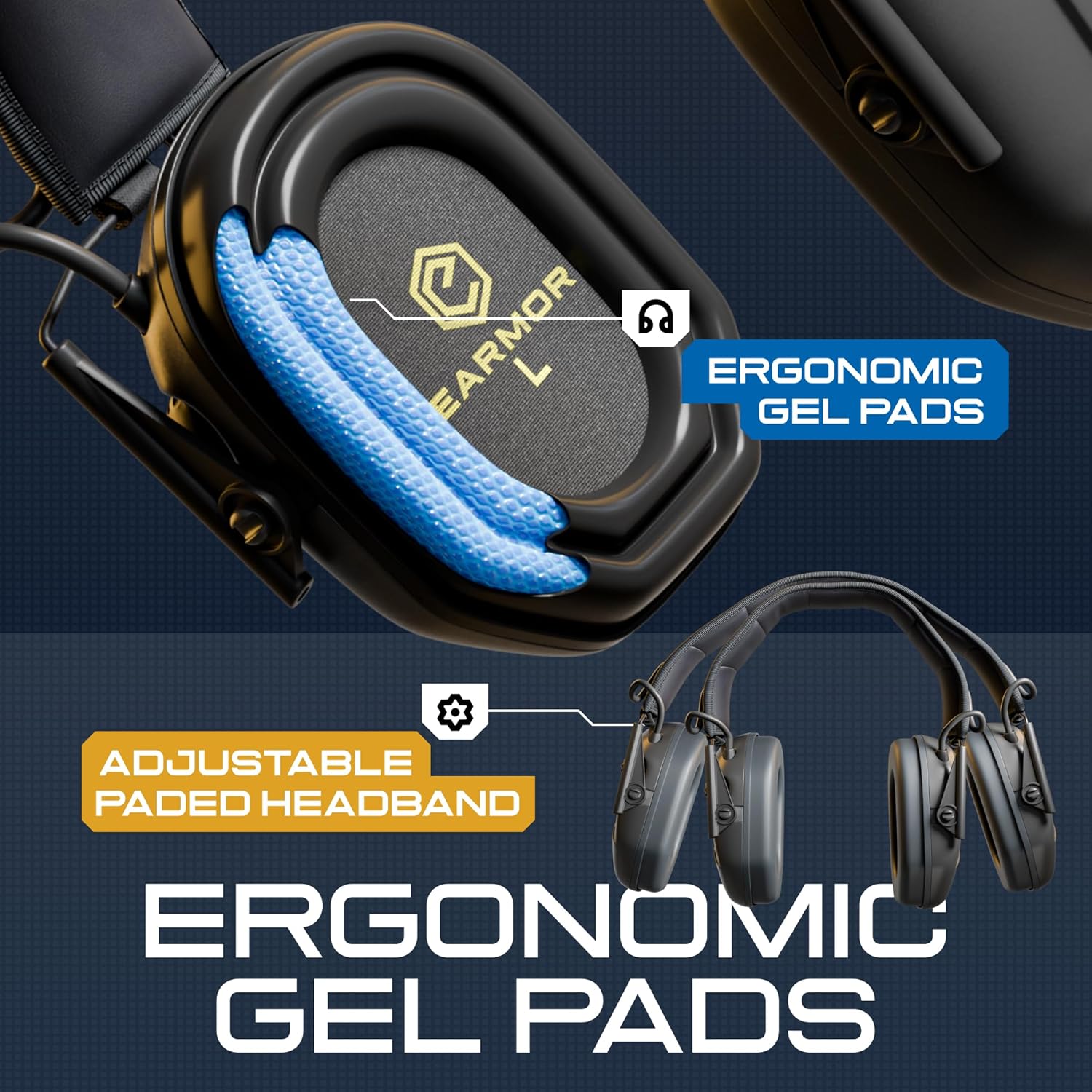
Hình ảnh 2.2: Cận cảnh view of the ergonomic gel pads and adjustable padded headband, designed for comfort and fit.
3. Thiết lập
3.1. Lắp đặt pin
- Locate the battery compartments on each earcup.
- Mở nắp ngăn chứa pin.
- Chèn 2 pin AAA into each compartment, ensuring correct polarity (+/-). Batteries are not included.
- Securely close the battery compartment covers.
3.2. Điều chỉnh độ vừa vặn
- Extend the headband by pulling the earcups downwards.
- Place the earmuffs over your ears, ensuring the earcups fully cover your ears and create a tight seal.
- Adjust the headband by sliding the earcups up or down until a comfortable and secure fit is achieved. The padded headband and gel cushions are designed to adapt to various head shapes.
4. Hướng dẫn vận hành
4.1. Bật/Tắt nguồn và Điều khiển âm lượng
- To power on, rotate the single control knob clockwise until you hear a click.
- Continue rotating the knob clockwise to increase the volume of ambient sounds.
- Xoay núm điều chỉnh ngược chiều kim đồng hồ để giảm âm lượng.
- Để tắt nguồn, hãy xoay núm ngược chiều kim đồng hồ cho đến khi bạn nghe thấy tiếng tách.

Image 4.1: The single control knob on the earcup manages both power and volume settings.
4.2. Bluetooth Pairing (M300T only)
- Hãy đảm bảo rằng tai nghe chống ồn đã được bật nguồn.
- Kích hoạt Bluetooth trên thiết bị di động của bạn.
- Tìm kiếm available devices and select "EARMOR M300T" from the list.
- Once paired, you can stream audio and manage calls through the earmuffs.

Image 4.2: A user demonstrating Bluetooth connectivity with a mobile device for music and calls.
4.3. Chế độ âm thanh xung quanh
The earmuffs feature three ambient pickup modes to customize your situational awareness. Refer to the specific button or control on your model (M300T or M300A) to cycle through these modes. Each mode adjusts the level of ambient sound ampsự hóa lỏng.

Image 4.3: Illustration of active voice tracking and the three ambient pickup modes for customized situational hearing.
4.4. Call Management (M300T only)
When connected via Bluetooth, you can accept or reject incoming calls directly through the earmuffs. Consult your device's Bluetooth settings or the earmuffs' specific controls for detailed call management instructions.
5. Bảo trì
5.1. Vệ sinh
- Wipe the exterior of the earmuffs with a damp vải. Không ngập trong nước.
- Clean the gel cushions with a mild soap solution and a soft cloth. Ensure they are completely dry before use.
- Tránh sử dụng hóa chất mạnh hoặc chất tẩy rửa có tính mài mòn.
5.2. Lưu trữ
- The earmuffs feature a foldable design for easy storage. Fold them compactly when not in use.
- Bảo quản ở nơi khô ráo, thoáng mát, tránh ánh nắng trực tiếp và nhiệt độ khắc nghiệt.
- Nếu cất giữ trong thời gian dài, hãy tháo pin ra để tránh rò rỉ.
5.3. Khả năng chống nước
The earmuffs are rated IPX5 waterproof, meaning they are protected against low-pressure water jets from any direction. They are not designed for submersion.
KHAI THÁC. Xử lý sự cố
- Không có điện: Ensure batteries are correctly installed and not depleted. Replace with fresh AAA batteries.
- No Ambient Sound: Check if the earmuffs are powered on and the volume is adjusted appropriately.
- Poor Sound Clarity: Ensure earcups form a tight seal around your ears. Adjust fit if necessary. Check for debris in microphones.
- Bluetooth Connection Issues (M300T only): Ensure earmuffs are in pairing mode and within range of your device. Forget the device on your phone and re-pair.
- Tự động tắt máy: This is a feature to conserve battery. If it occurs unexpectedly, ensure there is activity or adjust settings if available.
7. Thông số kỹ thuật
| Tính năng | Đặc điểm kỹ thuật |
|---|---|
| Xếp hạng giảm tiếng ồn (NRR) | 23dB |
| Noise Suppression Threshold | Harmful noises over 82dB suppressed in <1ms |
| Bluetooth Version (M300T) | 5.4 |
| Nguồn điện | 2 x pin AAA (không bao gồm) |
| Xếp hạng chống thấm nước | IPX5 |
| Tự động tắt máy | Sau 4 giờ không hoạt động |
| Phòng | Người lớn Unisex |
| Nguồn gốc | Nhập khẩu |
8. Bảo hành và Hỗ trợ
For warranty information, technical support, or service inquiries, please refer to the documentation included with your purchase or contact EARMOR customer service directly. Keep your proof of purchase for warranty claims.