
1. Giới thiệu
This instruction manual provides essential information for the safe and efficient use of your ApoloSign 32-inch UHD 4K Smart Portable TV Gen2. Please read this manual thoroughly before operating the device and retain it for future reference. This portable smart TV combines a high-resolution display with smart features, offering versatile entertainment and productivity options throughout your home.

Image: The ApoloSign 32-inch Portable TV Gen2 positioned in a modern living room, showcasinVới thiết kế đẹp mắt và tính di động cao.
2. Thông tin an toàn
Biện pháp phòng ngừa an toàn chung
- Không để thiết bị tiếp xúc với mưa hoặc hơi ẩm để tránh hỏa hoạn hoặc điện giật.
- Đảm bảo thông gió thích hợp. Không chặn các lỗ thông gió.
- Chỉ sử dụng bộ đổi nguồn được cung cấp cùng với thiết bị.
- Tránh đặt thiết bị trên các bề mặt không ổn định.
- Không tự ý tháo rời hoặc sửa chữa thiết bị. Vui lòng liên hệ nhân viên có trình độ để được bảo dưỡng.
An toàn pin
- The device contains a built-in 15000mAh lithium-ion battery. Do not expose it to excessive heat, direct sunlight, or fire.
- Sạc đầy pin trước khi sử dụng lần đầu.
- If the battery shows signs of swelling, leakage, or damage, discontinue use immediately and contact support.
- Bỏ pin theo quy định của địa phương.
3. Nội dung gói hàng
Xác minh rằng tất cả các mục đều có trong gói hàng:
- ApoloSign 32-inch UHD 4K Smart Portable TV Gen2 Display
- Rolling Stand Base
- Stand Pole (multiple sections)
- Bộ đổi nguồn
- Điều khiển từ xa bằng giọng nói
- 8MP Camera Module
- Assembly Screws and Tools
- Hướng dẫn sử dụng (tài liệu này)

Image: The voice remote control, a key accessory for navigating the ApoloSign TV.

Image: The detachable 8MP camera module, designed for video calls and other interactive features.
4. Sản phẩm hếtview
The ApoloSign 32-inch UHD 4K Smart Portable TV Gen2 is a versatile device designed for flexible use across various environments. Its main components include:
- 32-inch UHD 4K Touchscreen: A large, high-resolution display with touch functionality for intuitive interaction.
- Rolling Stand: A sturdy base with smooth wheels for easy movement between rooms.
- Adjustable Screen Mount: Allows for height adjustment, left/right swivel, and tilt for optimal viewing angles in both portrait and landscape orientations.
- Integrated 8MP Camera: For video conferencing and other camera-enabled applications.
- Voice Remote Control: Enables hands-free operation and navigation.
- Pin tích hợp 15000mAh: Provides up to 8 hours of portable use.
- Cổng kết nối: Includes HDMI, USB 2.0, USB 3.0, Bluetooth 5.3, and Wi-Fi for various connections.
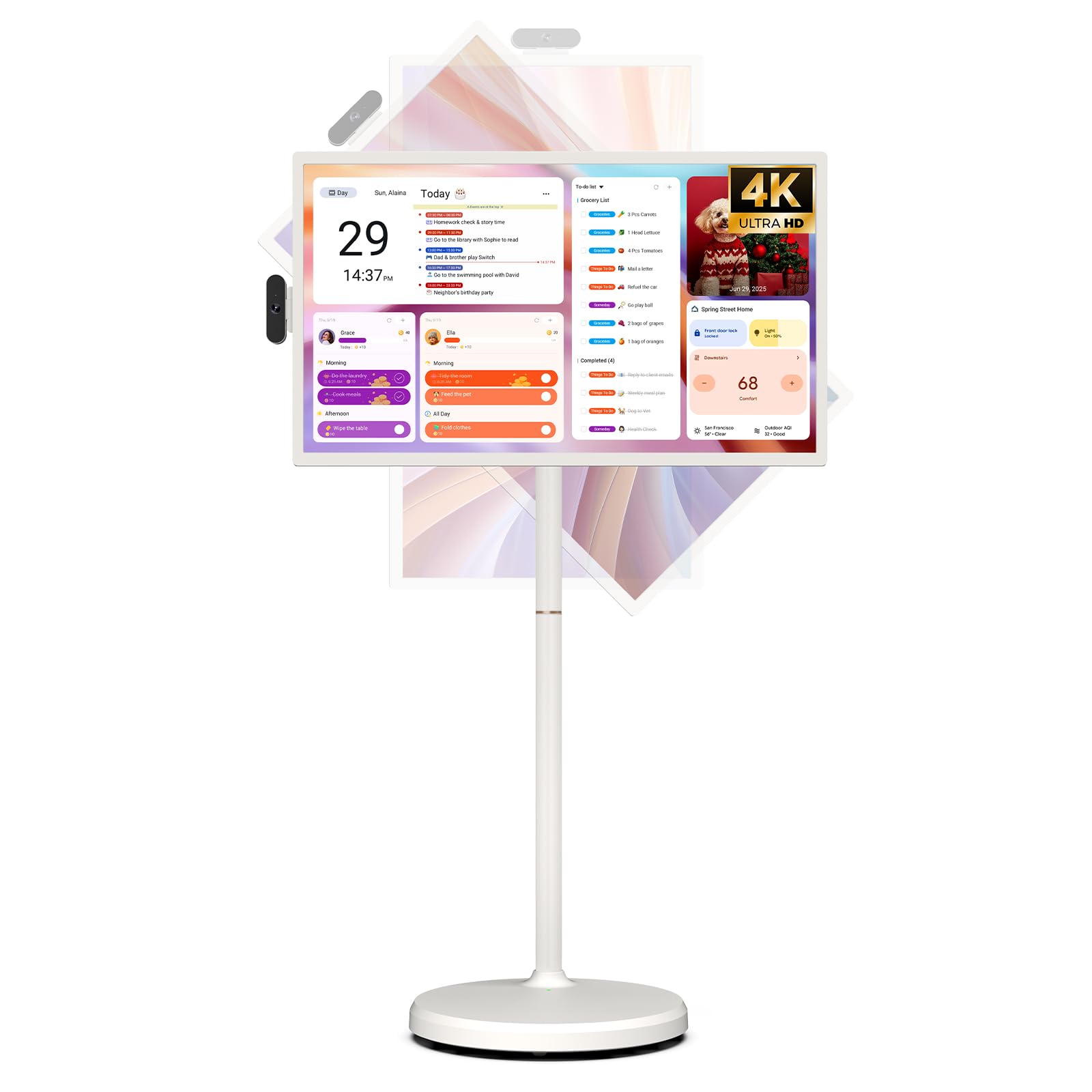
Image: The ApoloSign 32-inch UHD 4K Smart Portable TV Gen2, highlighting its large screen and mobile stand.
5. Thiết lập
Cuộc họp
- Giải nén tất cả các thành phần ra khỏi hộp.
- Attach the stand pole sections to the rolling base using the provided screws.
- Carefully mount the TV display onto the top of the assembled stand pole, ensuring it clicks securely into place.
- Connect the internal power cable from the stand to the display.
- Attach the 8MP camera module to the designated slot on top of the display.
Khởi động ban đầu và kết nối mạng
- Connect the power adapter to the TV and a power outlet. The device will begin charging.
- Press the power button located on the back of the display to turn on the TV.
- Làm theo lời nhắc trên màn hình để chọn ngôn ngữ và khu vực của bạn.
- Kết nối với mạng Wi-Fi bằng cách chọn mạng đó từ danh sách và nhập mật khẩu.
- Đăng nhập bằng tài khoản Google của bạn để truy cập Cửa hàng Google Play và các dịch vụ khác.
Ghép nối điều khiển từ xa
- Insert batteries into the voice remote control.
- On the TV screen, navigate to Settings > Remotes & Accessories > Add Accessory.
- Press and hold the specified pairing buttons on the remote (refer to remote's mini-guide) until the indicator light blinks.
- Select the remote control from the list on the TV screen to complete pairing.
6. Hướng dẫn vận hành
Điều hướng cơ bản
- Màn hình cảm ứng: Tap, swipe, and pinch to navigate menus, open apps, and interact with content.
- Điều khiển từ xa bằng giọng nói: Use the directional pad and selection buttons for menu navigation. Press the voice button to activate voice commands for searching or launching apps.
Screen Rotation and Adjustment
The screen can be rotated 90 degrees between landscape and portrait modes. It also allows for height adjustment, left/right swivel, and tilting to achieve the desired viewgóc ing.

Image: Illustrations demonstrating the various ways the ApoloSign TV screen can be adjusted: height, tilt, and rotation.
Apps and Google Play Store
Running on a customized Android 15 OS and Google certified, you can download and install any app available on the Google Play Store. Access streaming services, social media, productivity tools, and games.

Image: The ApoloSign TV screen showing the Android 15 interface with icons for popular apps like Netflix, YouTube, Spotify, and TikTok.
Wireless and Wired Casting
Share content from your mobile phone, tablet, or laptop to the TV screen.
- Truyền không dây: Use the built-in MixCast feature or other compatible casting protocols. Ensure your device and the TV are on the same Wi-Fi network.
- Wired Casting: Connect external devices like gaming consoles or laptops via the HDMI port. The TV supports 4K HDMI output.
Video: A demonstration of how to screen mirror a mobile phone, tablet, or laptop to the ApoloSign Smart Portable TV.
Calendar Widget and Screensavers
The interactive desktop calendar widget syncs with Google Calendar, Outlook, and Google Tasks to help manage your schedule. Utilize dynamic screensavers to transform the TV into a digital clock, photo frame, or market billboard.

Image: The ApoloSign TV screen showcasing its digital calendar feature, displaying daily schedules and events.

Image: The ApoloSign TV screen demonstrating different digital screensaver options, including a photo display and a music player interface.
Sử dụng máy ảnh
The integrated 8MP camera is ideal for video calls and conferences. Ensure the camera is correctly installed and facing the desired direction.
7. Bảo trì
Vệ sinh
- Luôn rút phích cắm của thiết bị trước khi vệ sinh.
- Sử dụng một miếng vải mềm, không xơ vải lau nhẹampDùng nước hoặc dung dịch vệ sinh màn hình để lau sạch màn hình. Tránh sử dụng hóa chất mạnh.
- Wipe the body of the TV and stand with a dry, soft cloth.
Chăm sóc pin
- Để tối ưu hóa tuổi thọ pin, hãy tránh xả hết pin thường xuyên.
- Bảo quản thiết bị ở nơi khô ráo, thoáng mát khi không sử dụng trong thời gian dài.
- Nếu để lâu không sử dụng, hãy sạc pin định kỳ để tránh tình trạng xả cạn.
Cập nhật phần mềm
Regularly check for and install software updates to ensure optimal performance and access to the latest features. Updates can usually be found in the device's settings menu.
KHAI THÁC. Xử lý sự cố
- Device not powering on or shutting off abruptly:
Ensure the power adapter is securely connected and the battery is charged. If the issue persists, perform a soft reset by holding the power button for 10-15 seconds. If problems continue, contact customer support. - Remote control not responding or selective functionality:
Check the remote's batteries and replace if necessary. Ensure the remote is paired correctly (refer to Section 5). If the remote is still unresponsive, try re-pairing it. - Sự cố kết nối Wi-Fi:
Verify that your Wi-Fi router is working correctly. Restart the TV and your router. Ensure the TV is within range of your Wi-Fi signal. - Screen mirroring not working:
Confirm that both the TV and the source device (phone, tablet, laptop) are connected to the same Wi-Fi network. Ensure the casting feature is activated on both devices. - Poor picture or sound quality:
For streaming content, check your internet connection speed. For wired connections (HDMI), ensure cables are securely connected and undamaged. Adjust display settings (resolution, brightness) as needed.
9. Thông số kỹ thuật
| Tính năng | Chi tiết |
|---|---|
| Tên mẫu | SW3299T-4K |
| Kích thước màn hình | 32 inch |
| Nghị quyết | 4K UHD 2160p (3840x2160 Pixels) |
| Công nghệ hiển thị | Màn hình tinh thể lỏng |
| Tốc độ làm mới | 60Hz |
| Hệ điều hành | Android 15 |
| ĐẬP | 16GB (8+8GB) |
| Bộ nhớ trong | 256GB |
| Dung lượng pin | 15000mAh (thời gian sử dụng lên đến 8 giờ) |
| Máy ảnh | 8MP |
| Kết nối | Bluetooth 5.3, Wi-Fi |
| Cổng | 1x HDMI, 1x USB 2.0, 1x USB 3.0 |
| Mô tả diễn giả | Loa 2.1 kênh |
| Phương pháp kiểm soát | Touch, Voice Remote |
| Kích thước sản phẩm | 16.14"D x 28.87"W x 60.26"H |
10. Bảo hành và Hỗ trợ
Bảo hành của nhà sản xuất
This ApoloSign product is covered by a Bảo hành của nhà sản xuất 1 năm kể từ ngày mua. Bảo hành này bao gồm các lỗi về vật liệu và tay nghề trong điều kiện sử dụng bình thường. Vui lòng giữ lại hóa đơn mua hàng để yêu cầu bảo hành.
Hỗ trợ khách hàng
For technical assistance, troubleshooting, or warranty inquiries, please contact ApoloSign Official customer support. They offer 24/7 fast support to address any issues you may encounter.
Để biết thêm thông tin, hãy truy cập ApoloSign Store on Amazon.