
Giới thiệu
Thank you for choosing the Billboard Soul Advance True Wireless Stereo (TWS) Earbuds. These earbuds are designed to provide a superior audio experience with Active Noise Cancellation (ANC), Environmental Noise Cancellation (ENC), and a comfortable, splash-resistant design. This manual will guide you through the setup, operation, and maintenance of your new earbuds.
Thông tin an toàn
- Không nên để tai nghe hoặc hộp sạc tiếp xúc với nhiệt độ quá cao hoặc ánh nắng trực tiếp trong thời gian dài.
- Tránh làm rơi hoặc tác dụng lực quá mạnh vào thiết bị.
- Keep the earbuds and charging case away from water and liquids, except for light splashes as per IPX4 rating. Do not submerge.
- Không được tháo rời hoặc sửa đổi sản phẩm. Việc này sẽ làm mất hiệu lực bảo hành.
- Chỉ sử dụng cáp sạc được cung cấp hoặc loại cáp tương đương đã được chứng nhận.
- Listening at high volumes for prolonged periods can cause hearing damage. Adjust volume to a safe level.
Nội dung gói
- Billboard Soul Advance TWS Earbuds (Left and Right)
- Vỏ sạc
- Cáp sạc USB
- Hướng dẫn sử dụng
Sản phẩm trênview
Familiarize yourself with the components of your Billboard Soul Advance TWS Earbuds and charging case.
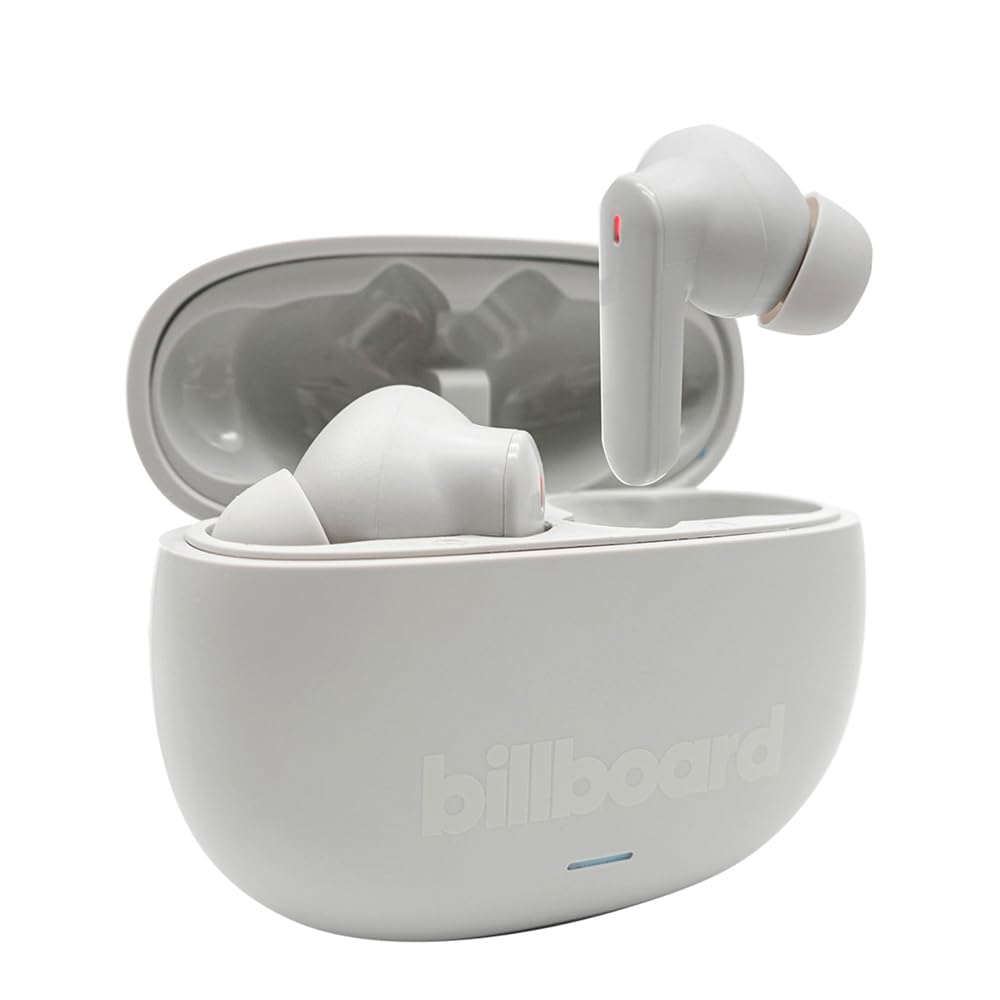
Image: The Billboard Soul Advance TWS Earbuds resting inside their open charging case. The earbuds are grey with red indicator lights visible, and the case is also grey with the 'billboard' logo embossed on the front.

Image: The Billboard Soul Advance TWS Earbuds charging case in a closed position. The case is grey with the 'billboard' logo embossed on the front and a small indicator light at the bottom.
Image: A person holding a single Billboard Soul Advance TWS earbud and the open charging case, demonstrating the compact size and design.
Cài đặt
1. Sạc tai nghe và hộp đựng
Trước khi sử dụng lần đầu, hãy sạc đầy tai nghe và hộp sạc.
- Đặt tai nghe vào hộp sạc. Đảm bảo chúng được đặt đúng vị trí trong các khe cắm tương ứng.
- Kết nối cáp sạc USB vào cổng sạc trên vỏ máy và vào nguồn điện USB (ví dụ: máy tính, bộ chuyển đổi nguồn).
- The indicator light on the case will show charging status. Once fully charged, the indicator will change or turn off. A full charge takes approximately 5 hours for the case and earbuds.
2. Ghép nối với thiết bị
Để kết nối tai nghe với điện thoại thông minh hoặc thiết bị hỗ trợ Bluetooth khác:
- Open the charging case. The earbuds will automatically enter pairing mode, indicated by flashing lights on the earbuds.
- Trên thiết bị của bạn, hãy vào cài đặt Bluetooth và đảm bảo Bluetooth đã được bật.
- Tìm kiếm available devices and select "Billboard Soul Advance" from the list.
- Sau khi kết nối, đèn báo trên tai nghe sẽ ngừng nhấp nháy.
- Tai nghe sẽ tự động kết nối lại với thiết bị được ghép nối gần nhất khi được lấy ra khỏi hộp, nếu Bluetooth được bật trên thiết bị.
Hoạt động
Điều khiển cảm ứng
The earbuds feature touch-sensitive controls on their outer surface. Specific functions may vary slightly by device or app.
| Hoạt động | Chức năng |
|---|---|
| Chạm một lần (Trái/Phải) | Phát / Tạm dừng nhạc, Trả lời / Kết thúc cuộc gọi |
| Nhấn đúp (Phải) | Bài hát tiếp theo |
| Nhấn đúp (Trái) | Bài hát trước |
| Nhấn ba lần (Trái/Phải) | Kích hoạt Trợ lý giọng nói |
| Nhấn giữ lâu (Trái/Phải) | Bật/tắt Chế độ chống ồn chủ động/Chế độ trong suốt |
| Nhấn giữ lâu để có cuộc gọi đến | Từ chối cuộc gọi |
Khử tiếng ồn chủ động (ANC) & Khử tiếng ồn môi trường (ENC)
The Soul Advance earbuds feature both ANC and ENC for an optimized listening and calling experience.
- Khử tiếng ồn chủ động (ANC): Reduces external ambient noise, allowing for a more immersive audio experience. Activate/deactivate by long-pressing an earbud.
- Khử tiếng ồn môi trường (ENC): Utilizes 4 built-in microphones to filter out background noise during calls, ensuring clearer conversations for both you and the listener. This feature is active automatically during calls.

Image: A graphic illustrating the concept of Ultra ANC (Active Noise Cancellation), showing sound waves being blocked by headphones, emphasizing a quiet listening experience.
BẢO TRÌ
Vệ sinh
- Nhẹ nhàng lau sạch tai nghe và hộp sạc bằng vải mềm, khô và không xơ.
- Không sử dụng chất tẩy rửa có tính mài mòn, cồn hoặc dung môi hóa học.
- Đảm bảo các điểm tiếp xúc sạc trên cả tai nghe và hộp sạc đều sạch và khô để sạc tối ưu.
Kho
Khi không sử dụng, hãy cất tai nghe vào hộp sạc để bảo vệ và duy trì trạng thái sạc.
Xử lý sự cố
| Vấn đề | Giải pháp |
|---|---|
| Tai nghe không ghép nối | Hãy đảm bảo tai nghe đã được sạc đầy. Tắt và bật lại Bluetooth trên thiết bị của bạn. Xóa thiết bị khỏi cài đặt Bluetooth và ghép nối lại. |
| Chỉ có một tai nghe hoạt động | Place both earbuds back in the case, close it, then open again. Ensure both are charged. |
| Không có âm thanh | Kiểm tra âm lượng thiết bị. Đảm bảo tai nghe đã được kết nối. Thử phát các bản nhạc khác nhau. |
| Các vấn đề về sạc | Ensure charging cable is securely connected. Clean charging contacts. Try a different USB port or cable. |
Thông số kỹ thuật
- Tên mẫu: Soul Advance
- Công nghệ kết nối: Không dây
- Các thành phần bao gồm: Trạm sạc
- Công dụng cụ thể: Outdoor activities, Sports
- Thời gian sạc: Khoảng 5 giờ
- Thiết bị tương thích: Điện thoại, máy tính bảng
- Mức độ chống nước: IPX4 (Chống nước bắn)
- Tuổi thọ pin trung bình: 27 giờ (có hộp sạc)
- Vị trí Tai: Trong tai
- Yếu tố hình thức: Trong tai
- Kiểm soát tiếng ồn: Chống ồn chủ động

Image: A graphic highlighting long battery life, showing headphones with '40H' and earbuds with '42H*' (battery + case), indicating extended usage times.
Video sản phẩm chính thức
Video: Product demonstration video (0:49 duration).
Video: Product feature overview (0:44 duration).
Video: Additional product details (0:44 duration).
Video: Short product highlight (0:24 duration).
Video: Product feature showcase (0:24 duration).
Video: Detailed product review/demonstration (1:57 duration).
Video: Quick product overview (0:34 duration).
Video: Comprehensive product guide (2:00 duration).
Bảo hành và Hỗ trợ
Your Billboard Soul Advance TWS Earbuds come with a standard manufacturer's warranty. For detailed warranty information, please refer to the warranty card included in your package or visit the official Billboard website. For technical support or customer service, please contact the retailer or manufacturer directly.
For returns, a 30-day free return policy is available from the purchase date.

