1. Giới thiệu
This manual provides detailed instructions for the setup, operation, and maintenance of your Generic HY-500B 5MP USB Microscope Camera. Please read this manual thoroughly before using the device to ensure proper function and longevity.
Nội dung gói
- 1 x 5.0MP Microscope Camera
- 1 x Dây cáp USB
- 1 x Software DISC
- 1 x 150X C-mount Lens
- 1 x Stand with LED Light
- 1 x Bộ đổi nguồn
2. Thông tin an toàn
Hãy tuân thủ các biện pháp phòng ngừa an toàn sau đây để tránh làm hỏng thiết bị hoặc gây thương tích cho bản thân:
- Do not expose the camera or lens to direct sunlight or high temperatures.
- Tránh làm rơi hoặc để thiết bị chịu tác động mạnh.
- Để thiết bị tránh xa nước và các chất lỏng khác.
- Use only the provided power adapter and USB cable.
- Do not attempt to disassemble or modify the device. Refer servicing to qualified personnel.
3. Thiết lập
Follow these steps to set up your microscope camera system:
3.1 Assemble the Stand and Camera
- Giải nén tất cả các thành phần ra khỏi hộp.
- Attach the microscope camera unit to the stand's mounting arm. Ensure it is securely fastened.
- Screw the 150X C-mount lens onto the camera unit.
- Position the LED lights on the stand to illuminate your observation area.

Figure 1: Fully assembled HY-500B microscope camera system.
3.2 Connect to Power and Computer
- Connect the power adapter to the stand's LED lights and plug it into a power outlet.
- Connect the USB line from the microscope camera to an available USB 2.0 port on your computer.

Figure 2: Microscope camera unit connected via USB cable.
3.3 Cài đặt phần mềm
- Insert the provided Software DISC into your computer's optical drive.
- Follow the on-screen instructions to install the microscope camera software. If your computer does not have an optical drive, please contact customer support for alternative software download options.
- Once installed, launch the software. The camera should be automatically detected.
4. Hướng dẫn vận hành
This section details how to operate your HY-500B microscope camera for observation and image capture.
4.1 Đặt mẫu vật
Place the object you wish to observe directly under the microscope lens on the stand's base. Ensure it is stable and well-lit by the LED lights.
4.2 Adjusting Focus and Magnification
- In the software interface, you should see a live feed from the camera.
- Use the focus knob on the stand to adjust the distance between the lens and the specimen until the image appears clear and sharp on your computer screen.
- The 150X C-mount lens provides a fixed magnification. Further digital magnification may be available through the software.
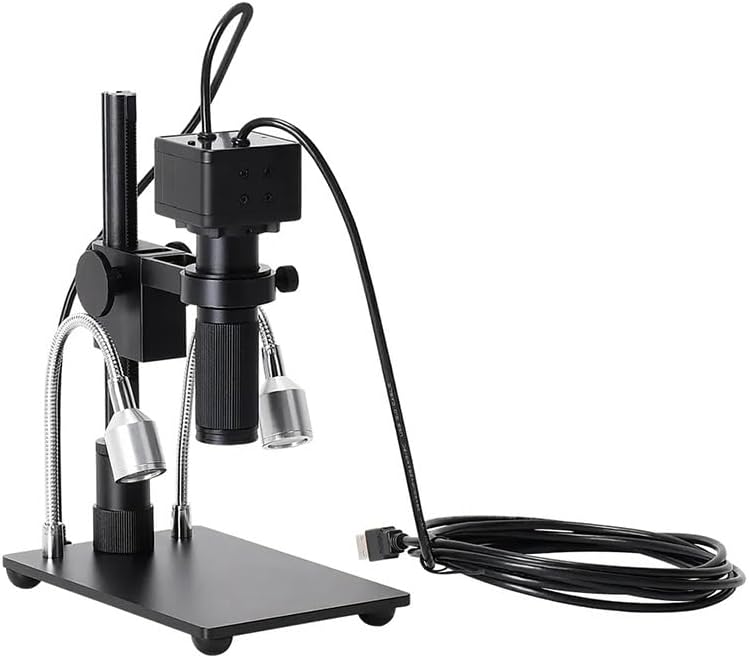
Hình 3: Mặt trước view of the camera with C-mount lens attached.
4.3 Chụp ảnh và quay video
Refer to the specific instructions within the installed software for capturing still images and recording video footage. Typically, there are dedicated buttons or menu options for these functions.

Hình 4: Nội bộ view of the 5MP camera sensor.
5. Bảo trì
Proper maintenance ensures the longevity and performance of your microscope camera.
5.1 Cleaning the Lens and Camera
- Use a soft, lint-free cloth to gently wipe the exterior of the camera and stand.
- For the lens, use a specialized lens cleaning solution and a microfiber lens cloth. Avoid touching the lens surface with your fingers.
- Không bao giờ sử dụng chất tẩy rửa hoặc dung môi có tính ăn mòn.
5.2 Lưu trữ
When not in use, store the microscope camera system in a clean, dry, and dust-free environment. It is recommended to cover the lens to prevent dust accumulation.
KHAI THÁC. Xử lý sự cố
If you encounter issues with your HY-500B microscope camera, refer to the following common problems and solutions:
| Vấn đề | Nguyên nhân có thể | Giải pháp |
|---|---|---|
| Không có hình ảnh trên màn hình | USB cable not connected; Software not launched; Camera not selected in software. | Ensure USB cable is securely connected. Launch software. Select the HY-500B camera in the software settings. |
| Hình ảnh bị mờ | Incorrect focus; Dirty lens. | Adjust the focus knob on the stand. Clean the lens as described in Section 5.1. |
| Đèn LED không hoạt động | Power adapter not connected; Faulty adapter. | Ensure the power adapter is securely connected and plugged into a working outlet. Test with another outlet if possible. |
| Software not detecting camera | Driver issue; USB port issue. | Reinstall the software and drivers from the DISC. Try a different USB port on your computer. Restart your computer. |
7. Thông số kỹ thuật
- Người mẫu: HY-500B
- Độ phân giải camera: 5.0 Megapixel
- Ống kính: 150X C-mount Lens
- Giao diện đầu ra: USB 2.0 (480Mb/s)
- Chiều dài dây: 1.5 mét
- Phản ứng quang phổ: 400nm ~ 1000nm
- Dải động: 74 dB (Linear), 85 dB (HDR)
- Kích thước điểm ảnh: 2.2µm x 2.2µm
- Trọng lượng sản phẩm: Approximately 1.76 pounds (800 Grams)
- Kích thước gói hàng: 1.18 x 0.79 x 0.39 inches (Camera unit only)
- Nhà sản xuất: Chung chung
8. Bảo hành và Hỗ trợ
We are committed to providing high-quality after-sales service. If you have any questions, require assistance, or encounter any issues not covered in this manual, please do not hesitate to contact our customer support. We are available to serve you wholeheartedly.
For support, please refer to the contact information provided with your purchase or visit the manufacturer's official webđịa điểm.


