
1. Giới thiệu
Thank you for choosing the VIGORWORK 1 Din 12V Car Radio. This versatile audio system is designed to enhance your in-car entertainment experience, offering a wide range of features including DVD/VCD/CD/MP3 playback, Bluetooth connectivity for hands-free calls and audio streaming, FM radio, and support for USB, SD card, and AUX input. This manual provides detailed instructions to help you install, operate, and maintain your new car radio.
2. Nội dung gói hàng
Please check the package contents carefully upon unpacking. If any items are missing or damaged, contact your retailer.
- VIGORWORK 1 Din Car Radio Unit
- Khai thác dây điện và loa
- Điều khiển từ xa
- Installation Removal Keys (2 pieces)
- Hướng dẫn sử dụng

Image: Contents of the VIGORWORK car radio package, including the main unit, wiring, remote, removal keys, and manual.
3. Sản phẩm hếtview
Hãy làm quen với các bộ phận và nút điều khiển chính của đài phát thanh trên xe hơi của bạn.
Bố cục bảng điều khiển phía trước

Hình ảnh: Mặt trước view of the VIGORWORK car radio, highlighting the display, control knob, buttons (PWR, MUTE, BND, MOD, CLK), USB port, SD card slot, and AUX input.
- Power (PWR) / Mute: Bật/tắt thiết bị hoặc tắt/bật âm thanh.
- Núm âm lượng: Điều chỉnh âm lượng. Nhấn để chọn các tùy chọn menu.
- Band (BND): Switches between FM radio bands (FM1, FM2, FM3).
- Mode (MOD): Cycles through input sources (Radio, DVD/CD, USB, SD, AUX, Bluetooth).
- Đồng hồ (CLK): Displays or sets the time.
- Cổng USB: Connect USB flash drives for media playback or charging.
- Khe cắm thẻ SD: Lắp thẻ SD để phát lại phương tiện.
- Đầu vào AUX: Kết nối các thiết bị âm thanh ngoài thông qua giắc cắm 3.5 mm.
- Khe đĩa: Insert DVDs or CDs for playback.

Image: A smartphone screen displaying an incoming call next to the car radio, illustrating the intelligent Bluetooth call feature for convenient call management.

Image: A collage showing various car entertainment scenarios, including video playback, Bluetooth hands-free calling, listening to radio, and cell phone charging, demonstrating the unit's versatility.

Image: An infographic highlighting eight key advantages of the car radio, such as professional hardware, Bluetooth, DVD player, radio reception, U disk/SD card play, 52W*4 power output, USB car charger, and sound quality enhancement.
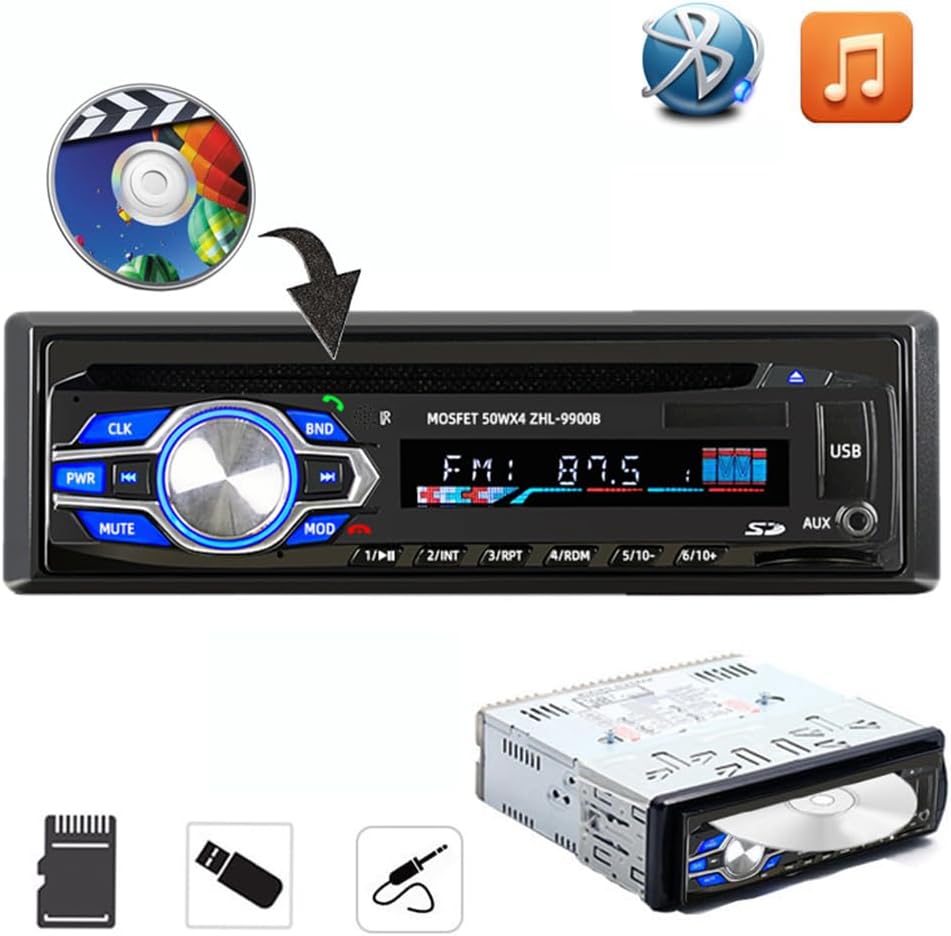
Image: The car radio unit with icons representing various media playback options, including CD/DVD, Bluetooth, and music notes, indicating its compatibility with different audio sources.

Image: The car radio unit with arrows pointing to the USB port and SD card slot, emphasizing its support for vast USB/SD storage equipment for convenient music playback.

Image: A hand holding a smartphone connected to the car radio via USB, illustrating the unit's ability to provide 5V USB charging for mobile devices.
Kích thước

Image: The car radio unit with dimensions labeled: 18.8cm (7.4 inches) width and 5.8cm (2.3 inches) height, indicating its standard 1 Din size.
4. Thiết lập và Cài đặt
This car radio is designed for easy installation in most vehicles. It is recommended to have the installation performed by a qualified professional if you are unsure about the wiring or mounting process.
Các bước cài đặt:
- Ngắt kết nối pin: Trước khi bắt đầu, hãy ngắt cực âm của ắc quy xe để tránh hiện tượng đoản mạch.
- Xóa đơn vị cũ: Carefully remove your existing car radio from the dashboard.
- Kết nối dây: Connect the provided wiring harness to your vehicle's wiring. Ensure correct connections for power (constant 12V, accessory 12V, ground), speaker outputs, and antenna. Refer to your vehicle's wiring diagram if necessary.
- Bộ phận lắp đặt: Slide the new VIGORWORK car radio into the dashboard opening until it clicks into place. Use the provided removal keys to secure or remove the unit.
- Kết nối lại pin: Kết nối lại cực âm của ắc quy xe.
- Chức năng kiểm tra: Turn on the unit and test all functions (radio, CD/DVD, USB, Bluetooth, AUX) to ensure proper operation.
5. Hướng dẫn vận hành
5.1 Bật/Tắt nguồn và Chọn chế độ
- Nhấn nút PWR để bật thiết bị. Nhấn và giữ để tắt.
- Nhấn nút CHẾ ĐỘ button repeatedly to cycle through available input sources: FM Radio, DVD/CD, USB, SD, AUX, Bluetooth.
5.2 Kết nối Bluetooth
The unit features built-in Bluetooth for hands-free calling and audio streaming.
- Ensure the car radio is powered on and in Bluetooth mode (select using CHẾ ĐỘ cái nút).
- Trên thiết bị di động của bạn, bật Bluetooth và tìm kiếm các thiết bị có sẵn.
- Select "VIGORWORK" or a similar name from the list.
- Once paired, the unit will confirm the connection. You can now make/receive calls and stream audio.
- Use the car radio's controls or remote to answer/end calls, adjust volume, and control music playback.
Hoạt động của đài phát thanh FM 5.3
- Nhấn CHẾ ĐỘ to select FM radio mode.
- Nhấn BND to switch between FM1, FM2, and FM3 bands. Each band can store 6 stations, totaling 18 presets.
- Sử dụng << Và >> các nút để dò đài hoặc tìm kiếm đài theo cách thủ công.
- Để tự động quét và lưu các trạm, hãy nhấn và giữ nút. BND cái nút.
- To recall a preset station, press the corresponding number button (1-6).
5.4 Phát lại qua USB/thẻ SD
- Cắm ổ USB vào cổng USB hoặc thẻ nhớ SD vào khe cắm thẻ nhớ SD.
- The unit will automatically switch to USB/SD mode and begin playing compatible audio/video files.
- Sử dụng << Và >> các nút để điều hướng bài hát.
- The unit supports MP3, WMA, and other common audio formats, as well as DIVX and MPEG4 video formats.
5.5 Phát lại DVD/CD
- Gently insert a DVD or CD into the disc slot with the label side facing up.
- The unit will automatically load the disc and begin playback.
- Use the control buttons or remote for playback control (play, pause, skip, fast forward/rewind).
5.6 đầu vào AUX
- Connect an external audio device (e.g., smartphone, MP3 player) to the AUX input jack using a 3.5mm audio cable.
- Nhấn CHẾ ĐỘ để chọn chế độ Aux.
- Audio from the connected device will now play through the car radio's speakers. Control playback from the external device.
6. Bảo trì
Bảo trì đúng cách đảm bảo tuổi thọ và hiệu suất tối ưu của đài phát thanh ô tô của bạn.
- Vệ sinh: Dùng khăn mềm, khô để lau mặt trước. Đối với vết bẩn cứng đầu, hãyampThấm nhẹ khăn bằng nước. Không sử dụng chất tẩy rửa có tính ăn mòn hoặc dung môi.
- Chăm sóc đĩa đệm: Cầm đĩa bằng mép đĩa. Giữ đĩa sạch sẽ và không bị trầy xước. Cất đĩa trong hộp khi không sử dụng.
- Nhiệt độ: Tránh để thiết bị ở nơi có nhiệt độ quá cao, ánh nắng trực tiếp trong thời gian dài hoặc độ ẩm cao.
- Thông gió: Ensure the unit has adequate ventilation to prevent overheating. Do not block ventilation openings.
KHAI THÁC. Xử lý sự cố
Nếu bạn gặp sự cố với đài phát thanh trên xe hơi, hãy tham khảo các vấn đề và giải pháp thường gặp sau đây:
| Vấn đề | Nguyên nhân có thể | Giải pháp |
|---|---|---|
| Không có điện | Cầu chì bị đứt; Dây điện không đúng; Kết nối lỏng lẻo. | Check vehicle's fuse box and unit's fuse; Verify wiring connections (constant 12V, accessory 12V, ground); Ensure all connectors are secure. |
| Không có âm thanh | Âm lượng quá nhỏ; Chức năng tắt tiếng đang hoạt động; Kết nối dây loa không đúng cách; Loa bị hỏng. | Increase volume; Press MUTE button; Check speaker wire connections; Test with known good speakers. |
| Bluetooth không kết nối | Thiết bị không bật Bluetooth; Thiết bị không ở chế độ ghép nối; Có nhiễu. | Ensure Bluetooth is on and discoverable on your phone; Select Bluetooth mode on the unit; Move closer to the unit; Try unpairing and re-pairing. |
| Disc Error / Disc Not Playing | Dirty or scratched disc; Incorrect disc format; Disc inserted incorrectly. | Clean the disc; Ensure disc format is compatible (DVD, VCD, CD, MP3); Re-insert disc correctly. |
| USB/SD không đọc được | Không tương thích file định dạng; Bị hỏng files; USB/SD card not formatted correctly; Card/drive capacity too large. | Đảm bảo files are MP3/WMA/DIVX/MPEG4; Reformat USB/SD card to FAT32; Try a different USB/SD card. |
8. Thông số kỹ thuật
Key technical specifications for the VIGORWORK 1 Din Car Radio.
- Số hiệu mẫu: 5014BT
- Nguồn điện: 12V DC (Âm đất)
- Công suất đầu ra: 52W x 4 (Tối đa)
- Định dạng đĩa được hỗ trợ: DVD, VCD, CD, MP3
- Supported Video Encoding: MPEG-4, DIVX
- Dải tần số FM: 87.5 - 107.90 MHz
- Bluetooth: Built-in Bluetooth for hands-free calls and audio streaming
- Kết nối: USB, SD Card, AUX (3.5mm Jack)
- Thiết bị tương thích: Smartphone, Tablet, Laptop (via AUX/Bluetooth)
- Chế độ đầu ra âm thanh: Âm thanh nổi
- Cấu hình kênh âm thanh vòm: 5.1 (for compatible media)
- Kích thước sản phẩm (L x W x H): Khoảng 7.4 x 2.3 x 6.5 inch (18.8 x 5.8 x 16.5 cm)
- Trọng lượng sản phẩm: Khoảng 3.03 pound (1.38 kg)
9. Bảo hành và Hỗ trợ
For warranty information, technical support, or service inquiries, please contact the manufacturer, VIGORWORK, or your authorized retailer. Keep your purchase receipt as proof of purchase.