
1. Giới thiệu
Thank you for choosing the MageGee MK-Box 60% Mechanical Gaming Keyboard. This compact 68-key keyboard is designed for both gaming and office use, offering a space-saving layout without compromising essential functionality. Featuring responsive red mechanical switches and customizable LED backlighting, the MK-Box provides a comfortable and efficient typing experience. This manual will guide you through the setup, operation, and maintenance of your new keyboard.
2. Sản phẩm hếtview
Các tính năng chính:
- Thiết kế nhỏ gọn, di động, kích thước chỉ 60%: The MK-Box features 68 keys, including separate arrow keys and Fn function keys, optimizing desk space while retaining necessary functions.
- Công tắc cơ học màu đỏ: Characterized by a linear and smoother feel with minimal resistance, these switches offer fast action without a tactile bump, making typing and gaming effortless.
- Classic Charming Blue LED Backlit: Customize your experience with approximately 16 illuminated LED light effects. Adjust backlight modes, speed, and brightness using simple key combinations.
- Khử bóng mờ hoàn toàn: Tất cả 68 phím đều không xung đột, đảm bảo mọi lần nhấn phím đều được ghi nhận chính xác trong những phiên chơi game căng thẳng.
- Thiết kế công thái học: Features ergonomic suspension double-color injection keycaps, double kickstand feet for adjustable typing angles, and a detachable USB cable for convenience and durability.
- Khả năng tương thích rộng rãi: Compatible with Windows (2000, XP, ME, Vista, 7, 8), Linux, and Mac operating systems. Plug and play, no drivers or software required.
Có gì trong hộp:
- MageGee MK-Box Mechanical Keyboard x 1
- Detachable USB-C to USB-A Cable x 1
- Extra Keycaps (e.g., 16 purple keycaps, red WASD keys) x 1 set
- Keycap Kéo x 1
- Hướng dẫn sử dụng x 1
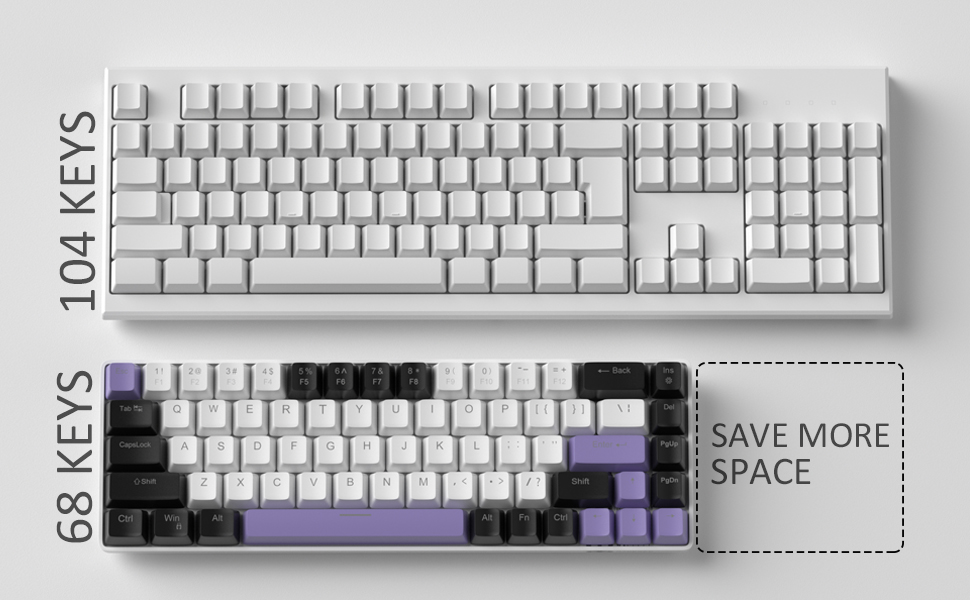
Image: Contents of the MageGee MK-Box packaging, including the keyboard, detachable USB-C cable, extra keycaps, keycap puller, and user manual.
3. Thiết lập
- Kết nối bàn phím: Locate the detachable USB-C cable. Plug the USB-C end into the port on the left side of the keyboard and the USB-A end into an available USB port on your computer (Laptop, PC, Mac).
Image: Close-up of the detachable USB-C port on the side of the MageGee MK-Box keyboard, with the cable being inserted.
- Điều chỉnh góc gõ: Flip the keyboard over to reveal the double kickstand feet. Gently pull out the feet to adjust the keyboard to your preferred typing angle for ergonomic comfort. There are two levels of adjustment.
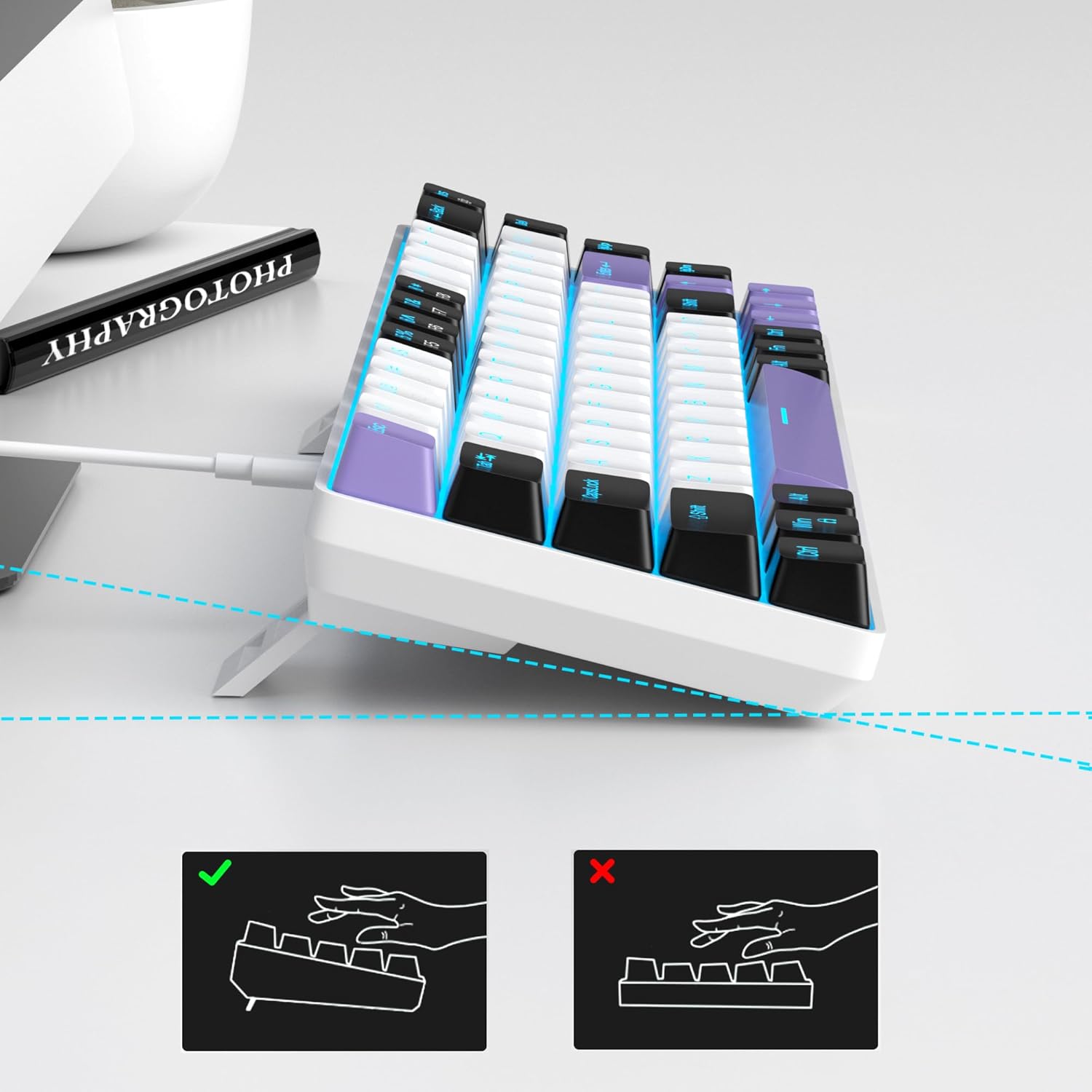
Image: The MageGee MK-Box keyboard shown from a side angle with its adjustable feet extended, illustrating the ergonomic tilt for comfortable typing.
- Nhận dạng hệ thống: Your computer should automatically recognize the keyboard. No additional drivers or software installation is required.
4. Hướng dẫn vận hành
Chức năng chính cơ bản:
- The keyboard features a standard QWERTY layout with 68 keys.
- Dedicated arrow keys are located on the bottom right.
- Function keys (F1-F12) are accessed via the Fn key in combination with the number row keys.
Điều khiển đèn nền:
The MageGee MK-Box features a classic blue LED backlight with multiple modes and adjustable settings.
- Thay đổi chế độ đèn nền: Nhấn Fn + Vào to cycle through approximately 16 different backlight effects.
- Điều chỉnh tốc độ đèn nền: Nhấn Fn + ← (Mũi tên trái) to decrease speed or Fn + → (Mũi tên phải) để tăng tốc độ.
- Điều chỉnh độ sáng đèn nền: Nhấn Fn + ↓ (Mũi tên xuống) to decrease brightness or Fn + ↑ (Mũi tên lên) để tăng độ sáng.

Image: A diagram illustrating the key combinations for controlling the backlight effects, speed, and brightness on the MageGee MK-Box keyboard.
5. Bảo trì
- Vệ sinh: Use a soft, dry cloth to wipe down the keyboard surface. For deeper cleaning, you can use a can of compressed air to remove dust and debris from between the keycaps.
- Tháo nắp phím: To clean under the keycaps or replace them with the provided extra keycaps, use the included keycap puller. Gently attach the puller to a keycap and pull straight up. When reattaching, align the keycap with the switch stem and press down firmly until it clicks into place.
- Chăm sóc cáp: The detachable USB-C cable should be handled with care. Avoid sharp bends or excessive pulling to prevent damage.

Image: A close-up of the keycap puller tool, used for safely removing and replacing keycaps on the mechanical keyboard.
KHAI THÁC. Xử lý sự cố
- Bàn phím không phản hồi:
- Đảm bảo cáp USB được kết nối chắc chắn với cả bàn phím và máy tính.
- Hãy thử cắm bàn phím vào một cổng USB khác trên máy tính của bạn.
- Kiểm tra bàn phím trên một máy tính khác để loại trừ sự cố liên quan đến máy tính.
- Đèn nền không hoạt động/Hiển thị không chính xác:
- Hãy đảm bảo bàn phím được kết nối đúng cách và nhận được nguồn điện.
- Nhấn Fn + Vào to cycle through backlight modes, as it might be set to an 'off' mode.
- Điều chỉnh độ sáng bằng cách sử dụng Fn + ↑/↓.
- Phím không đăng ký (Ghosting):
- The MK-Box features full anti-ghosting. If you experience issues, ensure no debris is lodged under the keycaps.
- Try reconnecting the keyboard or restarting your computer.
7. Thông số kỹ thuật
| Tính năng | Chi tiết |
|---|---|
| Thương hiệu | MageGee |
| Tên mẫu | MK-Box |
| Mô tả bàn phím | Cơ khí |
| Số lượng chìa khóa | 68 |
| Loại công tắc | Linear (Red Switch) |
| Công nghệ kết nối | USB (Có dây) |
| Thiết bị tương thích | máy tính xách tay, máy tính |
| Họ hệ điều hành tương thích | Windows, Linux, Mac |
| Tính năng đặc biệt | 60% Mechanical Design, LED Backlit, Anti-Ghosting |
| Bố trí bàn phím | BÀN PHÍM QWERTY |
| Vật liệu | Nhựa |
| Mức độ chống nước | Không chống nước |
8. Bảo hành và Hỗ trợ
MageGee products are designed for durability and performance. For any product-related inquiries, technical support, or warranty claims, please refer to the contact information provided on the product packaging or visit the official MageGee webVui lòng giữ lại hóa đơn mua hàng để được bảo hành.