
Phanteks M25-140 Gen2
Phanteks M25-140 Gen2 Triple Pack 140mm ARGB High Performance Cooling Fans
Hướng dẫn sử dụng
1. Giới thiệu
This manual provides comprehensive instructions for the installation, operation, and maintenance of your Phanteks M25-140 Gen2 Triple Pack ARGB High Performance Cooling Fans. Please read this manual thoroughly before installation to ensure proper setup and optimal performance. These fans are designed for efficient thermal management in computer systems, featuring daisy-chain connectivity, integrated D-RGB lighting, and a single cable solution for simplified management.
2. Nội dung gói hàng
- 3x Phanteks M25-140 Gen2 Fans
- Vít quạt
- Hướng dẫn cài đặt (tài liệu này)
3. Các tính năng chính
- Daisy-Chain Unified Fan Design: Connect multiple fans easily for a streamlined setup and reduced cable clutter.
- Single Cable Solution (Linq6): Consolidates both fan power (PWM) and lighting controls (D-RGB) into one cable for a cleaner build.
- Hệ thống chiếu sáng D-RGB tích hợp: Features smooth lighting on fan blades and an infinity mirror effect in the hub for aesthetic customization.
- Tính thẩm mỹ bóng bẩy: Includes screw covers to provide a polished, professional appearance.
- Versatile Airflow Options: Available in regular and reverse airflow models to optimize system configuration.
- High Cooling Performance: Engineered for effective cooling on radiators and heat sinks.
4. Thông tin an toàn
- Hãy đảm bảo hệ thống máy tính của bạn đã được tắt nguồn và rút phích cắm khỏi ổ điện trước khi cài đặt.
- Xử lý các bộ phận một cách cẩn thận để tránh hư hỏng.
- Refer to your motherboard manual for specific fan header locations and D-RGB connection instructions.
- Do not force connectors; ensure proper alignment before plugging in.
- Để xa tầm tay trẻ em những bộ phận nhỏ.
5. Thiết lập và Cài đặt
5.1. Chuẩn bị hệ thống của bạn
Before beginning installation, ensure your computer is completely powered down and disconnected from the power supply. Open your PC case to access the fan mounting locations.
5.2. Daisy-Chain Connection
The M25-140 Gen2 fans feature a unified frame design allowing them to be daisy-chained together. Align the connectors on the side of each fan and gently push them together until they click into place. This creates a single block of fans, simplifying installation and cable management.
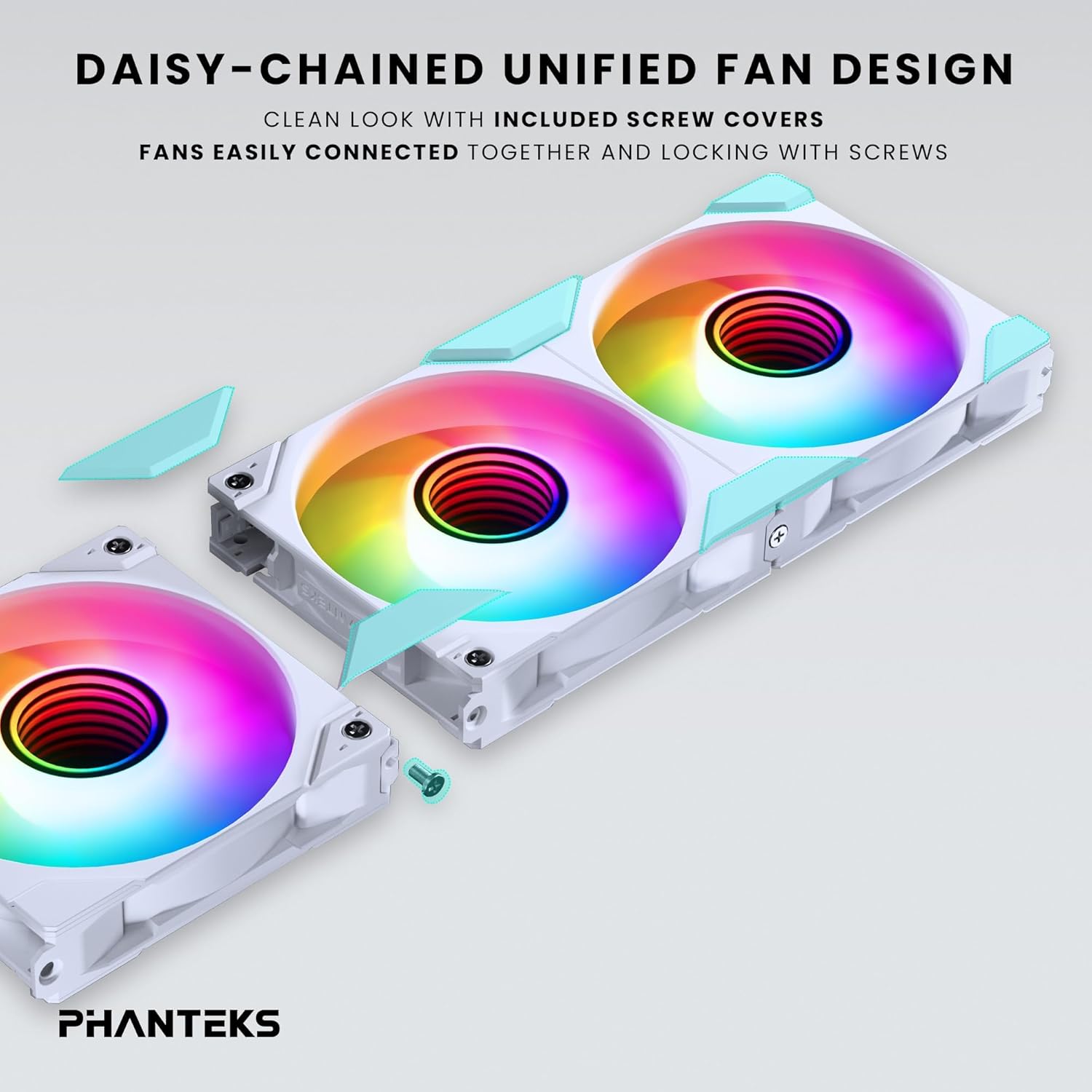
Image: Daisy-chaining Phanteks M25-140 Gen2 fans and applying screw covers.
5.3. Secure Fans
Mount the daisy-chained fan unit to your desired location (e.g., case front, top, or radiator) using the provided fan screws. Ensure the fans are securely fastened to prevent vibration. Once secured, attach the included screw covers for a clean, finished look.
5.4. Cable Connection (Linq6)
Connect the single Linq6 cable from the daisy-chained fan unit to a compatible fan/ARGB controller or motherboard header. This single cable manages both PWM fan speed control and D-RGB lighting. Refer to your motherboard or controller manual for specific connection points.

Image: Detail of the Linq6 single cable solution for fan and D-RGB control.
5.5. Airflow Configuration
The M25-140 Gen2 fans are available in regular and reversed airflow models. Ensure you install the correct fan type for your desired airflow direction. Regular fans pull air from the front to the rear, while reversed fans push air from the rear to the front.

Image: Diagram showing regular and reversed airflow directions for M25-140 Gen2 fans.
6. Hoạt động
6.1. Điều khiển ánh sáng ARGB
Once connected, the D-RGB lighting can be controlled via your motherboard's RGB software (e.g., ASUS Aura Sync, MSI Mystic Light Sync, Gigabyte RGB Fusion 2.0, ASRock Polychrome Sync) or a compatible Phanteks D-RGB controller (e.g., NEXLINQ). Customize colors, effects, and brightness to match your system's aesthetic.

Image: Close-up of the integrated D-RGB lighting with infinity mirror effect in the fan hub.
6.2. Kiểm soát tốc độ quạt
The fan speed (PWM) is controlled through the same Linq6 cable. You can adjust fan curves and speeds via your motherboard's BIOS/UEFI settings or dedicated fan control software provided by your motherboard manufacturer. This allows for optimization between cooling performance and noise levels.
7. Bảo trì
Regular maintenance ensures optimal performance and longevity of your fans.
- Vệ sinh: Periodically clean the fan blades and frame to remove dust buildup. Use compressed air or a soft, dry cloth. Ensure the system is powered off before cleaning.
- Điều tra: Kiểm tra cáp xem có dấu hiệu hao mòn hoặc hư hỏng không. Đảm bảo tất cả các kết nối vẫn chắc chắn.
- Do not use liquid cleaners directly on the fans or electrical components.
KHAI THÁC. Xử lý sự cố
| Vấn đề | Nguyên nhân có thể | Giải pháp |
|---|---|---|
| Quạt không quay | Loose power connection, incorrect header, insufficient power. | Check Linq6 cable connection to motherboard/controller. Ensure power supply is adequate. Verify BIOS settings for fan headers. |
| Đèn ARGB không hoạt động | Loose D-RGB connection, incompatible header, software issue. | Ensure Linq6 cable is properly connected to a 3-pin 5V D-RGB header (not 4-pin 12V RGB). Check motherboard RGB software settings. |
| Fans making unusual noise | Obstruction, loose mounting, faulty fan. | Inspect for cables or debris obstructing fan blades. Tighten mounting screws. If noise persists, contact support. |
| Quạt không được phần mềm nhận diện. | Incorrect connection, outdated software/drivers. | Verify Linq6 connection. Update motherboard BIOS and chipset drivers. Ensure RGB software is the latest version. |
9. Thông số kỹ thuật
| Tính năng | Chi tiết |
|---|---|
| Người mẫu | M25-140 Gen2 (PH-F140M25_G2_DWT01_3P) |
| Kích thước quạt | 140mm x 140mm x 25mm |
| Tốc độ quay | Lên đến 1800 vòng/phút |
| Công suất dòng khí | 101.78 feet khối mỗi phút (CFM) |
| Mức độ tiếng ồn | 36.4 dB |
| Loại đầu nối nguồn | 6-Pin (Linq6) |
| Tậptage | 12V (Fan), 5V (ARGB) |
| Cái gì?tage | 10 watts (total for pack) |
| Vật liệu | Polybutylene Terephthalate, Polycarbonate |
| Thiết bị tương thích | Desktop, Gaming PC, Server |
10. Bảo hành và Hỗ trợ
Phanteks products are manufactured to the highest quality standards. This product comes with a limited warranty against defects in materials and workmanship. For specific warranty terms and conditions, please refer to the official Phanteks webhoặc liên hệ với nhà bán lẻ địa phương của bạn.
Để được hỗ trợ kỹ thuật, trợ giúp khắc phục sự cố hoặc hỏi về linh kiện thay thế, vui lòng truy cập trang hỗ trợ chính thức của Phanteks: www.phanteks.com/support.html
Ask a question about this manual
Ask about setup, troubleshooting, compatibility, parts, safety, or missing instructions. Manuals+ will review the question and use this page’s manual context to help answer it.