
1. Thiết lập và Cài đặt
1.1 Mở hộp và Nội dung gói hàng
Carefully unpack your new TCL 65Q5K QLED 4K Google TV. Ensure all components are present before proceeding with installation.
- TCL 65Q5K Television
- Điều khiển từ xa
- Chân đế để bàn (nếu có)
- Cáp nguồn
- Hướng dẫn bắt đầu nhanh
- Thẻ bảo hành
1.2 Kích thước vật lý và vị trí đặt
Before installation, consider the dimensions of your television to ensure proper fit and ventilation. The TV can be placed on a table stand or mounted on a wall using a VESA compatible mount (200 x 200 mm).

Hình ảnh: Mặt trước và mặt bên view of the TCL 65Q5K television, illustrating its dimensions with and without the stand. The TV with stand measures 144.6 cm (width) x 87.8 cm (height) x 30.0 cm (depth). Without the stand, it measures 144.6 cm (width) x 83.3 cm (height) x 7.3 cm (depth).
- TV with Stand: 144.6 cm (rộng) x 87.8 cm (cao) x 30.0 cm (sâu)
- TV without Stand: 144.6 cm (rộng) x 83.3 cm (cao) x 7.3 cm (sâu)
- Cân nặng: 15 Kilôgam
- Tiêu chuẩn lắp đặt VESA: 200 x 200mm
1.3 Kết nối thiết bị ngoại vi
Connect your external devices such as cable boxes, gaming consoles, or Blu-ray players to the available ports on the TV.
- Cổng HDMI: The TV features 3 HDMI ports for high-definition audio and video connections.
- Kết nối Wi-Fi: Connect to your home network wirelessly using the integrated Wi-Fi (802.11 b/g).
2. Operating Your TCL 65Q5K TV
2.1 Giao diện Google TV
Your TCL 65Q5K TV operates on the Google TV platform, providing a comprehensive and user-friendly interface for accessing streaming services, apps, and live TV. The system offers a fluid experience and intuitive content recommendations.

Image: A screenshot of the Google TV home screen, displaying recommended content and various streaming applications like Netflix, Amazon Prime Video, and Apple TV+.
2.2 Voice Control and Smart Connectivity
The TV supports hands-free voice control, allowing you to navigate, search for content, and control smart home devices using voice commands. It is compatible with Google Assistant, Alexa, Apple AirPlay, and Apple HomeKit.

Image: A person relaxing on a couch, using the TV remote to activate voice control, indicated by a speech bubble with "Hey Google".
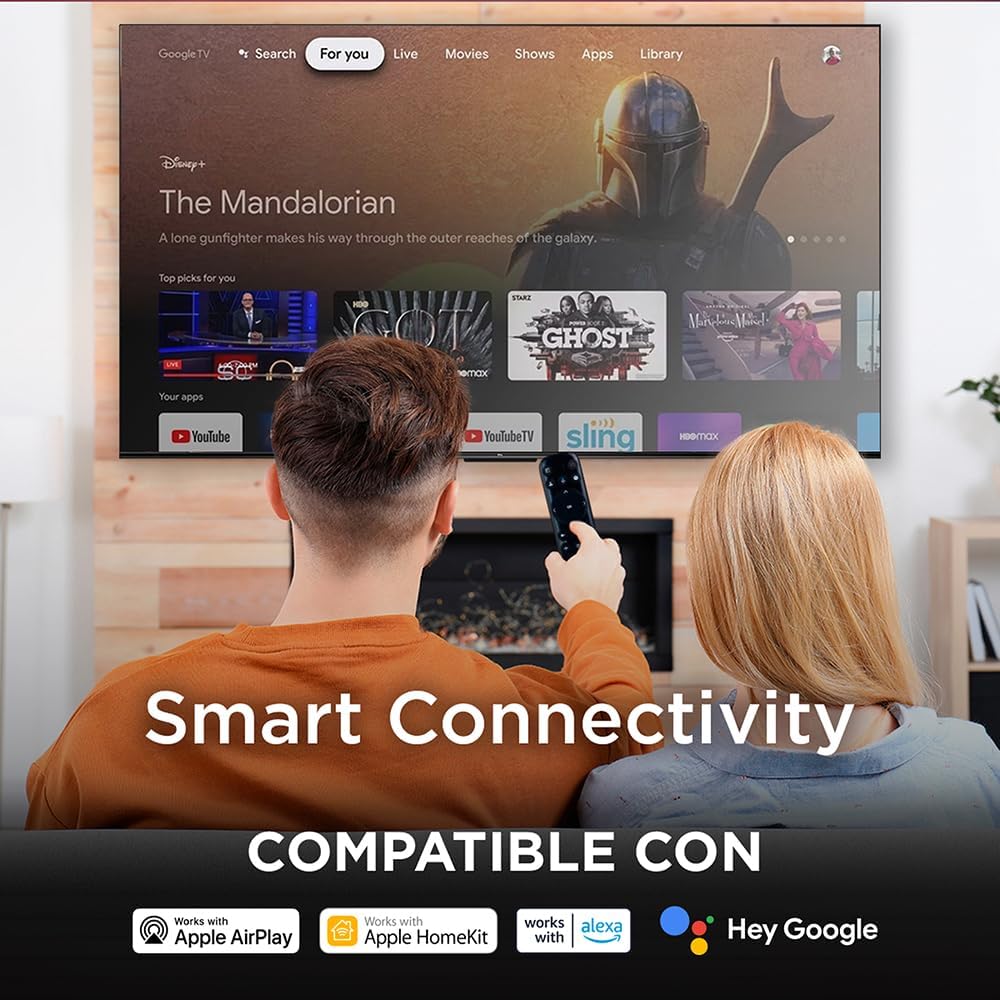
Image: A couple watching TV, with an overlay highlighting "Smart Connectivity" and logos indicating compatibility with Apple AirPlay, Apple HomeKit, Alexa, and Google.
2.3 Cài đặt hình ảnh và âm thanh
Your QLED TV offers advanced picture and sound technologies for an immersive viewkinh nghiệm.
- Công nghệ QLED: Experience vibrant colors and enhanced brightness with Quantum Dot technology.
- Độ phân giải 4K: Enjoy crisp, detailed images with 4K Ultra HD resolution.
- HDR10+ and VisionHDR10+: Supports high dynamic range content for greater contrast and color accuracy.
- Bộ xử lý AiPQ: The AiPQ engine optimizes picture quality by analyzing and enhancing various visual elements.
- Dolby Atmos: Integrated Dolby Atmos provides immersive, multi-dimensional audio.

Image: A split screen comparison demonstrating the enhanced color and vibrancy of QLED technology versus a non-QLED display.

Image: A living room scene with a TV displaying a vibrant image, accompanied by the Dolby Vision Atmos logo and visual representations of immersive sound waves.
2.4 Tính năng chơi game
For gamers, the TV includes features designed to enhance your experience:
- 60 Hz Panel: Provides a smooth viewkinh nghiệm tạo nội dung đa dạng.
- ALLM (Chế độ tự động có độ trễ thấp): Tự động chuyển sang chế độ độ trễ thấp để chơi game mượt mà hơn.
- VRR (Tốc độ làm mới thay đổi): Helps eliminate screen tearing and stuttering for smoother gameplay.

Image: A TV screen displaying a high-speed racing game, with text overlays highlighting "GAMING," "120Hz Game Accelerator," "ALLM (Auto Low Latency Mode)," and "VRR."
3. Bảo trì
3.1 Vệ sinh TV của bạn
To maintain the visual quality of your TV, follow these cleaning guidelines:
- Màn hình: Nhẹ nhàng lau màn hình bằng vải mềm, khô và không xơ. Đối với các vết bẩn cứng đầu, hãy lau nhẹampLau khăn bằng nước hoặc chất tẩy rửa màn hình chuyên dụng. Tránh sử dụng hóa chất mạnh hoặc vật liệu mài mòn.
- Khung và chân đế: Sử dụng vải mềm, khô để lau sạch khung và chân đế TV.
- Điều khiển từ xa: Wipe the remote with a soft, dry cloth. Do not use liquids directly on the remote.
3.2 Cập nhật phần mềm
Your Google TV will periodically receive software updates to improve performance and add new features. Ensure your TV is connected to the internet to receive these updates automatically. You can also manually check for updates in the TV's settings menu.
KHAI THÁC. Xử lý sự cố
If you encounter issues with your TCL 65Q5K TV, refer to the following common troubleshooting steps. For more detailed solutions, consult the full instruction manual provided with your product.
- Không có điện: Hãy đảm bảo dây nguồn được kết nối chắc chắn với cả TV và ổ cắm điện đang hoạt động. Thử cắm một thiết bị khác vào cùng ổ cắm để xác nhận thiết bị đó có điện.
- Không có hình ảnh/âm thanh: Verify that the correct input source is selected. Check all cable connections (HDMI, etc.) for looseness. Restart the TV by unplugging it from the power outlet for a few minutes, then plugging it back in.
- Điều khiển từ xa không phản hồi: Thay pin cho điều khiển từ xa. Đảm bảo không có vật cản nào giữa điều khiển từ xa và cảm biến hồng ngoại của TV.
- Sự cố kết nối mạng: Check your Wi-Fi router and modem to ensure they are working correctly. Restart your router. In the TV settings, try forgetting the network and reconnecting.
- Picture/Sound Quality: For optimal picture and sound, it may be necessary to adjust settings for different content types (e.g., normal, HDR). Explore the picture and sound settings menus to calibrate to your preference.
5. Thông số kỹ thuật
| Tính năng | Đặc điểm kỹ thuật |
|---|---|
| Tên mẫu | 65Q5K |
| Kích thước màn hình | 65 inch |
| Công nghệ hiển thị | Màn hình QLED |
| Nghị quyết | 4K (3840 x 2160) |
| Tốc độ làm mới | 60Hz |
| Hỗ trợ định dạng HDR | HDR10+, VisionHDR10+ |
| Độ sáng đỉnh | 350 NITS |
| Công nghệ nâng cao hình ảnh | AiPQ™ |
| Cấu hình đèn nền | Direct Illumination LED |
| Định dạng âm thanh | Dolby Atmos |
| Mô tả diễn giả | Dolby Atmos Surround Sound System |
| Kết nối | Wi-Fi (802.11 b/g) |
| Cổng HDMI | 3 |
| Tính năng đặc biệt | Chromecast, Flat Panel, Smart Voice Recognition |
| Hệ điều hành | GoogleTV |
| Kích thước (có chân đế) | 144.6 cm (Rộng) x 87.8 cm (C) x 30.0 cm (Sâu) |
| Kích thước (không có chân đế) | 144.6 cm (Rộng) x 83.3 cm (C) x 7.3 cm (Sâu) |
| Cân nặng | 15 Kilôgam |
| Tiêu chuẩn gắn kết VESA | 200 x 200mm |
| Năm mẫu | 2025 |
6. Thông tin bảo hành
Your TCL 65Q5K television comes with a Bảo hành sản phẩm có giới hạn 1 năm from the date of purchase. This warranty covers manufacturing defects under normal use. Please refer to the warranty card included in your package for full terms and conditions, including details on what is covered and how to make a claim.
Giữ lại bằng chứng mua hàng để xác nhận bảo hành.
7. Hỗ trợ
For technical assistance or customer service, please contact TCL Support:
- Điện thoại: 800 112 4656 (Monday to Saturday, 8:00 a.m. to 8:00 p.m.)
- WhatsApp: 55 7005 5159 (Monday to Saturday, 8:00 a.m. to 8:00 p.m.)
- E-mail: servicio.mx@tcl.com
When contacting support, please have your TV model number (65Q5K) and serial number ready.


